
Best way to set 2x2GB + 2x4GB RAM on the same PC

Fking

New member
Member
Local time
5:25 PM
Messages
35
I've got 2x2GB DDR3 1333, 9-9-9 dual channel Corsair memory, right now in slot 1 and 3

I just got 2x4GB DDR3 1333, 9-9-9 dual channel Samsung memory, and planning to put them as well.

I was wondering what would be the best way to place them?

The 4GB chips in 1st and 3rd slot and the 2GB ones in 2nd and 4th, or it doesn't really matter?
 

My Computer My Computer

At a glance

Microsoft Windows 7 Enterprise 64-bitIntel(R) Core(TM) i7-2600K CPU @ 3.40GHz12.00 GB Corsair and Samsung DIMM(1) NVIDIA GeForce GTX 460 v2 (2) Intel(R) HD...
OS
Microsoft Windows 7 Enterprise 64-bit
CPU
Intel(R) Core(TM) i7-2600K CPU @ 3.40GHz
Motherboard
ASRock Z68 Extreme3 Gen3
Memory
12.00 GB Corsair and Samsung DIMM
Graphics Card(s)
(1) NVIDIA GeForce GTX 460 v2 (2) Intel(R) HD Graphics Fam
Sound Card
(1) NVIDIA High Definition Audio (2) NVIDIA High Definitio
Monitor(s) Displays
Dell 23" + Acer 21"
Screen Resolution
1920 x 1080 x 32 bits (4294967296 colors) @ 60 Hz
Hard Drives
1x128GB Samsung 830 SSD
2x500gb Western Digital Black on Raid 1
Case
Elite cooler master
Cooling
1 on the back, 1 on the front next to the HDDs
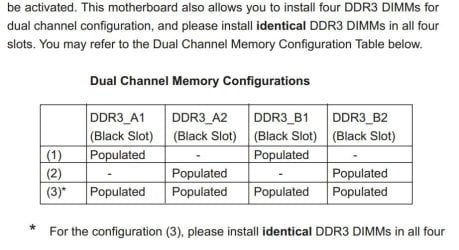
Your spec says you have 32 bit OS, so more than 4GB will be not be usable. To use more than 4GB you will need 64 bit Windows. Also I just looked up your motherboard manual at Asrock and it says when using all 4 ram slots, to use identical sticks

ram.JPG

If you really need more ram, I'd say upgrade to 64 bit and just use the 2 x 4GB memory
 

My Computer My Computer

At a glance

Windows 7 pro x64 SP1Intel i7-2600k o/c to 4.6GHz8GB Mushkin 1866MHzNvidia GTX 750 Ti 2GB
Computer type
PC/Desktop
Computer Manufacturer/Model Number
self build
OS
Windows 7 pro x64 SP1
CPU
Intel i7-2600k o/c to 4.6GHz
Motherboard
MSI Z68-GD80
Memory
8GB Mushkin 1866MHz
Graphics Card(s)
Nvidia GTX 750 Ti 2GB
Sound Card
integrated
Monitor(s) Displays
Liyama ProLite 27"
Screen Resolution
1920*1080 px
Hard Drives
Seagate 2TB
PSU
Coolermaster GX 750W
Case
Antec 300 case + 5 fans
Cooling
Dark Rock Pro
Internet Speed
62Mbit down 18Mbit up
Antivirus
MSE
Browser
Firefox
Other Info
Blackgold BGT3650 Quad HD TV card. Also have various 3770 + 4770K render boxes.
I will be installing 64 bit windows but the part about the indentical sticks is worrying.
I specially ordered ones with the same MHz and timing, but didn't know they have to be same size and/or brand?

still hoping that asrock is just being conservative here, and they will work
 

My Computer My Computer

At a glance

Microsoft Windows 7 Enterprise 64-bitIntel(R) Core(TM) i7-2600K CPU @ 3.40GHz12.00 GB Corsair and Samsung DIMM(1) NVIDIA GeForce GTX 460 v2 (2) Intel(R) HD...
OS
Microsoft Windows 7 Enterprise 64-bit
CPU
Intel(R) Core(TM) i7-2600K CPU @ 3.40GHz
Motherboard
ASRock Z68 Extreme3 Gen3
Memory
12.00 GB Corsair and Samsung DIMM
Graphics Card(s)
(1) NVIDIA GeForce GTX 460 v2 (2) Intel(R) HD Graphics Fam
Sound Card
(1) NVIDIA High Definition Audio (2) NVIDIA High Definitio
Monitor(s) Displays
Dell 23" + Acer 21"
Screen Resolution
1920 x 1080 x 32 bits (4294967296 colors) @ 60 Hz
Hard Drives
1x128GB Samsung 830 SSD
2x500gb Western Digital Black on Raid 1
Case
Elite cooler master
Cooling
1 on the back, 1 on the front next to the HDDs
You have a pretty good chance of it working out OK.

I'd leave the old RAM where it is and put the new RAM in the other slots and see if it is all recognized.

I'd worry about installing 64-bit first.

In the worst case, you may have to use just the new 8 GB and uninstall the old 4 GB. You may not notice the difference between 8 total and 12 total anyway.
 

My Computer My Computer

At a glance

Windows 7 Home Premium SP1, 64-bitIntel Skylake i5-6600K, not overclocked8 GB HyperX DDR4-2666 (2 x 4 GB)none; graphics are integrated on CPU
Computer type
PC/Desktop
Computer Manufacturer/Model Number
Ignatz Special; 4 speed manual gearbox; factory air conditioning; one of one
OS
Windows 7 Home Premium SP1, 64-bit
CPU
Intel Skylake i5-6600K, not overclocked
Motherboard
AsRock Z170M Extreme 4, micro ATX
Memory
8 GB HyperX DDR4-2666 (2 x 4 GB)
Graphics Card(s)
none; graphics are integrated on CPU
Sound Card
onboard: Realtek ALC1150; external: USB Behringer UF0-202
Monitor(s) Displays
Dell S2340M 23 inch IPS
Screen Resolution
1600 x 900
Hard Drives
System: Crucial MX100 series SSD, 128 GB;
Data: Samsung Spinpoint 103SJ, 1 TB;
Backup: WD Caviar Green WD30EZRX-00D8PB0, 3 TB
PSU
Rosewill SilentNight 500 watt fanless, semi-modular
Case
Antec Solo II
Cooling
Noctua NH-U12S; Noctua F12 intake, Noctua S12A exhaust
Keyboard
Microsoft 200 6JH-00001 USB
Mouse
Dell or Microsoft optical wired; USB
Antivirus
Microsoft Security Essentials and Malwarebytes Premium
Browser
Pale Moon
Other Info
All fans PWM; speeds at idle: CPU circa 500 rpm; intake circa 600 rpm; exhaust circa 600 rpm; CPU temps 27 idle and 47 C load in a warm room (27 C/81 F) when running Intel Extreme Tuning Utility stress test.
I always suggest to not try 2 changes at once. It just complicates things if there is a problem.

My suggestion is to leave the current 4GB in the system and then install W7 64bit. Make sure everything is working well and there are no problems with the install, drivers, configuration, etc.

Then add the new RAM.

If it were me I would remove the 2x2GB sticks and install the new 2x4GB sticks in the same slots and test (that computer boots and runs Windows, then with Memtest86+).
If all is good then I would add the 2x2GB sticks into the remaining slots and test again.

This just makes diagnosing any problem that might arise easier. No need to work backward.
 

My Computer My Computer

At a glance

Windows 7 64 Bit Home Premium SP1i7-3820GSkill F3-14900CL9Q - 16GBEVGA GeForce GTX660 - Driver 352.86
Computer type
PC/Desktop
Computer Manufacturer/Model Number
Home Built - Jan 2013
OS
Windows 7 64 Bit Home Premium SP1
CPU
i7-3820
Motherboard
Asus P9X79-PRO - Bios 4608
Memory
GSkill F3-14900CL9Q - 16GB
Graphics Card(s)
EVGA GeForce GTX660 - Driver 352.86
Sound Card
On board Realtek ALC898
Monitor(s) Displays
Acer S271HL
Screen Resolution
1920 x 1080
Hard Drives
#1- Samsung 840 Pro Series
#2- Western Digital WD1002FAEX Sata3 Black
#3- Western Digital WD1002FAEX Sata3 Black
PSU
Corsair CMPSU-850TX-V2 - 850 watt (by Seasonic)
Case
Corsair Obsidian 550D
Cooling
Standard 3 120mm case fans, Cooler Master Hyper 212 EVO
Keyboard
MS KC-0405
Mouse
Intellimouse 5-button
Internet Speed
56 Mbits/Sec (on a good day)
Antivirus
Avast & Malwarebytes
Browser
Firefox
Other Info
Asus DVD - DRW-24B1ST 24X
Your board's manual should tell you how your channels are split..either 1,3 2,4 or 1,2 and 3,4. As long as you put the pairs in the same channel, it shouldn't matter.

You should be okay with installing all of it first, and then installing Windows 7. Vista had some issues with certain chipsets, usually Nvidia, where it didn't like seeing a lot of memory for the install, but was fine if it was added later. Those issues have been scarce and aren't much of a worry anymore. However, if you decide not to chance it, I'd put in the 8 GB alone, and then install.
 

My Computer My Computer

At a glance

Windows 7 Ultimate x64 SP1Intel Core i7-260012 GB Patriot Extreme DDR3-1333Nvidia GTX 470
OS
Windows 7 Ultimate x64 SP1
CPU
Intel Core i7-2600
Motherboard
Gigabyte GA-P67A-UD3P-B3
Memory
12 GB Patriot Extreme DDR3-1333
Graphics Card(s)
Nvidia GTX 470
Monitor(s) Displays
Dell UltraSharp 2209WA
Hard Drives
OCZ Agility3 240 GB, WD5001AALS, WD7501AALS
PSU
OCZ ModStream 700W
Case
CoolerMaster HAF 912 Advanced
Cooling
CoolerMaster Hyper 212 Plus
thank you all, for the advices, going to try it tomorrow! :)
 

My Computer My Computer

At a glance

Microsoft Windows 7 Enterprise 64-bitIntel(R) Core(TM) i7-2600K CPU @ 3.40GHz12.00 GB Corsair and Samsung DIMM(1) NVIDIA GeForce GTX 460 v2 (2) Intel(R) HD...
OS
Microsoft Windows 7 Enterprise 64-bit
CPU
Intel(R) Core(TM) i7-2600K CPU @ 3.40GHz
Motherboard
ASRock Z68 Extreme3 Gen3
Memory
12.00 GB Corsair and Samsung DIMM
Graphics Card(s)
(1) NVIDIA GeForce GTX 460 v2 (2) Intel(R) HD Graphics Fam
Sound Card
(1) NVIDIA High Definition Audio (2) NVIDIA High Definitio
Monitor(s) Displays
Dell 23" + Acer 21"
Screen Resolution
1920 x 1080 x 32 bits (4294967296 colors) @ 60 Hz
Hard Drives
1x128GB Samsung 830 SSD
2x500gb Western Digital Black on Raid 1
Case
Elite cooler master
Cooling
1 on the back, 1 on the front next to the HDDs
Just a note: It shouldn't matter what brand you mix up as long as they have the like timings and slot orientation.

When I mean slot orientation I mean "Brand A" in 1 and 3 and "Brand B" in 2 and 4 (if your motherboard states to put like RAM in slots 1+3, and 2+4 if you have four slots).

For the timing I think it'll work also, but the motherboard will auto bottleclock the timings (I was bored; my way of saying ". . . the motherboard will automatically downclock the timings to the slowest, as in 'only as strong as the weakest link'").
 

My Computer My Computer

At a glance

Windows 7 Home Premium x64AMD FX-8150Corsair Vengeance Dual-Channel 1866MHz 8GB (2...x2 Galaxy GeForce GTX 560 2GB in SLI
Computer Manufacturer/Model Number
Mine
OS
Windows 7 Home Premium x64
CPU
AMD FX-8150
Motherboard
ASUS Sabertooth 990FX
Memory
Corsair Vengeance Dual-Channel 1866MHz 8GB (2x4GB)
Graphics Card(s)
x2 Galaxy GeForce GTX 560 2GB in SLI
Sound Card
(Onboard) Realtek ALC892
Monitor(s) Displays
Dynex 42 inch HDTV
Screen Resolution
1920x1080
Hard Drives
Seagate Barracuda 2TB (SATA);
My Book 300GB (USB);
My Book 3TB (USB)
PSU
Kingwin KX-1000
Case
Corsair Carbide 500R
Cooling
Corsair H100
Keyboard
Logitech Wireless Solar K750
Mouse
Logitech Wireless M305
Internet Speed
DSL (unsure of details)
Other Info
LiteOn iHBS212 Blu-Ray Writer (SATA)
Everything works perfect!

Infact I found that the assembler of the PC has put the old ram in different channels, since my motherboard is using 1&2 and 3&4 instead of the more popular 1&3 and 2&4

I'm getting 7.6 out of 7.9 max according to the windows performance test :)
 

My Computer My Computer

At a glance

Microsoft Windows 7 Enterprise 64-bitIntel(R) Core(TM) i7-2600K CPU @ 3.40GHz12.00 GB Corsair and Samsung DIMM(1) NVIDIA GeForce GTX 460 v2 (2) Intel(R) HD...
OS
Microsoft Windows 7 Enterprise 64-bit
CPU
Intel(R) Core(TM) i7-2600K CPU @ 3.40GHz
Motherboard
ASRock Z68 Extreme3 Gen3
Memory
12.00 GB Corsair and Samsung DIMM
Graphics Card(s)
(1) NVIDIA GeForce GTX 460 v2 (2) Intel(R) HD Graphics Fam
Sound Card
(1) NVIDIA High Definition Audio (2) NVIDIA High Definitio
Monitor(s) Displays
Dell 23" + Acer 21"
Screen Resolution
1920 x 1080 x 32 bits (4294967296 colors) @ 60 Hz
Hard Drives
1x128GB Samsung 830 SSD
2x500gb Western Digital Black on Raid 1
Case
Elite cooler master
Cooling
1 on the back, 1 on the front next to the HDDs
Back
Top