
You are using an out of date browser. It may not display this or other websites correctly.
You should upgrade or use an alternative browser.
You should upgrade or use an alternative browser.
Solved Bin in Start Menu
- Thread starter Scoubi7
- Start date

Hello Scoubi, and welcome to Seven Forums.
You could drag and drop the desktop Recycle Bin into one of the hidden folders below to have it show up in your Start Menu All Programs area as a shortcut with the "Empty..." option.
Current user only:
C:\Users\User-Name\AppData\Roaming\Microsoft\Windows\Start Menu\Programs
All users:
C:\ProgramData\Microsoft\Windows\Start Menu
Hope this helps,
Shawn
You could drag and drop the desktop Recycle Bin into one of the hidden folders below to have it show up in your Start Menu All Programs area as a shortcut with the "Empty..." option.
Current user only:
C:\Users\User-Name\AppData\Roaming\Microsoft\Windows\Start Menu\Programs
All users:
C:\ProgramData\Microsoft\Windows\Start Menu
Hope this helps,
Shawn
Last edited:
My Computer
- Computer type
- PC/Desktop
- Computer Manufacturer/Model Number
- Self built custom
- OS
- 64-bit Windows 11 Pro for Workstations
- CPU
- Intel i7-8700K OC'd to 5 GHz
- Motherboard
- ASUS ROG Maximus XI Formula Z390
- Memory
- 64 GB (4x16GB) G.SKILL TridentZ RGB DDR4 3600 MHz
- Graphics Card(s)
- ASUS ROG-STRIX-GTX1080TI-O11G-GAMING
- Sound Card
- Integrated
- Monitor(s) Displays
- 2 x Samsung Odyssey G7 27"
- Screen Resolution
- 2560x1440
- Hard Drives
- 1TB Samsung 990 PRO M.2,
4TB Samsung 990 PRO PRO M.2,
TerraMaster F8 SSD Plus NAS
- PSU
- Seasonic Prime Titanium 850W
- Case
- Thermaltake Core P3
- Cooling
- Corsair Hydro H115i
- Keyboard
- Logitech wireless K800
- Mouse
- Logitech MX Master 4
- Internet Speed
- 2 Gb/s Download and 100 Mb/s Upload
- Antivirus
- Malwarebyte Anti-Malware Premium
- Browser
- Google Chrome
- Other Info
- Logitech Z625 speaker system,
Logitech BRIO 4K Pro webcam,
HP Color LaserJet Pro MFP M477fdn,
APC SMART-UPS RT 1000 XL - SURT1000XLI,
Galaxy S23 Plus phone
Tanks for your answer but it doesn't work...
For the second path : it's not the location where I want that the bin appear.
For the first : I restarted my computer but the bin not appear...
Is it normal that in your path it's writed "Internet Explorer" ?
For the second path : it's not the location where I want that the bin appear.
For the first : I restarted my computer but the bin not appear...
Is it normal that in your path it's writed "Internet Explorer" ?
My Computer
- OS
- Windows 7 Home Premium 64bit
Sorry, had the wrong path somehow. Try the correct path above instead. 
If you didn't want it in the All Programs area in the Start Menu, then you might consider having the Recycle Bin pinned to the taskbar instead if you like.
http://www.sevenforums.com/tutorials/6687-recycle-bin-pin-taskbar.html
If you didn't want it in the All Programs area in the Start Menu, then you might consider having the Recycle Bin pinned to the taskbar instead if you like.
http://www.sevenforums.com/tutorials/6687-recycle-bin-pin-taskbar.html
My Computer
- Computer type
- PC/Desktop
- Computer Manufacturer/Model Number
- Self built custom
- OS
- 64-bit Windows 11 Pro for Workstations
- CPU
- Intel i7-8700K OC'd to 5 GHz
- Motherboard
- ASUS ROG Maximus XI Formula Z390
- Memory
- 64 GB (4x16GB) G.SKILL TridentZ RGB DDR4 3600 MHz
- Graphics Card(s)
- ASUS ROG-STRIX-GTX1080TI-O11G-GAMING
- Sound Card
- Integrated
- Monitor(s) Displays
- 2 x Samsung Odyssey G7 27"
- Screen Resolution
- 2560x1440
- Hard Drives
- 1TB Samsung 990 PRO M.2,
4TB Samsung 990 PRO PRO M.2,
TerraMaster F8 SSD Plus NAS
- PSU
- Seasonic Prime Titanium 850W
- Case
- Thermaltake Core P3
- Cooling
- Corsair Hydro H115i
- Keyboard
- Logitech wireless K800
- Mouse
- Logitech MX Master 4
- Internet Speed
- 2 Gb/s Download and 100 Mb/s Upload
- Antivirus
- Malwarebyte Anti-Malware Premium
- Browser
- Google Chrome
- Other Info
- Logitech Z625 speaker system,
Logitech BRIO 4K Pro webcam,
HP Color LaserJet Pro MFP M477fdn,
APC SMART-UPS RT 1000 XL - SURT1000XLI,
Galaxy S23 Plus phone

IownAmoneyPit
Canadian Loonie X 2
Hello Scoulbi7 an easy way to place the recycle bin on the Start menu or (white part) is to drag the recycle bin icon to the start menu button (see fig 1) and wait until the "pin to start menu" dialogue appears under the recycle bin icon then release the left mouse button and the recycle bin should now be in your start menu (fig 2).
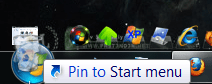
(Fig 1)
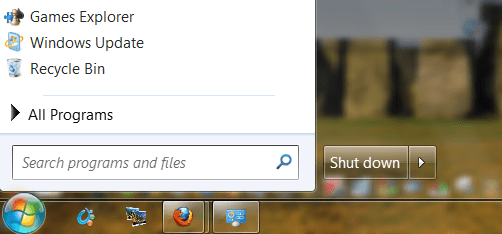
(Fig 2)
(Fig 1)
(Fig 2)
My Computer
- Computer type
- PC/Desktop
- Computer Manufacturer/Model Number
- My own abomination, I call it the Money Pit
- OS
- Windows 10 Pro x 2/Windows 11 Home
- CPU
- Intel i7 2600K @ 3.40 GHz
- Motherboard
- ASUS Sabertooth P67
- Memory
- Corsair Vengeance 16GB DDR3 1600MHz CL8 Dual Channel Kit
- Graphics Card(s)
- EVGA GeForce RTX 3080 XC3 ULTRA GAMING 10GB GDDR6X
- Sound Card
- Onboard Realtek or Nvidia High Definition Audio (HDMI)
- Monitor(s) Displays
- Samsung JS7000 50" SUHD TV or Samsung 27" FHD 60Hz 8ms GTG V
- Screen Resolution
- 1920 x 1080
- Hard Drives
- 1 x Samsung 870 EVO 250 GB SSD (Windows 10 Pro), 1 x Samsung 850 EVO 250 GB SSD (Windows 10 Pro)
- PSU
- Corsair AX860 - 860W Modular Power Supply
- Case
- Phanteks Enthoo Luxe Full Tower Case - Black
- Cooling
- CORSAIR Hydro Series H150i PRO RGB 360mm Liquid CPU Cooler
- Keyboard
- Logitech K830 Illuminated Living-Room Keyboard
- Mouse
- Logitech MX Anywhere 2S Wireless Mouse
- Internet Speed
- 100 Mbps
- Antivirus
- ESET Internet Security
- Browser
- Latest Version Of Firefox & Microsoft Edge Chromium Stable
- Other Info
- LG Super Multi Blue Internal Blu-ray Disk Rewriter - BH10LS30
6x2 HDMI Switcher (6 inputs, 2 outputs) so I can send the output of my Cable Box, Roku, or any my 4 computers to either my TV or Monitor separately or simultaneously.
IownAmoneyPit
Canadian Loonie X 2
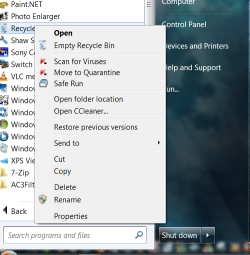
In post #2 use the path given by Brink to create the shortcut in the all programs part of the menu and the empty recycle bin context will be available. (see photo)
My Computer
- Computer type
- PC/Desktop
- Computer Manufacturer/Model Number
- My own abomination, I call it the Money Pit
- OS
- Windows 10 Pro x 2/Windows 11 Home
- CPU
- Intel i7 2600K @ 3.40 GHz
- Motherboard
- ASUS Sabertooth P67
- Memory
- Corsair Vengeance 16GB DDR3 1600MHz CL8 Dual Channel Kit
- Graphics Card(s)
- EVGA GeForce RTX 3080 XC3 ULTRA GAMING 10GB GDDR6X
- Sound Card
- Onboard Realtek or Nvidia High Definition Audio (HDMI)
- Monitor(s) Displays
- Samsung JS7000 50" SUHD TV or Samsung 27" FHD 60Hz 8ms GTG V
- Screen Resolution
- 1920 x 1080
- Hard Drives
- 1 x Samsung 870 EVO 250 GB SSD (Windows 10 Pro), 1 x Samsung 850 EVO 250 GB SSD (Windows 10 Pro)
- PSU
- Corsair AX860 - 860W Modular Power Supply
- Case
- Phanteks Enthoo Luxe Full Tower Case - Black
- Cooling
- CORSAIR Hydro Series H150i PRO RGB 360mm Liquid CPU Cooler
- Keyboard
- Logitech K830 Illuminated Living-Room Keyboard
- Mouse
- Logitech MX Anywhere 2S Wireless Mouse
- Internet Speed
- 100 Mbps
- Antivirus
- ESET Internet Security
- Browser
- Latest Version Of Firefox & Microsoft Edge Chromium Stable
- Other Info
- LG Super Multi Blue Internal Blu-ray Disk Rewriter - BH10LS30
6x2 HDMI Switcher (6 inputs, 2 outputs) so I can send the output of my Cable Box, Roku, or any my 4 computers to either my TV or Monitor separately or simultaneously.

I tried what you want and also couldn't get it. But...
If you are using Quicklaunch, just put the shortcut there and you can right-click to empty and everything else.
If you don't want quicklaunch, you can have the recycle bin on the taskbar this way (really it's just like the quicklaunch folder):
1. Create a new folder wherever it's convenient for you. Put a shortcut to the recycle bin in there.
2. Unlock the taskbar and right click Toolbars > new toolbar, and browse to the folder you just made and select it.
3. Right click on the bar to the left of the new toolbar you just made and untick show title and show text.
4. Now you see the recycle bin icon which you can right click on to empty, etc.
5. Move the new toolbar where you want by clicking on the little bar and dragging.
6. Lock the taskbar and the little vertical bars go away
If you are using Quicklaunch, just put the shortcut there and you can right-click to empty and everything else.
If you don't want quicklaunch, you can have the recycle bin on the taskbar this way (really it's just like the quicklaunch folder):
1. Create a new folder wherever it's convenient for you. Put a shortcut to the recycle bin in there.
2. Unlock the taskbar and right click Toolbars > new toolbar, and browse to the folder you just made and select it.
3. Right click on the bar to the left of the new toolbar you just made and untick show title and show text.
4. Now you see the recycle bin icon which you can right click on to empty, etc.
5. Move the new toolbar where you want by clicking on the little bar and dragging.
6. Lock the taskbar and the little vertical bars go away
Last edited by a moderator:
My Computer
- OS
- Windows 7
You're most welcome Scoubi. I'm glad that we could help. 
My Computer
- Computer type
- PC/Desktop
- Computer Manufacturer/Model Number
- Self built custom
- OS
- 64-bit Windows 11 Pro for Workstations
- CPU
- Intel i7-8700K OC'd to 5 GHz
- Motherboard
- ASUS ROG Maximus XI Formula Z390
- Memory
- 64 GB (4x16GB) G.SKILL TridentZ RGB DDR4 3600 MHz
- Graphics Card(s)
- ASUS ROG-STRIX-GTX1080TI-O11G-GAMING
- Sound Card
- Integrated
- Monitor(s) Displays
- 2 x Samsung Odyssey G7 27"
- Screen Resolution
- 2560x1440
- Hard Drives
- 1TB Samsung 990 PRO M.2,
4TB Samsung 990 PRO PRO M.2,
TerraMaster F8 SSD Plus NAS
- PSU
- Seasonic Prime Titanium 850W
- Case
- Thermaltake Core P3
- Cooling
- Corsair Hydro H115i
- Keyboard
- Logitech wireless K800
- Mouse
- Logitech MX Master 4
- Internet Speed
- 2 Gb/s Download and 100 Mb/s Upload
- Antivirus
- Malwarebyte Anti-Malware Premium
- Browser
- Google Chrome
- Other Info
- Logitech Z625 speaker system,
Logitech BRIO 4K Pro webcam,
HP Color LaserJet Pro MFP M477fdn,
APC SMART-UPS RT 1000 XL - SURT1000XLI,
Galaxy S23 Plus phone