Solved Bizarre boot sequence following power surge/failure

TuckerB

New member
Local time
5:24 AM
Messages
7
Location
Savannah, Ga.
Here is what happened:
Win 7(32b) is on C:
Win XP is on E:
(Two physical drives, no extra partitions)
Was re-installing XP onto E: Somewhere along the way, there was a power fluctuation(lights flickered a couple of times, but computer continued to run), then the power completely died and everything shut down. I re-booted and started over. The process terminated with an error, so I decided to leave it alone and let the storm pass. When I tried to boot WIN 7 I got a boot error stating hal.dll was corrupt and needed to be replaced in the System32 directory.
Now here is where we are no longer in Kansas - if I use F12 during warm-up with the Dell Logo showing and ask to boot off of E: (the XP drive) WIN 7 runs without problems. I believe the boot instructions on C: are corrupted but the boot instructions on E: points to WIN 7 on the C: drive!
How can I move those boot instructions to the proper C: drive?
 

My Computer My Computer

At a glance

Win 7(32bit)
Computer type
PC/Desktop
Computer Manufacturer/Model Number
Dell
OS
Win 7(32bit)
Make sure Win7 or its 100mb System Reserved partition (preferred if you have it) are marked Active: http://www.sevenforums.com/tutorials/71432-partition-mark-active.html

Then power down to unplug all other HD's and run http://www.sevenforums.com/tutorials/105541-startup-repair-run-3-separate-times.html

Once Win7 starts and holds its own System Active Boot flags, power down to unplug it and install the the XP HD. Then afterwards when you plug both drives back in boot XP via the BIOS F12 key, setting Win7 first HD to boot in BIOS setup.

If this isn't to your liking, install EasyBCD to Win7 to add XP to a Dual Boot Menu, which keeps both HD's independent.

Always unplug all other HD's when installing an OS.

I would also run from F12 http://www.pchelpforum.com/xf/threa...l-diagnostics-utility-error-code-list.122044/. If it will run then its the only partition on that HD you should keep since Recovery partition will no longer run after http://www.sevenforums.com/tutorials/219487-clean-reinstall-factory-oem-windows-7-a.html#post1839164. If you've not yet done the Clean Reinstall I would do it asap as it is a vastly superior install to corrupt bloated factory-preinstalled Win7
 
Bizarre Boot

Thanks for your informative response.
I attempted to alter the physical drive as you described but the command was grayed out. I am a bit reticent as my WIN 7 installation has a "world" of data and very important functions, like Peachtree Accounting with several years of business accounting information.
I don't know how to insert an image, but the WIN 7 drive is active, boot, crash, etc. as you described it should be.
I have experimented by disconnecting the 2 drives. Here is what happens:
E: (XP) drive connected, C: (7) disconnected = "The boot selection failed because a required device is inaccessible."
E: disconnected C: connected = "Windows could not read from selected boot disk. Check boot path and disk hardware."
Rebuilding the XP system will be no problem as it is only used to run Paradox DOS and Paradox WIN for a very specific, infrequent task. But the WIN 7 rebuild would be a nightmare.

Should I just leave E: disconnected and let the Win 7 upgrade CD run Startup Repair a few times to see if that will get it going? Can you advise the risk of total failure?

I appreciate your help.
 

My Computer My Computer

At a glance

Win 7(32bit)
Computer type
PC/Desktop
Computer Manufacturer/Model Number
Dell
OS
Win 7(32bit)
The "mark as active" link you had in the first line.
I will have to check the instructions on image posting and attempt to post that Disk Management image.
 

My Computer My Computer

At a glance

Win 7(32bit)
Computer type
PC/Desktop
Computer Manufacturer/Model Number
Dell
OS
Win 7(32bit)
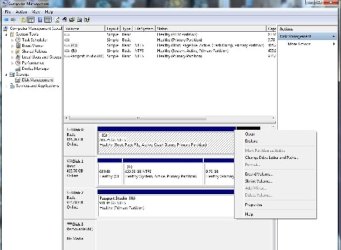
Disk Manage Shot

Not exactly as suggested, but here is a screen shot of the Disk Manager with the C:[7] plugged into physical disk drive 1 and the E:[XP] disk plugged into physical disk drive 0.
 

Attachments

  • ScreenShot.jpg
    ScreenShot.jpg
    29.9 KB · Views: 6

My Computer My Computer

At a glance

Win 7(32bit)
Computer type
PC/Desktop
Computer Manufacturer/Model Number
Dell
OS
Win 7(32bit)
Slick as a Moray Eel.
Back to normal.
Many thanks, you saved me a weeks worth of re-installation.
 

My Computer My Computer

At a glance

Win 7(32bit)
Computer type
PC/Desktop
Computer Manufacturer/Model Number
Dell
OS
Win 7(32bit)
Good.

Now for the third time what were the results of Dell Diagnostics Utility - How to Run the?

A power surge can do more than just foul the boot. The hardware needs to be gone over, which is easy with a Dell if Diagnostics will run from boot - and if not you should know that too.
 
Will see if I can find and run it...I did a memory check which was all OK.
 

My Computer My Computer

At a glance

Win 7(32bit)
Computer type
PC/Desktop
Computer Manufacturer/Model Number
Dell
OS
Win 7(32bit)
Sorry, had to find that disk and install the diagnosis program.
All check out as "OK".
 

My Computer My Computer

At a glance

Win 7(32bit)
Computer type
PC/Desktop
Computer Manufacturer/Model Number
Dell
OS
Win 7(32bit)
Back
Top