
blocking some ports

beg4mercy

Banned
Local time
2:46 AM
Messages
26
Location
Istanbul - Turkey
Hello all,

Im using windows 7 RTM x86
I want to close some opened ports.These ports are 135 and 445.
So, I try to close/block these ports using Windows Firewall. ( with advanced settings )


I created inbound rule for closing port 135(TCP) (as you can see attached screenshot )
Also I applied same step for UDP.

but , when I scan my pc's opened ports using Net Tools 5 program ( open port scanner tool ) , it found port 135 as open.
I created rule and blocked/closed port 135 but Net Tools says : Port 135 still open.

This is risky for me.
How can I close this port correctly ?

Note : Im using MSE for Antivirus security.

Thanks a lot
 

Attachments
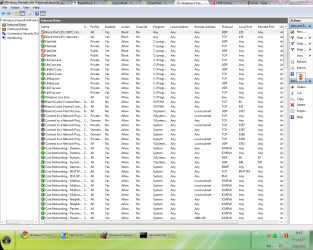
  • Capture.PNG
    Capture.PNG
    74.9 KB · Views: 781

My Computer

Computer Manufacturer/Model Number
Self Built
OS
Windows 7 Rtm x64
CPU
Intel Core i5 750 3.0 ( Overclocked )
Motherboard
Asus P7P55D Pro
Memory
2x2 GB DDR3 1333 Mhz
Graphics Card(s)
Sapphire HD6850 1gb
Sound Card
Onboard
Monitor(s) Displays
Samsung SyncMaster B1930
Screen Resolution
1366x768
PSU
Coolermaster 750W
Test the tool.

Scan your ports at grc.com and see if they are reported open or closed.
 
Are you behind a router with a firewall?
 

My Computer

Computer type
PC/Desktop
Computer Manufacturer/Model Number
Alienware Aurora ALX R4
OS
Windows 10 Pro (x64)
CPU
Intel Core i7-3930K (3.2GHz - 4.5GHz)
Motherboard
Alienware Aurora-R4 x79
Memory
4x Samsung 4GB PC3-12800 DDR3 (16GB 1600MHz)
Graphics Card(s)
Nvidia Geforce GTX 690
Sound Card
SteelSeries Siberia Elite
Monitor(s) Displays
Dell UltraSharp U3011
Screen Resolution
2560x1600
Hard Drives
Samsung 850 Pro 256 GB, Seagate 1TB Desktop Hybrid HDD, 2x Western Digital 4TB Green HDD
PSU
875W Some Dell PSU <.<
Case
Alienware Aurora ALX
Cooling
Custom Liquid Cooling (EK CPU & GPU blocks) dual EK 480RAD
Keyboard
Logitech G710+ Mechanical
Mouse
Logitech G700s
Internet Speed
Verizon Fios (50 mbps average)
Other Info
Server: Intel NUC D54250WYK: i5-4250U, 16GB, 256 GB mSATA, Windows Server 2012 R2
Ports 135 and 445 are used by Windows for sharing files and printers and finding each other in a Local Area Network.

Did you run Windows update after installing your version of Win7?
 

My Computer

Computer type
PC/Desktop
Computer Manufacturer/Model Number
Bruce ... somewhere in his 40's
OS
Windows 7 Ultimate 32bit SP1
CPU
Intel(R) Core(TM)2 Quad CPU @ 2.40GHz, 2400 MHz
Motherboard
INTEL/D975XBX2
Memory
4 GB
Graphics Card(s)
ATI Radeon HD 2600 Pro
Monitor(s) Displays
Samsung SyncMaster 914v
Screen Resolution
1280 x 1024
Hard Drives
2/500GB each ... ST3500630AS ATA Device.
One is not connected
PSU
Rocketfish 700 W
Case
G.Skill Gigabyte Chassis
Keyboard
Standard PS/2 Keyboard
Mouse
Microsoft PS/2 Mouse
Internet Speed
DSL
Antivirus
Avira Internet Security
Browser
IE 11
Other Info
ATI HDMI Audio
Ports 135 and 445 are used by Windows for sharing files and printers and finding each other in a Local Area Network.

Did you run Windows update after installing your version of Win7?

Yes I installed all necessary updates from Windows Update.
I think , port 135 can be risky if it open because some worms using the port 135 for attack.

Are you behind a router with a firewall?

no im not behind a router, im in home network.Only Windows Firewall working as a firewall.

Test the tool.

Scan your ports at grc.com and see if they are reported open or closed.

I didnt find a port scanner tool at this site.Also I scanned my open ports via another online port scanner.

Results are attached.
But Im confused.When I open cmd and type ''netstat -an'' it says : port 135 still open...
but I scanned the same port via another online port scanner , it says : ''your ip address isnt responding on port 135''


Thank you for your replies
 

Attachments

  • Capture2.PNG
    Capture2.PNG
    918 bytes · Views: 36
  • Capture.PNG
    Capture.PNG
    3.1 KB · Views: 167

My Computer

Computer Manufacturer/Model Number
Self Built
OS
Windows 7 Rtm x64
CPU
Intel Core i5 750 3.0 ( Overclocked )
Motherboard
Asus P7P55D Pro
Memory
2x2 GB DDR3 1333 Mhz
Graphics Card(s)
Sapphire HD6850 1gb
Sound Card
Onboard
Monitor(s) Displays
Samsung SyncMaster B1930
Screen Resolution
1366x768
PSU
Coolermaster 750W
most online port scanning tools are for checking for http(or some other service) being active on a port, not just if its open.
 

My Computer

Computer Manufacturer/Model Number
Black_Box (homebuilt)
OS
windows 7 RTM x64
CPU
Phenom II 965 Quad Core 3.4Ghz
Motherboard
Asus M4A79T Deluxe
Memory
Mushkin Blackline 8GB (4x2gb)
Graphics Card(s)
XFX Radeon 5970 Black Edition
Sound Card
onboard
Monitor(s) Displays
Dell 2408WPF-main Dell E248WFP-secondary
Screen Resolution
1920x1200-main 1920x1200-secondary
Hard Drives
OCZ Vertex Limited Edition 100GB (OS)
x1 WD Black Edition 500GB drive (Storage)
PSU
XFX 850w Black Edition (Modular)
Case
Mountian Mods H2go
Cooling
CoolITSystems ECO A.L.C.
Keyboard
Logitech MX 5500 wireless keyboard
Mouse
Razor Copperhead
Internet Speed
16Mb down/2Mb up Wowway Cable Internet
most online port scanning tools are for checking for http(or some other service) being active on a port, not just if its open.

I scanned again the open ports via LANguard Port Scanner tool and Net Tools( these are application, not online tools ) , port 135 seems still open.

my Windows Firewall inbound rule does not work correctly.
Thanks
 

My Computer

Computer Manufacturer/Model Number
Self Built
OS
Windows 7 Rtm x64
CPU
Intel Core i5 750 3.0 ( Overclocked )
Motherboard
Asus P7P55D Pro
Memory
2x2 GB DDR3 1333 Mhz
Graphics Card(s)
Sapphire HD6850 1gb
Sound Card
Onboard
Monitor(s) Displays
Samsung SyncMaster B1930
Screen Resolution
1366x768
PSU
Coolermaster 750W
What does the port scan here: https://www.grc.com/x/ne.dll?bh0bkyd2 say?

Also are you sure the port is open to remote access? I.e., on a different computer does a port scan show the port is open? Because, from what I'm seeing in my own testing, the port is closed to remote clients.
 

My Computer

Computer type
PC/Desktop
Computer Manufacturer/Model Number
Alienware Aurora ALX R4
OS
Windows 10 Pro (x64)
CPU
Intel Core i7-3930K (3.2GHz - 4.5GHz)
Motherboard
Alienware Aurora-R4 x79
Memory
4x Samsung 4GB PC3-12800 DDR3 (16GB 1600MHz)
Graphics Card(s)
Nvidia Geforce GTX 690
Sound Card
SteelSeries Siberia Elite
Monitor(s) Displays
Dell UltraSharp U3011
Screen Resolution
2560x1600
Hard Drives
Samsung 850 Pro 256 GB, Seagate 1TB Desktop Hybrid HDD, 2x Western Digital 4TB Green HDD
PSU
875W Some Dell PSU <.<
Case
Alienware Aurora ALX
Cooling
Custom Liquid Cooling (EK CPU & GPU blocks) dual EK 480RAD
Keyboard
Logitech G710+ Mechanical
Mouse
Logitech G700s
Internet Speed
Verizon Fios (50 mbps average)
Other Info
Server: Intel NUC D54250WYK: i5-4250U, 16GB, 256 GB mSATA, Windows Server 2012 R2
What does the port scan here: https://www.grc.com/x/ne.dll?bh0bkyd2 say?

Also are you sure the port is open to remote access? I.e., on a different computer does a port scan show the port is open? Because, from what I'm seeing in my own testing, the port is closed to remote clients.

Hm ,I scanned my pc from my another machine with Nmap 5.0.It says : ''port 135 closed''

When I scan my pc from another machine , Im seeing the port 135 is closed but when I scan my pc from local port 135 seems like open.

I mean, port 135 closed to inbound connections.

but that is interesting because I deleted all port 135 blocking rules from my Windows Firewall before last port scan process.
port 135 is closed to inbound connections but there arent any rules for blocking port 135 in Windows Firewall right now:confused:

Does Windows Firewall automatically close all ports for inbound connections when it up ?
 

My Computer

Computer Manufacturer/Model Number
Self Built
OS
Windows 7 Rtm x64
CPU
Intel Core i5 750 3.0 ( Overclocked )
Motherboard
Asus P7P55D Pro
Memory
2x2 GB DDR3 1333 Mhz
Graphics Card(s)
Sapphire HD6850 1gb
Sound Card
Onboard
Monitor(s) Displays
Samsung SyncMaster B1930
Screen Resolution
1366x768
PSU
Coolermaster 750W
Yes all Inbound connection are denied, if there is no rule for allowing the port to be open. Inbound by default is blocked to unsolicited request.
 

My Computer

Computer type
PC/Desktop
Computer Manufacturer/Model Number
Alienware Aurora ALX R4
OS
Windows 10 Pro (x64)
CPU
Intel Core i7-3930K (3.2GHz - 4.5GHz)
Motherboard
Alienware Aurora-R4 x79
Memory
4x Samsung 4GB PC3-12800 DDR3 (16GB 1600MHz)
Graphics Card(s)
Nvidia Geforce GTX 690
Sound Card
SteelSeries Siberia Elite
Monitor(s) Displays
Dell UltraSharp U3011
Screen Resolution
2560x1600
Hard Drives
Samsung 850 Pro 256 GB, Seagate 1TB Desktop Hybrid HDD, 2x Western Digital 4TB Green HDD
PSU
875W Some Dell PSU <.<
Case
Alienware Aurora ALX
Cooling
Custom Liquid Cooling (EK CPU & GPU blocks) dual EK 480RAD
Keyboard
Logitech G710+ Mechanical
Mouse
Logitech G700s
Internet Speed
Verizon Fios (50 mbps average)
Other Info
Server: Intel NUC D54250WYK: i5-4250U, 16GB, 256 GB mSATA, Windows Server 2012 R2
Yes all Inbound connection are denied, if there is no rule for allowing the port to be open. Inbound by default is blocked to unsolicited request.

cool
that means , all ports are blocked by Windows Firewall(default) for inbound connections.But the closed ports can be open for outbound connections.

Thanks for your help and for your replies.
 

My Computer

Computer Manufacturer/Model Number
Self Built
OS
Windows 7 Rtm x64
CPU
Intel Core i5 750 3.0 ( Overclocked )
Motherboard
Asus P7P55D Pro
Memory
2x2 GB DDR3 1333 Mhz
Graphics Card(s)
Sapphire HD6850 1gb
Sound Card
Onboard
Monitor(s) Displays
Samsung SyncMaster B1930
Screen Resolution
1366x768
PSU
Coolermaster 750W
Back
Top
