Solved Booting/PC starting problem?

saresu

New member
Local time
4:20 AM
Messages
24
I'm not sure if I'm posting at the right place or if this problem's been addressed before, If that's the case pls kindly show me the link... Thanks.

I need some help with this:

After not using my PC for a few days, when I switch it on, it just runs for a few seconds, shuts down then it switches on and goes to the BIOS.

Then I get out of the BIOS and the PC boots Windows normally. Another strange thing is that the hidden icons "available connections" and "lan" icons don't show (at the lower/right corner). Only if I restart, the icons appear.

I built this PC on 2014 and it's been working so fine, this is first time a problem occur.

Do u guys know about this problem?

Thank you

My PC configuration:

Windows 7 Pro 64bit SP 1
I74770K 3.50GHz
16Gb Crucial Ballistix
Asus Z87 pro
Samsung 840 pro 128Gb
Seagate Barracuda 3TB
Cooling: Corsair Hydro Series H100i
PSU: Corsair AX 860i
Case: Fractal Define XL R2
 

My Computer

Computer type
PC/Desktop
Computer Manufacturer/Model Number
Build
OS
Windows 7 Professional 64bit SP 1
CPU
i7 4770k
Motherboard
Asus Z87 Pro
Memory
Crucial Ballistix BLT2K8G3D1608ET3LX0 DDR3 PC3-12800 2x8Gb
Graphics Card(s)
None
Hard Drives
SSD Samsung SSD 840 PRO 128GB
Western Digital Green 3T WD30EZRX-1TBP
PSU
Corsair AX860i
Case
Fractal Design Define XL R2
Cooling
Corsair H100i
Internet Speed
1Gb
Browser
Chrome
Other Info
https://soundcloud.com/diego-doo
If you are turning off the power to your AX-860i what is happening is normal.

That on off process is the power supply doing a self test.
Every time you remove the power to the power supply and then turn the power to it back on and start your computer it is designed to do a self test.
 

My Computer

Computer type
PC/Desktop
Computer Manufacturer/Model Number
Home made Desktop
OS
Windows 10 Pro. 64/ version 1709 Windows 7 Pro/64
CPU
Intel i7-6800K @ 4.3
Motherboard
ASUS X-99 Deluxe II
Memory
Corsair Platinum 16 gig @2400
Graphics Card(s)
EVGA GTX 1070 OC
Monitor(s) Displays
Asus 27" LED LCD/VE278Q
Screen Resolution
1920-1080 or 1280-720 HDMI
Hard Drives
INTEL SSD 730-240 Gb Sata 3.0/
PSU
EVGA Platium 1200W
Case
Phanteks Luxe Tempered Glass 8 fans/ one radiator
Cooling
XSPC/ Water Cooled CPU
Keyboard
Das 4 Professional
Mouse
Logitech M705/MX Anywhere 2-S
Internet Speed
100 mbits
Antivirus
Microsoft Security Essentials/ Malwarebytes Premium 3.0/ SAS
Browser
I.E. 11 default/Firefox/ ISP Time Warner Cable/Spectrum
Other Info
LG BluRay Burner/
Sound system-KLipsch-THX/
Icy Dock ssd Hot Swap bays.
If you are turning off the power to your AX-860i what is happening is normal.

That on off process is the power supply doing a self test.
Every time you remove the power to the power supply and then turn the power to it back on and start your computer it is designed to do a self test.
:ditto: see this

The Power good signal voltage at pin 8 on the 24 pin plug (grey cable) should be the same as the 5v rail reading/s
See this for the rail voltage info
PSUs 101: A Detailed Look Into Power Supplies (Section 2.)
 

My Computer

Computer type
PC/Desktop
Computer Manufacturer/Model Number
Own build (new) Desk1 / Asus ROG Win 7 / Desk2 1st build
OS
Desk1 7 Home Prem / Desk2 10 Pro / Main lap Asus ROG 10 Pro 2 laptop Toshiba 7 Pro Asus P2520 7 & 10
CPU
Desk1 i5 3750K / Laptop i7 GTX 860M / Desk2 i5 2500
Motherboard
Desk1 Asus P877-V / Desk2 Gigabyte H67 UD3H / Laptop ?
Memory
Desk1 8GB (1866) / Desk2 16GB (1333) / Laptop 8Gb DDR3
Graphics Card(s)
Desk 1& 2NVidia GTX 650 & Laptops on board Intel
Sound Card
Desk 1 & 2 -XONAR DG Realtek High Def audio Laptop
Monitor(s) Displays
Desk 1 Benq HD 2450 / Desk2 Philips 24" / Laptop 17.5"
Screen Resolution
1920x1080 D1 & D2 & Laptop 1
Hard Drives
Desk1 Samsung 120GB 830 SSD
Asus ROG 256GB 850 Pro SSD
Desk2 Samsung 840 256 SSD
Toshiba 120GB EVO
PSU
Desk 1 Corsair HX 1050/ Laptop ? / Desk 2 Corsair HX 650
Case
Desk 1 Cooler HAF XM ? Toshiba laptop / Desk2 Coolermaster
Cooling
Fans on all Desk1 -2 Desk2 - all Coolermasters 5 Laptop ?
Keyboard
Desk 1 MS Sidewinder X6 Desk 2 MS Sidewinder X 4
Mouse
Desk 1&2 - Gigabyte MS 900 gamer - laptop - Logitec wireless
Internet Speed
ADSL2+
Other Info
One other Desktop (tester) and spare Toshba laptop both with SSD's
Running Kaspersky 2016 ISS on all machines config'd identically
Logitec audio stereo systems on each machine (x3)
Canon MG5250MFC
Router/modem TP-Link running WPA2SK
If you are turning off the power to your AX-860i what is happening is normal.

That on off process is the power supply doing a self test.
Every time you remove the power to the power supply and then turn the power to it back on and start your computer it is designed to do a self test.
:ditto: see this

The Power good signal voltage at pin 8 on the 24 pin plug (grey cable) should be the same as the 5v rail reading/s
See this for the rail voltage info
PSUs 101: A Detailed Look Into Power Supplies (Section 2.)

I'll definitely read that. Thanks a lot.
 

My Computer

Computer type
PC/Desktop
Computer Manufacturer/Model Number
Build
OS
Windows 7 Professional 64bit SP 1
CPU
i7 4770k
Motherboard
Asus Z87 Pro
Memory
Crucial Ballistix BLT2K8G3D1608ET3LX0 DDR3 PC3-12800 2x8Gb
Graphics Card(s)
None
Hard Drives
SSD Samsung SSD 840 PRO 128GB
Western Digital Green 3T WD30EZRX-1TBP
PSU
Corsair AX860i
Case
Fractal Design Define XL R2
Cooling
Corsair H100i
Internet Speed
1Gb
Browser
Chrome
Other Info
https://soundcloud.com/diego-doo
If you are turning off the power to your AX-860i what is happening is normal.

That on off process is the power supply doing a self test.
Every time you remove the power to the power supply and then turn the power to it back on and start your computer it is designed to do a self test.

I see... But why now?
I always turn the switch off at the PSU and use PC days later, I've been using like this over 2 years. It's never happened before

And what about the Internet icons?
 

My Computer

Computer type
PC/Desktop
Computer Manufacturer/Model Number
Build
OS
Windows 7 Professional 64bit SP 1
CPU
i7 4770k
Motherboard
Asus Z87 Pro
Memory
Crucial Ballistix BLT2K8G3D1608ET3LX0 DDR3 PC3-12800 2x8Gb
Graphics Card(s)
None
Hard Drives
SSD Samsung SSD 840 PRO 128GB
Western Digital Green 3T WD30EZRX-1TBP
PSU
Corsair AX860i
Case
Fractal Design Define XL R2
Cooling
Corsair H100i
Internet Speed
1Gb
Browser
Chrome
Other Info
https://soundcloud.com/diego-doo
If you are turning off the power to your AX-860i what is happening is normal.

That on off process is the power supply doing a self test.
Every time you remove the power to the power supply and then turn the power to it back on and start your computer it is designed to do a self test.

I see... But why now?
I always turn the switch off at the PSU and use PC days later, I've been using like this over 2 years. It's never happened before

And what about the Internet icons?
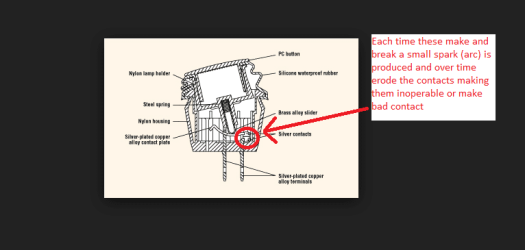
Yes mate we hear what you are saying but like anything else a PSU can go bad even after a short time of operation and two years is a long time if the device is used at heavy loads. I don't understand why you switch it off at the PSU though I always switch my equipment with the Start button and then off at the uninterrupted power supply unit and surge boards so that the machines are in essence isolated from the mains supply - it could be over use of that switch causing issues because as you may know any switch causes a tiny arc each time it is actuated and tends to burn the contacts a tiny bit more each time.
As you said read through tht article I linked.
 

My Computer

Computer type
PC/Desktop
Computer Manufacturer/Model Number
Own build (new) Desk1 / Asus ROG Win 7 / Desk2 1st build
OS
Desk1 7 Home Prem / Desk2 10 Pro / Main lap Asus ROG 10 Pro 2 laptop Toshiba 7 Pro Asus P2520 7 & 10
CPU
Desk1 i5 3750K / Laptop i7 GTX 860M / Desk2 i5 2500
Motherboard
Desk1 Asus P877-V / Desk2 Gigabyte H67 UD3H / Laptop ?
Memory
Desk1 8GB (1866) / Desk2 16GB (1333) / Laptop 8Gb DDR3
Graphics Card(s)
Desk 1& 2NVidia GTX 650 & Laptops on board Intel
Sound Card
Desk 1 & 2 -XONAR DG Realtek High Def audio Laptop
Monitor(s) Displays
Desk 1 Benq HD 2450 / Desk2 Philips 24" / Laptop 17.5"
Screen Resolution
1920x1080 D1 & D2 & Laptop 1
Hard Drives
Desk1 Samsung 120GB 830 SSD
Asus ROG 256GB 850 Pro SSD
Desk2 Samsung 840 256 SSD
Toshiba 120GB EVO
PSU
Desk 1 Corsair HX 1050/ Laptop ? / Desk 2 Corsair HX 650
Case
Desk 1 Cooler HAF XM ? Toshiba laptop / Desk2 Coolermaster
Cooling
Fans on all Desk1 -2 Desk2 - all Coolermasters 5 Laptop ?
Keyboard
Desk 1 MS Sidewinder X6 Desk 2 MS Sidewinder X 4
Mouse
Desk 1&2 - Gigabyte MS 900 gamer - laptop - Logitec wireless
Internet Speed
ADSL2+
Other Info
One other Desktop (tester) and spare Toshba laptop both with SSD's
Running Kaspersky 2016 ISS on all machines config'd identically
Logitec audio stereo systems on each machine (x3)
Canon MG5250MFC
Router/modem TP-Link running WPA2SK
I see... But why now?
I always turn the switch off at the PSU and use PC days later, I've been using like this over 2 years. It's never happened before

And what about the Internet icons?
Yes mate we hear what you are saying but like anything else a PSU can go bad even after a short time of operation and two years is a long time if the device is used at heavy loads. I don't understand why you switch it off at the PSU though I always switch my equipment with the Start button and then off at the uninterrupted power supply unit and surge boards so that the machines are in essence isolated from the mains supply - it could be over use of that switch causing issues because as you may know any switch causes a tiny arc each time it is actuated and tends to burn the contacts a tiny bit more each time.
As you said read through tht article I linked.


No no, I guess there's a misunderstanding here. If I'm understanding u, I've never switch off from PSU straight, sorry my English... I shutdown and wait the fans to stop then I switch off at the PSU. I wonder if I'm following your point.

I didn't know about the "arc" thing :)

Anyway, yes. I will study the article Thanks a lot for the help and generosity! This isn't even a Windows related issue.
 

My Computer

Computer type
PC/Desktop
Computer Manufacturer/Model Number
Build
OS
Windows 7 Professional 64bit SP 1
CPU
i7 4770k
Motherboard
Asus Z87 Pro
Memory
Crucial Ballistix BLT2K8G3D1608ET3LX0 DDR3 PC3-12800 2x8Gb
Graphics Card(s)
None
Hard Drives
SSD Samsung SSD 840 PRO 128GB
Western Digital Green 3T WD30EZRX-1TBP
PSU
Corsair AX860i
Case
Fractal Design Define XL R2
Cooling
Corsair H100i
Internet Speed
1Gb
Browser
Chrome
Other Info
https://soundcloud.com/diego-doo
No I know what you are doing powering doin then switching the PSU off with it's rocker power switch. What I am saying is inside the switch there are contacts that are opened and closed each time you operate it and the mere touching of the switch contacts creates if only on a very small scale a small spark (arc) and it can gradually eat away at the contacts surfaces. You only have to switch off at where the power lead is plugged in at the mains input or the surge board switch - operating the PSU switch is really not necessary at all - you gain absolutely nothing by doing so. If you are doing it in case of a power surge, dropout or direct lightning strike then particularly with a a lightning strike just flicking the switch off will achieve nothing because of the enormous power that will connect to it via the mains power lead by the extremely high voltage "jumping" the gap .
You are best shutting the power off at your surge board and even that is no absolute protection against what I have described above - that can only be avoided by unplugging the entire power source from the wall.
The pic is simplistic and PSU switches usually have four contacts inside two for positive and two for negative - what they call a double throw switch.
 

Attachments

  • SWITCH.PNG
    SWITCH.PNG
    64.1 KB · Views: 1

My Computer

Computer type
PC/Desktop
Computer Manufacturer/Model Number
Own build (new) Desk1 / Asus ROG Win 7 / Desk2 1st build
OS
Desk1 7 Home Prem / Desk2 10 Pro / Main lap Asus ROG 10 Pro 2 laptop Toshiba 7 Pro Asus P2520 7 & 10
CPU
Desk1 i5 3750K / Laptop i7 GTX 860M / Desk2 i5 2500
Motherboard
Desk1 Asus P877-V / Desk2 Gigabyte H67 UD3H / Laptop ?
Memory
Desk1 8GB (1866) / Desk2 16GB (1333) / Laptop 8Gb DDR3
Graphics Card(s)
Desk 1& 2NVidia GTX 650 & Laptops on board Intel
Sound Card
Desk 1 & 2 -XONAR DG Realtek High Def audio Laptop
Monitor(s) Displays
Desk 1 Benq HD 2450 / Desk2 Philips 24" / Laptop 17.5"
Screen Resolution
1920x1080 D1 & D2 & Laptop 1
Hard Drives
Desk1 Samsung 120GB 830 SSD
Asus ROG 256GB 850 Pro SSD
Desk2 Samsung 840 256 SSD
Toshiba 120GB EVO
PSU
Desk 1 Corsair HX 1050/ Laptop ? / Desk 2 Corsair HX 650
Case
Desk 1 Cooler HAF XM ? Toshiba laptop / Desk2 Coolermaster
Cooling
Fans on all Desk1 -2 Desk2 - all Coolermasters 5 Laptop ?
Keyboard
Desk 1 MS Sidewinder X6 Desk 2 MS Sidewinder X 4
Mouse
Desk 1&2 - Gigabyte MS 900 gamer - laptop - Logitec wireless
Internet Speed
ADSL2+
Other Info
One other Desktop (tester) and spare Toshba laptop both with SSD's
Running Kaspersky 2016 ISS on all machines config'd identically
Logitec audio stereo systems on each machine (x3)
Canon MG5250MFC
Router/modem TP-Link running WPA2SK
No I know what you are doing powering doin then switching the PSU off with it's rocker power switch. What I am saying is inside the switch there are contacts that are opened and closed each time you operate it and the mere touching of the switch contacts creates if only on a very small scale a small spark (arc) and it can gradually eat away at the contacts surfaces. You only have to switch off at where the power lead is plugged in at the mains input or the surge board switch - operating the PSU switch is really not necessary at all - you gain absolutely nothing by doing so. If you are doing it in case of a power surge, dropout or direct lightning strike then particularly with a a lightning strike just flicking the switch off will achieve nothing because of the enormous power that will connect to it via the mains power lead by the extremely high voltage "jumping" the gap .
You are best shutting the power off at your surge board and even that is no absolute protection against what I have described above - that can only be avoided by unplugging the entire power source from the wall.
The pic is simplistic and PSU switches usually have four contacts inside two for positive and two for negative - what they call a double throw switch.

Omg... Didn't know that... So I guess I damaged my PSU to some extent.
 

My Computer

Computer type
PC/Desktop
Computer Manufacturer/Model Number
Build
OS
Windows 7 Professional 64bit SP 1
CPU
i7 4770k
Motherboard
Asus Z87 Pro
Memory
Crucial Ballistix BLT2K8G3D1608ET3LX0 DDR3 PC3-12800 2x8Gb
Graphics Card(s)
None
Hard Drives
SSD Samsung SSD 840 PRO 128GB
Western Digital Green 3T WD30EZRX-1TBP
PSU
Corsair AX860i
Case
Fractal Design Define XL R2
Cooling
Corsair H100i
Internet Speed
1Gb
Browser
Chrome
Other Info
https://soundcloud.com/diego-doo
No mate I am not saying that you have probably damaged the contacts or the PSU just that the least you use that method of shutting the PSU down the less likely to are to create more wear on the switch contacts.

Now we can get back to the problem if you get into safe mode run these
http://www.sevenforums.com/tutorials/1538-sfc-scannow-command-system-file-checker.html
http://www.sevenforums.com/tutorials/433-disk-check.html < if necessary include the /f and /r in the command line as per Option2
Run these in safe mode and the sfc often best run for two to three runs

Now it this gets system going properly again then all well and good if not run this for us so we can rule out the PSU rail voltages.
Using HW Info
PART A:
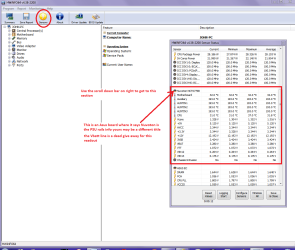
You can test the volts on the PSU with HW Info HWiNFO, HWiNFO32/64 - Download < download the right bit version and close the right hand window select Sensors and scroll down to the power section where you will see what the volts are doing see my pic. In my pic the section (Nuvoton) with VBATT as a dead give away you are in the section for the rail voltages. There are other section titles and one that pops up often is ITE (sometimes the usual one for Gigabyte boards)
Now the voltage on the different rails have to be within 5% =+/- of what is required or the machine will not work properly if at all.
Limits +/-
12v = 11.4 – 12.6v
5v = 4.74 – 5.25v
3.3v = 3.135 – 3.465v
The Power good signal voltage at pin 8 on the 24 pin plug (grey cable) should be the same as the 5v rail reading/s
See this for the rail voltage info
PSUs 101: A Detailed Look Into Power Supplies (Section 2.)
The original right hand window shows the machine running and is handy for that but for looking at the components in some detail close it and use the main left hand side panel
FOR OTHER COMPONENTS
PART B:
Open each small square with + in it on the section the components are in and then click on the individual component/s (it will highlight in blue) - in the right hand side will appear all sorts of details including brands speeds and other essential info that particular device. See pic for example.
 

Attachments

  • HW INFO DESKTOP PSU.PNG
    HW INFO DESKTOP PSU.PNG
    152.2 KB · Views: 0

My Computer

Computer type
PC/Desktop
Computer Manufacturer/Model Number
Own build (new) Desk1 / Asus ROG Win 7 / Desk2 1st build
OS
Desk1 7 Home Prem / Desk2 10 Pro / Main lap Asus ROG 10 Pro 2 laptop Toshiba 7 Pro Asus P2520 7 & 10
CPU
Desk1 i5 3750K / Laptop i7 GTX 860M / Desk2 i5 2500
Motherboard
Desk1 Asus P877-V / Desk2 Gigabyte H67 UD3H / Laptop ?
Memory
Desk1 8GB (1866) / Desk2 16GB (1333) / Laptop 8Gb DDR3
Graphics Card(s)
Desk 1& 2NVidia GTX 650 & Laptops on board Intel
Sound Card
Desk 1 & 2 -XONAR DG Realtek High Def audio Laptop
Monitor(s) Displays
Desk 1 Benq HD 2450 / Desk2 Philips 24" / Laptop 17.5"
Screen Resolution
1920x1080 D1 & D2 & Laptop 1
Hard Drives
Desk1 Samsung 120GB 830 SSD
Asus ROG 256GB 850 Pro SSD
Desk2 Samsung 840 256 SSD
Toshiba 120GB EVO
PSU
Desk 1 Corsair HX 1050/ Laptop ? / Desk 2 Corsair HX 650
Case
Desk 1 Cooler HAF XM ? Toshiba laptop / Desk2 Coolermaster
Cooling
Fans on all Desk1 -2 Desk2 - all Coolermasters 5 Laptop ?
Keyboard
Desk 1 MS Sidewinder X6 Desk 2 MS Sidewinder X 4
Mouse
Desk 1&2 - Gigabyte MS 900 gamer - laptop - Logitec wireless
Internet Speed
ADSL2+
Other Info
One other Desktop (tester) and spare Toshba laptop both with SSD's
Running Kaspersky 2016 ISS on all machines config'd identically
Logitec audio stereo systems on each machine (x3)
Canon MG5250MFC
Router/modem TP-Link running WPA2SK
I would not concern yourself with this, the quoted life for a PSU switch is likely to be measured in millions of operations so even if you turned it off and on several times an hour the switch would likely last thousands of years, and even if it did fail they are normally standard items that are available for pennies :)
 

My Computers

System One System Two

  • Computer type
    PC/Desktop
    Computer Manufacturer/Model Number
    ChillBlast - Custom to my design
    OS
    Windows 11 Pro x64 [Latest Release and Release Preview]
    CPU
    Ryzen 9 5950X, 3.8 - 5.2 MHz
    Motherboard
    Asus Prime X570-Pro
    Memory
    64GB [2 x 32GB] DDR4 3200MHz
    Graphics Card(s)
    4GB NVIDIA GEFORCE GTX 1650 Ti
    Sound Card
    On-board SPDIF to 5.1 System + HDMI [5.1 system]
    Monitor(s) Displays
    32" UHD 32 Bit HDR Monitor + 43" UHD 4K 32Bit HDR TV
    Screen Resolution
    2 x 3840 x 2160 @60Hz
    Hard Drives
    1TB M2 SSD OS, 500GB Fast Access SSD, 2 x 8TB Data + Various Externals from 1TB to 4TB, 10TB NAS
    PSU
    NZXT C750 80 PLUS Gold 750W Modular PSU
    Case
    Workstation Case [Matt Black]
    Cooling
    NZXT Kraken X63 280mm CPU Cooler +2x Quiet Case fans
    Keyboard
    Logitech Wireless MX Keys & K400 + others
    Mouse
    Logitech Wireless MX Master 3S
    Internet Speed
    920 MB Down 50 MB Up
    Antivirus
    BitDefender Total Security Pro
    Browser
    Chrome (always run latest Non-Beta)
    Other Info
    Also run ...
    Laptop - Quad 8GB - Windows 10 Pro x64
    Nexus 7 Android tablet x2
    Samsung 10.2" tablet
    Blackview TAB 8 4G Android Tablet c/w Keyboard
    Wacom Intuos Pro Medium Pen Pad
    Wacom Intuos Pro Small Pen Pad
    Wacom Expresskeys Remote
    Loopdeck+ Graphics Controller
    Shuttle Pro v2 Control
  • Computer type
    Laptop
    System Manufacturer/Model Number
    Dell XPS 17 10750H
    OS
    Windows 11 Pro x64 Latest RP
    CPU
    Intel I7 10750H 5.0GHz
    Motherboard
    Dell XPS
    Memory
    32GB [2x16GB] DDR4 2933 MHz
    Graphics Card(s)
    nVidia GTX1650Ti 4 GB GDDR6
    Sound Card
    Stock [Realtek] 4 Speaker
    Monitor(s) Displays
    17" IPS UHD+ Infinity Edge Touchscreen
    Screen Resolution
    3840 x 2400
    Hard Drives
    2TB M2 NVMe, 4TB External + various 500GB & 1TB External NVMe (also have access to spinner HDD from
    PSU
    Stock
    Case
    Stock XPS Aluminium & Carbon Fibre
    Cooling
    Stock - Active Fan Control
    Keyboard
    Backlit + Various Logitech
    Mouse
    Stock Track Pad + Logitech MX Trackball
    Internet Speed
    72 MB Down 18MB Up
    Browser
    Chrome
    Other Info
    Also run ...
    Laptop - Quad 8GB - Windows 10 Pro x64
    Nexus 7 Android tablet x2
    10.2" tablet
    Sony Z3 Android Smartphone
    Wacom Intuos Pro Medium Pen Pad
    Wacom Intuos Pro Small Pen Pad
    Wacom Expresskeys Remote
    Loopdeck+ Graphics Controller
    Shuttle Pro v2 Control Pad
    10TB NAS
I have the same power supply and I noticed the same reaction after turning off the power supply.
I called Asus and they explained that it was normal because the power supply was doing a self test after the power supply was turned off and back on again.
It acted the same way when the AX-860i was installed the first time.
 

My Computer

Computer type
PC/Desktop
Computer Manufacturer/Model Number
Home made Desktop
OS
Windows 10 Pro. 64/ version 1709 Windows 7 Pro/64
CPU
Intel i7-6800K @ 4.3
Motherboard
ASUS X-99 Deluxe II
Memory
Corsair Platinum 16 gig @2400
Graphics Card(s)
EVGA GTX 1070 OC
Monitor(s) Displays
Asus 27" LED LCD/VE278Q
Screen Resolution
1920-1080 or 1280-720 HDMI
Hard Drives
INTEL SSD 730-240 Gb Sata 3.0/
PSU
EVGA Platium 1200W
Case
Phanteks Luxe Tempered Glass 8 fans/ one radiator
Cooling
XSPC/ Water Cooled CPU
Keyboard
Das 4 Professional
Mouse
Logitech M705/MX Anywhere 2-S
Internet Speed
100 mbits
Antivirus
Microsoft Security Essentials/ Malwarebytes Premium 3.0/ SAS
Browser
I.E. 11 default/Firefox/ ISP Time Warner Cable/Spectrum
Other Info
LG BluRay Burner/
Sound system-KLipsch-THX/
Icy Dock ssd Hot Swap bays.
No mate I am not saying that you have probably damaged the contacts or the PSU just that the least you use that method of shutting the PSU down the less likely to are to create more wear on the switch contacts.

Now we can get back to the problem if you get into safe mode run these
http://www.sevenforums.com/tutorials/1538-sfc-scannow-command-system-file-checker.html
http://www.sevenforums.com/tutorials/433-disk-check.html < if necessary include the /f and /r in the command line as per Option2
Run these in safe mode and the sfc often best run for two to three runs

Now it this gets system going properly again then all well and good if not run this for us so we can rule out the PSU rail voltages.
Using HW Info
PART A:
You can test the volts on the PSU with HW Info HWiNFO, HWiNFO32/64 - Download < download the right bit version and close the right hand window select Sensors and scroll down to the power section where you will see what the volts are doing see my pic. In my pic the section (Nuvoton) with VBATT as a dead give away you are in the section for the rail voltages. There are other section titles and one that pops up often is ITE (sometimes the usual one for Gigabyte boards)
Now the voltage on the different rails have to be within 5% =+/- of what is required or the machine will not work properly if at all.
Limits +/-
12v = 11.4 – 12.6v
5v = 4.74 – 5.25v
3.3v = 3.135 – 3.465v
The Power good signal voltage at pin 8 on the 24 pin plug (grey cable) should be the same as the 5v rail reading/s
See this for the rail voltage info
PSUs 101: A Detailed Look Into Power Supplies (Section 2.)
The original right hand window shows the machine running and is handy for that but for looking at the components in some detail close it and use the main left hand side panel
FOR OTHER COMPONENTS
PART B:
Open each small square with + in it on the section the components are in and then click on the individual component/s (it will highlight in blue) - in the right hand side will appear all sorts of details including brands speeds and other essential info that particular device. See pic for example.


I did all that. So far so good. So is everything apparently alright?
 

My Computer

Computer type
PC/Desktop
Computer Manufacturer/Model Number
Build
OS
Windows 7 Professional 64bit SP 1
CPU
i7 4770k
Motherboard
Asus Z87 Pro
Memory
Crucial Ballistix BLT2K8G3D1608ET3LX0 DDR3 PC3-12800 2x8Gb
Graphics Card(s)
None
Hard Drives
SSD Samsung SSD 840 PRO 128GB
Western Digital Green 3T WD30EZRX-1TBP
PSU
Corsair AX860i
Case
Fractal Design Define XL R2
Cooling
Corsair H100i
Internet Speed
1Gb
Browser
Chrome
Other Info
https://soundcloud.com/diego-doo
resuming: you guys usually don't/rarely operate the PSU's switch like I've been doing all this time. Right?

that's common sense that I was totally ignorant about. :(
 

My Computer

Computer type
PC/Desktop
Computer Manufacturer/Model Number
Build
OS
Windows 7 Professional 64bit SP 1
CPU
i7 4770k
Motherboard
Asus Z87 Pro
Memory
Crucial Ballistix BLT2K8G3D1608ET3LX0 DDR3 PC3-12800 2x8Gb
Graphics Card(s)
None
Hard Drives
SSD Samsung SSD 840 PRO 128GB
Western Digital Green 3T WD30EZRX-1TBP
PSU
Corsair AX860i
Case
Fractal Design Define XL R2
Cooling
Corsair H100i
Internet Speed
1Gb
Browser
Chrome
Other Info
https://soundcloud.com/diego-doo
Anyway. I'm really glad I came to get help here. Thanks a lot! Problem solved
 

My Computer

Computer type
PC/Desktop
Computer Manufacturer/Model Number
Build
OS
Windows 7 Professional 64bit SP 1
CPU
i7 4770k
Motherboard
Asus Z87 Pro
Memory
Crucial Ballistix BLT2K8G3D1608ET3LX0 DDR3 PC3-12800 2x8Gb
Graphics Card(s)
None
Hard Drives
SSD Samsung SSD 840 PRO 128GB
Western Digital Green 3T WD30EZRX-1TBP
PSU
Corsair AX860i
Case
Fractal Design Define XL R2
Cooling
Corsair H100i
Internet Speed
1Gb
Browser
Chrome
Other Info
https://soundcloud.com/diego-doo
Yep well that is good I only mentioned the PSU issue because as quoted by Scott Mueller (the link authour) PSU's are more commonly a problem than most people think they are and I agree with that usually folks dive straight in for the GPU or hard drive for example but if you think about it NOTHING works without a good PSU:p
 

My Computer

Computer type
PC/Desktop
Computer Manufacturer/Model Number
Own build (new) Desk1 / Asus ROG Win 7 / Desk2 1st build
OS
Desk1 7 Home Prem / Desk2 10 Pro / Main lap Asus ROG 10 Pro 2 laptop Toshiba 7 Pro Asus P2520 7 & 10
CPU
Desk1 i5 3750K / Laptop i7 GTX 860M / Desk2 i5 2500
Motherboard
Desk1 Asus P877-V / Desk2 Gigabyte H67 UD3H / Laptop ?
Memory
Desk1 8GB (1866) / Desk2 16GB (1333) / Laptop 8Gb DDR3
Graphics Card(s)
Desk 1& 2NVidia GTX 650 & Laptops on board Intel
Sound Card
Desk 1 & 2 -XONAR DG Realtek High Def audio Laptop
Monitor(s) Displays
Desk 1 Benq HD 2450 / Desk2 Philips 24" / Laptop 17.5"
Screen Resolution
1920x1080 D1 & D2 & Laptop 1
Hard Drives
Desk1 Samsung 120GB 830 SSD
Asus ROG 256GB 850 Pro SSD
Desk2 Samsung 840 256 SSD
Toshiba 120GB EVO
PSU
Desk 1 Corsair HX 1050/ Laptop ? / Desk 2 Corsair HX 650
Case
Desk 1 Cooler HAF XM ? Toshiba laptop / Desk2 Coolermaster
Cooling
Fans on all Desk1 -2 Desk2 - all Coolermasters 5 Laptop ?
Keyboard
Desk 1 MS Sidewinder X6 Desk 2 MS Sidewinder X 4
Mouse
Desk 1&2 - Gigabyte MS 900 gamer - laptop - Logitec wireless
Internet Speed
ADSL2+
Other Info
One other Desktop (tester) and spare Toshba laptop both with SSD's
Running Kaspersky 2016 ISS on all machines config'd identically
Logitec audio stereo systems on each machine (x3)
Canon MG5250MFC
Router/modem TP-Link running WPA2SK
Back
Top