Booting shuts down unexpectedly

shmish

New member
Local time
1:13 AM
Messages
3
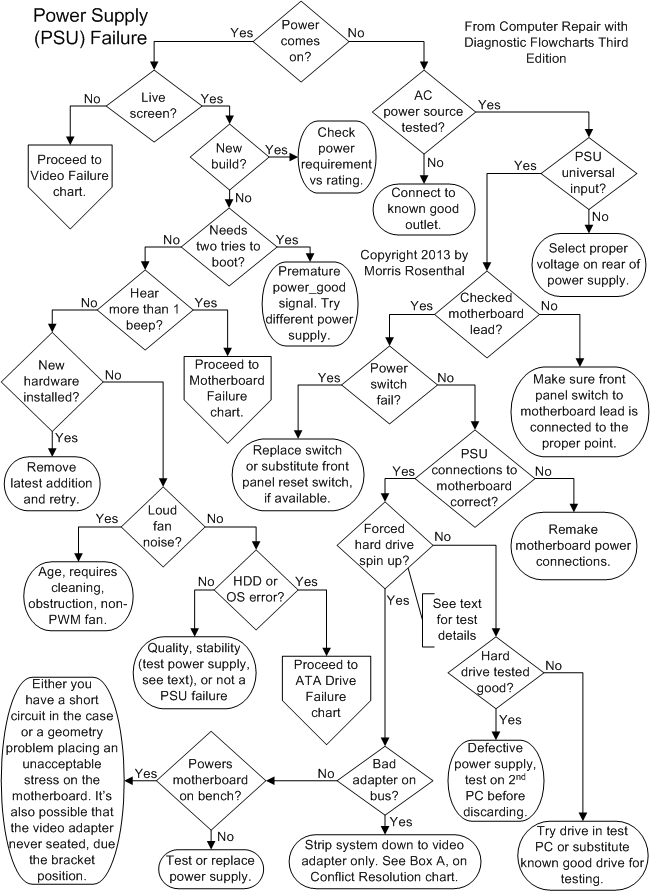
I am having problems with my desktop computer with Windows 7 32-bit home deluxe booting. I try to power it up and everything goes okay for a while. Eventually the windows logo comes up, but then the computer shuts down without warning. Once this happens, the computer seems mostly unresponsive to a restart using the power button. Press power on does something (some lights come on), but it doesn't even get to the Bios. I have to turn off the power supply then turn it back on. Then when I press power on, the computer tries to boot up again. A couple of days ago when this first happened, upon reboot Windows entered a "startup repair" process. After this, the computer was able to boot. However, trying to boot today is even worse. While Windows is running the startup repair and tries to boot, the computer does the shut down thing again.

I'm not sure if it's a heat issue, as I've tried to boot from room temperature. Mind you, I don't know how long it takes for things to heat up, maybe 30s is all that is needed?

What really confuses me is that I have to cycle the power supply in order to boot again. Maybe there is a simple explanation for that though.

During the startup repair I'm given the option to do a restore, so I'll try that next.

thanks
 

My Computer

OS
Windows 7 32-bit Home Deluxe
It sounds to me like your power supply or something that connects your motherboard/devices to your power supply is failing. If the computer can't receive power properly then that's definitely the problem. If all the other devices were booting yet certain devices weren't then it could be something else, but since it's everythnig it's probably the power supply.

Depending on what kind of computer you have and how many devices you have you will need a power supply of atleast 350-400 watts or more. If you've built your own computer you'll know what you need, if not, check the rating on your old power supply.

If you don't need anything more than 430 watts, one of these will do nicely:

http://www.newegg.com/Product/Product.aspx?Item=N82E16817139003
http://www.newegg.com/Product/Product.aspx?Item=N82E16817371023
 

My Computer

Computer Manufacturer/Model Number
Apple Macbook Pro (April 2009)
OS
W7 Ult. x64 | OS X
CPU
Intel Mobile Core 2 Duo 2.93Ghz [T9800 Penryn]
Motherboard
NVIDIA nForce 730i Rev. B1 [Mac-F2268EC8 (U2E1)]
Memory
4096MB Samsung DDR3 Dual Channel [PC3-8500F 1066Mhz]
Graphics Card(s)
NVIDIA GeForce 9600M GT 512MB [G96M Rev. C1]
Sound Card
SB X-Fi Surround 5.1 USB | Onboard Realtek (Disabled)
Monitor(s) Displays
Acer x223wbd 22" | Apple Anti-Glare 17" (Disabled)
Screen Resolution
{Current} 1440x900 {Acer} 1680x1050 {Apple} 1920x1200
Hard Drives
{Internal}
Seagate Momentus 320GB 2.5" 7200RPM [ST9320421AS]

{Externals}
LaCie 320GB USB 2.0 HDD [301284UR]
LaCie 750GB USB 2.0 FW400 eSATA HDD [301314U]
LaCie 1TB USB 2.0 HDD [301304UR]
PSU
Magsafe
Case
Aluminum/Unibody (MBP52)
Cooling
2 x 6000 RPM Fans
Keyboard
Logitech G-15v2 [PN 920-000379]
Mouse
Logitech G-9 [PN 910-000338]
Internet Speed
12Mbps/2.5Mbps w/ 24Mbps Speed Boost [Comcast]
Other Info
Logitech X-540 Speakers [PN 970223-0122]
Sennheiser PC-151 Headset
Thanks.
I should mention that once booted, I have never had the PC unexpectdly shut down. Does that still make sense with the power supply being at fault when booting?

I was pretty careful when I spec'd out the power supply so it is fine in terms of size. I guess I'll pull some PCI cards and try booting to see if that helps. Maybe one of the cards is causing problems.

Would the CMOS battery have any effect on this?
 

My Computer

OS
Windows 7 32-bit Home Deluxe
I'm not certain on the more technical details, but from my limited understanding, power fluctuations are usually a problem with the power supply.

power.gif
 

My Computer

Computer Manufacturer/Model Number
Apple Macbook Pro (April 2009)
OS
W7 Ult. x64 | OS X
CPU
Intel Mobile Core 2 Duo 2.93Ghz [T9800 Penryn]
Motherboard
NVIDIA nForce 730i Rev. B1 [Mac-F2268EC8 (U2E1)]
Memory
4096MB Samsung DDR3 Dual Channel [PC3-8500F 1066Mhz]
Graphics Card(s)
NVIDIA GeForce 9600M GT 512MB [G96M Rev. C1]
Sound Card
SB X-Fi Surround 5.1 USB | Onboard Realtek (Disabled)
Monitor(s) Displays
Acer x223wbd 22" | Apple Anti-Glare 17" (Disabled)
Screen Resolution
{Current} 1440x900 {Acer} 1680x1050 {Apple} 1920x1200
Hard Drives
{Internal}
Seagate Momentus 320GB 2.5" 7200RPM [ST9320421AS]

{Externals}
LaCie 320GB USB 2.0 HDD [301284UR]
LaCie 750GB USB 2.0 FW400 eSATA HDD [301314U]
LaCie 1TB USB 2.0 HDD [301304UR]
PSU
Magsafe
Case
Aluminum/Unibody (MBP52)
Cooling
2 x 6000 RPM Fans
Keyboard
Logitech G-15v2 [PN 920-000379]
Mouse
Logitech G-9 [PN 910-000338]
Internet Speed
12Mbps/2.5Mbps w/ 24Mbps Speed Boost [Comcast]
Other Info
Logitech X-540 Speakers [PN 970223-0122]
Sennheiser PC-151 Headset
Thanks again.
I ran ubuntu live of a CD and that worked ok. I also ran Acronis True Image to restore the c: drive. The restore went okay, it ran for an hour or so. When the computer rebooted into Windows, it shut down again.

I don't mean to disregard the power supply suggestions. Simply, I don't have a spare PS to test with and I don't want to shell out $100 if it's not needed.
 

My Computer

OS
Windows 7 32-bit Home Deluxe
did you solve this?

Hi Smish,
I have a pc with exactly the same problem...
I've already replaced everything (Power Supply, Ram, Harddisk...) but the problem remains...
Did you solve the problem?
 

My Computer

OS
windows 7 64 bit
Back
Top