I'll just jump in with some other suggestions but please do follow Gokay's advice.
A factory reset (re-install windows) didn't fix the problem so I'd say it must be a hardware issue. Try swapping cables and cleaning connectors - Already done.
On the software/ configuration side try opening an Elevated Command Prompt then type:
netstat -ano
Press Enter.
From the list that appears check the PID's against Task Manager and see if you can find any connections by processes that you don't actually need.
Also since it affects all browsers it can't be a browser configuration issue.
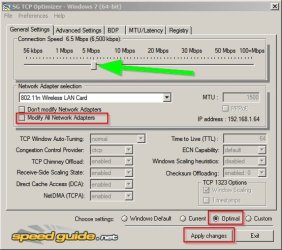
However it's best to just run the program, choose your connection speed and let it apply optimal settings and also use the reg backup feature so that you can restore current settings.
Test after a reboot.
Re: DNS Settings.
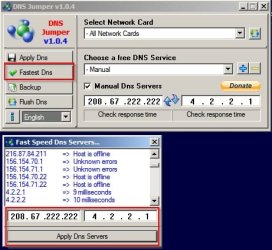
Sometimes you can just try to find your fastest DNS Server. I'll post more on that if you want to give it a go.
[EDIT]
Additional info:
It might be worth running ICSI Netalyzer and seeing if it flags up anything unusual. Note: I've used this in the past but will not run it currently as it requires JAVA. I do not have JAVA installed.
I seem to be having problems creating a bootable USB, I downloaded Linux Mint Mate, and have followed the instructions listed at the below website on how to create a bootable USB. When i go through the boot menu and select to boot from it, it tells me i am missing the boot manager.
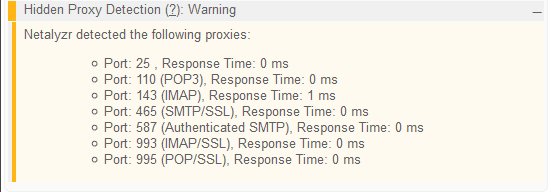
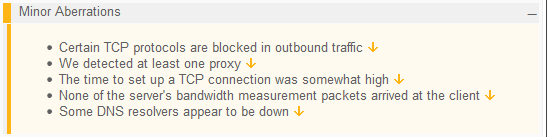
I ran the SG TCP Optimizer and couldn't see any changes after doing so. Then I did the netalyzer, and got some results that may or may not be helpful to understand i will post screenshots of some of the results below.
Attachments
dns.png
2 KB
· Views: 19
hidden proxy.png
4.2 KB
· Views: 20
https blocked.png
1.1 KB
· Views: 19
Minor.png
3.9 KB
· Views: 20
My Computer
At a glance
Windows 7 home premium 64-bit SP1Intel Core i5 23208.00GB Dual-Channel DDR3Intel HD graphics family
Callendar- I checked Control Panel/Internet options/connections and that was how it was already set by default.
GokAy- I changed the MAC address and it did nothing for connectivity.
My Computer
At a glance
Windows 7 home premium 64-bit SP1Intel Core i5 23208.00GB Dual-Channel DDR3Intel HD graphics family
Don't worry about DNS Server results. Those can be caused by blocking sites using your Hosts file, an IP address blocklist, Firewall or other security software. I'd say - nothing to worry about.
As far as I know - allowed is the default setting for this unless you have some sort of SSL scanning set up in your AV.
My Computer
At a glance
Microsoft Windows 7 Home Premium 64-bit 7601 ...AMD C-60 APU with Radeon(tm) HD Graphics4.00 GBAMD Radeon HD 6290 Graphics
Computer type
Laptop
Computer Manufacturer/Model Number
ASUS
OS
Microsoft Windows 7 Home Premium 64-bit 7601 Multiprocessor Free Service Pack 1
CPU
AMD C-60 APU with Radeon(tm) HD Graphics
Motherboard
ASUSTeK COMPUTER INC. X501U
Memory
4.00 GB
Graphics Card(s)
AMD Radeon HD 6290 Graphics
Sound Card
(1) AMD High Definition Audio Device (2) Realtek High Defi
RE: GokAy
I have tried a total of 3 different cables now, and with wifi only as well. Is there any diagnostic tools you can think of that might help me figure out if it is a hardware problem? (I would of thought it would be software because LoL runs fine)
RE: Callender
Not sure if i have SSL in my AV- I am using Avast Free AV, along with Malwarebytes.
My Computer
At a glance
Windows 7 home premium 64-bit SP1Intel Core i5 23208.00GB Dual-Channel DDR3Intel HD graphics family
Since this is happening on both OS's I believe it is not a Windows configuration issue. However, I can't be sure it is hardware either as LoL is working.
Did we try loading defaults in BIOS yet?
My Computer
At a glance
Windows 7 Ultimate x64 SP1AMD Phenom 2 1090T2x8GB Kingston HyperX Fury Black 1600Mhz Unga...MSI GTX 970 Gaming 4G
Computer type
PC/Desktop
Computer Manufacturer/Model Number
Custom Build
OS
Windows 7 Ultimate x64 SP1
CPU
AMD Phenom 2 1090T
Motherboard
Gigabyte GA-890FXA-UD5
Memory
2x8GB Kingston HyperX Fury Black 1600Mhz Unganged
Graphics Card(s)
MSI GTX 970 Gaming 4G
Sound Card
Realtek On-Board HD 7.1 Audio / Logitech G35
Monitor(s) Displays
3xAcer GD245HQ
Screen Resolution
1920x1080
Hard Drives
Samsung 850 Pro 512GB SSD - OS /
WD Caviar Black SATA 3 - 1 TBx2 - Dynamic RAID 0 /
WD Caviar Green SATA 2 - 640GBx2 - Dynamic RAID 0 /
WD Caviar Green SATA 2 - 640GB - Internal Backup /
Seagate Barracude SATA 3 - 3TB - External Backup/ Sync
PSU
HighPower 1000W
Case
Cooler Master HAF 932
Cooling
Noctua NH-D14
Keyboard
Logitech G19
Mouse
Logitech G500
Internet Speed
100/4 Mbit Cable (100GB quota)
Antivirus
ZoneAlarm Extreme Security / MBAM Pro / MBAE Free / SAS Free
Do you know how to open BIOS setup? It is written in the first screen you see when you start any PC. May be called "Setup" only, most likely a F-key or DEL.
Once inside, either in first screen or the exit menu. Once you load the defaults make sure to "Save the changes and Exit".
My Computer
At a glance
Windows 7 Ultimate x64 SP1AMD Phenom 2 1090T2x8GB Kingston HyperX Fury Black 1600Mhz Unga...MSI GTX 970 Gaming 4G
Computer type
PC/Desktop
Computer Manufacturer/Model Number
Custom Build
OS
Windows 7 Ultimate x64 SP1
CPU
AMD Phenom 2 1090T
Motherboard
Gigabyte GA-890FXA-UD5
Memory
2x8GB Kingston HyperX Fury Black 1600Mhz Unganged
Graphics Card(s)
MSI GTX 970 Gaming 4G
Sound Card
Realtek On-Board HD 7.1 Audio / Logitech G35
Monitor(s) Displays
3xAcer GD245HQ
Screen Resolution
1920x1080
Hard Drives
Samsung 850 Pro 512GB SSD - OS /
WD Caviar Black SATA 3 - 1 TBx2 - Dynamic RAID 0 /
WD Caviar Green SATA 2 - 640GBx2 - Dynamic RAID 0 /
WD Caviar Green SATA 2 - 640GB - Internal Backup /
Seagate Barracude SATA 3 - 3TB - External Backup/ Sync
PSU
HighPower 1000W
Case
Cooler Master HAF 932
Cooling
Noctua NH-D14
Keyboard
Logitech G19
Mouse
Logitech G500
Internet Speed
100/4 Mbit Cable (100GB quota)
Antivirus
ZoneAlarm Extreme Security / MBAM Pro / MBAE Free / SAS Free