BSOD - 0x000000f4, not sure what I was doing at the time.

Tombo

New member
Local time
7:22 PM
Messages
4
Sorry for the thread title but I this BSOD happened a few days ago and only just remembered this site so I thought I might as well check it out to see if this can be fixed.

I was probably playing games, listening to music and chatting on Skype when it happened.

I got a CRITICAL_OBJECT_TERMINATION 0x000000f4, I have used a program bluescreen viewer it is also showing another bluescreen event but I have no idea about that one, sorry! Honestly I don't really know what I am doing, so any help from you guys would be much appreciated!

I have attached my SF diagnostic log for you guys to check out.

Many thanks.
 

My Computer My Computer

At a glance

Windows 7 Home Premium x64
OS
Windows 7 Home Premium x64
Hello Tombo.

Make it sure that the Samsung 840 PRO Series SSD is running with the up-to-date firmware.
Samsung SSD | Samsung Semiconductor Global Website

Do some Disc checks on the Seagate 1 TB and the Hitachi 2 TB.

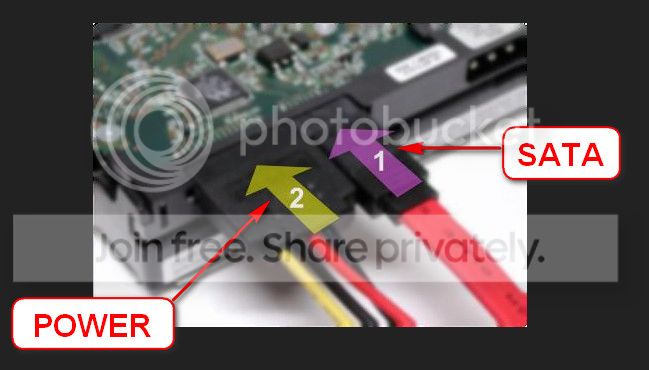
  1. Re-seat the sata and power (for the SSD, too).
    72974453_zps85c47d93.jpg
  2. Run chkdsk /f/r, following the option two of the tutorial Disk Check
  3. Seatool for dos: SeaTools | Seagate download
    • Burn it in a blank cd. boot from the CD, click on "Accept", wait for it to finish detecting the drives, then in the upper left corner select "Basic Tests", then select "Long Test" and let it run.
    • You can use Win32 DiscImager to create a bootable USB and run Seatools for DOS. Follow this post to know how to make a bootable Seatools USB.
  4. Post screenshots of all your SSDs and HDDs using CrystalDiskInfo - Software - Crystal Dew World.
Uninstall Marvell 91xx drivers in Control Panel > Programs and features. Then follow Drivers - Clean Left over Files after Uninstalling to remove all the leftovers.

Let us know the results.
_________________________________________________________________________
BSOD ANALYSIS:
Code:
*******************************************************************************
*                                                                             *
*                        Bugcheck Analysis                                    *
*                                                                             *
*******************************************************************************

Use !analyze -v to get detailed debugging information.

BugCheck F4, {3, fffffa800fcbab30, fffffa800fcbae10, fffff800035d7350}

----- ETW minidump data unavailable-----
Probably caused by : wininit.exe

Followup: MachineOwner
---------

3: kd> !analyze -v
*******************************************************************************
*                                                                             *
*                        Bugcheck Analysis                                    *
*                                                                             *
*******************************************************************************

CRITICAL_OBJECT_TERMINATION (f4)
A process or thread crucial to system operation has unexpectedly exited or been
terminated.
Several processes and threads are necessary for the operation of the
system; when they are terminated (for any reason), the system can no
longer function.
Arguments:
Arg1: 0000000000000003, Process
Arg2: fffffa800fcbab30, Terminating object
Arg3: fffffa800fcbae10, Process image file name
Arg4: fffff800035d7350, Explanatory message (ascii)

Debugging Details:
------------------

----- ETW minidump data unavailable-----

PROCESS_OBJECT: fffffa800fcbab30

IMAGE_NAME:  wininit.exe

DEBUG_FLR_IMAGE_TIMESTAMP:  0

MODULE_NAME: wininit

FAULTING_MODULE: 0000000000000000 

PROCESS_NAME:  WerFault.exe

BUGCHECK_STR:  0xF4_WerFault.exe

CUSTOMER_CRASH_COUNT:  1

DEFAULT_BUCKET_ID:  WIN7_DRIVER_FAULT

CURRENT_IRQL:  0

LAST_CONTROL_TRANSFER:  from fffff8000365ed22 to fffff800032d0c00

STACK_TEXT:  
fffff880`0be339c8 fffff800`0365ed22 : 00000000`000000f4 00000000`00000003 fffffa80`0fcbab30 fffffa80`0fcbae10 : nt!KeBugCheckEx
fffff880`0be339d0 fffff800`0360b08b : ffffffff`ffffffff fffffa80`0d971b50 fffffa80`0fcbab30 fffffa80`10d24060 : nt!PspCatchCriticalBreak+0x92
fffff880`0be33a10 fffff800`0358b144 : ffffffff`ffffffff 00000000`00000001 fffffa80`0fcbab30 00000000`00000008 : nt! ?? ::NNGAKEGL::`string'+0x17486
fffff880`0be33a60 fffff800`032cfe93 : fffffa80`0fcbab30 fffff880`000000ff fffffa80`0d971b50 00000000`00000000 : nt!NtTerminateProcess+0xf4
fffff880`0be33ae0 00000000`770115da : 00000000`00000000 00000000`00000000 00000000`00000000 00000000`00000000 : nt!KiSystemServiceCopyEnd+0x13
00000000`0013d3d8 00000000`00000000 : 00000000`00000000 00000000`00000000 00000000`00000000 00000000`00000000 : 0x770115da


STACK_COMMAND:  kb

FOLLOWUP_NAME:  MachineOwner

FAILURE_BUCKET_ID:  X64_0xF4_WerFault.exe_IMAGE_wininit.exe

BUCKET_ID:  X64_0xF4_WerFault.exe_IMAGE_wininit.exe

Followup: MachineOwner
---------

 

My Computer My Computer

At a glance

Microsoft Windows 10 Pro Insider Preview 64-bitIntel(R) Core(TM) i3-4130 CPU @ 3.40GHzCorsair Vengence 4GB x2 (8.00GB Dual-Channel ...2047MB GeForce GTS 450 (ZOTAC International)
Computer type
PC/Desktop
Computer Manufacturer/Model Number
Self Assembled
OS
Microsoft Windows 10 Pro Insider Preview 64-bit
CPU
Intel(R) Core(TM) i3-4130 CPU @ 3.40GHz
Motherboard
Gigabyte Technology Co., Ltd. B85M-D3H
Memory
Corsair Vengence 4GB x2 (8.00GB Dual-Channel DDR3 @ 798MHz)
Graphics Card(s)
2047MB GeForce GTS 450 (ZOTAC International)
Sound Card
Onboard (Realtek High Definition Audio)
Monitor(s) Displays
LG Flatron E2040T
Screen Resolution
1600x900
Hard Drives
Western Digital 1 TB
Seagate 500 GB
PSU
Corsair VS550
Case
Cooler Master K380
Cooling
Cooler Master Seidon 120V Plus
Keyboard
Logitech MK260r
Mouse
Logitech MK260r
Internet Speed
PMPL Broadband
Antivirus
Windows Defender + MBAM
Browser
Firefox
Other Info
Dell Studio 15" Laptop
Hello Arc, thanks for replying.

I re-seated my SATA leads and made sure they were in properly. Also my Samsung SSD firmware is up to date.

I ran the Disk Checks on all drives, everything seemed fine and there were no errors.

In SeaTools everything passed. Although I couldn't test my hitachi simple drive, probably because it's my external HDD and is USB?

I have attached screenshots of my drives as you have requested and finally I also removed the marvell 91xx drivers and cleaned the left over files.

Many thanks for your assistance so far!
 
Last edited:

My Computer My Computer

At a glance

Windows 7 Home Premium x64
OS
Windows 7 Home Premium x64
Looks good so far :)
Now we have to wait and see how it goes.
 

My Computer My Computer

At a glance

Microsoft Windows 10 Pro Insider Preview 64-bitIntel(R) Core(TM) i3-4130 CPU @ 3.40GHzCorsair Vengence 4GB x2 (8.00GB Dual-Channel ...2047MB GeForce GTS 450 (ZOTAC International)
Computer type
PC/Desktop
Computer Manufacturer/Model Number
Self Assembled
OS
Microsoft Windows 10 Pro Insider Preview 64-bit
CPU
Intel(R) Core(TM) i3-4130 CPU @ 3.40GHz
Motherboard
Gigabyte Technology Co., Ltd. B85M-D3H
Memory
Corsair Vengence 4GB x2 (8.00GB Dual-Channel DDR3 @ 798MHz)
Graphics Card(s)
2047MB GeForce GTS 450 (ZOTAC International)
Sound Card
Onboard (Realtek High Definition Audio)
Monitor(s) Displays
LG Flatron E2040T
Screen Resolution
1600x900
Hard Drives
Western Digital 1 TB
Seagate 500 GB
PSU
Corsair VS550
Case
Cooler Master K380
Cooling
Cooler Master Seidon 120V Plus
Keyboard
Logitech MK260r
Mouse
Logitech MK260r
Internet Speed
PMPL Broadband
Antivirus
Windows Defender + MBAM
Browser
Firefox
Other Info
Dell Studio 15" Laptop
Back
Top