Solved BSOD 0x00000101 and 0x00000124 a couple mins after logging in

jlambert

New member
Local time
11:09 PM
Messages
3
I have a new build that I built about 2 months ago. after a month I started getting these BSOD. I have ran prime 95 with no problems in safe mode. I have reinstalled windows multiple times. I can't even get drivers to update before I get bsod's. I sent in my motherboard and they said it was fine but did reflash it and update it. I want to think it is a USB problem because sometimes my keyboard will work but my mouse will not and they are using the same wireless usb. I have dump files that I can post but its just in the .dmp format as I can't even download the program like in the instructions. Any help would be aprreciated.
 

My Computer My Computer

At a glance

Windows 7 proffesional x64I7-6700K32gig G.skill Ripjaws 4 DDR4-3000 PC4-2400Intel
Computer type
PC/Desktop
OS
Windows 7 proffesional x64
CPU
I7-6700K
Motherboard
ASUS ROG Strix Z270E Gaming
Memory
32gig G.skill Ripjaws 4 DDR4-3000 PC4-2400
Graphics Card(s)
Intel
Monitor(s) Displays
2 27" AOC
Hard Drives
Wester Digital Blue ssd 500gig
PSU
Corsair CS650M
Case
Corsair Carbide Series 400C
Keyboard
Logitech K350
Mouse
Logitech M510
Browser
Chrome
Hi there welcome.
A question though, why is it you can't follow the BSOD posting instructions exactly?

We can't help you with little to no data I'm afraid.
With that said, 0x101 and 0x124 are 99.5% of the time hardware fault related, now you've
said that your USB ports are occasionally unresponsive, I would assume that you it means that your
motherboard is on its last legs.

0x101, unfortunately this bug check code doesn't contain enough
information in the minidump file be analyzed fully.

Please upload the Kernel dump file using Dropbox or Skydrive, the file is located in the Windows directory
and is usually a few hundred Megabytes in size.
Code:
C:\Windows\MEMORY.dmp

---------

Follow the steps detailed below with extra caution since I have no data to work with.

A "stop 0x124" is fundamentally different to many other types of bluescreens because it stems from a hardware complaint. Stop 0x124 minidumps contain very little practical information, and it is therefore necessary to approach the problem as a case of hardware in an unknown state of distress. - H2SO4
The generic nature of the 0x124 (Arg1=0) stop code means we would have to take
the trail & error approach.

Do you have any spare parts (or another PC) to test with?
The usual suspect of this kind of BCCode is the CPU but it's often not the the case which is why we need
to test other components to rule them out as the cause.
How old are your components?


What is the make, model and age of your PSU?
Fill out this form and post back the result:

Good practice, open up the case and re-seat all types of connection.

  • SATA Cables (HDD/SSD/ODD).
  • SATA-Power.
  • Motherboard 24-pin.
  • Motherboard 4/8-pin (CPU).
  • Re-seat the RAM.
  • Re-seat the GPU.
Make sure that every slot / cable head is free of dust or other obstruction.
Make sure that every connection is seating properly and firmly in-place.

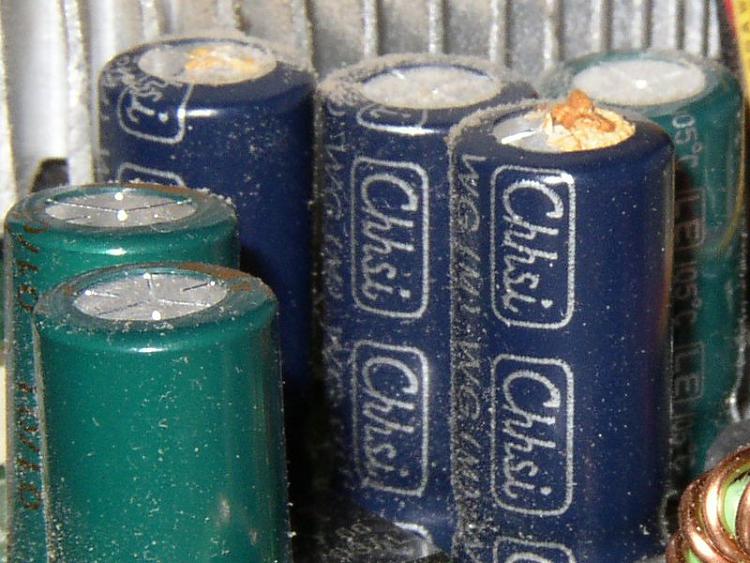
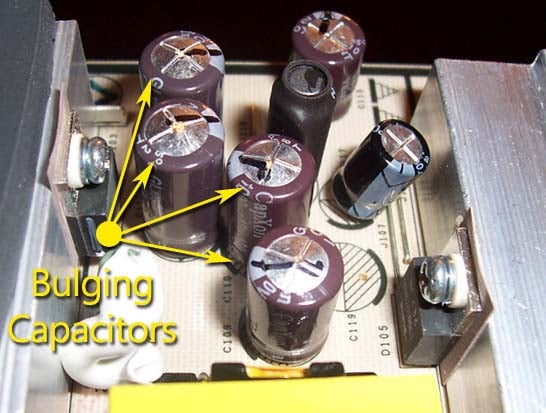
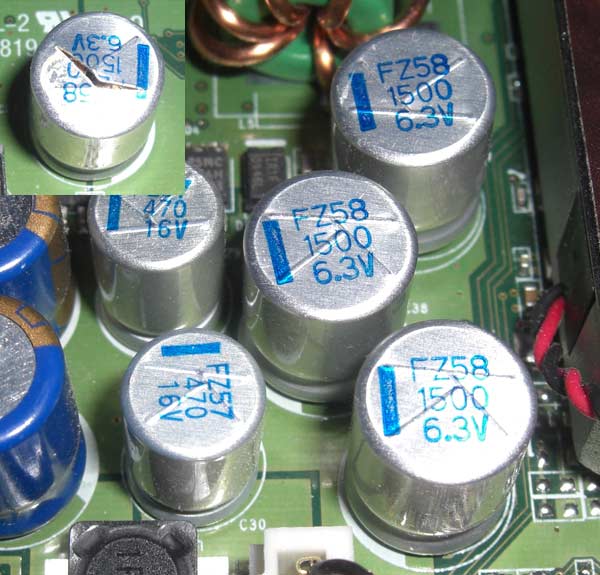
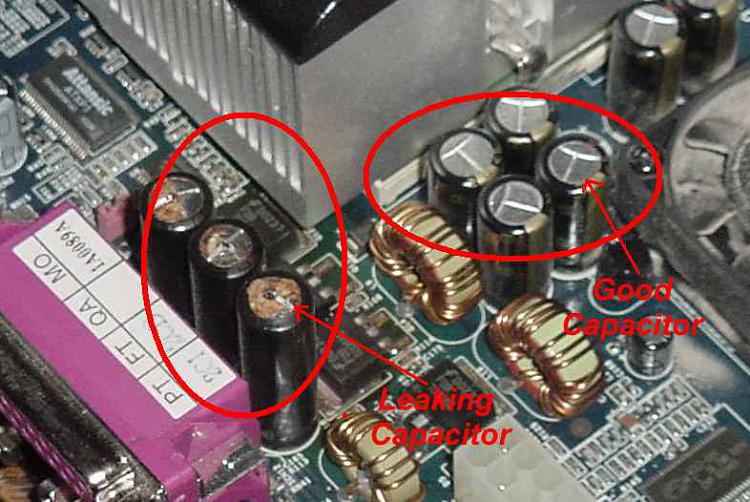
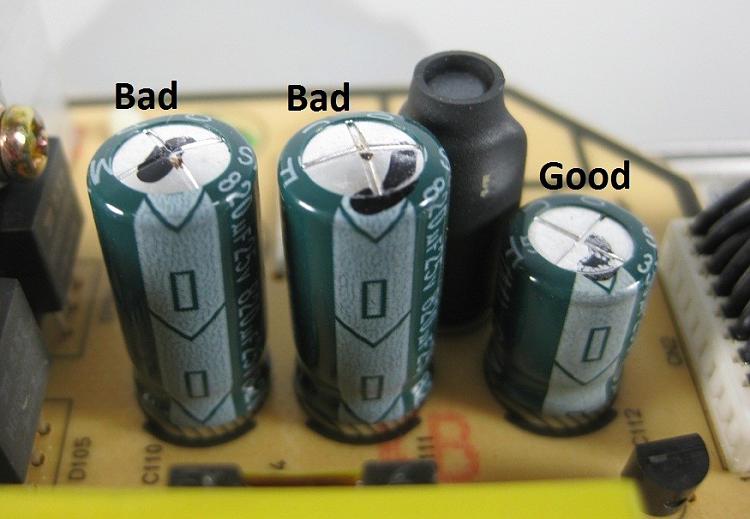
Also have a look at the motherboard and the GPU, search for any "bad caps", bulky, leaking bloated capacitors.

i.e


:ar: Test for thermals and stability:

  • Download HWinfo and post a Screenshot of the sensors window, one at idle and another while putting load on the PC using Prime95 for the CPU side and Furmark for the GPU.
    • Before running Prime95 make sure to enable Round-off checking (see 1st post under the tutorial).
       Note
    It is not mandatory to run both tests simultaneously, although possible as long as the temperatures are under constant monitoring.
:ar: Reset the BIOS back to default:
   Note
Write down the current value of the SATA Mode!
Its either AHCI or IDE.
After resetting the CMOS go back and verify the value for SATA Mode is what it was
when the OS was installed.

If any component is overclocked reset it back to stock speeds!



Good places to read more:


My Computer My Computer

At a glance

Windows 10Intel Core i5 3570K16GB 1600Mhz G.SkillGigabyte GTX 970 G1-Gaming
Computer type
PC/Desktop
OS
Windows 10
CPU
Intel Core i5 3570K
Motherboard
Asus P8Z77V-PRO
Memory
16GB 1600Mhz G.Skill
Graphics Card(s)
Gigabyte GTX 970 G1-Gaming
PSU
Seasonic 1000W Platinum
Case
Fractal Design Define R4
Cooling
Noctua NH-D14
Everything is 2 months old that is in my PC. The motherboard I just received from Asus last week from them testing it and they said it was fine and just reflashed it and sent it back. I know it's not the hard drive tried another known working one did same thing soon as I get logged in it would bsod. The USB problem is only in windows at log in when in bios it works fine. I wish I had older parts that would work but everything I have is out of date.
 

My Computer My Computer

At a glance

Windows 7 proffesional x64I7-6700K32gig G.skill Ripjaws 4 DDR4-3000 PC4-2400Intel
Computer type
PC/Desktop
OS
Windows 7 proffesional x64
CPU
I7-6700K
Motherboard
ASUS ROG Strix Z270E Gaming
Memory
32gig G.skill Ripjaws 4 DDR4-3000 PC4-2400
Graphics Card(s)
Intel
Monitor(s) Displays
2 27" AOC
Hard Drives
Wester Digital Blue ssd 500gig
PSU
Corsair CS650M
Case
Corsair Carbide Series 400C
Keyboard
Logitech K350
Mouse
Logitech M510
Browser
Chrome
Hi That's only a partial answer, why can't you collect the files necessary for a proper analysis?
 

My Computer My Computer

At a glance

Windows 10Intel Core i5 3570K16GB 1600Mhz G.SkillGigabyte GTX 970 G1-Gaming
Computer type
PC/Desktop
OS
Windows 10
CPU
Intel Core i5 3570K
Motherboard
Asus P8Z77V-PRO
Memory
16GB 1600Mhz G.Skill
Graphics Card(s)
Gigabyte GTX 970 G1-Gaming
PSU
Seasonic 1000W Platinum
Case
Fractal Design Define R4
Cooling
Noctua NH-D14
Ok so I had warranty on my processor I sent it in and they sent me a new one. I installed it Friday and so far no bsod. So it looks like my processor went bad. Just wanted to let people know the outcome of what my problem ended up being.
 

My Computer My Computer

At a glance

Windows 7 proffesional x64I7-6700K32gig G.skill Ripjaws 4 DDR4-3000 PC4-2400Intel
Computer type
PC/Desktop
OS
Windows 7 proffesional x64
CPU
I7-6700K
Motherboard
ASUS ROG Strix Z270E Gaming
Memory
32gig G.skill Ripjaws 4 DDR4-3000 PC4-2400
Graphics Card(s)
Intel
Monitor(s) Displays
2 27" AOC
Hard Drives
Wester Digital Blue ssd 500gig
PSU
Corsair CS650M
Case
Corsair Carbide Series 400C
Keyboard
Logitech K350
Mouse
Logitech M510
Browser
Chrome
Back
Top