Solved BSOD 0x7B if I update the driver for Standard AHCI 1.0 SATA controller

Windoog

New member
Local time
6:56 PM
Messages
13
Hi again, will post this as a quote since I had it posted on Winraid but so far no one has an clue yet on my problem, here it goes:


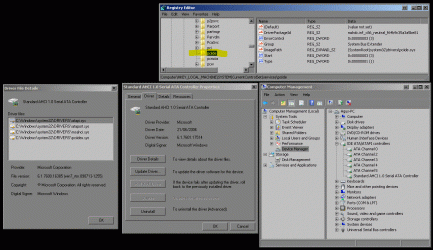
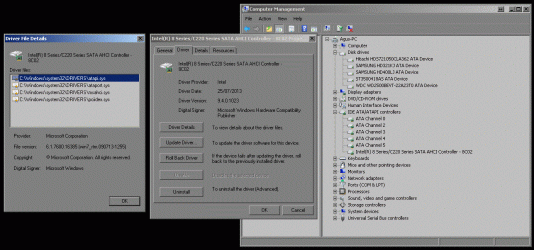
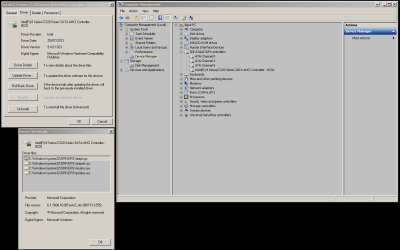
So, that´s my motherboard, so far it has been running with Microsoft drivers. See the following image.
attachment.php

attachment.php

For some reason, when I first tried to install Windows, that storage controller was not being recognized on AHCI mode, but on IDE. After some google search, I found that I needed to use some driver to get the AHCI mode recognized, although the motherboard was not so new. I had to use a gigabyte tool that made some changes to the USB image or something so that the controller could get recognized. (Google Search for: GA-B85M-D3H Windows install AHCI).

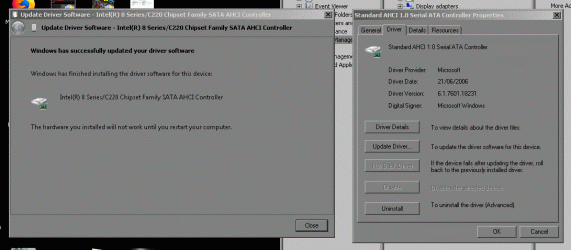
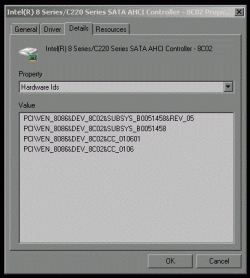
For some odd reason, every time I tried to update the storage driver (using any version available, I first used the ones recommended, then I tried the ones that matched my chipset or version, having the same result with all of them), the driver recognized the controller but upon reboot I always got the BSOD. Resetting and running the last known good resolved the trouble everytime. What I want to know is what´s happening? why I can´t update the storage driver?.

If I try to boot on IDE mode, it gives the same error as well.

The question is, what´s going on with this motherboard then? Do I need to change something on the registry before updating? Is there something wrong with my installation?


19-12-2017
Update...
Adding more info to the post, I was able to get the ntboot.log (attached), it has 3 boot attemps, the first is the bsod, the second was a pretty slow boot after choosing the last know good on the recovery menu, like 5min. but it booted normally or so, and the third was just a reboot just to check the speed, it came up normal. The thing is the last line of each attemp before showing me the log on screen or going bsod:
Code:
Loaded driver \SystemRoot\System32\DRIVERS\srv.sys
Did not load driver \SystemRoot\System32\DRIVERS\srv.sys
At the first boot, it stops there, the second one:
Code:
Loaded driver \SystemRoot\System32\DRIVERS\srv.sys
Did not load driver \SystemRoot\System32\DRIVERS\srv.sys
But it continue booting and I got to the desktop, no errors, but the third:
Code:
Loaded driver \SystemRoot\System32\DRIVERS\srv.sys
Did not load driver \SystemRoot\System32\DRIVERS\srv.sys
Loaded driver \SystemRoot\system32\DRIVERS\asyncmac.sys

This investigation is getting spooky by the minute. So far I haven´t been able to collect a bsod dump of the error.

Update...

More info found; I don´t know what to believe...

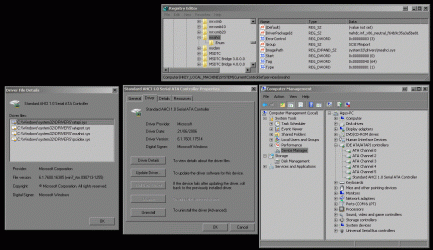
msahci seems disabled...
attachment.php


pciide enabled...
attachment.php


After trying to go back to AHCI, I find this... could it be that I am not on AHCI mode but IDE mode? (on Bios is set to AHCI, is this right?)


Update... again

I tried to enable the IAStor driver manually (which interestingly they were after installation) and then rebooting... and BSOD. Decided to try the recovery console to see what it said, and it showed that the error was because of a bad driver recently installed...[oh2]

I really would like to know what´s going on with this system???

Another update...


I changed manually from AHCI to IDE via registry and bios and guess what...
It worked...

The question is... now what?

Question added...

Could it be that the drivers have to be installed during Windows installation? Anyone could shed a light on this please?

20-12-2017
Remember that I had the Microsoft drivers for AHCI mode?...
attachment.php


Guess what happened at reboot?
You guessed right my friend... bsod.

Now what´s going on??? why is this happening? how come not even the Microsoft drivers don´t work... could it be... that this motherboard is not really... in ahci mode although the bios and the device manager say it is...

More info later.

Fernando... I seek your wisdom, anyone, please, help me.

---------------------------------

That was my post on Winraid, not able to find help there, I turn to seek wisdom here. Someone please, at least tell me, what´s going on my system? Do I have AHCI enabled? or is it some sort of deprecated mode? or some IDE emulation over SATA? I know it should be pretty straight forward to updated a driver but this time is weird.
 

Attachments
  • Capture (1).gif
    Capture (1).gif
    175.1 KB · Views: 29
  • Capture (2).gif
    Capture (2).gif
    185.2 KB · Views: 29
  • Capture (3).gif
    Capture (3).gif
    57.3 KB · Views: 30
  • Capture (4).gif
    Capture (4).gif
    38 KB · Views: 56
  • Capture.GIF
    Capture.GIF
    146.3 KB · Views: 29

My Computer My Computer

At a glance

Windows 7 Professional x86 SP1Intel Core I5 45702Gb DDR3nVidia GeForce 210
Computer type
PC/Desktop
Computer Manufacturer/Model Number
Custom Buil
OS
Windows 7 Professional x86 SP1
CPU
Intel Core I5 4570
Motherboard
Gigabyte B85m-D3H v.1
Memory
2Gb DDR3
Graphics Card(s)
nVidia GeForce 210
Hard Drives
Hitachi HDS721050CLA362
SAMSUNG HD321KJ
SAMSUNG HD400LJ
ST3500418AS
WDC WD3200AAJS-00B4A0
PSU
Chinese
Case
Chinese
Cooling
Oem
Internet Speed
Slow
Antivirus
Avast Free
Browser
Firefox, Chrome, and IE
Tried looking into this.
Not feeling confident with what I've written below, because I am not having a good idea of all of it yet (in addition to possible confusion I feel having), but still, maybe something helps:

For some reason, when I first tried to install Windows, that storage controller was not being recognized on AHCI mode, but on IDE. After some google search, I found that I needed to use some driver to get the AHCI mode recognized, although the motherboard was not so new. I had to use a gigabyte tool that made some changes to the USB image or something so that the controller could get recognized. (Google Search for: GA-B85M-D3H Windows install AHCI).

I think you get crashes in system because you attempt to update parts where Gigabyte tool you used earlier seems to depend on the setup it was applied back then. If this is separate and safe for an update, then things began going wrong from IDE mode (I believe).

I think there are few options for you at this point:

1) Reinstall Windows but having ensured that you've got ACHI mode enabled (or RAID, but regarding ACHI/RAID modes, you would prefer doing extra reading, as I've not researched it any further yet)

2) Staying with the setup which works for you for the time being, e.g. not updating drivers, as it seems that they change something on level where BSOD and crashes are caused from mismatching/failing compatibility.

3) Attempting to reapply the Gigabyte's patch to the newer driver installed, however, since BSOD arises before you get to the desktop, I am not sure how this would be done there...

4) or playing around with registry, with relevant entries.


If your Windows is fresh and you don't have problems reinstalling it, would it be an option for you to try installing Windows but with AHCI mode enabled instead of IDE? Or perhaps, try the suggestion shared in that source about registry if you like to try that method. Obviously, since your OS isn't stable, any important data to be saved, must be backed up before any further operations of this kind.

That was my post on Winraid, not able to find help there, I turn to seek wisdom here. Someone please, at least tell me, what´s going on my system? Do I have AHCI enabled? or is it some sort of deprecated mode? or some IDE emulation over SATA? I know it should be pretty straight forward to updated a driver but this time is weird.

I would go through topics such as ones explaining IDE, RAID, AHCI modes (I am not fully acquainted with these myself but mentioning steps I would take at this point) and see their compatibility with W7 + your relevant components, e.g. their capabilities. If your motherboard appears to be from an old time, then you may like to get into its capabilities and modes it can carry out. If you end up patching things up for the motherboard to work with W7, then this suggests that once you reach the working set of software support for devices, it will be rather the peak point for driver upgrades (based on facts that other drivers seem to cause BSODs). Or unless you manage to find a work around to keep upgrading drivers whilst having motherboard working with W7, which wasn't really designed back then to carry out such task.

I think that it is a problem of wrong/bad configuration, not the motherboard, though thanks to it, there are problems of this kind.

Have you come across this resource before:
https://www.askvg.com/how-to-change-sata-hard-disk-mode-from-ide-to-ahci-raid-in-bios-after-installing-windows/ ?


Adding extra resource for reading:

Solved Changing IDE to AHCI caused no boot (it contains sub resources, possibly, worth looking at too)
 

My Computer My Computer

At a glance

Windows 8.1 x64
Computer type
PC/Desktop
OS
Windows 8.1 x64
The thing is that the OS was installed and running on AHCI mode but for some reason, the AHCI drivers don´t seem to cooperate with me somehow.

The whole problem is like Windows thinks that I changed IDE to AHCI, but I didn´t, the whole setup was done on AHCI. The only moment I changed to IDE was to confirm that on installation the drives showed up. I rebooted, changed to AHCI, used the Gigabyte tool to setup something on my USB drive with the Windows installation and then the drives showed up, but the drivers for the controller never ever went to the correct version. Is like somehow or the Bios is sending the wrong data or Windows is not understanding the AHCI mode...

"...these pretzels are making me thirsty"

The other thing is the ntbootlog, how come the Iastor driver gets loaded and then Windows gives that bsod???
 
Last edited:

My Computer My Computer

At a glance

Windows 7 Professional x86 SP1Intel Core I5 45702Gb DDR3nVidia GeForce 210
Computer type
PC/Desktop
Computer Manufacturer/Model Number
Custom Buil
OS
Windows 7 Professional x86 SP1
CPU
Intel Core I5 4570
Motherboard
Gigabyte B85m-D3H v.1
Memory
2Gb DDR3
Graphics Card(s)
nVidia GeForce 210
Hard Drives
Hitachi HDS721050CLA362
SAMSUNG HD321KJ
SAMSUNG HD400LJ
ST3500418AS
WDC WD3200AAJS-00B4A0
PSU
Chinese
Case
Chinese
Cooling
Oem
Internet Speed
Slow
Antivirus
Avast Free
Browser
Firefox, Chrome, and IE
Last edited:

My Computer My Computer

At a glance

W7 home premium 32bit/W7HP 64bit/w10 tp insid...E5300 dual core3gbNvidia Geforce 7100 Nforce 630i
Computer type
PC/Desktop
Computer Manufacturer/Model Number
medionl/Aspire 6930G/acer x55a
OS
W7 home premium 32bit/W7HP 64bit/w10 tp insider ring
CPU
E5300 dual core
Motherboard
medion MS7366
Memory
3gb
Graphics Card(s)
Nvidia Geforce 7100 Nforce 630i
Monitor(s) Displays
avixc
Internet Speed
n (isp resticted to 72)
Antivirus
mse/pands
Browser
palemoon
Other Info
Belkin Fd7050 n USB using Railink RT2870 drivers, more upto date
:geek:I have seen the tutorials, I actually follow them to change from AHCI to IDE recently while doing some tests. The thing is, IDE mode works fine, AHCI works fine, is the process of the update that gives the BSOD.
 

My Computer My Computer

At a glance

Windows 7 Professional x86 SP1Intel Core I5 45702Gb DDR3nVidia GeForce 210
Computer type
PC/Desktop
Computer Manufacturer/Model Number
Custom Buil
OS
Windows 7 Professional x86 SP1
CPU
Intel Core I5 4570
Motherboard
Gigabyte B85m-D3H v.1
Memory
2Gb DDR3
Graphics Card(s)
nVidia GeForce 210
Hard Drives
Hitachi HDS721050CLA362
SAMSUNG HD321KJ
SAMSUNG HD400LJ
ST3500418AS
WDC WD3200AAJS-00B4A0
PSU
Chinese
Case
Chinese
Cooling
Oem
Internet Speed
Slow
Antivirus
Avast Free
Browser
Firefox, Chrome, and IE
The thing is that the OS was installed and running on AHCI mode but for some reason, the AHCI drivers don´t seem to cooperate with me somehow.
I doubt that the motherboard has some sort of damage only disabling one of its functionalities.

Boot log says loaded driver srv.sys and on next line says did not load - Microsoft Community
The above source mentions about restarting USB controllers which you at some point tackled a bit earlier.
Could it possibly have some impact on 'srv.sys' not loading? May be worth further investigation.
Besides, it kinda dictates that the problem is somewhere around that part, otherwise, your case of Windows installation would've had been ordinary, yet it isn't - because of motherboard.

Extra thought: given that you had to apply a fix for the Windows to get the other thing recognised, it may be this far as it can go with this M.Board. E.g. further upgrades will probably require or demand extra patches, since per fact of an attempt to upgrade drivers the Windows boot failure happened. This is rather robotic-observation of some sort, but keeping in mind these facts, helps.

...The whole problem is like Windows thinks that I changed IDE to AHCI, but I didn´t...
Sorry if this is a misleading question or an obvious one, but based on what you can state that Windows takes things in this particular way?

Also, can you confirm what service it uses in the same way as Phoenix's reply on this source:
Check if my SSD in runing on AHCI mode inside Windows 7 - Super User, e.g. check this pic.: https://i.stack.imgur.com/Z7xef.png (picture takes much space, so I don't enclose it in tags)

You can also double check things in:
C:\Windows\System32\msinfo32.exe
System Summary: Components: Storage: IDE: Driver

(added: one of your screens does show pciide.sys as a driver being in use (registry value), but anyways, do the check it again in the working for Windows mode)


...The only moment I changed to IDE was to confirm that on installation the drives showed up. ...
Ensure that the related data about driver being used matches other resources, e.g. registry values, device manager, system summary, BIOS. (to clear out suspicion on Windows being unable to carry out proper change of settings)

Also, did you check Event Viewer Log for any possible entries related to failures?
Reliability History might contain some info too.

If you are sure that everything is okay over there, then next would be investigating guilty connections to the not loading srv.sys . What connection it has with USB image, or where exactly it begins to crash with the setup you had attempted to start Windows with (and BSOD later).


...Is like somehow or the Bios is sending the wrong data or Windows is not understanding the AHCI mode...
It won't hurt checking BIOS's settings again but I believe you've been there a numerous amount of times already, and things over there are probably in check.


The other thing is the ntbootlog, how come the Iastor driver gets loaded and then Windows gives that bsod???
Why? Something wasn't happy with the loaded driver and expressed it in BSOD.
It would be likely worth comparing successful boot log with the crashed one, either to confirm the fact or to establish a new one.

Something tells me, this requires an in-depth research of drivers' functions or rather their limitations for your particular case. It kinda suggests that you won't be able to get beyond the working setup too far, as it is the limitation with your motherboard and this OS.

Note: I'm having a headache at this moment. Sorry if my writing appears a little bit chaotic/indirect/confusing/odd at times.


----

How many times have you already had Windows reinstalled by this far?
If you did more than once, then were you trying to reinstall it under same BIOS settings or did you try to variate them each time?
(Looking to figure out if you attempted to carry out any extra tests with it or not yet)


------------------
ADDED:

I've been rereading your initial post...

If you were installing Windows whilst having AHCI mode enabled, but Windows went by IDE mode, then the OS determined that the best compatibility for its drivers with your setup and went by the best option therefore. I didn't read much about IDE yet, but if I remember it right, it is flexible for communication with older parts/components.

Is your motherboard really old? It may end up funny for someone, but I am puzzled with question if the motherboard designed to run under/support W7 at all..

--

I would reinstall Windows for the sake of few tests...but I would double ensure that Windows behaves in this specific stated by you way, e.g. the controller never went AHCI mode but IDE. I would also research more if storage affects mode anyhow there too, by chance.

--

Windoog, what are your current thoughts after all the reading you've gone through by this point?
Have you had any new ideas to this problem by any chance?
 
Last edited:

My Computer My Computer

At a glance

Windows 8.1 x64
Computer type
PC/Desktop
OS
Windows 8.1 x64
View attachment ntbtlog.txt

So far following your suggestions and testing. I attached a new bootlog, that shows several normal boots. Now I am going to try to capture a failure boot, somehow it wasn´t captured before.

Update:

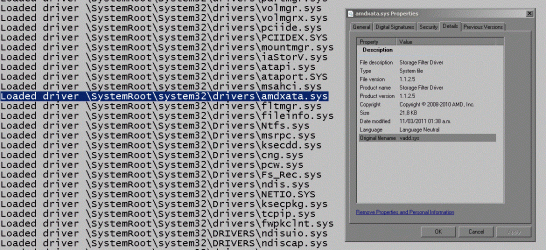
Something catched my eyes.

By fact, the motherboard is not old ancient, it has a Core I5 Processor, Intel based motherboard... therefore everything should be between Intel Partners, right?
Code:
Loaded driver \SystemRoot\system32\drivers\amdxata.sys

Then why an Intel Based Motherboard would load an AMD Sata controller driver?
attachment.php


Also, the pciide and pciidex are also loading. I tried disabling them all through registry but someone is still calling them, but who?
 

Attachments

  • Capture.GIF
    Capture.GIF
    150.6 KB · Views: 16
Last edited:

My Computer My Computer

At a glance

Windows 7 Professional x86 SP1Intel Core I5 45702Gb DDR3nVidia GeForce 210
Computer type
PC/Desktop
Computer Manufacturer/Model Number
Custom Buil
OS
Windows 7 Professional x86 SP1
CPU
Intel Core I5 4570
Motherboard
Gigabyte B85m-D3H v.1
Memory
2Gb DDR3
Graphics Card(s)
nVidia GeForce 210
Hard Drives
Hitachi HDS721050CLA362
SAMSUNG HD321KJ
SAMSUNG HD400LJ
ST3500418AS
WDC WD3200AAJS-00B4A0
PSU
Chinese
Case
Chinese
Cooling
Oem
Internet Speed
Slow
Antivirus
Avast Free
Browser
Firefox, Chrome, and IE
Hi Windoog,

Have you been to the Gigabyte homepage for your Motherboard
It does appear to have a lot of >> You must do this beforehand <<
and that includes what your trying to do


Roy
 

My Computer My Computer

At a glance

W7 home premium 32bit/W7HP 64bit/w10 tp insid...E5300 dual core3gbNvidia Geforce 7100 Nforce 630i
Computer type
PC/Desktop
Computer Manufacturer/Model Number
medionl/Aspire 6930G/acer x55a
OS
W7 home premium 32bit/W7HP 64bit/w10 tp insider ring
CPU
E5300 dual core
Motherboard
medion MS7366
Memory
3gb
Graphics Card(s)
Nvidia Geforce 7100 Nforce 630i
Monitor(s) Displays
avixc
Internet Speed
n (isp resticted to 72)
Antivirus
mse/pands
Browser
palemoon
Other Info
Belkin Fd7050 n USB using Railink RT2870 drivers, more upto date
I actually used those drivers and that´s the reason everything is failing. Apparently Gigabyte has a big problem with their design and leaves quite a good chunk of mobos helpless because someone didn´t test the procedure right.
 

My Computer My Computer

At a glance

Windows 7 Professional x86 SP1Intel Core I5 45702Gb DDR3nVidia GeForce 210
Computer type
PC/Desktop
Computer Manufacturer/Model Number
Custom Buil
OS
Windows 7 Professional x86 SP1
CPU
Intel Core I5 4570
Motherboard
Gigabyte B85m-D3H v.1
Memory
2Gb DDR3
Graphics Card(s)
nVidia GeForce 210
Hard Drives
Hitachi HDS721050CLA362
SAMSUNG HD321KJ
SAMSUNG HD400LJ
ST3500418AS
WDC WD3200AAJS-00B4A0
PSU
Chinese
Case
Chinese
Cooling
Oem
Internet Speed
Slow
Antivirus
Avast Free
Browser
Firefox, Chrome, and IE
About amdxata.sys - I've never liked to deal with motherboard related issues due to their complexities or amounts of information to bear in mind :confused:

but my (ignorant) guess to this happening:

either it recognised the component completely wrongly, that it makes a use of the "unexpected driver"
or
it's per motherboard's / OS's design
or
something is fishy about motherboard's build (motherboard's sub-components are not original/matching?)
or
I lack understanding of things in this specific algorithm they use to load and make things work.

Have you ever had to repair motherboard in past? It's unlikely the case, ...probably skip it.


I've done a bit of reading on Gigabyte forum - I think you were on the right track about drivers and setting up correctly the environment for Windows 7 installation. It may be that due to this poor design and the facts seen throughout your observations and info provided, you may need extra supportive software/drivers installed before Win can take its proper place on drive.

It takes on much time to go through each article whilst applying full understanding of things said there, I can't keep up with this amount of reading for the spare time that I've got.

However, I would go through alike situations that other people had with drivers and apply if applicable alike set of actions they did for their situation in order to tackle the recognition of mode for Windows. There is a good reason for this - you've already figured out to use some patch for things to work out.

Could you write your motherboard's model? In extra available spare time of mine, I might do more reading.
Also, have you only tried Windows 7 or did you try other OS installations on your machine (Win 8/10)?
 

My Computer My Computer

At a glance

Windows 8.1 x64
Computer type
PC/Desktop
OS
Windows 8.1 x64
I´ll be delighted:
System Manufacturer Gigabyte Technology Co., Ltd.
System Model B85M-D3H

Or GA-B85M-D3H. ver. 1.0

So far with the current drivers works "fine", weird slow downs while browsing contents on the web.
 
Last edited:

My Computer My Computer

At a glance

Windows 7 Professional x86 SP1Intel Core I5 45702Gb DDR3nVidia GeForce 210
Computer type
PC/Desktop
Computer Manufacturer/Model Number
Custom Buil
OS
Windows 7 Professional x86 SP1
CPU
Intel Core I5 4570
Motherboard
Gigabyte B85m-D3H v.1
Memory
2Gb DDR3
Graphics Card(s)
nVidia GeForce 210
Hard Drives
Hitachi HDS721050CLA362
SAMSUNG HD321KJ
SAMSUNG HD400LJ
ST3500418AS
WDC WD3200AAJS-00B4A0
PSU
Chinese
Case
Chinese
Cooling
Oem
Internet Speed
Slow
Antivirus
Avast Free
Browser
Firefox, Chrome, and IE
:D guys I have found the answer...

Remember the bsod? well, the driver that gigabyte provides DOESN´T work with that motherboard, because the driver the OEM supplies is for chipsets that ALSO have RAID, my chipset just has IDE and AHCI, but not RAID.

I formatted and reinstalled Windows on x64 version and during installation I loaded the driver, on reboot it gave me a bsod.

The solution was to install normally (using the USB 2.0 ports btw) and later install the intel chipset software, it automatically installed the AHCI driver that I need it without the bsod. What are the odds that the driver supplied from the OEM doesn´t work on their products because the have a botched chipset that it should have also raid?
402595d1517403930-bsod-0x7b-if-i-update-driver-standard-ahci-1-0-sata-controller-capture.png


Edit:

Yes, I now noticed that I had already the drivers from the beginning of the whole post...

God damm you Murphy...
 

Attachments

  • Capture.PNG
    Capture.PNG
    28.6 KB · Views: 4
Last edited:

My Computer My Computer

At a glance

Windows 7 Professional x86 SP1Intel Core I5 45702Gb DDR3nVidia GeForce 210
Computer type
PC/Desktop
Computer Manufacturer/Model Number
Custom Buil
OS
Windows 7 Professional x86 SP1
CPU
Intel Core I5 4570
Motherboard
Gigabyte B85m-D3H v.1
Memory
2Gb DDR3
Graphics Card(s)
nVidia GeForce 210
Hard Drives
Hitachi HDS721050CLA362
SAMSUNG HD321KJ
SAMSUNG HD400LJ
ST3500418AS
WDC WD3200AAJS-00B4A0
PSU
Chinese
Case
Chinese
Cooling
Oem
Internet Speed
Slow
Antivirus
Avast Free
Browser
Firefox, Chrome, and IE
Back
Top