
BSOD - Dual boot W7 - external hdd

Alex0000

New member
Local time
10:29 AM
Messages
4
Hey,

First of all, i'm not a native speaker nor writer, so please try to get over my writing skills.

I've installed a ssd in my laptop a month ago and as the space on it is quite limited i didn't invest time to install/clone Windows as my main OS is under Linux.

The initial idea was to boot from the old hard drive mounted as an external one when i would like to use it (quite sheldom). Indeed when i boot, GRUB load (the interface which allow to chose between linux or windows) i have no problem booting my old Linux, but Windows crash. First there is a message about a hard-drive change, after that i have two possibilities :

  • repair the system → do not detect any installation
  • boot → BSOD ( and I cannot read anything it reboot immediately )
Here are the result from a boot-info made from linux: Ubuntu Pastebin

Any help would be likely appreciated :)
 

My Computer My Computer

At a glance

Windows 7 Ultimate 32bit & Debian ( crunchban...
Computer type
PC/Desktop
Computer Manufacturer/Model Number
samsung
OS
Windows 7 Ultimate 32bit & Debian ( crunchbang 11)
As far as I know, you can't boot Windows from an external drive. It's not like Linux distros -- where you can carry around an installed OS on an external driver or USB stick.
 

My Computer My Computer

At a glance

Win7 Pro 32-bit, Win8 Pro 32-bitAMD Phenom II X6 1090T4GB ddr3 1300AMD HD 4290 onboard
Computer type
PC/Desktop
Computer Manufacturer/Model Number
Custom
OS
Win7 Pro 32-bit, Win8 Pro 32-bit
CPU
AMD Phenom II X6 1090T
Motherboard
Gigabyte
Memory
4GB ddr3 1300
Graphics Card(s)
AMD HD 4290 onboard
Sound Card
Builtin Realtek HD Audio
Monitor(s) Displays
Samsung 24" widescreen, LG 23" widescreen
Screen Resolution
1920x1200/1920x1080
Hard Drives
Kingston 256GB SSD
Keyboard
Logitech Illuminated Keyboard
Mouse
Logitech M705 wireless mouse
Antivirus
Norton Av 2013
Browser
IE v10
I actually booted on Windows7 some years ago while recovering some datas from a broken laptop, everything worked fine. And that give me the idea :)
 

My Computer My Computer

At a glance

Windows 7 Ultimate 32bit & Debian ( crunchban...
Computer type
PC/Desktop
Computer Manufacturer/Model Number
samsung
OS
Windows 7 Ultimate 32bit & Debian ( crunchbang 11)
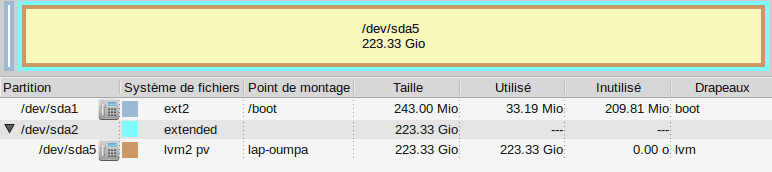
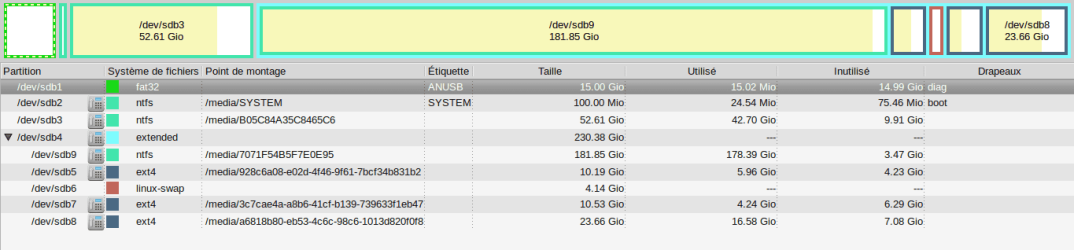
The pastebin should give you my whole system information, I made a screenshot from the linux partition manager as graphical reading is sometime easier :)
the first one is my internal hardrive, the second the external on wich i want to boot
partition1.pngparittion2.png

But Linux is not an option for me it's my everyday OS and stay on my hardrive. Windows on the other hand is -insert negatives points here - and as the opposite of my linux install who is less than 5go, take 20 or 30go of disk space.
 

My Computer My Computer

At a glance

Windows 7 Ultimate 32bit & Debian ( crunchban...
Computer type
PC/Desktop
Computer Manufacturer/Model Number
samsung
OS
Windows 7 Ultimate 32bit & Debian ( crunchbang 11)
I do not work with Linux tools. This is a Windows forum. To display your Disk Mgmt with all drives connected use Disk Management - Post a Screen Capture Image or if it won't boot use Partition Wizard bootable CD.

Win7 does not install to an external HD. Even if it can be done it would be horribly slow.

If you've installed an SSD for it's speed, then why would you want to slow it down by booting from an external?

Perhaps I am missing what you want to do, but I would install to the SSD, including as many programs as can fit, then place your User folders on the external linked to the User folders on C using Library - Include a Folder - Windows 7 Forums and Library - Set Save Folder - Windows 7 Help Forums
 
If you want to run Linux OR Windows from an external drive, Your best bet is to run it under VMware Player. That can be installed in Linux and Windows. Here are examples and installation guidelines.

Multiple Operating systems with VMware Player
 

My Computer My Computer

At a glance

Vista, Windows7, Mint Mate, Zorin, Windows 8from 1.6GHz Duo to i7
Computer Manufacturer/Model Number
HP, Dell, Gateway, Toshiba - 4 laptops and 2 desktops
OS
Vista, Windows7, Mint Mate, Zorin, Windows 8
CPU
from 1.6GHz Duo to i7
Monitor(s) Displays
2x HP w2207
Hard Drives
5x HDD, 7x SSD, 12x Externals
Keyboard
with trackball - no mices
Mouse
Trackball mice
Internet Speed
DSL 6000
@Greg
I'm sorry but I don't have access to window as I wrote before it crash ... And guys on Linux cannot really help me as the problem is related to windows... It might be linux tool but you can see all my partition on the second screenshot. The C: is dev/sdb3 a NTFS partition, the D: ( data partition) is dev/seb9 and the rest is linux stuff.

My only aim is to boot from time to time on windows to game. The rest is taken care by Linux ( wich i use 99% of the time) . I want to keep my ssd free of space. And the speed is not a problem for me on Windows

@whs
Yes I was already thinking about a VM, if i cannot find a solution :)
 

My Computer My Computer

At a glance

Windows 7 Ultimate 32bit & Debian ( crunchban...
Computer type
PC/Desktop
Computer Manufacturer/Model Number
samsung
OS
Windows 7 Ultimate 32bit & Debian ( crunchbang 11)
Back
Top