
BSOD Every 4 hours or so

s414

New member
Local time
1:42 AM
Messages
5
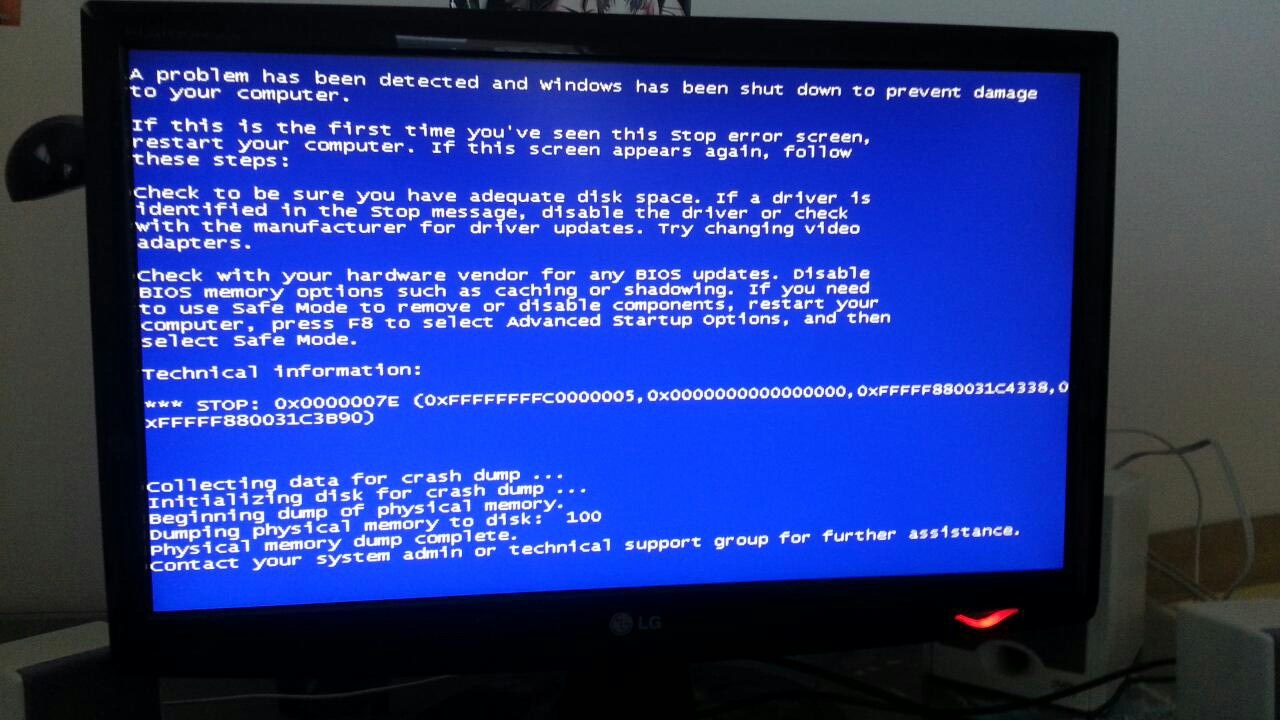
I have actually been getting these BSODs for probably more than 6 months. However usually they only happen every 4-5 days and they would occur overnight so I could live with it. However just recently this past week, the BSODs started getting more and more frequent, usually happening every 4 hours or so. It occurs randomly, whether I'm just watching a youtube video, or playing games. What would happen is the screen gets all messed up like pulling the cartridge while playing a gameboy (lack of a better comparison) and will kick me to this message.
jBzNpEK.jpg

For those who can't see the image
STOP: 0x7E (0xC5, 0x0, 0xFFFFF880031C4338, 0xFFFFF880031C3B90)
 

My Computer My Computer

Computer type
PC/Desktop
Computer Manufacturer/Model Number
Custom
OS
Windows 7 Home Premium 64 bit
CPU
AMD Athlon II X4 640 Processor 3.00GHz
Motherboard
ASUS M4A87TD Evo
Memory
8GB
Graphics Card(s)
AMD Radeon HD 6850
Update your video driver .

Uninstall the current driver ( CCC ) from control panel


Download


Catalyst Control Center version : 13.4

Display Driver ver. 12.104
 

My Computer My Computer

Computer Manufacturer/Model Number
Custom Built
OS
Windows 7 Ultimate 32-Bit & Windows 7 Ultimate 64-Bit
CPU
Intel Core i7 CPU 950 @ 3.07GHz
Motherboard
ASUS P6T DELUXE V2
Memory
OCZ 6GB (3 x 2GB) 240-Pin DDR3 SDRAM DDR3 1600 OCZ3X1600R2
Graphics Card(s)
ATI Radeon HD 5700 Series
Sound Card
OnBoard
Hard Drives
WD6400AACS-00M3B0 (640GB SATA )
PSU
CORSAIR 850w
Case
NZXT LEXA
Cooling
Intel Stock Heatsink Fan
Keyboard
Microsoft Wireless Laser Keyboard 7000
Mouse
Microsoft Wireless Laser Mouse 7000
Thanks for the help. I updated drivers, uninstalled CCC, downloaded and installed the 13.4 one, unfortunately, im still getting BSOD with the same stop codes after about 4 hours. I'm starting to suspect it may be hardware issue with the graphic card.
 

My Computer My Computer

Computer type
PC/Desktop
Computer Manufacturer/Model Number
Custom
OS
Windows 7 Home Premium 64 bit
CPU
AMD Athlon II X4 640 Processor 3.00GHz
Motherboard
ASUS M4A87TD Evo
Memory
8GB
Graphics Card(s)
AMD Radeon HD 6850
s414

You're missing the dmp file . Did you click on GRAB ALL on the SFD TOOL ?
 

My Computer My Computer

Computer Manufacturer/Model Number
Custom Built
OS
Windows 7 Ultimate 32-Bit & Windows 7 Ultimate 64-Bit
CPU
Intel Core i7 CPU 950 @ 3.07GHz
Motherboard
ASUS P6T DELUXE V2
Memory
OCZ 6GB (3 x 2GB) 240-Pin DDR3 SDRAM DDR3 1600 OCZ3X1600R2
Graphics Card(s)
ATI Radeon HD 5700 Series
Sound Card
OnBoard
Hard Drives
WD6400AACS-00M3B0 (640GB SATA )
PSU
CORSAIR 850w
Case
NZXT LEXA
Cooling
Intel Stock Heatsink Fan
Keyboard
Microsoft Wireless Laser Keyboard 7000
Mouse
Microsoft Wireless Laser Mouse 7000
I did click "grab all". However even though the BSOD said it performed a physical dump, I cannot find the MEMORY.dmp ; I specified it to dump to systemroot (the default)
 

My Computer My Computer

Computer type
PC/Desktop
Computer Manufacturer/Model Number
Custom
OS
Windows 7 Home Premium 64 bit
CPU
AMD Athlon II X4 640 Processor 3.00GHz
Motherboard
ASUS M4A87TD Evo
Memory
8GB
Graphics Card(s)
AMD Radeon HD 6850
I see, I'm supposed to set it to small memory dump instead of kernel, thanks! I'll upload the .dmp next time I get a blue screen
 

My Computer My Computer

Computer type
PC/Desktop
Computer Manufacturer/Model Number
Custom
OS
Windows 7 Home Premium 64 bit
CPU
AMD Athlon II X4 640 Processor 3.00GHz
Motherboard
ASUS M4A87TD Evo
Memory
8GB
Graphics Card(s)
AMD Radeon HD 6850
I followed the instructions, still can't find a minidump in the windows/minidump folder after BSODs.
 

My Computer My Computer

Computer type
PC/Desktop
Computer Manufacturer/Model Number
Custom
OS
Windows 7 Home Premium 64 bit
CPU
AMD Athlon II X4 640 Processor 3.00GHz
Motherboard
ASUS M4A87TD Evo
Memory
8GB
Graphics Card(s)
AMD Radeon HD 6850
Back
Top