BSOD while multitasking/gaming/playing a lot of youtube videos

Yellyphish

New member
Local time
6:56 AM
Messages
10
This past week I've encountered a BSOD almost daily and I really don't know what to do about it. I feel bad pandering for help on the internet but I'm not really sure where else to turn as I built this computer myself.

Each time I get a blue screen, my audio cuts out for a couple seconds, the screen freezes and then turns black, and then the computer restarts and it functions normally until another one hits. I copied/pasted the past 2 error messages and they are as follows:

Problem signature:
Problem Event Name: BlueScreen
OS Version: 6.1.7601.2.1.0.256.1
Locale ID: 1033

Additional information about the problem:
BCCode: 1000007e
BCP1: FFFFFFFFC0000005
BCP2: FFFFF80002EF4622
BCP3: FFFFF880009A9868
BCP4: FFFFF880009A90C0
OS Version: 6_1_7601
Service Pack: 1_0
Product: 256_1

Files that help describe the problem:
C:\Windows\Minidump\102114-35006-01.dmp
C:\Users\Beast Mode\AppData\Local\Temp\WER-72322-0.sysdata.xml

and

Problem signature:
Problem Event Name: BlueScreen
OS Version: 6.1.7601.2.1.0.256.1
Locale ID: 1033

Additional information about the problem:
BCCode: a
BCP1: FFFFA00000000000
BCP2: 0000000000000002
BCP3: 0000000000000001
BCP4: FFFFF80002F0A622
OS Version: 6_1_7601
Service Pack: 1_0
Product: 256_1

Files that help describe the problem:
C:\Windows\Minidump\102114-31075-01.dmp
C:\Users\Beast Mode\AppData\Local\Temp\WER-72587-0.sysdata.xml


Attached to this I have also included my dm logs.

As I previously mentioned, I am pretty clueless as what I can do to resolve this issue, any insight you could offer would be greatly appreciated, even if it's bad :P.
 
Last edited:

My Computer My Computer

At a glance

Windows 7 Ultimate, 64 bit version: 6.1.7601....AMD FX-8350 Black EditionG Skill Rip Jaws X Series 8 GB (2x4)Radeon Sapphire HD 7850
Computer type
PC/Desktop
Computer Manufacturer/Model Number
Custom Build
OS
Windows 7 Ultimate, 64 bit version: 6.1.7601.2.1.0.256.1
CPU
AMD FX-8350 Black Edition
Motherboard
Asus Sabertooth 990FX R2.0 AM3+
Memory
G Skill Rip Jaws X Series 8 GB (2x4)
Graphics Card(s)
Radeon Sapphire HD 7850
Hard Drives
Western Digital Blue WD5000AAKX 500 GB 720 RPM
Antivirus
AVG Free
Browser
Chrome
bump
 

My Computer My Computer

At a glance

Windows 7 Ultimate, 64 bit version: 6.1.7601....AMD FX-8350 Black EditionG Skill Rip Jaws X Series 8 GB (2x4)Radeon Sapphire HD 7850
Computer type
PC/Desktop
Computer Manufacturer/Model Number
Custom Build
OS
Windows 7 Ultimate, 64 bit version: 6.1.7601.2.1.0.256.1
CPU
AMD FX-8350 Black Edition
Motherboard
Asus Sabertooth 990FX R2.0 AM3+
Memory
G Skill Rip Jaws X Series 8 GB (2x4)
Graphics Card(s)
Radeon Sapphire HD 7850
Hard Drives
Western Digital Blue WD5000AAKX 500 GB 720 RPM
Antivirus
AVG Free
Browser
Chrome
I guess I'll try bumping one last time.

Any insight or help making sense of the DM logs would be appreciated.
 

My Computer My Computer

At a glance

Windows 7 Ultimate, 64 bit version: 6.1.7601....AMD FX-8350 Black EditionG Skill Rip Jaws X Series 8 GB (2x4)Radeon Sapphire HD 7850
Computer type
PC/Desktop
Computer Manufacturer/Model Number
Custom Build
OS
Windows 7 Ultimate, 64 bit version: 6.1.7601.2.1.0.256.1
CPU
AMD FX-8350 Black Edition
Motherboard
Asus Sabertooth 990FX R2.0 AM3+
Memory
G Skill Rip Jaws X Series 8 GB (2x4)
Graphics Card(s)
Radeon Sapphire HD 7850
Hard Drives
Western Digital Blue WD5000AAKX 500 GB 720 RPM
Antivirus
AVG Free
Browser
Chrome
A bump reduces the probability to get a response, as we search for unanswered threads. Your bump removes your thread from the list of unanswered ones, and gets it out of attention. Simple.

Moreover, bumping is against the forum rules. See rule 2.

Anyway, as you are new here, we may overlook it all. :)

There are multiple bugcheck codes. No finite probable cause, too. But there is a hint of display issue,
Code:
fffff880`009a9208  fffff880`049ec3d7Unable to load image \SystemRoot\system32\DRIVERS\atikmdag.sys, Win32 error 0n2
[COLOR=Red]*** WARNING: Unable to verify timestamp for atikmdag.sys
*** ERROR: Module load completed but symbols could not be loaded for atikmdag.sys[/COLOR]
 atikmdag+0x1023d7
.....and the display driver is too old.
Code:
    Image name: atikmdag.sys
[COLOR=Red]    Timestamp:        Thu Dec 20 02:08:55 2012[/COLOR] (50D225DF)
Update the display driver from Download Drivers

Let us know the result. Further troubleshooting may be needed based on the resulting situation.
 

My Computer My Computer

At a glance

Microsoft Windows 10 Pro Insider Preview 64-bitIntel(R) Core(TM) i3-4130 CPU @ 3.40GHzCorsair Vengence 4GB x2 (8.00GB Dual-Channel ...2047MB GeForce GTS 450 (ZOTAC International)
Computer type
PC/Desktop
Computer Manufacturer/Model Number
Self Assembled
OS
Microsoft Windows 10 Pro Insider Preview 64-bit
CPU
Intel(R) Core(TM) i3-4130 CPU @ 3.40GHz
Motherboard
Gigabyte Technology Co., Ltd. B85M-D3H
Memory
Corsair Vengence 4GB x2 (8.00GB Dual-Channel DDR3 @ 798MHz)
Graphics Card(s)
2047MB GeForce GTS 450 (ZOTAC International)
Sound Card
Onboard (Realtek High Definition Audio)
Monitor(s) Displays
LG Flatron E2040T
Screen Resolution
1600x900
Hard Drives
Western Digital 1 TB
Seagate 500 GB
PSU
Corsair VS550
Case
Cooler Master K380
Cooling
Cooler Master Seidon 120V Plus
Keyboard
Logitech MK260r
Mouse
Logitech MK260r
Internet Speed
PMPL Broadband
Antivirus
Windows Defender + MBAM
Browser
Firefox
Other Info
Dell Studio 15" Laptop
Oh, I'm sorry, I should have payed more attention when reading those.

Thanks a lot for replying though, I appreciate it! I am currently installing a new driver now and will let you know what impact this has.

As far is the impact, what should I look for to update you of?
 

My Computer My Computer

At a glance

Windows 7 Ultimate, 64 bit version: 6.1.7601....AMD FX-8350 Black EditionG Skill Rip Jaws X Series 8 GB (2x4)Radeon Sapphire HD 7850
Computer type
PC/Desktop
Computer Manufacturer/Model Number
Custom Build
OS
Windows 7 Ultimate, 64 bit version: 6.1.7601.2.1.0.256.1
CPU
AMD FX-8350 Black Edition
Motherboard
Asus Sabertooth 990FX R2.0 AM3+
Memory
G Skill Rip Jaws X Series 8 GB (2x4)
Graphics Card(s)
Radeon Sapphire HD 7850
Hard Drives
Western Digital Blue WD5000AAKX 500 GB 720 RPM
Antivirus
AVG Free
Browser
Chrome

My Computer My Computer

At a glance

Microsoft Windows 10 Pro Insider Preview 64-bitIntel(R) Core(TM) i3-4130 CPU @ 3.40GHzCorsair Vengence 4GB x2 (8.00GB Dual-Channel ...2047MB GeForce GTS 450 (ZOTAC International)
Computer type
PC/Desktop
Computer Manufacturer/Model Number
Self Assembled
OS
Microsoft Windows 10 Pro Insider Preview 64-bit
CPU
Intel(R) Core(TM) i3-4130 CPU @ 3.40GHz
Motherboard
Gigabyte Technology Co., Ltd. B85M-D3H
Memory
Corsair Vengence 4GB x2 (8.00GB Dual-Channel DDR3 @ 798MHz)
Graphics Card(s)
2047MB GeForce GTS 450 (ZOTAC International)
Sound Card
Onboard (Realtek High Definition Audio)
Monitor(s) Displays
LG Flatron E2040T
Screen Resolution
1600x900
Hard Drives
Western Digital 1 TB
Seagate 500 GB
PSU
Corsair VS550
Case
Cooler Master K380
Cooling
Cooler Master Seidon 120V Plus
Keyboard
Logitech MK260r
Mouse
Logitech MK260r
Internet Speed
PMPL Broadband
Antivirus
Windows Defender + MBAM
Browser
Firefox
Other Info
Dell Studio 15" Laptop
Absolutely, I'll do that. I hope the old driver was the cause of these issues.

Thanks for your help. Should I mark this thread as solved or wait a couple of days first?
 

My Computer My Computer

At a glance

Windows 7 Ultimate, 64 bit version: 6.1.7601....AMD FX-8350 Black EditionG Skill Rip Jaws X Series 8 GB (2x4)Radeon Sapphire HD 7850
Computer type
PC/Desktop
Computer Manufacturer/Model Number
Custom Build
OS
Windows 7 Ultimate, 64 bit version: 6.1.7601.2.1.0.256.1
CPU
AMD FX-8350 Black Edition
Motherboard
Asus Sabertooth 990FX R2.0 AM3+
Memory
G Skill Rip Jaws X Series 8 GB (2x4)
Graphics Card(s)
Radeon Sapphire HD 7850
Hard Drives
Western Digital Blue WD5000AAKX 500 GB 720 RPM
Antivirus
AVG Free
Browser
Chrome
Should I mark this thread as solved or wait a couple of days first?
As you got multiple bugchecks, may be the display driver is just a part of the issue. You need to wait for a few days to observe how everything is going after the updates.
 

My Computer My Computer

At a glance

Microsoft Windows 10 Pro Insider Preview 64-bitIntel(R) Core(TM) i3-4130 CPU @ 3.40GHzCorsair Vengence 4GB x2 (8.00GB Dual-Channel ...2047MB GeForce GTS 450 (ZOTAC International)
Computer type
PC/Desktop
Computer Manufacturer/Model Number
Self Assembled
OS
Microsoft Windows 10 Pro Insider Preview 64-bit
CPU
Intel(R) Core(TM) i3-4130 CPU @ 3.40GHz
Motherboard
Gigabyte Technology Co., Ltd. B85M-D3H
Memory
Corsair Vengence 4GB x2 (8.00GB Dual-Channel DDR3 @ 798MHz)
Graphics Card(s)
2047MB GeForce GTS 450 (ZOTAC International)
Sound Card
Onboard (Realtek High Definition Audio)
Monitor(s) Displays
LG Flatron E2040T
Screen Resolution
1600x900
Hard Drives
Western Digital 1 TB
Seagate 500 GB
PSU
Corsair VS550
Case
Cooler Master K380
Cooling
Cooler Master Seidon 120V Plus
Keyboard
Logitech MK260r
Mouse
Logitech MK260r
Internet Speed
PMPL Broadband
Antivirus
Windows Defender + MBAM
Browser
Firefox
Other Info
Dell Studio 15" Laptop
Alright, thanks Arc!
 

My Computer My Computer

At a glance

Windows 7 Ultimate, 64 bit version: 6.1.7601....AMD FX-8350 Black EditionG Skill Rip Jaws X Series 8 GB (2x4)Radeon Sapphire HD 7850
Computer type
PC/Desktop
Computer Manufacturer/Model Number
Custom Build
OS
Windows 7 Ultimate, 64 bit version: 6.1.7601.2.1.0.256.1
CPU
AMD FX-8350 Black Edition
Motherboard
Asus Sabertooth 990FX R2.0 AM3+
Memory
G Skill Rip Jaws X Series 8 GB (2x4)
Graphics Card(s)
Radeon Sapphire HD 7850
Hard Drives
Western Digital Blue WD5000AAKX 500 GB 720 RPM
Antivirus
AVG Free
Browser
Chrome
Alright, ran into another BSOD... So I probably need more troubleshooting lol. The additional information about the problem in the error message was:

BCCode: 1000007e
BCP1: FFFFFFFFC0000005
BCP2: FFFFF80002EB3622
BCP3: FFFFF880033E06D8
BCP4: FFFFF880033DFF30
OS Version: 6_1_7601
Service Pack: 1_0
Product: 256_1

And I've also attached a new log.
 

My Computer My Computer

At a glance

Windows 7 Ultimate, 64 bit version: 6.1.7601....AMD FX-8350 Black EditionG Skill Rip Jaws X Series 8 GB (2x4)Radeon Sapphire HD 7850
Computer type
PC/Desktop
Computer Manufacturer/Model Number
Custom Build
OS
Windows 7 Ultimate, 64 bit version: 6.1.7601.2.1.0.256.1
CPU
AMD FX-8350 Black Edition
Motherboard
Asus Sabertooth 990FX R2.0 AM3+
Memory
G Skill Rip Jaws X Series 8 GB (2x4)
Graphics Card(s)
Radeon Sapphire HD 7850
Hard Drives
Western Digital Blue WD5000AAKX 500 GB 720 RPM
Antivirus
AVG Free
Browser
Chrome
As you can see, the crash dump is not providing any finite cause of the BSOD.
Code:
BugCheck 1000007E, {ffffffffc0000005, fffff80002eb3622, fffff880033e06d8, fffff880033dff30}

[COLOR=Red]Probably caused by : ntkrnlmp.exe[/COLOR] ( nt!KxWaitForLockOwnerShip+12 )

Followup: MachineOwner
---------
But, as we know, the most possible causes of this bugcheck are ....
STOP 0x0000007E: SYSTEM_THREAD_EXCEPTION_NOT_HANDLEDhttp://carrona.org/bsodindx.html#top

Usual causes: Insufficient disk space, Device driver, Video card, BIOS, Breakpoint with no debugger attached, Hardware incompatibility, Faulty system service, Memory, 3rd party remote control
I striked the items which are not applicable for you. Let us check the others.

BIOS: Your installed version is 1503. Version 2501 is available here: http://www.asus.com/in/Motherboards/SABERTOOTH_990FX_R20/HelpDesk_Download/ .... plan to update it.

Video Card: Stress test the Graphics Card using Furmark.
Video Card - Stress Test with Furmark

Memory: Test your RAM modules for possible errors.
How to Test and Diagnose RAM Issues with Memtest86+
Run memtest86+ for at least 8 consecutive passes.

If it start showing errors/red lines, stop testing. A single error is enough to determine that something is going bad there.

System Service: Run SFC /SCANNOW Command - System File Checker
Also update windows to the latest.

3rd party remote control: If you have any (you know it better), disable it for the time being.

Two items remained .... we will check for them later, depending on the need. Let us know the results of these items.
 

My Computer My Computer

At a glance

Microsoft Windows 10 Pro Insider Preview 64-bitIntel(R) Core(TM) i3-4130 CPU @ 3.40GHzCorsair Vengence 4GB x2 (8.00GB Dual-Channel ...2047MB GeForce GTS 450 (ZOTAC International)
Computer type
PC/Desktop
Computer Manufacturer/Model Number
Self Assembled
OS
Microsoft Windows 10 Pro Insider Preview 64-bit
CPU
Intel(R) Core(TM) i3-4130 CPU @ 3.40GHz
Motherboard
Gigabyte Technology Co., Ltd. B85M-D3H
Memory
Corsair Vengence 4GB x2 (8.00GB Dual-Channel DDR3 @ 798MHz)
Graphics Card(s)
2047MB GeForce GTS 450 (ZOTAC International)
Sound Card
Onboard (Realtek High Definition Audio)
Monitor(s) Displays
LG Flatron E2040T
Screen Resolution
1600x900
Hard Drives
Western Digital 1 TB
Seagate 500 GB
PSU
Corsair VS550
Case
Cooler Master K380
Cooling
Cooler Master Seidon 120V Plus
Keyboard
Logitech MK260r
Mouse
Logitech MK260r
Internet Speed
PMPL Broadband
Antivirus
Windows Defender + MBAM
Browser
Firefox
Other Info
Dell Studio 15" Laptop
Hey Arc! Thanks for getting back to me, I've posted what I have discovered so far below.

As you can see, the crash dump is not providing any finite cause of the BSOD.
Well... looks like my computer's a woman.

Video Card: Stress test the Graphics Card using Furmark.
Video Card - Stress Test with Furmark

I finished the furmark test, and think my GPU passed.

I ran it for around 15 minutes. The temperature leveled off around 72-73 for about 8 minutes, my mouse was a little choppy while running it with the GPU being in the 70's, and so was moving around a window. I'm not sure how to interpret that. The computer did not crash.

System Service: Run SFC /SCANNOW Command - System File Checker
Also update windows to the latest.

Windows Resource Protection did not find any integrity violations

3rd party remote control: If you have any (you know it better), disable it for the time being.

To my knowledge I do not have a 3rd party controller on my computer.

Memory: Test your RAM modules for possible errors.
How to Test and Diagnose RAM Issues with Memtest86+
Run memtest86+ for at least 8 consecutive passes.

If it start showing errors/red lines, stop testing. A single error is enough to determine that something is going bad there.

I will do this test when I go to sleep tonight, and post the results sometime tomorrow.

BIOS: Your installed version is 1503. Version 2501 is available here: Motherboard - SABERTOOTH 990FX R2.0 - ASUS .... plan to update it.

I am a little reluctant to upgrade my BIOS because I have heard it can cause some problems/ I'm not entirely sure how to do it. Would it be alright to maybe test the other two options before we try this?


Oh and running the furmark test reminded me a weird thing my computer did a few times a couple months ago. The computer would randomly become very sluggish and unresponsive. The cursor on the screen would lag 2-3 seconds behind mouse movements. While this was occurring I could hear my computers fans start spinning loudly and it appeared my PC was under heavy strain although no programs were really running at the time. Once or twice I waited out the sluggishness and my computer went back to normal, and the other times, I held down the power button to restart my computer where it resumed normal function. I'm not sure if this is related to these BSOD's but I figured I would bring it up just in case it reminds you of anything.
 

My Computer My Computer

At a glance

Windows 7 Ultimate, 64 bit version: 6.1.7601....AMD FX-8350 Black EditionG Skill Rip Jaws X Series 8 GB (2x4)Radeon Sapphire HD 7850
Computer type
PC/Desktop
Computer Manufacturer/Model Number
Custom Build
OS
Windows 7 Ultimate, 64 bit version: 6.1.7601.2.1.0.256.1
CPU
AMD FX-8350 Black Edition
Motherboard
Asus Sabertooth 990FX R2.0 AM3+
Memory
G Skill Rip Jaws X Series 8 GB (2x4)
Graphics Card(s)
Radeon Sapphire HD 7850
Hard Drives
Western Digital Blue WD5000AAKX 500 GB 720 RPM
Antivirus
AVG Free
Browser
Chrome
BIOS updates are risky for sure. If it is done improperly or it there is any interruption in the middle, it will be damaged. But the basic job is not very tough. This video can give you some idea ....


Do all the rest. Plan the BIOS update as the last option.

What you stated about the earlier incidence, that might be a problem from the part of the display driver. And display is the first suspect for your entire issue.

Also, you may try two different things .... first, apply the GPU in another PCIe slot; and second, apply any other GPU (can you borrow one from friends or family members?) and see how it goes.
 

My Computer My Computer

At a glance

Microsoft Windows 10 Pro Insider Preview 64-bitIntel(R) Core(TM) i3-4130 CPU @ 3.40GHzCorsair Vengence 4GB x2 (8.00GB Dual-Channel ...2047MB GeForce GTS 450 (ZOTAC International)
Computer type
PC/Desktop
Computer Manufacturer/Model Number
Self Assembled
OS
Microsoft Windows 10 Pro Insider Preview 64-bit
CPU
Intel(R) Core(TM) i3-4130 CPU @ 3.40GHz
Motherboard
Gigabyte Technology Co., Ltd. B85M-D3H
Memory
Corsair Vengence 4GB x2 (8.00GB Dual-Channel DDR3 @ 798MHz)
Graphics Card(s)
2047MB GeForce GTS 450 (ZOTAC International)
Sound Card
Onboard (Realtek High Definition Audio)
Monitor(s) Displays
LG Flatron E2040T
Screen Resolution
1600x900
Hard Drives
Western Digital 1 TB
Seagate 500 GB
PSU
Corsair VS550
Case
Cooler Master K380
Cooling
Cooler Master Seidon 120V Plus
Keyboard
Logitech MK260r
Mouse
Logitech MK260r
Internet Speed
PMPL Broadband
Antivirus
Windows Defender + MBAM
Browser
Firefox
Other Info
Dell Studio 15" Laptop
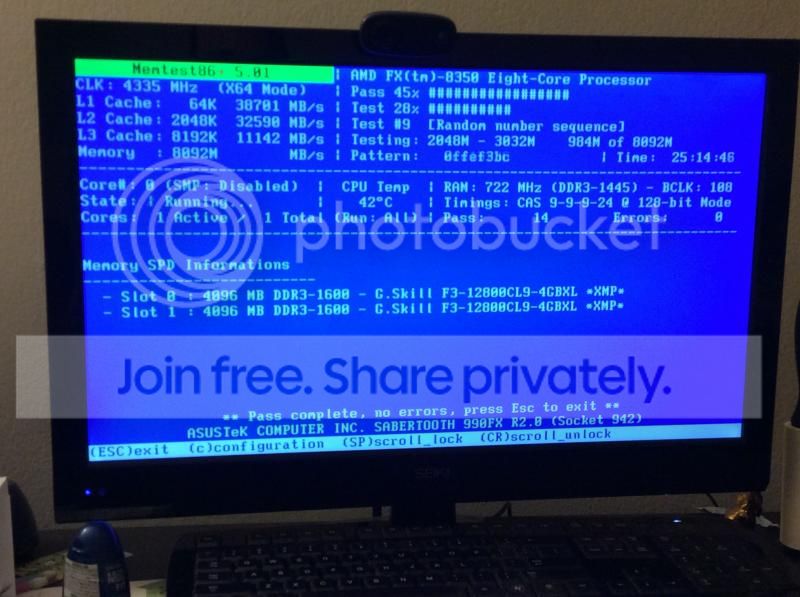
Here are the results from my memtest,
memtest-1.jpg


So it looks like my RAM is fine. And I'll try see what impact changing the pcie slot has tomorrow, it's been a long day today ha ha. Anything else I should check out while I am at it?


Thanks for sticking with me through this Arc, I appreciate it.
 

My Computer My Computer

At a glance

Windows 7 Ultimate, 64 bit version: 6.1.7601....AMD FX-8350 Black EditionG Skill Rip Jaws X Series 8 GB (2x4)Radeon Sapphire HD 7850
Computer type
PC/Desktop
Computer Manufacturer/Model Number
Custom Build
OS
Windows 7 Ultimate, 64 bit version: 6.1.7601.2.1.0.256.1
CPU
AMD FX-8350 Black Edition
Motherboard
Asus Sabertooth 990FX R2.0 AM3+
Memory
G Skill Rip Jaws X Series 8 GB (2x4)
Graphics Card(s)
Radeon Sapphire HD 7850
Hard Drives
Western Digital Blue WD5000AAKX 500 GB 720 RPM
Antivirus
AVG Free
Browser
Chrome
Yes, the RAM looks fine!

Nothing more to do there till now. Proceed as per the plan. :)
 

My Computer My Computer

At a glance

Microsoft Windows 10 Pro Insider Preview 64-bitIntel(R) Core(TM) i3-4130 CPU @ 3.40GHzCorsair Vengence 4GB x2 (8.00GB Dual-Channel ...2047MB GeForce GTS 450 (ZOTAC International)
Computer type
PC/Desktop
Computer Manufacturer/Model Number
Self Assembled
OS
Microsoft Windows 10 Pro Insider Preview 64-bit
CPU
Intel(R) Core(TM) i3-4130 CPU @ 3.40GHz
Motherboard
Gigabyte Technology Co., Ltd. B85M-D3H
Memory
Corsair Vengence 4GB x2 (8.00GB Dual-Channel DDR3 @ 798MHz)
Graphics Card(s)
2047MB GeForce GTS 450 (ZOTAC International)
Sound Card
Onboard (Realtek High Definition Audio)
Monitor(s) Displays
LG Flatron E2040T
Screen Resolution
1600x900
Hard Drives
Western Digital 1 TB
Seagate 500 GB
PSU
Corsair VS550
Case
Cooler Master K380
Cooling
Cooler Master Seidon 120V Plus
Keyboard
Logitech MK260r
Mouse
Logitech MK260r
Internet Speed
PMPL Broadband
Antivirus
Windows Defender + MBAM
Browser
Firefox
Other Info
Dell Studio 15" Laptop
Alright, so I played a game of league when I woke up and my computer blue screened during it :/. Below I attached the crash dump.

After that happened, I switched the pcie slot the GPU is in and I'll monitor how it's working.

To elaborate further, my roommate's PC only has an integrated GPU so I don't have one I can really borrow. Also I think the only thing left in our plan is the BIOS updtate, right?
 
Last edited:

My Computer My Computer

At a glance

Windows 7 Ultimate, 64 bit version: 6.1.7601....AMD FX-8350 Black EditionG Skill Rip Jaws X Series 8 GB (2x4)Radeon Sapphire HD 7850
Computer type
PC/Desktop
Computer Manufacturer/Model Number
Custom Build
OS
Windows 7 Ultimate, 64 bit version: 6.1.7601.2.1.0.256.1
CPU
AMD FX-8350 Black Edition
Motherboard
Asus Sabertooth 990FX R2.0 AM3+
Memory
G Skill Rip Jaws X Series 8 GB (2x4)
Graphics Card(s)
Radeon Sapphire HD 7850
Hard Drives
Western Digital Blue WD5000AAKX 500 GB 720 RPM
Antivirus
AVG Free
Browser
Chrome
Right, apparently.

It is the same BSOD despite of everything.
Code:
BugCheck 1000007E, {ffffffffc0000005, fffff80002f0a622, fffff880033e06d8, fffff880033dff30}

Probably caused by : ntkrnlmp.exe ( nt!KxWaitForLockOwnerShip+12 )

Followup: MachineOwner
---------
 

My Computer My Computer

At a glance

Microsoft Windows 10 Pro Insider Preview 64-bitIntel(R) Core(TM) i3-4130 CPU @ 3.40GHzCorsair Vengence 4GB x2 (8.00GB Dual-Channel ...2047MB GeForce GTS 450 (ZOTAC International)
Computer type
PC/Desktop
Computer Manufacturer/Model Number
Self Assembled
OS
Microsoft Windows 10 Pro Insider Preview 64-bit
CPU
Intel(R) Core(TM) i3-4130 CPU @ 3.40GHz
Motherboard
Gigabyte Technology Co., Ltd. B85M-D3H
Memory
Corsair Vengence 4GB x2 (8.00GB Dual-Channel DDR3 @ 798MHz)
Graphics Card(s)
2047MB GeForce GTS 450 (ZOTAC International)
Sound Card
Onboard (Realtek High Definition Audio)
Monitor(s) Displays
LG Flatron E2040T
Screen Resolution
1600x900
Hard Drives
Western Digital 1 TB
Seagate 500 GB
PSU
Corsair VS550
Case
Cooler Master K380
Cooling
Cooler Master Seidon 120V Plus
Keyboard
Logitech MK260r
Mouse
Logitech MK260r
Internet Speed
PMPL Broadband
Antivirus
Windows Defender + MBAM
Browser
Firefox
Other Info
Dell Studio 15" Laptop
Back
Top