bubbles screen saver problem

Matimba

New member
Local time
1:43 AM
Messages
9
hey guys please help, my bubbles screensaver on win7 home premium makes the backround blurry when it comes on, and i cant change it, whenever i try to change it, it resets:(
 

My Computer

OS
windows 7 home premium 32bit

My Computer

Computer Manufacturer/Model Number
acer aspire 5935g
OS
Windows 7 Home Premium x64 SP1
CPU
intel(R)core(TM)2 duo CPU T6600 @ 2.20GHz
Motherboard
intel gm45/gm47 revision 07
Memory
3 gb ddr3
Graphics Card(s)
ati radeon hd4570/512mb
Monitor(s) Displays
lop156wh2-tle1 15.3 flat
Screen Resolution
1366x768
Hard Drives
OCZ-Agility3 60gig ssd
320gig external hdd
500gig external hdd
Mouse
Optical
Internet Speed
30Mbps Down/30Mbps Up
okay ive downloaded the reset zip file ... the pages u sent dont solve the problem of windows resetting back to the bubbles screensaver. any help regarding that issue?
 

My Computer

OS
windows 7 home premium 32bit
reseting the screensaver did not help... where do i find the Catalyst Control Center
 

My Computer

OS
windows 7 home premium 32bit
The Catalyst Control Center should be available from the right-click menu on the desk top or from Control Panel. Catalyst Control Center is there if you have a AMD or ATI graphics card.
 

My Computer

Computer type
PC/Desktop
Computer Manufacturer/Model Number
Home Built Desktop By DataTech
OS
Windows 7 Ultimate X64 SP1
CPU
Intel i5-2550K, Differing ~4.4-4.8GHz No built in GPU
Motherboard
ASUS P8Z68-V PRO/GEN3
Memory
16GB G.Skill Sniper 1866MHz @ 2133MHz 2x8GB
Graphics Card(s)
ASUS GTX650TIB-DC2OC-2GD5, (650TI Boost)
Sound Card
Onboard Realtek 5-1
Monitor(s) Displays
Samsung P2570HD
Screen Resolution
1920x1080
Hard Drives
Samsung 840 Pro 256GB SSD for OS, 500GB Seagate Constellation (Enterprise drive) for Data
PSU
Corsair HX650W
Case
Inwin Dragon Rider
Cooling
Hyper 212 EVO w/two Noctua fans, push-pull, @1300 RPM
Keyboard
E-Z Eyes, bright yellow keys with large characters
Mouse
steelseries SENSEI Laser Pro Gaming
Internet Speed
48-51Mbs Mbs down, 11 Mbs up Xfinity Cable
Antivirus
Norton Internet Security 2013
Browser
IE 10, Opera, Pale Moon if needed
Other Info
4 case fans, LG BluRay-RE, ASUS DVD-RW, Mr. Fusion power supply, 1.21 gigawatts.
RE: bubbles screensaver problem

i have Intel(R) graphics. thats what appears on the right click
 

My Computer

OS
windows 7 home premium 32bit

My Computer

Computer type
PC/Desktop
Computer Manufacturer/Model Number
Home Built Desktop By DataTech
OS
Windows 7 Ultimate X64 SP1
CPU
Intel i5-2550K, Differing ~4.4-4.8GHz No built in GPU
Motherboard
ASUS P8Z68-V PRO/GEN3
Memory
16GB G.Skill Sniper 1866MHz @ 2133MHz 2x8GB
Graphics Card(s)
ASUS GTX650TIB-DC2OC-2GD5, (650TI Boost)
Sound Card
Onboard Realtek 5-1
Monitor(s) Displays
Samsung P2570HD
Screen Resolution
1920x1080
Hard Drives
Samsung 840 Pro 256GB SSD for OS, 500GB Seagate Constellation (Enterprise drive) for Data
PSU
Corsair HX650W
Case
Inwin Dragon Rider
Cooling
Hyper 212 EVO w/two Noctua fans, push-pull, @1300 RPM
Keyboard
E-Z Eyes, bright yellow keys with large characters
Mouse
steelseries SENSEI Laser Pro Gaming
Internet Speed
48-51Mbs Mbs down, 11 Mbs up Xfinity Cable
Antivirus
Norton Internet Security 2013
Browser
IE 10, Opera, Pale Moon if needed
Other Info
4 case fans, LG BluRay-RE, ASUS DVD-RW, Mr. Fusion power supply, 1.21 gigawatts.
i did see that link but i didnt want to go the Registry root. incase i put the wrong bit and the problem becomes worse. i changed the 3D preference to 50% in the intel(R) graphics properties. now the screensaver displays properly. thanks for your help. now one problem remains... changing the screensaver... i still cant change the dredded Bubbles to something else
 

My Computer

OS
windows 7 home premium 32bit
i still cant change the dredded Bubbles to something else
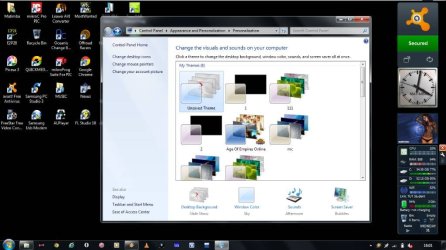
LOL, I don't like it much either. After you pick a different screen saver, you'll have an Unsaved Theme in your Personalisation window. Right click it and save it with a name of your choice.
 

My Computer

Computer type
PC/Desktop
Computer Manufacturer/Model Number
Home Built Desktop By DataTech
OS
Windows 7 Ultimate X64 SP1
CPU
Intel i5-2550K, Differing ~4.4-4.8GHz No built in GPU
Motherboard
ASUS P8Z68-V PRO/GEN3
Memory
16GB G.Skill Sniper 1866MHz @ 2133MHz 2x8GB
Graphics Card(s)
ASUS GTX650TIB-DC2OC-2GD5, (650TI Boost)
Sound Card
Onboard Realtek 5-1
Monitor(s) Displays
Samsung P2570HD
Screen Resolution
1920x1080
Hard Drives
Samsung 840 Pro 256GB SSD for OS, 500GB Seagate Constellation (Enterprise drive) for Data
PSU
Corsair HX650W
Case
Inwin Dragon Rider
Cooling
Hyper 212 EVO w/two Noctua fans, push-pull, @1300 RPM
Keyboard
E-Z Eyes, bright yellow keys with large characters
Mouse
steelseries SENSEI Laser Pro Gaming
Internet Speed
48-51Mbs Mbs down, 11 Mbs up Xfinity Cable
Antivirus
Norton Internet Security 2013
Browser
IE 10, Opera, Pale Moon if needed
Other Info
4 case fans, LG BluRay-RE, ASUS DVD-RW, Mr. Fusion power supply, 1.21 gigawatts.
just when i click okay, whichever theme thats not saved changes from no screensaver to Bubbles, before i save it, so even if i save it its saved with bubbles as a screensaver...
 

My Computer

OS
windows 7 home premium 32bit
Right-click the theme you want to save, and give it a name and apply it. Then right-click the unsaved one and hit Delete. Maybe that'll work.
Another thing to try is to go to C:\windows\system32 and locate Bubbles.scr and Bubbles.scr.mui and move both out of the System32 folder but don't delete them. That should keep it from running.
Or you could simply rename them such as Bubbles.scr.bak and Bubbles.scr.mui.bak which should also stop it.
 

My Computer

Computer type
PC/Desktop
Computer Manufacturer/Model Number
Home Built Desktop By DataTech
OS
Windows 7 Ultimate X64 SP1
CPU
Intel i5-2550K, Differing ~4.4-4.8GHz No built in GPU
Motherboard
ASUS P8Z68-V PRO/GEN3
Memory
16GB G.Skill Sniper 1866MHz @ 2133MHz 2x8GB
Graphics Card(s)
ASUS GTX650TIB-DC2OC-2GD5, (650TI Boost)
Sound Card
Onboard Realtek 5-1
Monitor(s) Displays
Samsung P2570HD
Screen Resolution
1920x1080
Hard Drives
Samsung 840 Pro 256GB SSD for OS, 500GB Seagate Constellation (Enterprise drive) for Data
PSU
Corsair HX650W
Case
Inwin Dragon Rider
Cooling
Hyper 212 EVO w/two Noctua fans, push-pull, @1300 RPM
Keyboard
E-Z Eyes, bright yellow keys with large characters
Mouse
steelseries SENSEI Laser Pro Gaming
Internet Speed
48-51Mbs Mbs down, 11 Mbs up Xfinity Cable
Antivirus
Norton Internet Security 2013
Browser
IE 10, Opera, Pale Moon if needed
Other Info
4 case fans, LG BluRay-RE, ASUS DVD-RW, Mr. Fusion power supply, 1.21 gigawatts.
okay i did that, bubbles stopped, now its stuck on <none> cnt change to another screensaver
 

My Computer

OS
windows 7 home premium 32bit

My Computer

Computer type
PC/Desktop
Computer Manufacturer/Model Number
Asus clone / Gateway DX4850-57
OS
Se7en X64 ultimate/Se7en X64 ultimate
CPU
Intel quad [email protected]/intel i7 quad [email protected]
Motherboard
Asus P5KPL-CM/Intel H67
Memory
kingston 4GB/32GB DDR3 Dual-Channel 1333MHz
Graphics Card(s)
ATI Radeon HD5770 1GB/NVidia GeForce GTX560 2GB
Sound Card
5.1 onboard/5.1 onboard
Monitor(s) Displays
sharp Aqous 46" 120MHz/LG 32" LCD/Asus VW266H 26"
Screen Resolution
1824X1026/1920X1080
Hard Drives
2x150GB=300GB raptor drives 10,000rpm+1TB seagate portable hard drive for movies/music/pictures/game iso's /programs
Gateway: Kingston 240GB Solid State Drive and 1.5 TB for storage
PSU
700 watts / 700 watts coolermaster extreme/on board
Case
Asus mid tower / Gateway mid tower
Cooling
stock / stock
Keyboard
logitech / razor Lycosa gaming
Mouse
logitech gaming mouse G500 5700DPI/Razer Lycosa & DeathAdder
Internet Speed
60MB/s
No thanks beman36 , the bubbles came back after some windows updates, and now am not allowed to rename them... (Bubbles.scr.BAK), not allowed to edit permissions to full control,and just recently the wallpaper turnned black, i cannot change the black wallpaper, should also mention that the theme is showing the wallpapers that should be displayed and desktop background is not set to solid colors... i may also mention that everything works fine on guest account (screensaver can be disabled wallpaper and theme work properly)
 

Attachments

  • New Bitmap Image.jpg
    New Bitmap Image.jpg
    67.4 KB · Views: 12
Last edited:

My Computer

OS
windows 7 home premium 32bit
Back
Top