Solved bug: click in left bottom of window responds incorrectly

mverbeek

New member
Local time
11:16 AM
Messages
2
Can anybody explain this. in windows 7 and office 2010 if I open Excel and maximize the window, when i left-click on theleft bottom of the tab-1 button of the excel file, and I go a bit too low so that the bottom of my mouse pointer is over the window-footer bar, then a menu will pop-up namely the menu that is supposed to open up when i right-click the windowHEADER

see picture: i clicked where the red arrow ends, and then this header-context menu opened (sorry it's dutch but believe me it is the menu that normally opens when you right-click the woindow header/title)

note: when i right-click in the same place, the excel tab context menu (with rename etc) does NOT get actiated but this is the same problem.

can somebody tell me whether there is a solution available for this?
 

Attachments

  • win7bug.jpg
    win7bug.jpg
    14.8 KB · Views: 4

My Computer My Computer

At a glance

windows 7 professional 32 bit
OS
windows 7 professional 32 bit
Hi, I'm another Windows 7 user with the same exact problem, only in English. I've noticed you haven't responded to this user's topic in over a month, so I just wanted to let you guys know that the problem is still out there. If you find a solution, please inform me. It gets really annoying when switching sheets in Excel.

EDIT: It only happens in a small area of the screen, but it's fairly noticeable when using Chrome or Excel.
 
Last edited:

My Computer My Computer

At a glance

Windows 7 Home Premium 64-bit SP1Intel(R) Core(TM) i3-2330M CPU @ 2.20 GHz4.00 GBIntel(R) HD Graphics
Computer Manufacturer/Model Number
HP Pavilion dm4t-2100 CTO Entertainment Notebook PC
OS
Windows 7 Home Premium 64-bit SP1
CPU
Intel(R) Core(TM) i3-2330M CPU @ 2.20 GHz
Motherboard
Intel(R) 6 Series/C200 Series Chipset Family
Memory
4.00 GB
Graphics Card(s)
Intel(R) HD Graphics
Sound Card
IDT High Definition Audio CODEC
Monitor(s) Displays
9x16 HD Integrated Display
Screen Resolution
1366x768
Hard Drives
TOSHIBA MK6476GSX (C:\)
HP Portable HD BB07 USB Device (H:\)
PSU
AC adapter
Case
None
Cooling
HP CoolSmart
Keyboard
Integrated keyboard
Mouse
Logitech wireless with USB Nano receiver
Internet Speed
See Other Info
Other Info
HOME INTERNET
<6 Mbs down, <1 Mbs up
UCONN STORRS
>20 Mbs both ways
Hi, indeed this is a bug that still needs to be solved, but this issue is not a year old yet 'only' 5 weeks.

Just checked it again and thought it was solved, but that was because I was working on my normal laptop screen. Only on the connected external monitor (either as only monitor as extended desktop's main monitor) does this problem occur. I dont know about you Pikalax whether you have it on your PC's/laptop's normal monitor or also on an external monitor...It's not a laptop/driver problem because colleagues of mine have it as well on completely different machines and monitors.

So, Microsoft, please still solve this.

The workaround i'm using in the meanwhile is: make the taskbar two rows high instead of the normal one row high and the problem does not occur anymore.
 
Last edited:

My Computer My Computer

At a glance

windows 7 professional 32 bit
OS
windows 7 professional 32 bit
Hi, indeed this is a bug that still needs to be solved, but this issue is not a year old yet 'only' 5 weeks.

Mistyped on that one.

Anyway, none of the automatic updates I've received from Microsoft have addressed this issue, and I know for a fact that it's not unique to the two of us. Could we have a staff member respond soon?
 

My Computer My Computer

At a glance

Windows 7 Home Premium 64-bit SP1Intel(R) Core(TM) i3-2330M CPU @ 2.20 GHz4.00 GBIntel(R) HD Graphics
Computer Manufacturer/Model Number
HP Pavilion dm4t-2100 CTO Entertainment Notebook PC
OS
Windows 7 Home Premium 64-bit SP1
CPU
Intel(R) Core(TM) i3-2330M CPU @ 2.20 GHz
Motherboard
Intel(R) 6 Series/C200 Series Chipset Family
Memory
4.00 GB
Graphics Card(s)
Intel(R) HD Graphics
Sound Card
IDT High Definition Audio CODEC
Monitor(s) Displays
9x16 HD Integrated Display
Screen Resolution
1366x768
Hard Drives
TOSHIBA MK6476GSX (C:\)
HP Portable HD BB07 USB Device (H:\)
PSU
AC adapter
Case
None
Cooling
HP CoolSmart
Keyboard
Integrated keyboard
Mouse
Logitech wireless with USB Nano receiver
Internet Speed
See Other Info
Other Info
HOME INTERNET
<6 Mbs down, <1 Mbs up
UCONN STORRS
>20 Mbs both ways
Same thing...

Oh yes, I noticed that few days ago, on my new laptop that came with preinstalled Win7 Home Premium x64. It's really annoying as app I use frequently (Xara Xtreme Pro 5) has the color picker option at that place... and I have to click multiple times to get what I want, not the window resize options?!

Please, someone do something, or I'll have to reinstall Windows and use illegal copy because this is outrageous, I didn't buy laptop to have FAULTY Windows 7 copy here.

I need to click at bottom left often and I need this FIXED!

I have the problem when connected to external monitor (I need it for graphics design I do).
 

My Computer My Computer

At a glance

7 Home Premium 64
Computer Manufacturer/Model Number
HP 620
OS
7 Home Premium 64
This bug was NOT addressed in SP1, and it certainly has not been reviewed by a SevenForums staff member. A fix is still needed for this problem.
 

My Computer My Computer

At a glance

Windows 7 Home Premium 64-bit SP1Intel(R) Core(TM) i3-2330M CPU @ 2.20 GHz4.00 GBIntel(R) HD Graphics
Computer Manufacturer/Model Number
HP Pavilion dm4t-2100 CTO Entertainment Notebook PC
OS
Windows 7 Home Premium 64-bit SP1
CPU
Intel(R) Core(TM) i3-2330M CPU @ 2.20 GHz
Motherboard
Intel(R) 6 Series/C200 Series Chipset Family
Memory
4.00 GB
Graphics Card(s)
Intel(R) HD Graphics
Sound Card
IDT High Definition Audio CODEC
Monitor(s) Displays
9x16 HD Integrated Display
Screen Resolution
1366x768
Hard Drives
TOSHIBA MK6476GSX (C:\)
HP Portable HD BB07 USB Device (H:\)
PSU
AC adapter
Case
None
Cooling
HP CoolSmart
Keyboard
Integrated keyboard
Mouse
Logitech wireless with USB Nano receiver
Internet Speed
See Other Info
Other Info
HOME INTERNET
<6 Mbs down, <1 Mbs up
UCONN STORRS
>20 Mbs both ways
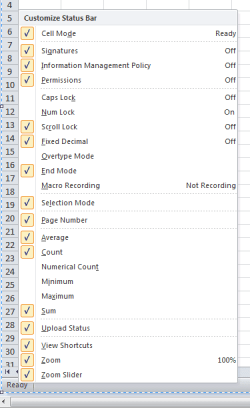
When I left-click 'Ready' nothing happens, when I right-click 'Ready' the following appears - what happens when you right-click?:
.
 

Attachments

  • RC Ready.PNG
    RC Ready.PNG
    9.4 KB · Views: 3

My Computer My Computer

At a glance

Windows 7 Home Premium 64bitIntel(R) Core(TM) i3-2120 CPU @ 3.30GHz3.00 GB(1) Intel(R) HD Graphics (2) VNC Mirror Driver
Computer type
PC/Desktop
Computer Manufacturer/Model Number
Packard Bell
OS
Windows 7 Home Premium 64bit
CPU
Intel(R) Core(TM) i3-2120 CPU @ 3.30GHz
Motherboard
Packard Bell IPISB-AG
Memory
3.00 GB
Graphics Card(s)
(1) Intel(R) HD Graphics (2) VNC Mirror Driver
Sound Card
Realtek High Definition Audio
Monitor(s) Displays
AIO LCD
Screen Resolution
1920 x 1080
Hard Drives
WDC WD10EADX-22TDHB0 ATA Device
Fixed hard disk media
4 partitions
931.51 GB
Keyboard
Wireless
Mouse
Wireless
Antivirus
Microsoft Security Essentials
Browser
IE; Firefox
Other Info
Also:
Samsung N220 Plus Netbook - Windows 7 Home
HP laptop
iPad 5
Same thing happens.

I uploaded this video illustrating the bug.

 
Last edited by a moderator:

My Computer My Computer

At a glance

Windows 7 Home Premium 64-bit SP1Intel(R) Core(TM) i3-2330M CPU @ 2.20 GHz4.00 GBIntel(R) HD Graphics
Computer Manufacturer/Model Number
HP Pavilion dm4t-2100 CTO Entertainment Notebook PC
OS
Windows 7 Home Premium 64-bit SP1
CPU
Intel(R) Core(TM) i3-2330M CPU @ 2.20 GHz
Motherboard
Intel(R) 6 Series/C200 Series Chipset Family
Memory
4.00 GB
Graphics Card(s)
Intel(R) HD Graphics
Sound Card
IDT High Definition Audio CODEC
Monitor(s) Displays
9x16 HD Integrated Display
Screen Resolution
1366x768
Hard Drives
TOSHIBA MK6476GSX (C:\)
HP Portable HD BB07 USB Device (H:\)
PSU
AC adapter
Case
None
Cooling
HP CoolSmart
Keyboard
Integrated keyboard
Mouse
Logitech wireless with USB Nano receiver
Internet Speed
See Other Info
Other Info
HOME INTERNET
<6 Mbs down, <1 Mbs up
UCONN STORRS
>20 Mbs both ways
Could you try logging in as a different User, then test. If the problem is gone, you have a corrupt User Profile.

Fix a corrupted user profile
 

My Computer My Computer

At a glance

Windows 7 Home Premium 64bitIntel(R) Core(TM) i3-2120 CPU @ 3.30GHz3.00 GB(1) Intel(R) HD Graphics (2) VNC Mirror Driver
Computer type
PC/Desktop
Computer Manufacturer/Model Number
Packard Bell
OS
Windows 7 Home Premium 64bit
CPU
Intel(R) Core(TM) i3-2120 CPU @ 3.30GHz
Motherboard
Packard Bell IPISB-AG
Memory
3.00 GB
Graphics Card(s)
(1) Intel(R) HD Graphics (2) VNC Mirror Driver
Sound Card
Realtek High Definition Audio
Monitor(s) Displays
AIO LCD
Screen Resolution
1920 x 1080
Hard Drives
WDC WD10EADX-22TDHB0 ATA Device
Fixed hard disk media
4 partitions
931.51 GB
Keyboard
Wireless
Mouse
Wireless
Antivirus
Microsoft Security Essentials
Browser
IE; Firefox
Other Info
Also:
Samsung N220 Plus Netbook - Windows 7 Home
HP laptop
iPad 5
I created a new user account to test the problem. It still happened on that new user account.

The problem only occurs if an active window is occupying that space on the screen.

When I left-click any of the options in this context menu, nothing happens.
 

My Computer My Computer

At a glance

Windows 7 Home Premium 64-bit SP1Intel(R) Core(TM) i3-2330M CPU @ 2.20 GHz4.00 GBIntel(R) HD Graphics
Computer Manufacturer/Model Number
HP Pavilion dm4t-2100 CTO Entertainment Notebook PC
OS
Windows 7 Home Premium 64-bit SP1
CPU
Intel(R) Core(TM) i3-2330M CPU @ 2.20 GHz
Motherboard
Intel(R) 6 Series/C200 Series Chipset Family
Memory
4.00 GB
Graphics Card(s)
Intel(R) HD Graphics
Sound Card
IDT High Definition Audio CODEC
Monitor(s) Displays
9x16 HD Integrated Display
Screen Resolution
1366x768
Hard Drives
TOSHIBA MK6476GSX (C:\)
HP Portable HD BB07 USB Device (H:\)
PSU
AC adapter
Case
None
Cooling
HP CoolSmart
Keyboard
Integrated keyboard
Mouse
Logitech wireless with USB Nano receiver
Internet Speed
See Other Info
Other Info
HOME INTERNET
<6 Mbs down, <1 Mbs up
UCONN STORRS
>20 Mbs both ways
I wonder if this could be the answer?
Navigating between worksheets in excel - Microsoft Answers

Solution: uninstall or deactivate the HPWAMain.exe process.


I do not have ready access to an HP laptop right now, but I guess deactivation would be done through MSCONFIG's Startup tab (e.g. unchecking the process) and rebooting. Uninstall through the Control Panel's Programs and Features applet. A clean boot should accomplish the same thing temporarily if you wish to test this proposed solution.
How to troubleshoot a problem by performing a clean boot in Windows Vista or in Windows 7
Or maybe in this thread:
Hard to select first worksheet tab in Excel Miscellaneous

Solution!


Also had this issue and found the solution for it today! At least this works for HP Laptops.

The problem is NOT related to Excel or any other application. It is something on top of them all, some process that is running hidden and in the background and only pops up, when an application is maximized to full screen and only active in this area of the screen.

I did an investigation with the ProcessExplorer Tool, activated the context menu and just saw which process was responding on this. Therefore I found out, that the process HPWAMain.exe was the problem. This is the HP Wireless Assistant application.


SOLUTION: If you deinstall it or just deactivate this process, it will solve the problem!
 

My Computer My Computer

At a glance

Windows 7 Home Premium 64bitIntel(R) Core(TM) i3-2120 CPU @ 3.30GHz3.00 GB(1) Intel(R) HD Graphics (2) VNC Mirror Driver
Computer type
PC/Desktop
Computer Manufacturer/Model Number
Packard Bell
OS
Windows 7 Home Premium 64bit
CPU
Intel(R) Core(TM) i3-2120 CPU @ 3.30GHz
Motherboard
Packard Bell IPISB-AG
Memory
3.00 GB
Graphics Card(s)
(1) Intel(R) HD Graphics (2) VNC Mirror Driver
Sound Card
Realtek High Definition Audio
Monitor(s) Displays
AIO LCD
Screen Resolution
1920 x 1080
Hard Drives
WDC WD10EADX-22TDHB0 ATA Device
Fixed hard disk media
4 partitions
931.51 GB
Keyboard
Wireless
Mouse
Wireless
Antivirus
Microsoft Security Essentials
Browser
IE; Firefox
Other Info
Also:
Samsung N220 Plus Netbook - Windows 7 Home
HP laptop
iPad 5
Left-click in the bottom area of screen activates the context menu in certain programs like Excel, Firefox, and many others.

This is a system BUG!
This has nothing to do with a corrupted user account. My brand new HP laptop has this issue and it is very annoying. My HP laptop using VISTA does not have the issue. I have reinstalled Windows 7 three times ( not necessarily for this issue ) and the issue has not been resolved.

Micro$oft please fix this issue or lose some more windows users to Linux.
 

My Computer My Computer

At a glance

Windows 7 Home x64Intel
Computer Manufacturer/Model Number
HP
OS
Windows 7 Home x64
CPU
Intel
Preventing HP Wireless Assistant from starting with Windows boot has solved my problem. Thank you, Irene.
 

My Computer My Computer

At a glance

Windows 7 Home Premium 64-bit SP1Intel(R) Core(TM) i3-2330M CPU @ 2.20 GHz4.00 GBIntel(R) HD Graphics
Computer Manufacturer/Model Number
HP Pavilion dm4t-2100 CTO Entertainment Notebook PC
OS
Windows 7 Home Premium 64-bit SP1
CPU
Intel(R) Core(TM) i3-2330M CPU @ 2.20 GHz
Motherboard
Intel(R) 6 Series/C200 Series Chipset Family
Memory
4.00 GB
Graphics Card(s)
Intel(R) HD Graphics
Sound Card
IDT High Definition Audio CODEC
Monitor(s) Displays
9x16 HD Integrated Display
Screen Resolution
1366x768
Hard Drives
TOSHIBA MK6476GSX (C:\)
HP Portable HD BB07 USB Device (H:\)
PSU
AC adapter
Case
None
Cooling
HP CoolSmart
Keyboard
Integrated keyboard
Mouse
Logitech wireless with USB Nano receiver
Internet Speed
See Other Info
Other Info
HOME INTERNET
<6 Mbs down, <1 Mbs up
UCONN STORRS
>20 Mbs both ways
Preventing HP Wireless Assistant from starting with Windows boot has solved my problem. Thank you, Irene.
You are very welcome. :)
 

My Computer My Computer

At a glance

Windows 7 Home Premium 64bitIntel(R) Core(TM) i3-2120 CPU @ 3.30GHz3.00 GB(1) Intel(R) HD Graphics (2) VNC Mirror Driver
Computer type
PC/Desktop
Computer Manufacturer/Model Number
Packard Bell
OS
Windows 7 Home Premium 64bit
CPU
Intel(R) Core(TM) i3-2120 CPU @ 3.30GHz
Motherboard
Packard Bell IPISB-AG
Memory
3.00 GB
Graphics Card(s)
(1) Intel(R) HD Graphics (2) VNC Mirror Driver
Sound Card
Realtek High Definition Audio
Monitor(s) Displays
AIO LCD
Screen Resolution
1920 x 1080
Hard Drives
WDC WD10EADX-22TDHB0 ATA Device
Fixed hard disk media
4 partitions
931.51 GB
Keyboard
Wireless
Mouse
Wireless
Antivirus
Microsoft Security Essentials
Browser
IE; Firefox
Other Info
Also:
Samsung N220 Plus Netbook - Windows 7 Home
HP laptop
iPad 5
Back
Top