Built in VPN Client, Can't find settings

fnsnoop

New member
Local time
11:59 AM
Messages
2
I am trying to use the built in VPN client within Windows to connect to my school. I can connect fine with the Cisco software and other alternative software. I can not seem to find the area where I should input the Groupname with corresponding preshared key. Any advice would appreciated.
 

My Computer My Computer

At a glance

windows 7 pro 64 bit
OS
windows 7 pro 64 bit
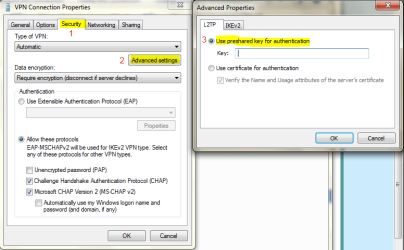
Right-click on the created VPN Connection in the "Network Connections" window (You can search in the start menu) and Select Properties.
VPN1.PNG
Click on the security tab, Select the Advance Settings under the type of VPN, Select the radio button "Use Preshared key for authentication" Type in your key and hit Ok. Also hit Ok in the VPN Connection Properties Window.
VPN2.PNG

Hope this Helps, and Welcome to SevenForums :)
Ryan
 

My Computer My Computer

At a glance

Windows Seven x642.2 GHz Dual Core4GBATI Mobility RADEON HD 3470
Computer Manufacturer/Model Number
HP Pavilion dv5 Notebook PC
OS
Windows Seven x64
CPU
2.2 GHz Dual Core
Motherboard
Quanta 3600
Memory
4GB
Graphics Card(s)
ATI Mobility RADEON HD 3470
Sound Card
ATI
Monitor(s) Displays
Laptop
Hard Drives
ATA Hitachi HTS543215 (5400RPM)
Case
Laptop
Cooling
Fan
Internet Speed
Basic DSL 1.5 up and Down
Thanks for the reply, the 1 missing piece is the group name, im not sure where that goes.
 

My Computer My Computer

At a glance

windows 7 pro 64 bit
OS
windows 7 pro 64 bit
Thanks for the reply, the 1 missing piece is the group name, im not sure where that goes.

Well after looking into this further, it seems like you might still need to use the Cisco VPN Client. I'm not finding anything saying that the Windows 7 built-in VPN client supports it.

I would stick with the Cisco Client VPN software has your school is probably using Cisco VPN equipment.

I'll look at this some more tomorrow and update this post if there is solution available.

Ryan
 

My Computer My Computer

At a glance

Windows Seven x642.2 GHz Dual Core4GBATI Mobility RADEON HD 3470
Computer Manufacturer/Model Number
HP Pavilion dv5 Notebook PC
OS
Windows Seven x64
CPU
2.2 GHz Dual Core
Motherboard
Quanta 3600
Memory
4GB
Graphics Card(s)
ATI Mobility RADEON HD 3470
Sound Card
ATI
Monitor(s) Displays
Laptop
Hard Drives
ATA Hitachi HTS543215 (5400RPM)
Case
Laptop
Cooling
Fan
Internet Speed
Basic DSL 1.5 up and Down
As far as i am aware you wont be able to connect to your school using Windows 7, even though they support a few VPN protocols like L2TP over IPSEC, PPTP and SSTP. Trying to replace the Cisco VPN wont work as intended (unless you use other 3rd party software like you mentioned). I haven't heard anything about windows 7 updating their Native VPN either. I'm investigating this at the moment as well (just about to implament a ASA).
 

My Computer My Computer

At a glance

Windows 7 Professional x64 Backtrack 4 R2Intel Core i5-6504 GB Geil PC3 12800HIS HD 4870 X2
OS
Windows 7 Professional x64 Backtrack 4 R2
CPU
Intel Core i5-650
Motherboard
Gigabyte P55-UD3
Memory
4 GB Geil PC3 12800
Graphics Card(s)
HIS HD 4870 X2
Sound Card
Sound Blaster X-Fi Titanium Fatal1ty Champion
Monitor(s) Displays
BenQ 22" G2220HD
Hard Drives
Seagate Barracuda 7200.12 500GB
PSU
Antec High Current Gamer 620W Power Supply
Case
Thermaltake Armor+ MX
Keyboard
Microsoft SideWinder X6
Mouse
Razer Abyssus
As far as i am aware you wont be able to connect to your school using Windows 7, even though they support a few VPN protocols like L2TP over IPSEC, PPTP and SSTP. Trying to replace the Cisco VPN wont work as intended (unless you use other 3rd party software like you mentioned). I haven't heard anything about windows 7 updating their Native VPN either. I'm investigating this at the moment as well (just about to implament a ASA).

+1 for that I completely agree with that, Windows 7 has issues with their built in vpn it just very hard to get to work or if at all...
 

My Computer My Computer

At a glance

Windows 7 Ultimate x64I76 x 1.5V DDR3 DIMM sockets supporting up to 2...GeForce GTX 580
Computer Manufacturer/Model Number
Alienware
OS
Windows 7 Ultimate x64
CPU
I7
Motherboard
GA-X58-USB3
Memory
6 x 1.5V DDR3 DIMM sockets supporting up to 24 GB of system
Graphics Card(s)
GeForce GTX 580
Sound Card
Realtek ALC892 codec 2/4/5.1/7.1-channel
Monitor(s) Displays
NEC Display Solutions E321 Black 32"
Screen Resolution
1366 x 768
Hard Drives
OCZ Colossus LT Series OCZSSD2-1CLSLT1T 3.5" 1TB SATA II MLC Internal Solid State Drive
PSU
XFX Black Edition XPS-850W-BES 850W ATX12V
Case
Antec
Cooling
Zalman
Keyboard
Microsoft
Mouse
Microsoft
Back
Top