Solved buying laptop PCIe mini dual band adapter

Matts1

New member
Member
Local time
9:40 AM
Messages
44
Unfortunately, at my school you need a dual band wireless adapter in order to connect to the internet. With my current laptop, there are certain requirements it must meet in order for it to work.

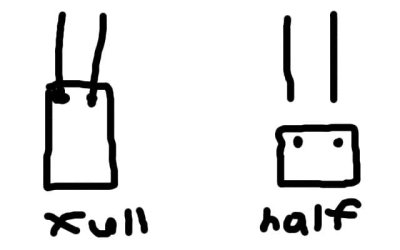
  • it must be a full height card. An adapter will not work as the antenna wires won't go that far.
  • It needs to have 2 antenna ports. I have found a few ones which fit all the other specifications, but they appear to have 3 ports.
  • Obviously it must be PCIe-mini and dual band, as stated in the title
Does anyone know what one to get, or even if there is one that meets those specifications?
 

My Computer My Computer

At a glance

Windows 7 Home Premiumi5 2500k @ 4.6GHz4x4GB G-Skill Ripjaws DDR3 1600MHzAMD Radeon HD 5770
Computer Manufacturer/Model Number
Custom Build
OS
Windows 7 Home Premium
CPU
i5 2500k @ 4.6GHz
Motherboard
Asus P8P67 LE
Memory
4x4GB G-Skill Ripjaws DDR3 1600MHz
Graphics Card(s)
AMD Radeon HD 5770
Sound Card
Onboard
Monitor(s) Displays
AOC e2434pw, Dell 20"
Screen Resolution
1920x1080, 1600x1200
Hard Drives
1 OCZ vertex II 60GB
2 seagate barracuda 1TB on RAID0
PSU
Antec Earthwatts 650w
Case
Antec 902
Cooling
Coolermaster Hyper212+
Keyboard
Logiteck K300
Mouse
Microsoft basic mouse
Internet Speed
~12.5 Mb/s
Your post is confusing for a few reasons:

  1. Laptops do not have expansion slots, PCIe or otherwise. Everything is expanded through the external ports.
  2. Very few laptops are made with dual band adapters right now. It is curious that a school would require something that is only available on top end laptops.
  3. Wires? Network connectivity is done through CAT5 or 6 Ethernet wiring or wirelessly.
  4. Dual band refers to the frequency of the wireless signal: 2.4GHz or 5GHz.
  5. The antennas on a wireless device correspond to the channels that the wireless signal is sent out on. 2 antennae do not equal dual band.
  6. Full height or half height cards are only configurations. The configuration of a card has nothing to do with performance. Where are you going to put a full height card for desktop PC in a laptop?
  7. PCIe-mini makes a little more sense, but contradicts the earlier need for a full height card. These are opposites.
Perhaps it would be better to explain what you are trying to do.
 

My Computer My Computer

At a glance

Windows 7 64 Bit Home Premium SP1i7-3820GSkill F3-14900CL9Q - 16GBEVGA GeForce GTX660 - Driver 352.86
Computer type
PC/Desktop
Computer Manufacturer/Model Number
Home Built - Jan 2013
OS
Windows 7 64 Bit Home Premium SP1
CPU
i7-3820
Motherboard
Asus P9X79-PRO - Bios 4608
Memory
GSkill F3-14900CL9Q - 16GB
Graphics Card(s)
EVGA GeForce GTX660 - Driver 352.86
Sound Card
On board Realtek ALC898
Monitor(s) Displays
Acer S271HL
Screen Resolution
1920 x 1080
Hard Drives
#1- Samsung 840 Pro Series
#2- Western Digital WD1002FAEX Sata3 Black
#3- Western Digital WD1002FAEX Sata3 Black
PSU
Corsair CMPSU-850TX-V2 - 850 watt (by Seasonic)
Case
Corsair Obsidian 550D
Cooling
Standard 3 120mm case fans, Cooler Master Hyper 212 EVO
Keyboard
MS KC-0405
Mouse
Intellimouse 5-button
Internet Speed
56 Mbits/Sec (on a good day)
Antivirus
Avast & Malwarebytes
Browser
Firefox
Other Info
Asus DVD - DRW-24B1ST 24X
1. Yes, I meant PCI-e mini
2. The school provides us laptops for us to use, but they are crap and I don't have privelages to install nessecary programs
3. Antenna wires connect to a pci-e mini wireless card (see here)
4. I know that dual band refers to the frequency. The school runs on 5GHz and my house runs on 2.4GHz, so I need a dual band card.
5. Is what you're saying that 3 antennas are nessecary for dual band? If so, is it possible to add a third antenna wire.
6. I know they are only configurations. In the attatchment is a crappy sketch of the problem.
Comparison between full and half height PCI-e
 

Attachments

  • wireless.jpg
    wireless.jpg
    10.5 KB · Views: 5

My Computer My Computer

At a glance

Windows 7 Home Premiumi5 2500k @ 4.6GHz4x4GB G-Skill Ripjaws DDR3 1600MHzAMD Radeon HD 5770
Computer Manufacturer/Model Number
Custom Build
OS
Windows 7 Home Premium
CPU
i5 2500k @ 4.6GHz
Motherboard
Asus P8P67 LE
Memory
4x4GB G-Skill Ripjaws DDR3 1600MHz
Graphics Card(s)
AMD Radeon HD 5770
Sound Card
Onboard
Monitor(s) Displays
AOC e2434pw, Dell 20"
Screen Resolution
1920x1080, 1600x1200
Hard Drives
1 OCZ vertex II 60GB
2 seagate barracuda 1TB on RAID0
PSU
Antec Earthwatts 650w
Case
Antec 902
Cooling
Coolermaster Hyper212+
Keyboard
Logiteck K300
Mouse
Microsoft basic mouse
Internet Speed
~12.5 Mb/s

My Computer My Computer

At a glance

win 7 ultimate32bit, Win8.1pro wmc 32bitamd phenom x4 9600corsair twinxs 2x2gb2x nvidia 1gb 8500gt
Computer type
PC/Desktop
Computer Manufacturer/Model Number
self build
OS
win 7 ultimate32bit, Win8.1pro wmc 32bit
CPU
amd phenom x4 9600
Motherboard
asus m2n32-sli deluxe
Memory
corsair twinxs 2x2gb
Graphics Card(s)
2x nvidia 1gb 8500gt
Sound Card
onboard
Monitor(s) Displays
23" PB Viseo 233d
Screen Resolution
1920x1080
Hard Drives
maxtor sata 500gb
maxtor sata 320gb
fujitsu sata200gb
PSU
oryxx tornado 750w
Case
thermaltake xaser lll
Cooling
artic freezer64 pro + 7 case fans
4. I know that dual band refers to the frequency. The school runs on 5GHz and my house runs on 2.4GHz, so I need a dual band card.
If you don't have the privileges to install stuff on the laptops, even if you place a dual-band mini-pcie wifi adapter you won't be able to install drivers. So it's pointless.

What about buying a dual band router for your home?

Also, what about asking the IT guys of your school? Thay may be able to do something for free.
 

My Computer My Computer

At a glance

Win 7 Pro 64-bit 7601AMD Phenom 9650 QuadCore, revision DR-B35 GB yes I run 2x 2GB and 1x 1GB, different b...NVIDIA GeForce 9800 GT 512 Mb, unknown manufa...
Computer type
PC/Desktop
Computer Manufacturer/Model Number
custom built
OS
Win 7 Pro 64-bit 7601
CPU
AMD Phenom 9650 QuadCore, revision DR-B3
Motherboard
ASUS M4A78
Memory
5 GB yes I run 2x 2GB and 1x 1GB, different brand, spank me.
Graphics Card(s)
NVIDIA GeForce 9800 GT 512 Mb, unknown manufacturer.
Sound Card
Crappy Realtek Integrated Audio
Monitor(s) Displays
Fujitsu Siemens P19-3P
Screen Resolution
1280 x 1024 x 32 bits @ 60 Hz Oh yeah, 4:3 rocks!
Hard Drives
(1) MAXTOR S TM3320613AS SATA Disk Device (2) STM35004 18AS SATA Disk Device (3) TOSHIBA USB 2.5"-HDD
PSU
whatever, around 450w
Case
Scavenged from old company PC, 10+ years old
Cooling
CPU fan, GPU fan, case fan, nothing fancy
Keyboard
Microsoft, PS/2, white.
Mouse
Optical, logitec.
Internet Speed
effective max speeds: 70-ish kB/s down 30-ish kB/s up
Antivirus
Avira, free edition.
Browser
Firefox with FXChrome to make it look like Google Chrome :P
Other Info
Was discarded by previous owner due to "horrible performance".
Was running Win Xp from a IDE drive. Yeah. Was a pain.
SATA II drive and Win7 and it zips away! Yay!
This is the type of USB connected device you would use to add dual band wireless connectivity to a laptop:

WNDA4100

There is no need for wires.

As I stated previously, the antennae on routers and wireless adapters only receive the radio signal through the air. The frequency of that signal, 2.4GHz or 5GHz, is generated inside the router. The antennae do not determine the frequency.

The "PCI-e wireless card" you show in that picture is actually the laptop's "Wireless Adapter". Yes it is a card, but it is an integral part of the laptop. That adapter must be a dual band adapter in order to receive signals on both bands. Adding more antennae wires to it will not change it from a single band adapter to a dual band adapter. That can only be done on the adapter's circuit board.

You may be able to get a replacement adapter for that laptop that is dual band, but don't count on every manufacturer having one.

bobafetthotmail's idea of talking to the IT guys at your school is a very good one.
 

My Computer My Computer

At a glance

Windows 7 64 Bit Home Premium SP1i7-3820GSkill F3-14900CL9Q - 16GBEVGA GeForce GTX660 - Driver 352.86
Computer type
PC/Desktop
Computer Manufacturer/Model Number
Home Built - Jan 2013
OS
Windows 7 64 Bit Home Premium SP1
CPU
i7-3820
Motherboard
Asus P9X79-PRO - Bios 4608
Memory
GSkill F3-14900CL9Q - 16GB
Graphics Card(s)
EVGA GeForce GTX660 - Driver 352.86
Sound Card
On board Realtek ALC898
Monitor(s) Displays
Acer S271HL
Screen Resolution
1920 x 1080
Hard Drives
#1- Samsung 840 Pro Series
#2- Western Digital WD1002FAEX Sata3 Black
#3- Western Digital WD1002FAEX Sata3 Black
PSU
Corsair CMPSU-850TX-V2 - 850 watt (by Seasonic)
Case
Corsair Obsidian 550D
Cooling
Standard 3 120mm case fans, Cooler Master Hyper 212 EVO
Keyboard
MS KC-0405
Mouse
Intellimouse 5-button
Internet Speed
56 Mbits/Sec (on a good day)
Antivirus
Avast & Malwarebytes
Browser
Firefox
Other Info
Asus DVD - DRW-24B1ST 24X
Your current antennas are likely only 2.4 GHz antennas. Even if you find a dual band card that fits, your antennas won't support the 5 GHz band. As far as I know it has nothing to do with how many antennas there are. My DIR-655 has three antennas but it only works on the 2.4 GHz band. The third antenna just gives it another MIMO stream to play with. Its my understanding that dual band Routers and adapters have dual band antennas.
 

My Computer My Computer

At a glance

Windows 10 Education 64 bitAMD Phenom II X4 980 Black Edition Deneb 3.7GHz8GB 4GBx2 Kingston PC10600 DDR3 1333 MemoryZotac NVIDIA Geforce GT640 2 Gig DDR3 PCIe
Computer type
PC/Desktop
Computer Manufacturer/Model Number
Home Built
OS
Windows 10 Education 64 bit
CPU
AMD Phenom II X4 980 Black Edition Deneb 3.7GHz
Motherboard
Asus M4N68T-M V2 µATX Motherboard
Memory
8GB 4GBx2 Kingston PC10600 DDR3 1333 Memory
Graphics Card(s)
Zotac NVIDIA Geforce GT640 2 Gig DDR3 PCIe
Sound Card
VIA VT1708s High Definition Audio 8-channel Onboard
Monitor(s) Displays
22" LG E2242 1080p and 2 19" I-INC AG191D
Screen Resolution
1280x1024 - 1920x1080 - 1280x1024
Hard Drives
Crucial M100 256 GB SSD and 500 GB WD Blue SATA
PSU
Thermaltake TR 620
Case
Power Up Black ATX Mid-Tower Case
Cooling
Stock heatsink and fan
Keyboard
Logitech Wireless K350 Wave
Mouse
Logitech Wireless M570 Trackman Wheel
Internet Speed
80 Mbps Down 30 Mbps Up
Antivirus
Windows Defender
Browser
Internet Explorer 11
Other Info
HP DVD1040e Lightscribe - External USB2
Thanks alphanumeric. I didn't realise that my current 2 may not support dual band.

Pebbly, thanks, I read that post and it seemed very useful. The only issue is, I don't trust myself to install another 3 antenna leads, so I think I will end up going with TVemblem's solution instead.

PS. I wanted the dual band on another old laptop I have (not school laptop, it already has dual band)
 

My Computer My Computer

At a glance

Windows 7 Home Premiumi5 2500k @ 4.6GHz4x4GB G-Skill Ripjaws DDR3 1600MHzAMD Radeon HD 5770
Computer Manufacturer/Model Number
Custom Build
OS
Windows 7 Home Premium
CPU
i5 2500k @ 4.6GHz
Motherboard
Asus P8P67 LE
Memory
4x4GB G-Skill Ripjaws DDR3 1600MHz
Graphics Card(s)
AMD Radeon HD 5770
Sound Card
Onboard
Monitor(s) Displays
AOC e2434pw, Dell 20"
Screen Resolution
1920x1080, 1600x1200
Hard Drives
1 OCZ vertex II 60GB
2 seagate barracuda 1TB on RAID0
PSU
Antec Earthwatts 650w
Case
Antec 902
Cooling
Coolermaster Hyper212+
Keyboard
Logiteck K300
Mouse
Microsoft basic mouse
Internet Speed
~12.5 Mb/s
How do all the other students make their laptops do what you are trying to do?
The OP's post #3
2. The school provides us laptops for us to use, but they are crap and I don't have privelages to install nessecary programs
 

My Computer My Computer

At a glance

Windows 10 Pro. 64/ version 1709 Windows 7 Pr...Intel i7-6800K @ 4.3Corsair Platinum 16 gig @2400EVGA GTX 1070 OC
Computer type
PC/Desktop
Computer Manufacturer/Model Number
Home made Desktop
OS
Windows 10 Pro. 64/ version 1709 Windows 7 Pro/64
CPU
Intel i7-6800K @ 4.3
Motherboard
ASUS X-99 Deluxe II
Memory
Corsair Platinum 16 gig @2400
Graphics Card(s)
EVGA GTX 1070 OC
Monitor(s) Displays
Asus 27" LED LCD/VE278Q
Screen Resolution
1920-1080 or 1280-720 HDMI
Hard Drives
INTEL SSD 730-240 Gb Sata 3.0/
PSU
EVGA Platium 1200W
Case
Phanteks Luxe Tempered Glass 8 fans/ one radiator
Cooling
XSPC/ Water Cooled CPU
Keyboard
Das 4 Professional
Mouse
Logitech M705/MX Anywhere 2-S
Internet Speed
100 mbits
Antivirus
Microsoft Security Essentials/ Malwarebytes Premium 3.0/ SAS
Browser
I.E. 11 default/Firefox/ ISP Time Warner Cable/Spectrum
Other Info
LG BluRay Burner/
Sound system-KLipsch-THX/
Icy Dock ssd Hot Swap bays.
@ Layback Bear, The way I read it the OP doesn't want to use the school provided laptop because its restricted in what can be installed on it. He is trying to modify his own laptop so he can connect to the school network and use it instead. The school provided laptops connect fine without any modifications. His laptop won't because the school uses the 5 GHz band, which his laptop doesn't have.
 

My Computer My Computer

At a glance

Windows 10 Education 64 bitAMD Phenom II X4 980 Black Edition Deneb 3.7GHz8GB 4GBx2 Kingston PC10600 DDR3 1333 MemoryZotac NVIDIA Geforce GT640 2 Gig DDR3 PCIe
Computer type
PC/Desktop
Computer Manufacturer/Model Number
Home Built
OS
Windows 10 Education 64 bit
CPU
AMD Phenom II X4 980 Black Edition Deneb 3.7GHz
Motherboard
Asus M4N68T-M V2 µATX Motherboard
Memory
8GB 4GBx2 Kingston PC10600 DDR3 1333 Memory
Graphics Card(s)
Zotac NVIDIA Geforce GT640 2 Gig DDR3 PCIe
Sound Card
VIA VT1708s High Definition Audio 8-channel Onboard
Monitor(s) Displays
22" LG E2242 1080p and 2 19" I-INC AG191D
Screen Resolution
1280x1024 - 1920x1080 - 1280x1024
Hard Drives
Crucial M100 256 GB SSD and 500 GB WD Blue SATA
PSU
Thermaltake TR 620
Case
Power Up Black ATX Mid-Tower Case
Cooling
Stock heatsink and fan
Keyboard
Logitech Wireless K350 Wave
Mouse
Logitech Wireless M570 Trackman Wheel
Internet Speed
80 Mbps Down 30 Mbps Up
Antivirus
Windows Defender
Browser
Internet Explorer 11
Other Info
HP DVD1040e Lightscribe - External USB2
Thank you Kerry. I did miss that somehow.
 

My Computer My Computer

At a glance

Windows 10 Pro. 64/ version 1709 Windows 7 Pr...Intel i7-6800K @ 4.3Corsair Platinum 16 gig @2400EVGA GTX 1070 OC
Computer type
PC/Desktop
Computer Manufacturer/Model Number
Home made Desktop
OS
Windows 10 Pro. 64/ version 1709 Windows 7 Pro/64
CPU
Intel i7-6800K @ 4.3
Motherboard
ASUS X-99 Deluxe II
Memory
Corsair Platinum 16 gig @2400
Graphics Card(s)
EVGA GTX 1070 OC
Monitor(s) Displays
Asus 27" LED LCD/VE278Q
Screen Resolution
1920-1080 or 1280-720 HDMI
Hard Drives
INTEL SSD 730-240 Gb Sata 3.0/
PSU
EVGA Platium 1200W
Case
Phanteks Luxe Tempered Glass 8 fans/ one radiator
Cooling
XSPC/ Water Cooled CPU
Keyboard
Das 4 Professional
Mouse
Logitech M705/MX Anywhere 2-S
Internet Speed
100 mbits
Antivirus
Microsoft Security Essentials/ Malwarebytes Premium 3.0/ SAS
Browser
I.E. 11 default/Firefox/ ISP Time Warner Cable/Spectrum
Other Info
LG BluRay Burner/
Sound system-KLipsch-THX/
Icy Dock ssd Hot Swap bays.
Well, the USB adaptor I just purchased today appears to kind of work. Unlike before, it prompts for credentials when connecting to the network. Hopefully this is just an issue with the old driver, but it doesn't connect. I will try again tomorrow, now that I have installed the new driver on there.
 

My Computer My Computer

At a glance

Windows 7 Home Premiumi5 2500k @ 4.6GHz4x4GB G-Skill Ripjaws DDR3 1600MHzAMD Radeon HD 5770
Computer Manufacturer/Model Number
Custom Build
OS
Windows 7 Home Premium
CPU
i5 2500k @ 4.6GHz
Motherboard
Asus P8P67 LE
Memory
4x4GB G-Skill Ripjaws DDR3 1600MHz
Graphics Card(s)
AMD Radeon HD 5770
Sound Card
Onboard
Monitor(s) Displays
AOC e2434pw, Dell 20"
Screen Resolution
1920x1080, 1600x1200
Hard Drives
1 OCZ vertex II 60GB
2 seagate barracuda 1TB on RAID0
PSU
Antec Earthwatts 650w
Case
Antec 902
Cooling
Coolermaster Hyper212+
Keyboard
Logiteck K300
Mouse
Microsoft basic mouse
Internet Speed
~12.5 Mb/s
When installing an add on network adapter it is usually necessary to disable the built in wireless adapter.

Go to Control Panel > Device Manager > Find the internal adapter > right click > and choose Disable.

That should work, but in some cases it will be necessary to uninstall the old driver from the system.
To do this you uninstall the built in adapter from Device Manager (which will remove the driver also). Then restart the laptop and immediately go into the BIOS settings and disable the wireless adapter there (before Windows loads).

Unfortunately, some laptops do not allow you to disable the wireless adapter in BIOS settings. In this case if you can't solve the conflict by disabling the adapter, then it may be necessary to remove it (only after removing it from Device Manager first).
 

My Computer My Computer

At a glance

Windows 7 64 Bit Home Premium SP1i7-3820GSkill F3-14900CL9Q - 16GBEVGA GeForce GTX660 - Driver 352.86
Computer type
PC/Desktop
Computer Manufacturer/Model Number
Home Built - Jan 2013
OS
Windows 7 64 Bit Home Premium SP1
CPU
i7-3820
Motherboard
Asus P9X79-PRO - Bios 4608
Memory
GSkill F3-14900CL9Q - 16GB
Graphics Card(s)
EVGA GeForce GTX660 - Driver 352.86
Sound Card
On board Realtek ALC898
Monitor(s) Displays
Acer S271HL
Screen Resolution
1920 x 1080
Hard Drives
#1- Samsung 840 Pro Series
#2- Western Digital WD1002FAEX Sata3 Black
#3- Western Digital WD1002FAEX Sata3 Black
PSU
Corsair CMPSU-850TX-V2 - 850 watt (by Seasonic)
Case
Corsair Obsidian 550D
Cooling
Standard 3 120mm case fans, Cooler Master Hyper 212 EVO
Keyboard
MS KC-0405
Mouse
Intellimouse 5-button
Internet Speed
56 Mbits/Sec (on a good day)
Antivirus
Avast & Malwarebytes
Browser
Firefox
Other Info
Asus DVD - DRW-24B1ST 24X
Got it working at school today :)
Just tried connecting with the new drivers, and it worked fine.

TVemblem, I have found that it isn't usually nessecary, but I will admit that it does make it less confusing when connecting to a network. However, in my case, I'm leaving it on, because the only place which operates on 5GHz is school, so I can connect to everywhere else with the internal wireless adapter.
 

My Computer My Computer

At a glance

Windows 7 Home Premiumi5 2500k @ 4.6GHz4x4GB G-Skill Ripjaws DDR3 1600MHzAMD Radeon HD 5770
Computer Manufacturer/Model Number
Custom Build
OS
Windows 7 Home Premium
CPU
i5 2500k @ 4.6GHz
Motherboard
Asus P8P67 LE
Memory
4x4GB G-Skill Ripjaws DDR3 1600MHz
Graphics Card(s)
AMD Radeon HD 5770
Sound Card
Onboard
Monitor(s) Displays
AOC e2434pw, Dell 20"
Screen Resolution
1920x1080, 1600x1200
Hard Drives
1 OCZ vertex II 60GB
2 seagate barracuda 1TB on RAID0
PSU
Antec Earthwatts 650w
Case
Antec 902
Cooling
Coolermaster Hyper212+
Keyboard
Logiteck K300
Mouse
Microsoft basic mouse
Internet Speed
~12.5 Mb/s
Glad to hear it. Yes it is always better when drivers play well together.
Congrats.
 

My Computer My Computer

At a glance

Windows 7 64 Bit Home Premium SP1i7-3820GSkill F3-14900CL9Q - 16GBEVGA GeForce GTX660 - Driver 352.86
Computer type
PC/Desktop
Computer Manufacturer/Model Number
Home Built - Jan 2013
OS
Windows 7 64 Bit Home Premium SP1
CPU
i7-3820
Motherboard
Asus P9X79-PRO - Bios 4608
Memory
GSkill F3-14900CL9Q - 16GB
Graphics Card(s)
EVGA GeForce GTX660 - Driver 352.86
Sound Card
On board Realtek ALC898
Monitor(s) Displays
Acer S271HL
Screen Resolution
1920 x 1080
Hard Drives
#1- Samsung 840 Pro Series
#2- Western Digital WD1002FAEX Sata3 Black
#3- Western Digital WD1002FAEX Sata3 Black
PSU
Corsair CMPSU-850TX-V2 - 850 watt (by Seasonic)
Case
Corsair Obsidian 550D
Cooling
Standard 3 120mm case fans, Cooler Master Hyper 212 EVO
Keyboard
MS KC-0405
Mouse
Intellimouse 5-button
Internet Speed
56 Mbits/Sec (on a good day)
Antivirus
Avast & Malwarebytes
Browser
Firefox
Other Info
Asus DVD - DRW-24B1ST 24X
Back
Top