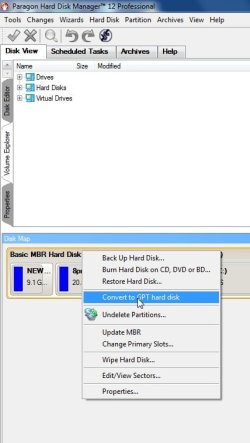
Can I convert a basic disk with MBR to GPT without affecting Windows?

Moondragon

New member
Local time
8:19 AM
Messages
11
Location
Borneo, Malaysia
Hello,
I want to change a Hard disk Drive with a MBR to GPT. THere are tools out there that can do it without losing data.
BUT, my question is will that affect my current windows installation (ie make it unbootable)?
My BIOS supports UEFI and I am running Windows 7 64bit..
If anyone knows, I would love to hear.. :confused:
 

My Computer My Computer

Computer Manufacturer/Model Number
Asus N82JQ
OS
Windows 7 home
CPU
Intel i7 Q720
Memory
4G
Graphics Card(s)
NVIDIA GeForce GT 335M
Sound Card
external Alesis IO2
Monitor(s) Displays
Laptop Display
Screen Resolution
1280 x 768
Hard Drives
one internal 600G
one external 350G USB2
one external 500G Firewire
Mouse
Logitech wireless optical
Internet Speed
5mbps
Maybe there is software that say it can be done, and maybe you can but i would remove all of your data and do a back up.
 

My Computer My Computer

Computer type
PC/Desktop
Computer Manufacturer/Model Number
Dell / Lenovo g550
OS
Windows 7 Ultimate 64-bit
CPU
Intel Core 2 Duo E6550 @2.33GHz
Motherboard
foxconn g33m02
Memory
4GB DDR"
Graphics Card(s)
NVIDIA GeForce 8600 GS
Hard Drives
HDD 1 = 150GB
HDD 2 = 1.5TB
PSU
450W
Cooling
Stock fan
Internet Speed
12Mb
Antivirus
AVG Internet Security
To change a master boot record disk into a GUID partition table disk using the Windows interface

  1. Back up or move the data on the basic master boot record (MBR) disk you want to convert into a GUID partition table (GPT) disk.
  2. If the disk contains any partitions or volumes, right-click any volumes on the disk and then click Delete Partition or Delete Volume.
  3. Right-click the MBR disk that you want to change into a GPT disk, and then click Convert to GPT Disk.
To change a master boot record disk into a GUID partition table disk using a command line

  1. Back up or move the data on the basic master boot record (MBR) disk you want to convert into a GUID partition table (GPT) disk.
  2. Open an elevated command prompt (right-click Command Prompt, and then click Run as Administrator) and type diskpart. If the disk does not contain any partitions or volumes, skip to step 6.
  3. At the DISKPART prompt, type list disk. Make note of the disk number you want to convert.
  4. At the DISKPART prompt, type select disk <disknumber>.
clear.gif
Important Running the clean command will delete all partitions or volumes on the disk.
At the DISKPART prompt, type clean

  1. At the DISKPART prompt, type convert gpt.
 

My Computer My Computer

Computer type
PC/Desktop
Computer Manufacturer/Model Number
Dell / Lenovo g550
OS
Windows 7 Ultimate 64-bit
CPU
Intel Core 2 Duo E6550 @2.33GHz
Motherboard
foxconn g33m02
Memory
4GB DDR"
Graphics Card(s)
NVIDIA GeForce 8600 GS
Hard Drives
HDD 1 = 150GB
HDD 2 = 1.5TB
PSU
450W
Cooling
Stock fan
Internet Speed
12Mb
Antivirus
AVG Internet Security
I must remember about this tutorials greg save me looking online. Thank for the reply, Some of this save's a lot of typing :)
 

My Computer My Computer

Computer type
PC/Desktop
Computer Manufacturer/Model Number
Dell / Lenovo g550
OS
Windows 7 Ultimate 64-bit
CPU
Intel Core 2 Duo E6550 @2.33GHz
Motherboard
foxconn g33m02
Memory
4GB DDR"
Graphics Card(s)
NVIDIA GeForce 8600 GS
Hard Drives
HDD 1 = 150GB
HDD 2 = 1.5TB
PSU
450W
Cooling
Stock fan
Internet Speed
12Mb
Antivirus
AVG Internet Security
Hi there
Yes it can be done -- but be aware -- I might be wrong on this but I think W7 needs the hardware to support UEFI if you want to BOOT W7 from a GPT drive. You can Read / Write to GPT drives with no problem.

Here's the "Chapter and verse" from Ms.

Windows and GPT FAQ

Read about half way down to get to the section on BOOTING from GPT drives.

Cheers

Jimbo
 

My Computer My Computer

Computer type
PC/Desktop
Computer Manufacturer/Model Number
Custom built, several laptops HP/ASUS
OS
Linux CENTOS 7 / various Windows OS'es and servers
CPU
Intel i7 Intel i5
Memory
8GB, 16GB
Graphics Card(s)
On Motherboard
Sound Card
Realtek HD audio
Monitor(s) Displays
Apple Cinema display, Samsung LCD
Screen Resolution
1920 X 1080
Hard Drives
4 X 1TB SATA
Mouse
Toshiba wireless laser
Internet Speed
> 20MB up
Why do you want to convert it from MBR to GPT in the first place? GPT is recommended for drives with size of 2TB+. Is that your case?
 
Paragon software can do that.

Not certain if the trial version does - the trail version has some limitations.

Full versions will do it without data loss. As long as your os supports booting from GPT - it will boot up fine.

If you want to boot windows, it needs to be 64 bit and you need uefi.

MBR-GPT.jpg
 

My Computers My Computers

System One System Two

  • Computer type
    PC/Desktop
    OS
    7 X64
    CPU
    i5 8400
    Motherboard
    gigabyte b365m ds3h
    Memory
    2x8gb 3200mhz
    Hard Drives
    various
    PSU
    pure power 11 400w cm
    Case
    Coolermaster
    Cooling
    cryorig m9i
  • Computer type
    PC/Desktop
    OS
    7x64
    CPU
    g5400
    Motherboard
    ga b365m ds3h
    Memory
    8gb ddr4 2400
    PSU
    xfx pro 450w
May I ask why? You're unlikely to notice any difference.
 

My Computer My Computer

Computer type
PC/Desktop
Computer Manufacturer/Model Number
Apple 17" iMac MA199LL (Early 2006)
OS
Windows 8 Pro (32-bit)
CPU
1.83GHz Intel Core Duo
Memory
2GB 667MHz DDR2 SDRAM (PC2-5300) (upgrade)
Graphics Card(s)
ATI Radeon X1600 with 128MB GDDR3 memory
Monitor(s) Displays
17-inch TFT active-matrix LCD, millions of colors
Screen Resolution
1440 x 900
Hard Drives
Hitachi 320GB HDT721032SLA360 7200RPM SATA II (upgrade)
Keyboard
Microsoft Wired Keyboard 600
Mouse
Microsoft Basic Optical Mouse v2.0
Internet Speed
4 Mbps
Antivirus
Microsoft Security Essentials
Browser
Google Chrome
Other Info
WEI:
Base Score: 3.9 Processor: 4.4 Memory 4.7
Graphics: 3.9 Gaming Graphics: 4.1 Primary HD: 5.9
Back
Top