can i fix an os install on a seperate drive

brceallmgty

New member
Local time
11:33 AM
Messages
7
I had a black screen of death on my ssd. I did everything I could think of and I read online to do. I bought a bigger one, planning to just clone it. I try to access to in windows as a data drive..nothing access denied data not accessible. I try to boot from it one more time, can't even get the ksod now. The drive is still reconized in windows, its a healthy drive according to the os. Pretty sure the bios is up to date, not sure about the firmware on the ssd. Can i fix it from another disk?
 

My Computer My Computer

At a glance

Windows 7 home premiumIntel 9504gig6950
Computer type
PC/Desktop
OS
Windows 7 home premium
CPU
Intel 950
Motherboard
asus x58 sabertooth
Memory
4gig
Graphics Card(s)
6950
Hard Drives
ocz vertez 2 90 gig
ocz vertez 2 240gig
seagate 500gig
Antivirus
none
Browser
internet explorer

My Computer My Computer

At a glance

Windows 7 32 bitAMD 5200+ dual core2 GBNVidia GeForce 6150SE 128 MB
Computer Manufacturer/Model Number
HP Media Center
OS
Windows 7 32 bit
CPU
AMD 5200+ dual core
Memory
2 GB
Graphics Card(s)
NVidia GeForce 6150SE 128 MB
Monitor(s) Displays
CRT
Screen Resolution
1280x1024
Hard Drives
500 GB Sata internal :

SIIG USB 3.0 docking stations w/WD Caviar Black 6 Gb/s drives
Keyboard
PS/2
Mouse
PS/2 Wheel Mouse
Other Info
SIIG USB 3.0 PCIexpress card.

My Computer My Computer

At a glance

Vista, Windows7, Mint Mate, Zorin, Windows 8from 1.6GHz Duo to i7
Computer Manufacturer/Model Number
HP, Dell, Gateway, Toshiba - 4 laptops and 2 desktops
OS
Vista, Windows7, Mint Mate, Zorin, Windows 8
CPU
from 1.6GHz Duo to i7
Monitor(s) Displays
2x HP w2207
Hard Drives
5x HDD, 7x SSD, 12x Externals
Keyboard
with trackball - no mices
Mouse
Trackball mice
Internet Speed
DSL 6000
Tried the ownership, same message. I did the startup repair nothing. Says can't automatically repair. I look at the problem details log it says root cause no OS files found on disk.
 

My Computer My Computer

At a glance

Windows 7 home premiumIntel 9504gig6950
Computer type
PC/Desktop
OS
Windows 7 home premium
CPU
Intel 950
Motherboard
asus x58 sabertooth
Memory
4gig
Graphics Card(s)
6950
Hard Drives
ocz vertez 2 90 gig
ocz vertez 2 240gig
seagate 500gig
Antivirus
none
Browser
internet explorer
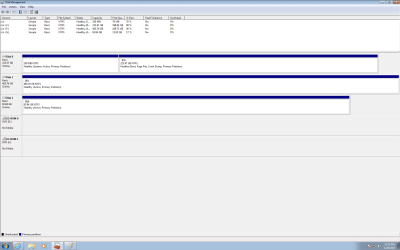
Can you post a picture of Disk Management
 

My Computer My Computer

At a glance

Vista, Windows7, Mint Mate, Zorin, Windows 8from 1.6GHz Duo to i7
Computer Manufacturer/Model Number
HP, Dell, Gateway, Toshiba - 4 laptops and 2 desktops
OS
Vista, Windows7, Mint Mate, Zorin, Windows 8
CPU
from 1.6GHz Duo to i7
Monitor(s) Displays
2x HP w2207
Hard Drives
5x HDD, 7x SSD, 12x Externals
Keyboard
with trackball - no mices
Mouse
Trackball mice
Internet Speed
DSL 6000
here it is
 

Attachments

  • disk.png
    disk.png
    28.2 KB · Views: 8

My Computer My Computer

At a glance

Windows 7 home premiumIntel 9504gig6950
Computer type
PC/Desktop
OS
Windows 7 home premium
CPU
Intel 950
Motherboard
asus x58 sabertooth
Memory
4gig
Graphics Card(s)
6950
Hard Drives
ocz vertez 2 90 gig
ocz vertez 2 240gig
seagate 500gig
Antivirus
none
Browser
internet explorer
Hmm, looks pretty normal except I would recommend to deactivate F and G.
 

My Computer My Computer

At a glance

Vista, Windows7, Mint Mate, Zorin, Windows 8from 1.6GHz Duo to i7
Computer Manufacturer/Model Number
HP, Dell, Gateway, Toshiba - 4 laptops and 2 desktops
OS
Vista, Windows7, Mint Mate, Zorin, Windows 8
CPU
from 1.6GHz Duo to i7
Monitor(s) Displays
2x HP w2207
Hard Drives
5x HDD, 7x SSD, 12x Externals
Keyboard
with trackball - no mices
Mouse
Trackball mice
Internet Speed
DSL 6000
Deativate? Will I still be able to use them?
How would I do that?
 

My Computer My Computer

At a glance

Windows 7 home premiumIntel 9504gig6950
Computer type
PC/Desktop
OS
Windows 7 home premium
CPU
Intel 950
Motherboard
asus x58 sabertooth
Memory
4gig
Graphics Card(s)
6950
Hard Drives
ocz vertez 2 90 gig
ocz vertez 2 240gig
seagate 500gig
Antivirus
none
Browser
internet explorer
You deactivate in Disk Management (right click). Of course you can still use those disks. Active you only use on partitions from where you boot. It could be that the system gets confused with all those active partitions. Theonly active partition you need is the 100MB system partition on Disk0.
 

My Computer My Computer

At a glance

Vista, Windows7, Mint Mate, Zorin, Windows 8from 1.6GHz Duo to i7
Computer Manufacturer/Model Number
HP, Dell, Gateway, Toshiba - 4 laptops and 2 desktops
OS
Vista, Windows7, Mint Mate, Zorin, Windows 8
CPU
from 1.6GHz Duo to i7
Monitor(s) Displays
2x HP w2207
Hard Drives
5x HDD, 7x SSD, 12x Externals
Keyboard
with trackball - no mices
Mouse
Trackball mice
Internet Speed
DSL 6000
I don't see an option to deactivate. What will deactivation able me to do?
 

My Computer My Computer

At a glance

Windows 7 home premiumIntel 9504gig6950
Computer type
PC/Desktop
OS
Windows 7 home premium
CPU
Intel 950
Motherboard
asus x58 sabertooth
Memory
4gig
Graphics Card(s)
6950
Hard Drives
ocz vertez 2 90 gig
ocz vertez 2 240gig
seagate 500gig
Antivirus
none
Browser
internet explorer

My Computer My Computer

At a glance

Vista, Windows7, Mint Mate, Zorin, Windows 8from 1.6GHz Duo to i7
Computer Manufacturer/Model Number
HP, Dell, Gateway, Toshiba - 4 laptops and 2 desktops
OS
Vista, Windows7, Mint Mate, Zorin, Windows 8
CPU
from 1.6GHz Duo to i7
Monitor(s) Displays
2x HP w2207
Hard Drives
5x HDD, 7x SSD, 12x Externals
Keyboard
with trackball - no mices
Mouse
Trackball mice
Internet Speed
DSL 6000
Ok I deactivated them both. Still same message. What are my options now?
 

My Computer My Computer

At a glance

Windows 7 home premiumIntel 9504gig6950
Computer type
PC/Desktop
OS
Windows 7 home premium
CPU
Intel 950
Motherboard
asus x58 sabertooth
Memory
4gig
Graphics Card(s)
6950
Hard Drives
ocz vertez 2 90 gig
ocz vertez 2 240gig
seagate 500gig
Antivirus
none
Browser
internet explorer
Thanks that did it. Not sure what I did though. I transfered a lot of data over, tried to reboot, it gave me message bootmgr is missing. I used install cd to fix it it gave me option it restore from a disk image. Everything was there, as far as I can tell. Expanded the unallocated space done.
 

My Computer My Computer

At a glance

Windows 7 home premiumIntel 9504gig6950
Computer type
PC/Desktop
OS
Windows 7 home premium
CPU
Intel 950
Motherboard
asus x58 sabertooth
Memory
4gig
Graphics Card(s)
6950
Hard Drives
ocz vertez 2 90 gig
ocz vertez 2 240gig
seagate 500gig
Antivirus
none
Browser
internet explorer
If you booted into the Win7 disk to try to repair Bootmgr is Missing and instead chose Restore using an Image, you reapplied the image to the HD from whenever that image was made. Your files may not be current. Be sure you have the latest file set before you delete them on the other HDD.
 
Back
Top