Can my HD 6550D2 graphics card handle my new Philips B272B monitor?

leuce

New member
Member
Local time
4:24 PM
Messages
63
Location
Netherlands
Can my HD 6530D graphics card handle my new Philips B272B monitor?

Hello everyone

I just got meself a QHD monitor, the Philips 272B8QJEB/00 monitor. It's a 27" monitor with a native resolution of 2560 × 1440 @ 60 Hz. My computer is an Acer Aspire X3470, i.e. it has an HD 6530D graphic card.

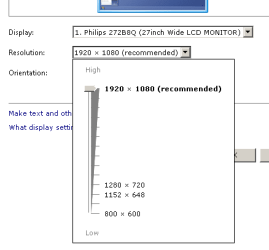
I've installed the drivers for the monitor but it displays only 1920 x 1080 via the HDMI 1.4 cable. I'm trying to figure out where the problem lies. Is my graphic card capable of displaying this resolution at all? I can't find that information anywhere.

Both the monitor and my computer has a VGA port as well, but with I get the same results, even after a reboot -- the "recommended" screen resolution according to the Windows control panel remains 1920 x 1080. (The monitor also has DVI and DisplayPort, but my computer doesn't -- but I'm not sure if that is even relevant to my question.)

I have Windows 7 HP 64-bit.

Thanks
Samuel
 
Last edited:

My Computer My Computer

At a glance

Windows 7 Home Premium 64 bitAMD A6 36204 x 4 GBAMD Radeon HD 6530D
Computer type
PC/Desktop
Computer Manufacturer/Model Number
Acer Aspire X3470
OS
Windows 7 Home Premium 64 bit
CPU
AMD A6 3620
Memory
4 x 4 GB
Graphics Card(s)
AMD Radeon HD 6530D
Sound Card
AMD, Realtek
Monitor(s) Displays
iiyama ProLite B2209HDS full HD in portrait mode
Screen Resolution
1920x1080 or 1080x1920
Hard Drives
SSD 250 GB
WD Green 2 TB 5400 rpm
Antivirus
Avast
Browser
Opera (Blink)
Hello leuce

The max HDMI/DVI resolution of the HD 6530D is 2560 x 1600. The maximum VGA resolution is quoted as 2048 x 1536. So, you wont be able to experience the native resolution of the panel via a VGA cable, so try the HDMI connection instead. Had you adjusted the resolution in Start Button > Control Panel > Appearance and Personalization > Adjust Screen Resolution ?
 

My Computer My Computer

At a glance

Windows 7 x64, Vista x64, 8.1 smartphoneIntel E8400 65W 64-bitDDR2 2 x 2GB, 1GB x 2XFX Radeon HD5750
Computer type
PC/Desktop
OS
Windows 7 x64, Vista x64, 8.1 smartphone
CPU
Intel E8400 65W 64-bit
Motherboard
Gigabyte EP45-UD3LR
Memory
DDR2 2 x 2GB, 1GB x 2
Graphics Card(s)
XFX Radeon HD5750
Sound Card
AMD High Definition Audio; Realtek High Definition Audio
Monitor(s) Displays
iiyama prolite X2377HDS
Screen Resolution
1920 x 1080
Hard Drives
500GB 7200 rpm Seagate ST3500413AS 16MB, 500GB 5400 rpm Toshiba MQ02ABF050H 32MB, 200GB 7200 rpm Seagate ST3200820AS 8MB, 2TB 7200 rpm Western Digital WD20EZRX 64MB
PSU
Enermax Liberty Modular
Case
Antec P193 Midi Tower
Keyboard
Mionix ZIBAL 60
Mouse
Razer USB 2.0 Diamondback Mouse or Huion Graphics Tablet
Browser
Internet Explorer, Lunascape, Firefox, Opera, Avast Safezone
your graphics card:
Access denied
An HDMI cable from PC to monitor should provide you the max resolution produced by your video card. Sometimes you need to manually tweak the refresh rate.
Access Denied

no idea why it says access denied for the links. Here they are for cut-n-paste if necessary

---http://www.gpuzoo.com/GPU-AMD/Radeon_HD_6530D_IGP.html
---https://www.dell.com/support/article/us/en/04/sln145162/adjust-the-screen-resolution-color-depth-refresh-rate-and-size-of-fonts-and-icons-on-your-windows-desktop?lang=en#Adjust-the-Refresh-Rate
 

My Computer My Computer

At a glance

Win7 pro x64stock i7 7700kCorsair Vengeance LPX 16GB (2x8GB) DDR4 @ 320...integrated Intel HD 630
Computer type
PC/Desktop
Computer Manufacturer/Model Number
diy
OS
Win7 pro x64
CPU
stock i7 7700k
Motherboard
Gigabyte Z270N-WIFI mini-ITX
Memory
Corsair Vengeance LPX 16GB (2x8GB) DDR4 @ 3200MHz
Graphics Card(s)
integrated Intel HD 630
Sound Card
onboard Realtek ALC1220
Monitor(s) Displays
two vertically mounted samsung 55" 4k un55mu8000
Screen Resolution
1920x1280
Hard Drives
256GB Samsung EVO 960 M.2 pci-e NVMe SSD
PSU
SilverStone Nightjar ST45NF 450Watt Fanless
Case
No case. Motherboard is mounted directly onto power supply
Cooling
Evercool low profile 815EP with Panaflow 12L fan at 7v
Keyboard
Ortek MCK-86 mini
Mouse
Belkin 5-button USB
Internet Speed
spectrum 400mbps
...so try the HDMI connection instead.

I'm using the HDMI connection now. The colours are slightly "truer" but the maximum resolution is not affected.

Had you adjusted the resolution in Start Button > Control Panel > Appearance and Personalization > Adjust Screen Resolution ?

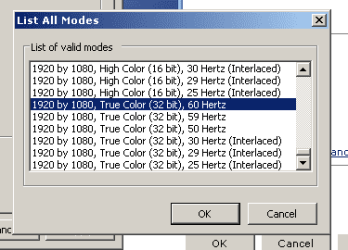
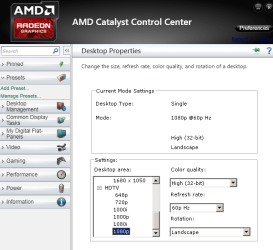
Yup. I also tried other ways of accessing the monitor resolution/refresh rate, but they all max out at FHD.

==

I'm a bit miffed because my daughter has a hand-me-down computer (a 20 year old Inspiron with a 15 year old graphic card) and her choice of resolutions go way, way higher than mine. Maybe, until I get a new computer, she can use this monitor :-)
 

Attachments

  • resolution.png
    resolution.png
    3.6 KB · Views: 18
  • resolution2.png
    resolution2.png
    3.4 KB · Views: 17
  • resolution3.png
    resolution3.png
    25.7 KB · Views: 17

My Computer My Computer

At a glance

Windows 7 Home Premium 64 bitAMD A6 36204 x 4 GBAMD Radeon HD 6530D
Computer type
PC/Desktop
Computer Manufacturer/Model Number
Acer Aspire X3470
OS
Windows 7 Home Premium 64 bit
CPU
AMD A6 3620
Memory
4 x 4 GB
Graphics Card(s)
AMD Radeon HD 6530D
Sound Card
AMD, Realtek
Monitor(s) Displays
iiyama ProLite B2209HDS full HD in portrait mode
Screen Resolution
1920x1080 or 1080x1920
Hard Drives
SSD 250 GB
WD Green 2 TB 5400 rpm
Antivirus
Avast
Browser
Opera (Blink)
Your graphics card:
---http://www.gpuzoo.com/GPU-AMD/Radeon_HD_6530D_IGP.html

Thanks. It's baffling, then, that I don't see that option, even with my graphics card's latest drivers and with my monitor's official drivers. I'm using HDMI at this moment.
 

My Computer My Computer

At a glance

Windows 7 Home Premium 64 bitAMD A6 36204 x 4 GBAMD Radeon HD 6530D
Computer type
PC/Desktop
Computer Manufacturer/Model Number
Acer Aspire X3470
OS
Windows 7 Home Premium 64 bit
CPU
AMD A6 3620
Memory
4 x 4 GB
Graphics Card(s)
AMD Radeon HD 6530D
Sound Card
AMD, Realtek
Monitor(s) Displays
iiyama ProLite B2209HDS full HD in portrait mode
Screen Resolution
1920x1080 or 1080x1920
Hard Drives
SSD 250 GB
WD Green 2 TB 5400 rpm
Antivirus
Avast
Browser
Opera (Blink)
In Catalyst Control Centre > Desktop Management > Advanced Display Settings, what is the present Display Detection Option ?
 

My Computer My Computer

At a glance

Windows 7 x64, Vista x64, 8.1 smartphoneIntel E8400 65W 64-bitDDR2 2 x 2GB, 1GB x 2XFX Radeon HD5750
Computer type
PC/Desktop
OS
Windows 7 x64, Vista x64, 8.1 smartphone
CPU
Intel E8400 65W 64-bit
Motherboard
Gigabyte EP45-UD3LR
Memory
DDR2 2 x 2GB, 1GB x 2
Graphics Card(s)
XFX Radeon HD5750
Sound Card
AMD High Definition Audio; Realtek High Definition Audio
Monitor(s) Displays
iiyama prolite X2377HDS
Screen Resolution
1920 x 1080
Hard Drives
500GB 7200 rpm Seagate ST3500413AS 16MB, 500GB 5400 rpm Toshiba MQ02ABF050H 32MB, 200GB 7200 rpm Seagate ST3200820AS 8MB, 2TB 7200 rpm Western Digital WD20EZRX 64MB
PSU
Enermax Liberty Modular
Case
Antec P193 Midi Tower
Keyboard
Mionix ZIBAL 60
Mouse
Razer USB 2.0 Diamondback Mouse or Huion Graphics Tablet
Browser
Internet Explorer, Lunascape, Firefox, Opera, Avast Safezone
I looked up your Acer and the service manual shows 18 different possible graphics cards, and all 18 have a DVI port (which would solve your problem).

Acer Aspire X3470 Service Manual (Page 97 of 111)

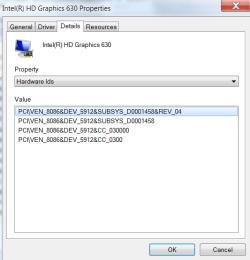
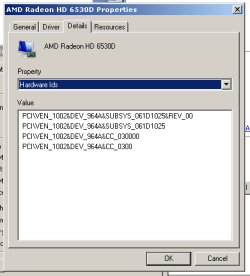
You might do control panel > display adapter > properties > details > Hardware IDs and look up the Device ID in driveridentifier.com or other similar site. That way we know precisely what graphics hardware your computer has.
Here's mine as an example, an Intel HD 630. The device ID is PCI\VEN_8086&DEV_5912
Intel(R) HD Graphics 630 driver free download for windows - System manufacturer - System Product Name
 

Attachments

  • pic.png
    pic.png
    24.8 KB · Views: 12

My Computer My Computer

At a glance

Win7 pro x64stock i7 7700kCorsair Vengeance LPX 16GB (2x8GB) DDR4 @ 320...integrated Intel HD 630
Computer type
PC/Desktop
Computer Manufacturer/Model Number
diy
OS
Win7 pro x64
CPU
stock i7 7700k
Motherboard
Gigabyte Z270N-WIFI mini-ITX
Memory
Corsair Vengeance LPX 16GB (2x8GB) DDR4 @ 3200MHz
Graphics Card(s)
integrated Intel HD 630
Sound Card
onboard Realtek ALC1220
Monitor(s) Displays
two vertically mounted samsung 55" 4k un55mu8000
Screen Resolution
1920x1280
Hard Drives
256GB Samsung EVO 960 M.2 pci-e NVMe SSD
PSU
SilverStone Nightjar ST45NF 450Watt Fanless
Case
No case. Motherboard is mounted directly onto power supply
Cooling
Evercool low profile 815EP with Panaflow 12L fan at 7v
Keyboard
Ortek MCK-86 mini
Mouse
Belkin 5-button USB
Internet Speed
spectrum 400mbps
In Catalyst Control Centre > Desktop Management > Advanced Display Settings, what is the present Display Detection Option ?

It says "manual" but I've also tried the other option.
 

My Computer My Computer

At a glance

Windows 7 Home Premium 64 bitAMD A6 36204 x 4 GBAMD Radeon HD 6530D
Computer type
PC/Desktop
Computer Manufacturer/Model Number
Acer Aspire X3470
OS
Windows 7 Home Premium 64 bit
CPU
AMD A6 3620
Memory
4 x 4 GB
Graphics Card(s)
AMD Radeon HD 6530D
Sound Card
AMD, Realtek
Monitor(s) Displays
iiyama ProLite B2209HDS full HD in portrait mode
Screen Resolution
1920x1080 or 1080x1920
Hard Drives
SSD 250 GB
WD Green 2 TB 5400 rpm
Antivirus
Avast
Browser
Opera (Blink)
I looked up your Acer and the service manual shows 18 different possible graphics cards, and all 18 have a DVI port (which would solve your problem).

My graphics card's connectors are blocked from the outside, and I connect the monitor to the motherboard's connectors, which are HDMI and VGA.

You might do control panel > display adapter > properties > details > Hardware IDs...

(see attachment)

...and the scan from driveridentifier tells me that "PCI\VEN_1022&DEV_7801&SUBSYS_061D1025&REV_40 AMD SATA Controller" needs to be updated, so I'll investigate that.
 

Attachments

  • hardware ids.png
    hardware ids.png
    4.5 KB · Views: 11
Last edited:

My Computer My Computer

At a glance

Windows 7 Home Premium 64 bitAMD A6 36204 x 4 GBAMD Radeon HD 6530D
Computer type
PC/Desktop
Computer Manufacturer/Model Number
Acer Aspire X3470
OS
Windows 7 Home Premium 64 bit
CPU
AMD A6 3620
Memory
4 x 4 GB
Graphics Card(s)
AMD Radeon HD 6530D
Sound Card
AMD, Realtek
Monitor(s) Displays
iiyama ProLite B2209HDS full HD in portrait mode
Screen Resolution
1920x1080 or 1080x1920
Hard Drives
SSD 250 GB
WD Green 2 TB 5400 rpm
Antivirus
Avast
Browser
Opera (Blink)
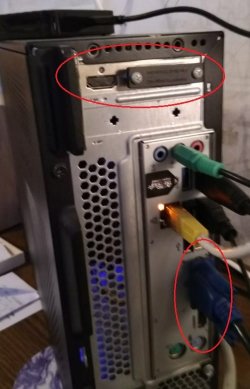
not sure what you mean that your graphics card's connectors are blocked from the outside. If you can use your smartphone to take a pic, that would be helpful

also can you post the status of your drivers by posting whatever is in the right-hand side of the display when you do start > run > msinfo32 > components > problem devices. If all your drivers are working fine, the right-hand side (which shows problem device detail) should be blank.
 

My Computer My Computer

At a glance

Win7 pro x64stock i7 7700kCorsair Vengeance LPX 16GB (2x8GB) DDR4 @ 320...integrated Intel HD 630
Computer type
PC/Desktop
Computer Manufacturer/Model Number
diy
OS
Win7 pro x64
CPU
stock i7 7700k
Motherboard
Gigabyte Z270N-WIFI mini-ITX
Memory
Corsair Vengeance LPX 16GB (2x8GB) DDR4 @ 3200MHz
Graphics Card(s)
integrated Intel HD 630
Sound Card
onboard Realtek ALC1220
Monitor(s) Displays
two vertically mounted samsung 55" 4k un55mu8000
Screen Resolution
1920x1280
Hard Drives
256GB Samsung EVO 960 M.2 pci-e NVMe SSD
PSU
SilverStone Nightjar ST45NF 450Watt Fanless
Case
No case. Motherboard is mounted directly onto power supply
Cooling
Evercool low profile 815EP with Panaflow 12L fan at 7v
Keyboard
Ortek MCK-86 mini
Mouse
Belkin 5-button USB
Internet Speed
spectrum 400mbps
not sure what you mean that your graphics card's connectors are blocked from the outside. If you can use your smartphone to take a pic, that would be helpful

Oh, I'm not sure if that is even relevant to my problem. But here it is (attachment).

also can you post the status of your drivers by posting whatever is in the right-hand side of the display when you do start > run > msinfo32 > components > problem devices. If all your drivers are working fine, the right-hand side (which shows problem device detail) should be blank.

It's blank.

I also tried the driveridentifier method (yes, I saw how it's done... watch where the drivers are unzipped, then use "browse", then use "let me pick"), but none of those drivers are accepted on my computer.
 

Attachments

  • IMG_20180912_073012a.jpg
    IMG_20180912_073012a.jpg
    46.9 KB · Views: 0

My Computer My Computer

At a glance

Windows 7 Home Premium 64 bitAMD A6 36204 x 4 GBAMD Radeon HD 6530D
Computer type
PC/Desktop
Computer Manufacturer/Model Number
Acer Aspire X3470
OS
Windows 7 Home Premium 64 bit
CPU
AMD A6 3620
Memory
4 x 4 GB
Graphics Card(s)
AMD Radeon HD 6530D
Sound Card
AMD, Realtek
Monitor(s) Displays
iiyama ProLite B2209HDS full HD in portrait mode
Screen Resolution
1920x1080 or 1080x1920
Hard Drives
SSD 250 GB
WD Green 2 TB 5400 rpm
Antivirus
Avast
Browser
Opera (Blink)
So you have internal motherboard graphics that you are using, and also a graphics card that is blocked off.

For the graphics card, I would remove the screws on the dvi port and remove the plastic covering the hdmi port on the graphics card, and giving each port a go. It could be that acer has built you a higher model x3470 but by covering those ports, sold it to you at a lower price so they could call it a lesser model. To try these ports, you will need to be sure there is no monitor plugged into the motherboard graphics ports, because when the system starts to boot if it detects something plugged into the motherboard graphics ports, the graphics card ports will be de-activated. Its uncommon for a system to be able to simultaneously use a graphics card alongside internal motherboard graphics.

From this document

cdn.cnetcontent.com/56/27/562790fe-bd6c-4e6b-a222-3a47a4b90f30.doc

we see from note 1 that the x3470 graphics specifications (resolutions?) vary by model.

The previous generation of amd motherboard graphics had a special dongle that had an ATI label and it was made specifically for amd in order to provide hdmi 1.4 functionality. Without that dongle you would get hdmi 1.0 resolutions (1920 max). AMD advertised those ports as "HDMI 1.4 via dongle". I'm not saying that's for sure the issue with your motherboard hdmi port, but it makes me suspicious.
 

My Computer My Computer

At a glance

Win7 pro x64stock i7 7700kCorsair Vengeance LPX 16GB (2x8GB) DDR4 @ 320...integrated Intel HD 630
Computer type
PC/Desktop
Computer Manufacturer/Model Number
diy
OS
Win7 pro x64
CPU
stock i7 7700k
Motherboard
Gigabyte Z270N-WIFI mini-ITX
Memory
Corsair Vengeance LPX 16GB (2x8GB) DDR4 @ 3200MHz
Graphics Card(s)
integrated Intel HD 630
Sound Card
onboard Realtek ALC1220
Monitor(s) Displays
two vertically mounted samsung 55" 4k un55mu8000
Screen Resolution
1920x1280
Hard Drives
256GB Samsung EVO 960 M.2 pci-e NVMe SSD
PSU
SilverStone Nightjar ST45NF 450Watt Fanless
Case
No case. Motherboard is mounted directly onto power supply
Cooling
Evercool low profile 815EP with Panaflow 12L fan at 7v
Keyboard
Ortek MCK-86 mini
Mouse
Belkin 5-button USB
Internet Speed
spectrum 400mbps
Back
Top