can the name of a user account be changed

blockie

New member
Member
VIP
Local time
12:57 PM
Messages
605
Location
in Assisted Care facility, Calif
I am the administrator of a resident computer in an Assisted Living facility. I have set up several user accounts with their first names so they could easily identify them. Several of the residents have left and no longer need a user account. How can I change the name of the accounts in question? I have the passwords.
 

My Computer My Computer

At a glance

W7 Ultimate2.2 bh Intel Core i3-2330M4MBOn Board
Computer type
Laptop
Computer Manufacturer/Model Number
Asus
OS
W7 Ultimate
CPU
2.2 bh Intel Core i3-2330M
Motherboard
Asustek Computer Inc. P53E 1.0
Memory
4MB
Graphics Card(s)
On Board
Sound Card
On Board
Monitor(s) Displays
On Board
Screen Resolution
1366 X 768
Hard Drives
ST9500423AS
ST2000DM USB Backup Drive External
in same screen where you made them you can change them. Just click the acoount and do "change account name" (translated form Dutch, so maybe slightly different)
 

My Computer My Computer

At a glance

Microsoft Windows 7 Home Premium 64-bits 7601...Intel(R) Core(TM) i3 CPU M 370 @ 2.40GHz4,00 GBATI Mobility Radeon HD 5400 Series
Computer type
Laptop
Computer Manufacturer/Model Number
ACER ASPIRE 5742G
OS
Microsoft Windows 7 Home Premium 64-bits 7601 Multiprocessor Free Service Pack 1
CPU
Intel(R) Core(TM) i3 CPU M 370 @ 2.40GHz
Motherboard
Acer Aspire 5742G
Memory
4,00 GB
Graphics Card(s)
ATI Mobility Radeon HD 5400 Series
Sound Card
(1) AMD High Definition Audio Device (2) Realtek High Defi
Screen Resolution
1366 x 768 x 32 bits (4294967296 colors) @ 60 Hz
Hard Drives
WDC WD5000BEVT-22ZAT0
Wouldn't it be easier simply to delete the unnecessary accounts and create new for new users?

When you change the name of a user profile in Windows, the name of the profile folder is not changed without editing the registry. If you change let's say user Abel's user account name to Zorro, you would have a situation where user Zorro has his personal folders located in C:\Users\Abel, pictures in C:\Users\Abel\Pictures and so on. Also Welcome / Login screen shows user accounts in alphabetical order according to the account name given when account was first created. Any later account name change does not change this order, i.e. if original accounts were Abel, Bubba and Cain and you later change Abel's account name to Zorro, they are still shown in original order Zorro (originally Abel), Bubba and Cain.

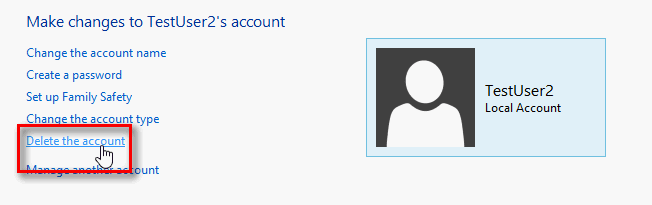
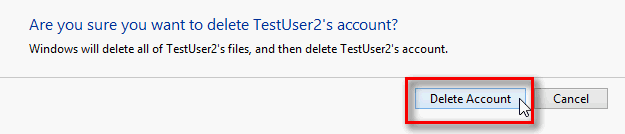
Hence my recommendation: delete the unnecessary accounts by selecting the user in Control Panel > User Accounts and clicking Delete the account, then selecting Delete Files and finally clicking Delete Account.

2013-05-09_002940.png

2013-05-09_003019.png

2013-05-09_003719.png

(Tutorial: http://www.sevenforums.com/tutorials/181036-user-account-delete.html)

Kari
 

My Computer My Computer

At a glance

Windows 10 Pro x64 EN-GB1.6 GHz Intel Core i7-720QM Processor6 GBATI Mobility Radeon HD 5850 Graphics
Computer type
Laptop
Computer Manufacturer/Model Number
HP ENVY 17-1150eg
OS
Windows 10 Pro x64 EN-GB
CPU
1.6 GHz Intel Core i7-720QM Processor
Memory
6 GB
Graphics Card(s)
ATI Mobility Radeon HD 5850 Graphics
Sound Card
Beats sound system with integrated subwoofer
Monitor(s) Displays
17" laptop display, 22" LED and 32" Full HD TV through HDMI
Screen Resolution
1600*900 (1), 1920*1080 (2&3)
Hard Drives
Internal: 2 x 500 GB SATA Hard Disk Drive 7200 rpm
External: 2TB for backups, 3TB USB3 network drive for media
Cooling
As Envy runs a bit warm, I have it on a Cooler Master pad
Keyboard
Logitech diNovo Media Desktop Laser (bluetooth)
Mouse
Logitech Performance Mouse MX
Internet Speed
50/10 Mbps VDSL
Antivirus
Windows Defender 4.3.9431.0
Browser
Maxthon 3.5.2., IE11
I wouldn't just rename the account. Delete the account no longer needed and create a new one. It not only clears out any settings and/or files the previous user had there, but it will have the correct file path (as Kari) said above.

I did that with an old computer (before I knew) and it was used for 2 years with the account named "Sara" but the file path using the user name "HP." So anytime I go to get a file over my network I have to go to the path C:\Users\HP... instead of C:\Users\Sara...
 

My Computer My Computer

At a glance

Windows 7 Ultimate x64AMD Phenom 9850 x4 2.50GHz4GB DDR2nVidia GeFore 210
Computer type
PC/Desktop
Computer Manufacturer/Model Number
Custom Built
OS
Windows 7 Ultimate x64
CPU
AMD Phenom 9850 x4 2.50GHz
Motherboard
ASUS M4A785-M
Memory
4GB DDR2
Graphics Card(s)
nVidia GeFore 210
Sound Card
Onboard
Monitor(s) Displays
Samsung SyncMaster BX2031 20" LED
Screen Resolution
1600x900
Hard Drives
Western Digital Caviar Blue 500 GB SATA III 7200 RPM
PSU
450 Watt
Case
Raygo R12-40835 ATX Mid-Tower Case
Cooling
Air
Antivirus
Microsoft Security Essentials
Browser
Google Chrome
Other Info
Laptop:
Intel Core Duo T2450 @ 2.00GHz
2GB RAM
Windows 7 Ultimate x86
Back
Top