Can you Back Up folders in Outlook?

BomberAF

New member
Member
VIP
Local time
2:43 AM
Messages
491
Location
Liverpool
I have created a couple of folders in Outlook that I use to save important emails in, but I want to know if there is a way to have those folders duplicated somehow with my user folder so that the emails can be backed up.
 

My Computer My Computer

At a glance

Windows 72.4 GHz Intel i3 cpu8GB
Computer Manufacturer/Model Number
Dell Inspiron
OS
Windows 7
CPU
2.4 GHz Intel i3 cpu
Memory
8GB
Mouse
MS Explorer Mouse
Internet Speed
100 Mb/s
take it from the lack of a response that it is not possible
 

My Computer My Computer

At a glance

Windows 72.4 GHz Intel i3 cpu8GB
Computer Manufacturer/Model Number
Dell Inspiron
OS
Windows 7
CPU
2.4 GHz Intel i3 cpu
Memory
8GB
Mouse
MS Explorer Mouse
Internet Speed
100 Mb/s
Last edited:

My Computer My Computer

At a glance

Win7 HP (x64)/Win7 Ultimate (x64)Core i7 9206 x 2GB Corsair XMS3CF HD4890
Computer Manufacturer/Model Number
Custom
OS
Win7 HP (x64)/Win7 Ultimate (x64)
CPU
Core i7 920
Motherboard
Intel X58
Memory
6 x 2GB Corsair XMS3
Graphics Card(s)
CF HD4890
Sound Card
Asus Xonar
Monitor(s) Displays
Dell 2408WFP
Screen Resolution
1920 x 1200
Hard Drives
2 x 150GB WDC Velociraptors (Raid 0)
1 x 1TB Seagate
1 x 1.5TB Seagate
PSU
Corsair HX1000W
Case
Antec 1200
Keyboard
Razer Lycosa/N52te
Mouse
Razer Lachesis
Thread seems to have slipped through the cracks ;)

There are several different methods of backing up email data from Outlook, these depend on several settings

Which version of outlook?
Are you using IMAP or POP3 (or Hotmail/Live account)?
Do you also need to backup contacts / Calendar / Notes Etc ?

If you can let us know more information there should be a way to suit your needs :)

I have to go out now but will check back later
 

My Computers My Computers

  • At a glance

    Windows 11 Pro x64 [Latest Release and Releas...Ryzen 9 5950X, 3.8 - 5.2 MHz64GB [2 x 32GB] DDR4 3200MHz4GB NVIDIA GEFORCE GTX 1650 Ti
    Computer type
    PC/Desktop
    Computer Manufacturer/Model Number
    ChillBlast - Custom to my design
    OS
    Windows 11 Pro x64 [Latest Release and Release Preview]
    CPU
    Ryzen 9 5950X, 3.8 - 5.2 MHz
    Motherboard
    Asus Prime X570-Pro
    Memory
    64GB [2 x 32GB] DDR4 3200MHz
    Graphics Card(s)
    4GB NVIDIA GEFORCE GTX 1650 Ti
    Sound Card
    On-board SPDIF to 5.1 System + HDMI [5.1 system]
    Monitor(s) Displays
    32" UHD 32 Bit HDR Monitor + 43" UHD 4K 32Bit HDR TV
    Screen Resolution
    2 x 3840 x 2160 @60Hz
    Hard Drives
    1TB M2 SSD OS, 500GB Fast Access SSD, 2 x 8TB Data + Various Externals from 1TB to 4TB, 10TB NAS
    PSU
    NZXT C750 80 PLUS Gold 750W Modular PSU
    Case
    Workstation Case [Matt Black]
    Cooling
    NZXT Kraken X63 280mm CPU Cooler +2x Quiet Case fans
    Keyboard
    Logitech Wireless MX Keys & K400 + others
    Mouse
    Logitech Wireless MX Master 3S
    Internet Speed
    920 MB Down 50 MB Up
    Antivirus
    BitDefender Total Security Pro
    Browser
    Chrome (always run latest Non-Beta)
    Other Info
    Also run ...
    Laptop - Quad 8GB - Windows 10 Pro x64
    Nexus 7 Android tablet x2
    Samsung 10.2" tablet
    Blackview TAB 8 4G Android Tablet c/w Keyboard
    Wacom Intuos Pro Medium Pen Pad
    Wacom Intuos Pro Small Pen Pad
    Wacom Expresskeys Remote
    Loopdeck+ Graphics Controller
    Shuttle Pro v2 Control
  • At a glance

    Windows 11 Pro x64 Latest RPIntel I7 10750H 5.0GHz32GB [2x16GB] DDR4 2933 MHznVidia GTX1650Ti 4 GB GDDR6
    Computer type
    Laptop
    System Manufacturer/Model Number
    Dell XPS 17 10750H
    OS
    Windows 11 Pro x64 Latest RP
    CPU
    Intel I7 10750H 5.0GHz
    Motherboard
    Dell XPS
    Memory
    32GB [2x16GB] DDR4 2933 MHz
    Graphics Card(s)
    nVidia GTX1650Ti 4 GB GDDR6
    Sound Card
    Stock [Realtek] 4 Speaker
    Monitor(s) Displays
    17" IPS UHD+ Infinity Edge Touchscreen
    Screen Resolution
    3840 x 2400
    Hard Drives
    2TB M2 NVMe, 4TB External + various 500GB & 1TB External NVMe (also have access to spinner HDD from
    PSU
    Stock
    Case
    Stock XPS Aluminium & Carbon Fibre
    Cooling
    Stock - Active Fan Control
    Keyboard
    Backlit + Various Logitech
    Mouse
    Stock Track Pad + Logitech MX Trackball
    Internet Speed
    72 MB Down 18MB Up
    Browser
    Chrome
    Other Info
    Also run ...
    Laptop - Quad 8GB - Windows 10 Pro x64
    Nexus 7 Android tablet x2
    10.2" tablet
    Sony Z3 Android Smartphone
    Wacom Intuos Pro Medium Pen Pad
    Wacom Intuos Pro Small Pen Pad
    Wacom Expresskeys Remote
    Loopdeck+ Graphics Controller
    Shuttle Pro v2 Control Pad
    10TB NAS
I have created a couple of folders in Outlook that I use to save important emails in, but I want to know if there is a way to have those folders duplicated somehow with my user folder so that the emails can be backed up.
I'm not sure which version of Outlook you're using but, in Outlook 2010, this is the method to back up folders independently of your main user folder:


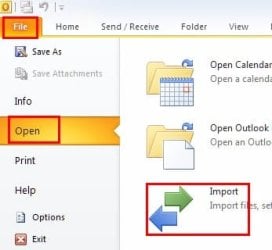
Click on the "File" tab then Select "Open" then click "Import":
ScreenShot00092.jpg

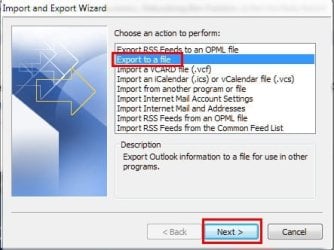
Select "Export to a file" then click "Next":
ScreenShot00093.jpg

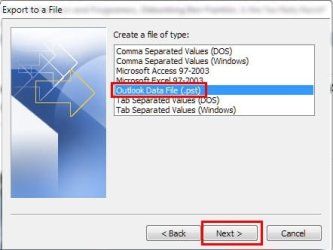
Select "Outlook Data File (.pst)" then click "Next":
ScreenShot00094.jpg

Select the folder you wish to backup (you can only select a single folder and it's subsequent sub-folders so, if you have more than one folder you want to back up and it's not a sub-folder of your initial backup folder, you'll have to do this entire routing for each separate folder):

ScreenShot00095.jpg

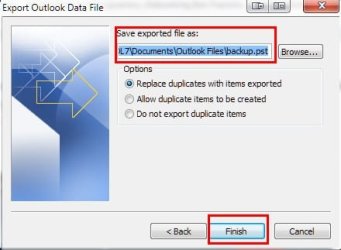
Select the name and destination of your backup and then click "Finish":
ScreenShot00096.jpg

I parenthetically mentioned the following, above, but it is something to keep in mind: you can only select a single folder and it's subsequent sub-folders so, if you have more than one folder you want to back up and it's not a sub-folder of your initial backup folder, you'll have to do this entire routing for each separate folder.

 

My Computer My Computer

At a glance

Windows 7 Ultimate x64 SP1Core2 Duo4 GBGM965 on-board
Computer Manufacturer/Model Number
Toshiba L355D
OS
Windows 7 Ultimate x64 SP1
CPU
Core2 Duo
Motherboard
Intel
Memory
4 GB
Graphics Card(s)
GM965 on-board
Sound Card
RealTek on-board
Monitor(s) Displays
19"+17"(laptop)
Screen Resolution
1440x900 (x 2)
Hard Drives
500GB Ext. 200GB Internal
PSU
N/A
Case
N/A
Cooling
N/A
Back
Top