Have a Win 7 Pro 64bit system. Started to get a disabled root\multifunction\0000 error in system health/performance about the time Windows Defender updated a week or so ago. Web seach indicates that Defender may be the culprit.
Not visable in main Device Manager window but does show up under view/hidden in Device Manager
Can I remove the Windows Defender program/setup from my system without issues to verify that's the problem.
I use another full Internet security/AV suite and didn't even know Windows Defender was on my sytem until recently.
Hi Tim...as it looks you can't really uninstall Defender in se7en (there was a way in Vista via running
msiexec /uninstall windowsdefender.msi /quiet /log uninstall.log
from the Admin console. However you can disable it (hope that'll save your purposes)
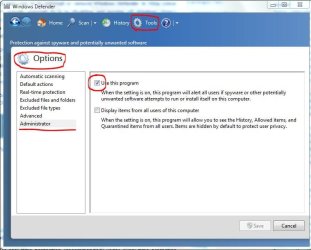
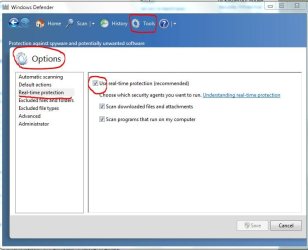
Start Defender and change those 2 settings under Tools/Options
and
You'll get a message that Windows Defender is turned off
To turn it back on just run Defender again...it'll ask for it
-DG
My Computer
Computer Manufacturer/Model Number
HP m8000n
OS
Windows 7 Ultimate x86
CPU
DualCore AMD Athlon 64 X2, 2600 MHz 5200+
Motherboard
Asus M2N68-LA (Narra)
Memory
Samsung 2GB DDR2
Graphics Card(s)
Onboard NVIDIA GeForce 6150SE nForce 430
Sound Card
Onboard nVIDIA nForce 6100-430 (MCP61P)
Monitor(s) Displays
Westinghouse 19" LED
Screen Resolution
1280x1024
Hard Drives
SATA II Seagate Barracuda 500GB
USB II WD Elements 500GB
USB II WD My Book 1TB
USB II WD My Book 2TB
Thanks guys...it has been disabled all the time...just since the last "update" for Defender have I had a phantom "device is disabled" error...seems to be a common problem and seems to be associated with Defender and the last "update" that has caused the issue...at least from the latest Google search
Seems also to be unaimous that in Win 7 you can not delete it from the system...next plan is to check Windows Update history and see if I can uninstall the "update" from there ?