Solved Cannot access external hard drive.

mkmkmk4780

New member
I've been using this hard drive for a while, and now all of a sudden I cannot access it. Under My Computer, it is referenced by Local Disk (H: ). Usually, it says MK HD (F: ) or (E: ). When I left or right click on the disk, Windows Explorer freezes. I have tried changing the letter of the drive by using Disk Management,however Disk Management gets stuck while saying "Connecting to Virtual Disk Service...".

Any suggestions on how I can access my hard drive? Data recovery is sort of important, but if a reformat is necessary, then that is fine.
 

My Computer

Computer Manufacturer/Model Number
Dell Inspiron 1545
OS
Windows 7 x64
CPU
Intel Core2 Duo 2.2GHz
Memory
4GB
Screen Resolution
1366x768
Hard Drives
218GB internal, 500GB external
I would try another cable first, or another port. What type drive is it?
 

My Computer

Computer type
PC/Desktop
Computer Manufacturer/Model Number
Dude Build
OS
Windows 10 Pro X64
CPU
Intel(R) Core(TM) i5-3570K CPU OC@ 4.5GHZ Turbo
Motherboard
MSI Z77A-G45 Gaming
Memory
8.00 GB DDR3 1600Mhz
Graphics Card(s)
MSI Gaming X GTX 1070
Sound Card
Realtek High Definition
Monitor(s) Displays
Dell S23O9W, HP L1710
Screen Resolution
DELL-1920 x 1080 HP-1280 x1024
Hard Drives
Crucial m4 256 SSD, WD 7200RPM 500GB WD 1TB
PSU
Seasonic X650 GOLD
Case
Zalman Z12
Cooling
Antec Kuhler 920
Keyboard
Logitech
Mouse
MSI DS100 Interceptor
Internet Speed
50 down and 5 up
Antivirus
MSE
Browser
Chrome, IE 11
Other Info
Logitech X-620 Speakers
I've already tried those suggestions. It is a 500GB Verbatim hard drive.
 

My Computer

Computer Manufacturer/Model Number
Dell Inspiron 1545
OS
Windows 7 x64
CPU
Intel Core2 Duo 2.2GHz
Memory
4GB
Screen Resolution
1366x768
Hard Drives
218GB internal, 500GB external
I will have access to another PC tomorrow. I will test the hard drive on that to help identify the problem.

In the mean time, here are some screenshots of Disk Management:

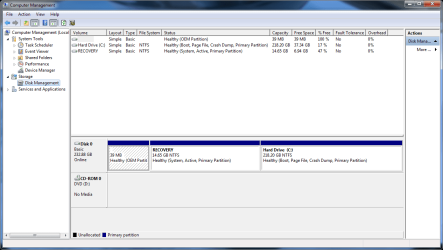
-Here is what it looks like without the hard drive connected:
Disk Management (no HD).png

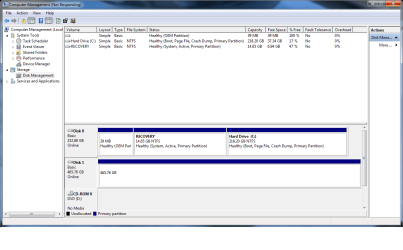
-Here is what it looks like when I connect the hard drive while the Computer Management window is open:
Disk Management (HD, not responding).png
Note that Disk 1 is my external hard drive. When I try to click on it, the window becomes non-responsive.

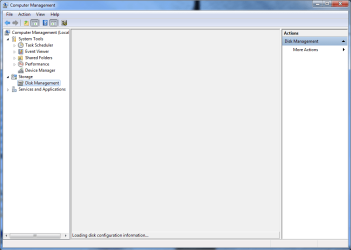
-Here is what it looks like when I close Computer Management, connect my hard drive, then re-open Computer Management:
Disk Management (HD, Loading disk configuration information).png
It stays like this for a while (but doesn't become non-responsive). Note that this is the first time I have seen the message at the bottom "Loading disk configuration information".

-Finally, here is the screen that I have always been getting:
Disk Management (HD, Connecting to Virtual Disk Service...).png
It stays like this, but doesn't become non-responsive.
 
Last edited:

My Computer

Computer Manufacturer/Model Number
Dell Inspiron 1545
OS
Windows 7 x64
CPU
Intel Core2 Duo 2.2GHz
Memory
4GB
Screen Resolution
1366x768
Hard Drives
218GB internal, 500GB external
OK,that is one too many screenshots.:D My bad, it doesn't take me anywhere but I shall not jump into any hasty conclusions.

My thinking at this point of time is that if it repeats the same in another PC, we may have to get into data recovery mode. I shall wait for the screenshots from another PC. (If by any chance your external drive is readable on another PC, copy all data in it to another external drive/storage media and then we shall format it. That is my plan as of now.)
 

My Computer

OS
Windows 7 Home Premium 32 bit
The problem definitely lies with the hard drive. We'll have to do the undesirable: re-format it. The only way I know how to do that is by right-clicking on the hard drive and selecting "Format". However, as I mentioned before, whenever I click on the hard drive the window becomes non-responsive.
 

My Computer

Computer Manufacturer/Model Number
Dell Inspiron 1545
OS
Windows 7 x64
CPU
Intel Core2 Duo 2.2GHz
Memory
4GB
Screen Resolution
1366x768
Hard Drives
218GB internal, 500GB external
What happened? Did you try the HDD on another PC? With what results?

Now Run MiniTools Partition Wizard Home edition. Download the bootable CD version from Free download Magic Partition Manager Software, partition magic alternative, free partition magic, partition magic Windows 7 and server partition software - Partition Wizard Online (the last one on this page)

You may either burn the ISO to a CD and boot from it or create a bootable pen drive with that ISO using Rufus Rufus - Create bootable USB drives the easy way

Note: If you had created a bootable pen drive, when booting with it you have to type linux0 against the boot prompt and press Enter for the boot process to continue. ( It is zero and not the alphabet O. You may press TAB key to see all available options linux0, linux1, local, I think.)

Let us know how it shows up in Partition Wizard. Take a camera snapshot and post it. Let us see whether data recovery is possible before trying to format.
 
Last edited:

My Computer

OS
Windows 7 Home Premium 32 bit
I seem to have the exact same problem with my hard drive. It freezes when I try to do anything with it and will only be read if the power supply to the hard drive is reset, disconnecting and connecting the USB does not let my computer read the drive.

The weird thing is, the drive works on Macs and not other Windows PC so I was wondering what steps I should take to solve this.

As a sidenote, I did not format it for the Mac.
 

My Computer

Computer type
PC/Desktop
OS
Windows 7 64 bit
Hi Octoben.

Welcome to Seven Forums.

Just a quick note before leaving station.( I am out for the next two days.)

When you can read the drive, copy all data to another drive (backup) and then try to format your problem hard drive. ( If Windows Disk Management cannot format it, try formatting with MiniTools Partition Wizard. I would prefer that you run PW from a bootable CD/pendrive.)

Download the bootable CD version from Free download Magic Partition Manager Software, partition magic alternative, free partition magic, partition magic Windows 7 and server partition software - Partition Wizard Online (the last one on this page)

You may either burn the ISO to a CD and boot from it or create a bootable pen drive with that ISO using Rufus Rufus - Create bootable USB drives the easy way

Note: If you had created a bootable pen drive, when booting with it you have to type linux0 against the boot prompt and press Enter for the boot process to continue. ( It is zero and not the alphabet O. You may press TAB key to see all available options)

OK, I got a call to rush to the Pickup vehicle. Bye.
 

My Computer

OS
Windows 7 Home Premium 32 bit
Here's an update for you:

I downloaded Partition Manager and used Rufus to allow my laptop to boot from my USB drive. From there, I was able to view the data on my hard drive. I didn't have a viable transfer location available (and the data isn't too terribly important) so I decided to re-format the hard drive. Note that this wasn't possible before as Windows Explorer would freeze every time I tried to click on my hard drive (be it left- or right-clicking). Thus, my hard drive was wiped clean. I think this was the best option in the end. It is now working fine again, being filled with remnants of its previous contents. Thank you all for your help.
 

My Computer

Computer Manufacturer/Model Number
Dell Inspiron 1545
OS
Windows 7 x64
CPU
Intel Core2 Duo 2.2GHz
Memory
4GB
Screen Resolution
1366x768
Hard Drives
218GB internal, 500GB external
Hi triplemk4780, :)

I am glad to note you successfully ran Partition Wizard from the Rufus-created bootable pen drive as per the instructions contained in my post #8.

You perhaps ran the Partition Recovery Wizard in it and could view the files in the partition explorer. Had you finished the operation, it would have repaired the partition table and your hard disk would have been restored. Anyway, data recovery not being a necessity, you chose to format it with PW. Good.

I am happy to see the solved tick mark. Thanks for the update.
 

My Computer

OS
Windows 7 Home Premium 32 bit
I tried booting with the same way.
It says some kernel loading problem.
I need to recover my hard disk.
Kindly help
 

My Computer

Computer type
Laptop
Computer Manufacturer/Model Number
Lenovo
OS
Window 8.1
Please start a new thread explaining your problem clearly. If an external drive is involved give all details like make, model /P/N , capacity etc.,. Also post a screenshot of Windows Disk Management with only the problem external drive connected.
 

My Computer

OS
Windows 7 Home Premium 32 bit
I am having the exact same problem as user mkmkmk4780. Could you please assist me. The data on my external is extremely important,and having to format it would be no option,unless there are other ways of retrieving the data
 

My Computer

Computer type
PC/Desktop
Computer Manufacturer/Model Number
HP
OS
Windows 7 Ultimate x64
CPU
Intel Core I5-3230M
Memory
8192MB
Graphics Card(s)
Nvidia 820m
Hi Wamfie,

Welcome onboard.

You may feel it is the same problem. But we may feel different if you explain the problem clearly.:)

So please start a new thread explaining your problem without referencing it to this thread - as if you hadn't seen or read this thread.

Please give complete details of your external drive and what exactly is happening. If possible post a screenshot of how the drive appears in Windows Disk Management. http://www.sevenforums.com/tutorials/274797-disk-management-post-screen-capture-image.html

Hope to see you return in a new thread.
 

My Computer

OS
Windows 7 Home Premium 32 bit
Hi triplemk4780, :)

I am glad to note you successfully ran Partition Wizard from the Rufus-created bootable pen drive as per the instructions contained in my post #8.

You perhaps ran the Partition Recovery Wizard in it and could view the files in the partition explorer. Had you finished the operation, it would have repaired the partition table and your hard disk would have been restored. Anyway, data recovery not being a necessity, you chose to format it with PW. Good.

I am happy to see the solved tick mark. Thanks for the update.

Hi Jumanji,
Please show me step by step for the post#8, i already download but still dont know how to use that..facing same problem & the content of HD very importatn to me:confused::confused:
 

My Computer

Computer type
Laptop
Computer Manufacturer/Model Number
Dell Inspiron 5520
OS
Windows 7 Home Premium 64bit
CPU
Intel i7
Memory
8GB RAM
Back
Top