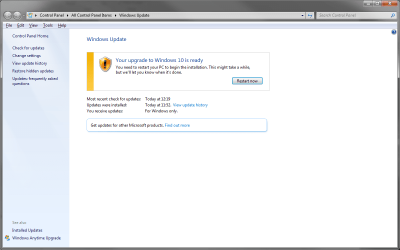
Cannot check for Win 7 updates after reserving Win 10

JamesPearlEX

New member
Local time
11:13 PM
Messages
12
I decided to reserve a copy of Windows 10 to potentially install at a later date as I do not have time at the moment. This was an effort in itself as it turns out Windows requires IE11 to be enabled.

However, I did not know that the Windows 10 app would constantly nag you to upgrade and I cancelled my reservation. I cannot check for updates as it just says that I am ready to upgrade to Windows 10 and cannot check for updates without restarting. I have searched around and haven't really found anyone with the same problem.

I have uninstalled the updates below and have also deleted the temporary windows installation files in disc cleanup to get 5GB back.
KB3035583
KB3075851
KB2952664

I still cannot check for updates as it wants me to upgrade to Windows 10. Even though I have deleted the Windows 10 installation files, and the $WINDOWS~.bt folder has gone, I am reluctant to click restart now in Windows update as I don't know what will happen.

Any ideas how to fix this as I would like to be able to get updates?
 

My Computer My Computer

Computer type
PC/Desktop
OS
Windows 7 Professional x64
CPU
i5 2500k
Motherboard
MSI P67A-GD53
Memory
16GB Corsair Vengeance
Graphics Card(s)
EVGA GTX770 ACX
Sound Card
Asus Xonar DGX
Monitor(s) Displays
BenQ BL2411PT, Philips 241ESB
Hard Drives
250GB Samsung 840 EVO,
1TB Samsung F3,
3TB WD Red
PSU
Corsair HX650
Case
Fractal Design Define R4
Cooling
Antex Kuhler H2O 620
Keyboard
Logitech G710+
Mouse
Logitech MX518
Antivirus
MSE
Browser
Firefox
I decided to reserve a copy of Windows 10 to potentially install at a later date as I do not have time at the moment. This was an effort in itself as it turns out Windows requires IE11 to be enabled.

However, I did not know that the Windows 10 app would constantly nag you to upgrade and I cancelled my reservation. I cannot check for updates as it just says that I am ready to upgrade to Windows 10 and cannot check for updates without restarting. I have searched around and haven't really found anyone with the same problem.

I have uninstalled the updates below and have also deleted the temporary windows installation files in disc cleanup to get 5GB back.
KB3035583
KB3075851
KB2952664

I still cannot check for updates as it wants me to upgrade to Windows 10. Even though I have deleted the Windows 10 installation files, and the $WINDOWS~.bt folder has gone, I am reluctant to click restart now in Windows update as I don't know what will happen.

Any ideas how to fix this as I would like to be able to get updates?

Does Windows 10 still appear in Windows Update? If so you'll have to hide it : Windows Update - Hide or Restore Hidden Updates

You'll surely have that too to uninstall kb3068708
 

My Computer My Computer

Computer type
PC/Desktop
Computer Manufacturer/Model Number
Custom Build
OS
Windows 7 Professional SP1 - x64 [Non-UEFI Boot]
CPU
Ivy Bridge Core i5 3570K (Delidded)
Motherboard
Asus P8Z77-V LE PLUS
Memory
G.Skill "Ares" DDR3 PC3-12800 - 1600MHz (16Gb)
Graphics Card(s)
Asus Dual-RX480-O4G
Sound Card
Creative Sound Blaster Z w/5.1 sound system
Monitor(s) Displays
Asus IPS 23"
Screen Resolution
16/9
Hard Drives
Internal:
500Go Sata 6Gb/s (x2)
500Go Sata 3Gb/s (x2)
SSD 60Go Sata 6Gb/s
PSU
In Win C 900W Series 80+ Platinum
Case
Thermaltake Chaser A71
Cooling
Custom Water Cooling Loop
Keyboard
Cooler Master QuickFire XTi
Mouse
Razer Imperator 2012 (4G)
Antivirus
MSE
Browser
IE 11.0.xxx Rtm
Other Info
"Raid0" with Intel Smart Response Technology (HDD/SSD)
I can't even hide or check for updates. The only thing I can do is restart my pc to begin the Windows 10 installation.
 

Attachments

  • Windows Update.png
    Windows Update.png
    43.7 KB · Views: 36

My Computer My Computer

Computer type
PC/Desktop
OS
Windows 7 Professional x64
CPU
i5 2500k
Motherboard
MSI P67A-GD53
Memory
16GB Corsair Vengeance
Graphics Card(s)
EVGA GTX770 ACX
Sound Card
Asus Xonar DGX
Monitor(s) Displays
BenQ BL2411PT, Philips 241ESB
Hard Drives
250GB Samsung 840 EVO,
1TB Samsung F3,
3TB WD Red
PSU
Corsair HX650
Case
Fractal Design Define R4
Cooling
Antex Kuhler H2O 620
Keyboard
Logitech G710+
Mouse
Logitech MX518
Antivirus
MSE
Browser
Firefox
Ahhh...But if you restart from the start menu it shouldn't install any. I mean i've that too but mine is loaded with Windows 10 and i've delayed the date for the install.

I can't check for update too but i know that.

You is a different matter since you have deleted the BT folder and KBs, it should not boot with the new OS. Did you already rebooted since?
 

My Computer My Computer

Computer type
PC/Desktop
Computer Manufacturer/Model Number
Custom Build
OS
Windows 7 Professional SP1 - x64 [Non-UEFI Boot]
CPU
Ivy Bridge Core i5 3570K (Delidded)
Motherboard
Asus P8Z77-V LE PLUS
Memory
G.Skill "Ares" DDR3 PC3-12800 - 1600MHz (16Gb)
Graphics Card(s)
Asus Dual-RX480-O4G
Sound Card
Creative Sound Blaster Z w/5.1 sound system
Monitor(s) Displays
Asus IPS 23"
Screen Resolution
16/9
Hard Drives
Internal:
500Go Sata 6Gb/s (x2)
500Go Sata 3Gb/s (x2)
SSD 60Go Sata 6Gb/s
PSU
In Win C 900W Series 80+ Platinum
Case
Thermaltake Chaser A71
Cooling
Custom Water Cooling Loop
Keyboard
Cooler Master QuickFire XTi
Mouse
Razer Imperator 2012 (4G)
Antivirus
MSE
Browser
IE 11.0.xxx Rtm
Other Info
"Raid0" with Intel Smart Response Technology (HDD/SSD)
I've rebooted many times after uninstalling the 3 updates and some other stuff and nothing has happened. I'm tempted just to press the restart button in Windows Update to see what happens as the installation files aren't there anymore.
 

My Computer My Computer

Computer type
PC/Desktop
OS
Windows 7 Professional x64
CPU
i5 2500k
Motherboard
MSI P67A-GD53
Memory
16GB Corsair Vengeance
Graphics Card(s)
EVGA GTX770 ACX
Sound Card
Asus Xonar DGX
Monitor(s) Displays
BenQ BL2411PT, Philips 241ESB
Hard Drives
250GB Samsung 840 EVO,
1TB Samsung F3,
3TB WD Red
PSU
Corsair HX650
Case
Fractal Design Define R4
Cooling
Antex Kuhler H2O 620
Keyboard
Logitech G710+
Mouse
Logitech MX518
Antivirus
MSE
Browser
Firefox
Before try to uninstall the article ID 3068708 i mentionned above. Also try to see in the Task Manager if GWX.exe is still running and kill the process.

PS: I'll be off this week-end days, luckily some around will help too.
 

My Computer My Computer

Computer type
PC/Desktop
Computer Manufacturer/Model Number
Custom Build
OS
Windows 7 Professional SP1 - x64 [Non-UEFI Boot]
CPU
Ivy Bridge Core i5 3570K (Delidded)
Motherboard
Asus P8Z77-V LE PLUS
Memory
G.Skill "Ares" DDR3 PC3-12800 - 1600MHz (16Gb)
Graphics Card(s)
Asus Dual-RX480-O4G
Sound Card
Creative Sound Blaster Z w/5.1 sound system
Monitor(s) Displays
Asus IPS 23"
Screen Resolution
16/9
Hard Drives
Internal:
500Go Sata 6Gb/s (x2)
500Go Sata 3Gb/s (x2)
SSD 60Go Sata 6Gb/s
PSU
In Win C 900W Series 80+ Platinum
Case
Thermaltake Chaser A71
Cooling
Custom Water Cooling Loop
Keyboard
Cooler Master QuickFire XTi
Mouse
Razer Imperator 2012 (4G)
Antivirus
MSE
Browser
IE 11.0.xxx Rtm
Other Info
"Raid0" with Intel Smart Response Technology (HDD/SSD)
I just removed the update you mentioned and it hasn't changed the Windows Update page. GWX.exe isn't running.
 

My Computer My Computer

Computer type
PC/Desktop
OS
Windows 7 Professional x64
CPU
i5 2500k
Motherboard
MSI P67A-GD53
Memory
16GB Corsair Vengeance
Graphics Card(s)
EVGA GTX770 ACX
Sound Card
Asus Xonar DGX
Monitor(s) Displays
BenQ BL2411PT, Philips 241ESB
Hard Drives
250GB Samsung 840 EVO,
1TB Samsung F3,
3TB WD Red
PSU
Corsair HX650
Case
Fractal Design Define R4
Cooling
Antex Kuhler H2O 620
Keyboard
Logitech G710+
Mouse
Logitech MX518
Antivirus
MSE
Browser
Firefox
Try the command SFC /SCANNOW as Admin before, reboot and see it again... I telling that manner in case you'll have to reset windows update: Windows Update - Reset and have to re-registred the windows update components, which is the hardest solution.

Wait a little some around will give their advices too.
 

My Computer My Computer

Computer type
PC/Desktop
Computer Manufacturer/Model Number
Custom Build
OS
Windows 7 Professional SP1 - x64 [Non-UEFI Boot]
CPU
Ivy Bridge Core i5 3570K (Delidded)
Motherboard
Asus P8Z77-V LE PLUS
Memory
G.Skill "Ares" DDR3 PC3-12800 - 1600MHz (16Gb)
Graphics Card(s)
Asus Dual-RX480-O4G
Sound Card
Creative Sound Blaster Z w/5.1 sound system
Monitor(s) Displays
Asus IPS 23"
Screen Resolution
16/9
Hard Drives
Internal:
500Go Sata 6Gb/s (x2)
500Go Sata 3Gb/s (x2)
SSD 60Go Sata 6Gb/s
PSU
In Win C 900W Series 80+ Platinum
Case
Thermaltake Chaser A71
Cooling
Custom Water Cooling Loop
Keyboard
Cooler Master QuickFire XTi
Mouse
Razer Imperator 2012 (4G)
Antivirus
MSE
Browser
IE 11.0.xxx Rtm
Other Info
"Raid0" with Intel Smart Response Technology (HDD/SSD)
Thanks for your help. I have run the SFC scan and attached the log file, but I've don't know if the corrupted files are of any relevance to my issue. I'll wait for other replies before doing anything else.
 

Attachments

My Computer My Computer

Computer type
PC/Desktop
OS
Windows 7 Professional x64
CPU
i5 2500k
Motherboard
MSI P67A-GD53
Memory
16GB Corsair Vengeance
Graphics Card(s)
EVGA GTX770 ACX
Sound Card
Asus Xonar DGX
Monitor(s) Displays
BenQ BL2411PT, Philips 241ESB
Hard Drives
250GB Samsung 840 EVO,
1TB Samsung F3,
3TB WD Red
PSU
Corsair HX650
Case
Fractal Design Define R4
Cooling
Antex Kuhler H2O 620
Keyboard
Logitech G710+
Mouse
Logitech MX518
Antivirus
MSE
Browser
Firefox
Thanks for your help. I have run the SFC scan and attached the log file, but I've don't know if the corrupted files are of any relevance to my issue. I'll wait for other replies before doing anything else.

Here one thing that have worked for me without totally reseting Windows Update:

How do I reset Windows Update components?

You can either use the Microsoft fix-it solution (i'd rather do it manually for better control)

Or

Using the manual step by step solution. Start step 1 and step 2 but Skip the steps 3, 4 and 7 and go to step 5 to 9 to start the services.

Hope this help.

PS: The log shows errors on KB3022345, try to see if its still on your system, then uninstall it.
 

My Computer My Computer

Computer type
PC/Desktop
Computer Manufacturer/Model Number
Custom Build
OS
Windows 7 Professional SP1 - x64 [Non-UEFI Boot]
CPU
Ivy Bridge Core i5 3570K (Delidded)
Motherboard
Asus P8Z77-V LE PLUS
Memory
G.Skill "Ares" DDR3 PC3-12800 - 1600MHz (16Gb)
Graphics Card(s)
Asus Dual-RX480-O4G
Sound Card
Creative Sound Blaster Z w/5.1 sound system
Monitor(s) Displays
Asus IPS 23"
Screen Resolution
16/9
Hard Drives
Internal:
500Go Sata 6Gb/s (x2)
500Go Sata 3Gb/s (x2)
SSD 60Go Sata 6Gb/s
PSU
In Win C 900W Series 80+ Platinum
Case
Thermaltake Chaser A71
Cooling
Custom Water Cooling Loop
Keyboard
Cooler Master QuickFire XTi
Mouse
Razer Imperator 2012 (4G)
Antivirus
MSE
Browser
IE 11.0.xxx Rtm
Other Info
"Raid0" with Intel Smart Response Technology (HDD/SSD)
I've just got back from holiday and have tried all the above suggestions yet nothing has worked. I still get the same thing when I open Windows Update and can't check for updates.

Also, after turning on my pc for the first time in 2 weeks I have somehow lost 10GB on my SSD and I got the pop up that asks when I want to schedule my Windows 10 Upgrade.

This is getting pretty frustrating now and I can't seem to find any other suggestions.
 

My Computer My Computer

Computer type
PC/Desktop
OS
Windows 7 Professional x64
CPU
i5 2500k
Motherboard
MSI P67A-GD53
Memory
16GB Corsair Vengeance
Graphics Card(s)
EVGA GTX770 ACX
Sound Card
Asus Xonar DGX
Monitor(s) Displays
BenQ BL2411PT, Philips 241ESB
Hard Drives
250GB Samsung 840 EVO,
1TB Samsung F3,
3TB WD Red
PSU
Corsair HX650
Case
Fractal Design Define R4
Cooling
Antex Kuhler H2O 620
Keyboard
Logitech G710+
Mouse
Logitech MX518
Antivirus
MSE
Browser
Firefox
I just pressed the restart now button in Windows Update to see what happens. It just restarts my PC as normal but when it loads into my desktop the exact same Windows Update screen opens by itself. I am so confused as to what is happening. I may just have to reinstall Windows.
 

My Computer My Computer

Computer type
PC/Desktop
OS
Windows 7 Professional x64
CPU
i5 2500k
Motherboard
MSI P67A-GD53
Memory
16GB Corsair Vengeance
Graphics Card(s)
EVGA GTX770 ACX
Sound Card
Asus Xonar DGX
Monitor(s) Displays
BenQ BL2411PT, Philips 241ESB
Hard Drives
250GB Samsung 840 EVO,
1TB Samsung F3,
3TB WD Red
PSU
Corsair HX650
Case
Fractal Design Define R4
Cooling
Antex Kuhler H2O 620
Keyboard
Logitech G710+
Mouse
Logitech MX518
Antivirus
MSE
Browser
Firefox
Back
Top