Solved Cannot connect to internet, constant orange

misternomo

New member
Member
Local time
1:46 AM
Messages
32
Just installed a new motherboard onto my computer and everything is working fine on it, all the settings are the same and no problems have been encountered when working on it except that I cannot connect to the internet (wired) and when I look at the back of the computer where I plugged the network cable into its a constant orange on the left and a blinking orange on the right where it should be green.

Tried disconnecting and reconnecting, restarting internet.

There's only one network I can connect to and it won't let me for some reason, it's as if the network adapter is broken or something but I want to make sure before I buy a new one.

Any suggestions on what I should try next?

Thanks
 

My Computer

Computer Manufacturer/Model Number
Custom Build
OS
MS Windows 7 Home Premium 64-bit
CPU
AMD FX 8320
Motherboard
ASUS M5A97 Pro
Memory
8gb Dual Channel Corsair
Graphics Card(s)
Amd R9 270X
Sound Card
Realtek High Definition Audio
Monitor(s) Displays
DELL ST2010
Screen Resolution
1600x900
Hard Drives
977GB Seagate ST31000528AS ATA Device (IDE)
PSU
550 watt
Case
XClio Godspeed 2
Cooling
n/a
Just installed a new motherboard onto my computer and everything is working fine on it, all the settings are the same and no problems have been encountered when working on it except that I cannot connect to the internet (wired) and when I look at the back of the computer where I plugged the network cable into its a constant orange on the left and a blinking orange on the right where it should be green.

Tried disconnecting and reconnecting, restarting internet.

There's only one network I can connect to and it won't let me for some reason, it's as if the network adapter is broken or something but I want to make sure before I buy a new one.

Any suggestions on what I should try next?

Thanks

Try shutting down the system, unplug the power and push the power button to bleed off all power then plug it back in, boot up and see if the network light is green yet.

If not then you might want to try clearing the cmos on the board, just be sure and check the bios settings first to make sure you get them back to how they were.
 

My Computer

Computer type
PC/Desktop
Computer Manufacturer/Model Number
Home built
OS
Windows 7 Ult, Windows 8.1 Pro,
CPU
Q9650-4.275GHz, E8600 4.5GHz, E6750-3.8GHz
Motherboard
Evga 780i FTW
Memory
G.Skill PC2 9600 1200Mhz 5 5 5 15 2T
Graphics Card(s)
GTX480
Sound Card
Asus Xonar D2
Monitor(s) Displays
HannsG
Screen Resolution
1680X1050
Hard Drives
GSkill Phoenix Pro 120GB SSD
PSU
ThermalTake Toughpower 1000Watt modular
Case
ThermalTake XaserV
Cooling
Xigmatek S1283
Keyboard
Logitech G15
Mouse
Logitech G9
Internet Speed
T1
Just installed a new motherboard onto my computer and everything is working fine on it, all the settings are the same and no problems have been encountered when working on it except that I cannot connect to the internet (wired) and when I look at the back of the computer where I plugged the network cable into its a constant orange on the left and a blinking orange on the right where it should be green.

Tried disconnecting and reconnecting, restarting internet.

There's only one network I can connect to and it won't let me for some reason, it's as if the network adapter is broken or something but I want to make sure before I buy a new one.

Any suggestions on what I should try next?

Thanks

Try shutting down the system, unplug the power and push the power button to bleed off all power then plug it back in, boot up and see if the network light is green yet.

If not then you might want to try clearing the cmos on the board, just be sure and check the bios settings first to make sure you get them back to how they were.

Tried both solutions but got no difference, still orange.
The motherboards a ASUS M5A97 PRO
 

My Computer

Computer Manufacturer/Model Number
Custom Build
OS
MS Windows 7 Home Premium 64-bit
CPU
AMD FX 8320
Motherboard
ASUS M5A97 Pro
Memory
8gb Dual Channel Corsair
Graphics Card(s)
Amd R9 270X
Sound Card
Realtek High Definition Audio
Monitor(s) Displays
DELL ST2010
Screen Resolution
1600x900
Hard Drives
977GB Seagate ST31000528AS ATA Device (IDE)
PSU
550 watt
Case
XClio Godspeed 2
Cooling
n/a
My dad always says, Keep It Simple. So, here it is. Check the cable. Both ends. Be sure that they're both ends of the same cable. Be sure the cable is CAT5 or better. Be sure that you're plugged into the correct port at the router/modem. Be sure that all of the pins in the plug are straight and that they make contact and that the plug is tight. Try a different cable, just to rule it out. Use the original cable on a different machine.

Just checking.... You would be surprised.
 
Last edited:

My Computer

Computer type
PC/Desktop
Computer Manufacturer/Model Number
iBuyPower NZXT
OS
Microsoft Windows 10 Home Build 15036
CPU
Intel(R) Core(TM) i7-860 @ 2.80GHz
Motherboard
Gigabyte Technology Co., Ltd. P55-UD3L
Memory
4.00 GB
Graphics Card(s)
NVIDIA GeForce GTX 750
Sound Card
(1) Line 6 UX2 (2) Realtek High Definition Audio
Monitor(s) Displays
23" acer
Screen Resolution
1920 x 1080 x 32 bits (4294967296 colors) @ 60 Hz
Hard Drives
(1) WDC WD5000AAKS-00D2B0 ATA Device (2) Seagate FreeAgent Go 250G USB Device
Cooling
Corsair H75 liquid cooler (Very easy to install, actually)
Internet Speed
60M cable modem-->Linksys E1200-->1Gbps net card
Browser
Chrome
Other Info
This is probably the longest I've ever had a Windows machine run without having to restore it to scratch. I'm used to restoring to "factory" about every 2 yrs. I've run with Win7 since new in 2009 and only recently (Nov, '14) restored to clean up the machine from all my 'xperimenting. LOL!! I may never need another machine.

Upgraded to 10 when it was still free, then installed 2017 update.

Attachments

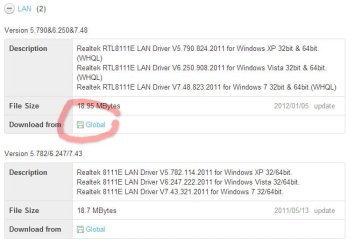
  • lan drivers.jpg
    lan drivers.jpg
    58.2 KB · Views: 5

My Computer

Computer type
PC/Desktop
Computer Manufacturer/Model Number
Self Built
OS
Windows 7 Ultimate 64bit
CPU
AMD Phenom Quad core 9950 black edition
Motherboard
Gigabyte
Memory
16Gb
Graphics Card(s)
2x XFX Radeon 5850
Sound Card
PCI Express X-Fi Titanium / Logitech G35
Monitor(s) Displays
2x HP 2410i
Screen Resolution
1920x1080
Hard Drives
2x 500Gb Seagate
1x 300Gb Seagate
1x 1Tb Seagate
2x 1Tb Hitatchi
PSU
Jean Tech Storm 700W
Case
Cooler Master COSMOS S
Cooling
Akasa Evo Blue Pro
Keyboard
Logitech G15
Mouse
Mad Catz M.M.O. 7
Internet Speed
12mb

My Computer

Computer Manufacturer/Model Number
Custom Build
OS
MS Windows 7 Home Premium 64-bit
CPU
AMD FX 8320
Motherboard
ASUS M5A97 Pro
Memory
8gb Dual Channel Corsair
Graphics Card(s)
Amd R9 270X
Sound Card
Realtek High Definition Audio
Monitor(s) Displays
DELL ST2010
Screen Resolution
1600x900
Hard Drives
977GB Seagate ST31000528AS ATA Device (IDE)
PSU
550 watt
Case
XClio Godspeed 2
Cooling
n/a
Nice 1 ... glad you got it sorted ;)
 

My Computer

Computer type
PC/Desktop
Computer Manufacturer/Model Number
Self Built
OS
Windows 7 Ultimate 64bit
CPU
AMD Phenom Quad core 9950 black edition
Motherboard
Gigabyte
Memory
16Gb
Graphics Card(s)
2x XFX Radeon 5850
Sound Card
PCI Express X-Fi Titanium / Logitech G35
Monitor(s) Displays
2x HP 2410i
Screen Resolution
1920x1080
Hard Drives
2x 500Gb Seagate
1x 300Gb Seagate
1x 1Tb Seagate
2x 1Tb Hitatchi
PSU
Jean Tech Storm 700W
Case
Cooler Master COSMOS S
Cooling
Akasa Evo Blue Pro
Keyboard
Logitech G15
Mouse
Mad Catz M.M.O. 7
Internet Speed
12mb
Back
Top