
Cannot disable Remote desktop from system properties

landcru

New member
Local time
4:33 AM
Messages
7
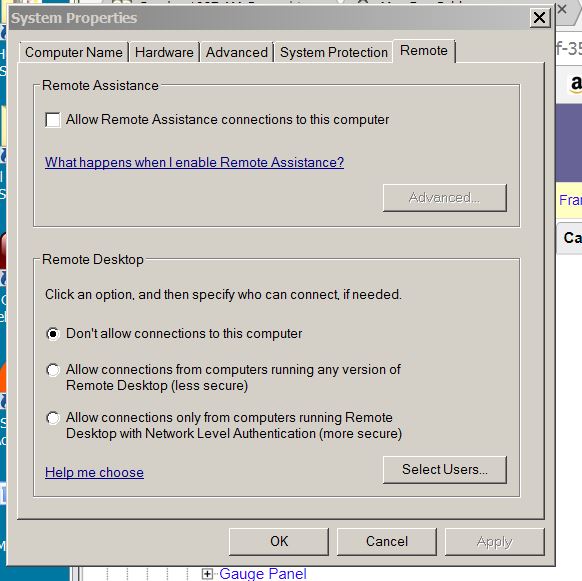
I constantly get the system properties popup dialog requesting remote
desktop connections. No matter how many times I select
"Dont allow connections to this computer" the dialog comes multiple
times during the day.

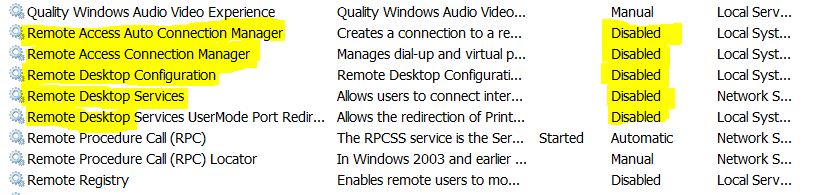
I have opened the services.msc and disabled all of the remote desktop
programs and that does not seem to help.
Can anyone offer some suggestions?
remote10.jpg


captur10.jpg
 

My Computer

Computer type
PC/Desktop
Computer Manufacturer/Model Number
dell
OS
windows 7 64 bit
Antivirus
defender
Browser
chrome
Welcome to the forum. Are you saying someone is trying to remote control your pc and is it RPC or could it be some other software running like teamviewer?
 

My Computer

Computer type
PC/Desktop
OS
win 8 32 bit
I dont believe it is someone trying to access my computer but anything is possible I guess.
It seems to happen when I access various websites using the chrome browser.
 

My Computer

Computer type
PC/Desktop
Computer Manufacturer/Model Number
dell
OS
windows 7 64 bit
Antivirus
defender
Browser
chrome

My Computers

System One System Two

Well I changed the port number as you suggested and that did not seem
to fix it, the dialog still pops up from time to time.
 

My Computer

Computer type
PC/Desktop
Computer Manufacturer/Model Number
dell
OS
windows 7 64 bit
Antivirus
defender
Browser
chrome
You might want to check the startup folder under start menu as well as task scheduler and see if anything is enabled pertaining remote desktop or terminal services. I think that you have a program installed that is causing this. I haven't had that happen personally.
 

My Computers

System One System Two

I tried everything.... disabled all the references to Remote
Desktop in the startup folder and task scheduler..... Same results
Popup keeps coming back
 

My Computer

Computer type
PC/Desktop
Computer Manufacturer/Model Number
dell
OS
windows 7 64 bit
Antivirus
defender
Browser
chrome
post a screenshot of the popup so we can see
 

My Computer

Computer type
PC/Desktop
OS
win 8 32 bit

My Computer

Computer type
PC/Desktop
Computer Manufacturer/Model Number
dell
OS
windows 7 64 bit
Antivirus
defender
Browser
chrome
First post shows system properties not something trying to connect is that what we have been talking about not anyone trying to connect?
 

My Computer

Computer type
PC/Desktop
OS
win 8 32 bit
This system properties dialog is what keeps popping up.
If I select "dont allow connections to this computer" and click ok, the
dialog goes away but then comes back in seconds or minutes. Seems
to happen more while visiting websites (not anything suspicious or
irregular)
 

My Computer

Computer type
PC/Desktop
Computer Manufacturer/Model Number
dell
OS
windows 7 64 bit
Antivirus
defender
Browser
chrome
Does it come on at startup?
 

My Computer

Computer type
PC/Desktop
OS
win 8 32 bit
No, usually after the browser (chrome) is opened
 

My Computer

Computer type
PC/Desktop
Computer Manufacturer/Model Number
dell
OS
windows 7 64 bit
Antivirus
defender
Browser
chrome
Back
Top