I was referring to the registry . The UpdatusUser is the Nvidia user account for updating drivers . You don't need to log in with that one .
My Computer
At a glance
Windows 7 Ultimate 32-Bit & Windows 7 Ultimat...Intel Core i7 CPU 950 @ 3.07GHzOCZ 6GB (3 x 2GB) 240-Pin DDR3 SDRAM DDR3 160...ATI Radeon HD 5700 Series
Computer Manufacturer/Model Number
Custom Built
OS
Windows 7 Ultimate 32-Bit & Windows 7 Ultimate 64-Bit
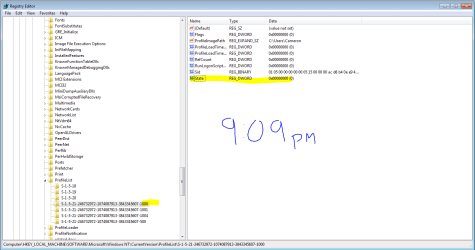
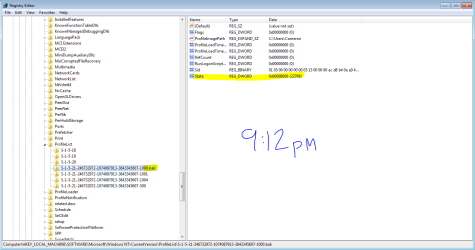
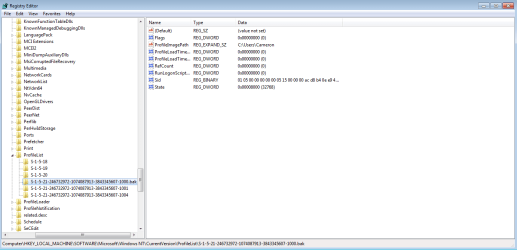
Looking at the image you posted . Right click on the SID which is highlighted choose Rename and remove .bak then on the right hand side where it says State . Right click and choose modify and type in 0 in the value , click ok and close the registry restart PC .
Look at 7. If you have Only One S-1-5 (SID) key with .bak
My Computer
At a glance
Windows 7 Ultimate 32-Bit & Windows 7 Ultimat...Intel Core i7 CPU 950 @ 3.07GHzOCZ 6GB (3 x 2GB) 240-Pin DDR3 SDRAM DDR3 160...ATI Radeon HD 5700 Series
Computer Manufacturer/Model Number
Custom Built
OS
Windows 7 Ultimate 32-Bit & Windows 7 Ultimate 64-Bit
When you're doing this what account are you doing this on ? Try doing this on the builtin Administrator account . You will need to enable this hidden account
Click on rb: type CMD right click on CMD underneath Programs (1) choose Run as Administrator . Click on the Yes button inside UAC window . Inside command prompt window type in
Code:
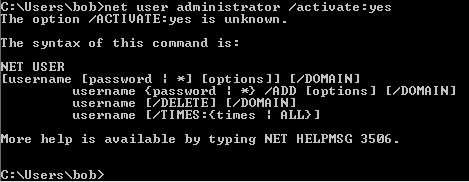
net user administrator /active:yes
Close the command prompt log off and log in with the user account " Administrator " no password
:ar: DO THIS AFTER YOU FIXED YOUR ISSUE
Then Click on rb: type CMD right click on CMD underneath Programs (1) choose Run as Administrator . Click on the Yes button inside UAC window . Inside command prompt window type in
Note
This will disable the built-in Administrator user account
My Computer
At a glance
Windows 7 Ultimate 32-Bit & Windows 7 Ultimat...Intel Core i7 CPU 950 @ 3.07GHzOCZ 6GB (3 x 2GB) 240-Pin DDR3 SDRAM DDR3 160...ATI Radeon HD 5700 Series
Computer Manufacturer/Model Number
Custom Built
OS
Windows 7 Ultimate 32-Bit & Windows 7 Ultimate 64-Bit
At the moment I have 2 accounts:
Cameron---My main account the one that's messed up...
bob---the Account I created thru the cmd prmpt, which is an admin account...
Right now I cannot get onto the account "cameron" at all.
When I enter this CMD I get this reply: ---> see link
Attachments
CMD.PNG
2.1 KB
· Views: 4
My Computer
At a glance
Windows 7 64 biti5 4760k8GB DDR3-2000MHzEVGA 760TI
Computer type
PC/Desktop
Computer Manufacturer/Model Number
Custom Build
OS
Windows 7 64 bit
CPU
i5 4760k
Motherboard
MSI Mini ITX Gaming AC
Memory
8GB DDR3-2000MHz
Graphics Card(s)
EVGA 760TI
Hard Drives
C: Transcend 256GB Internal Solid State Drive - 2.5" Form Factor, SATA3, 6Gb/s
You need to run the command inside an elevated command prompt . Click on rb: type CMD inside the Search programs and files . Once CMD pops underneath Programs (1) right click and choose Run as administrator . Click on Yes on the UAC window .
Command prompt will open to this path C:\Windows\System32>_
The word is active not activate .
My Computer
At a glance
Windows 7 Ultimate 32-Bit & Windows 7 Ultimat...Intel Core i7 CPU 950 @ 3.07GHzOCZ 6GB (3 x 2GB) 240-Pin DDR3 SDRAM DDR3 160...ATI Radeon HD 5700 Series
Computer Manufacturer/Model Number
Custom Built
OS
Windows 7 Ultimate 32-Bit & Windows 7 Ultimate 64-Bit
Roger, I did that...that was actually a screen shot of the cmd I 1st did it on and then realized I did it wrong however both ended with the same result
My Computer
At a glance
Windows 7 64 biti5 4760k8GB DDR3-2000MHzEVGA 760TI
Computer type
PC/Desktop
Computer Manufacturer/Model Number
Custom Build
OS
Windows 7 64 bit
CPU
i5 4760k
Motherboard
MSI Mini ITX Gaming AC
Memory
8GB DDR3-2000MHz
Graphics Card(s)
EVGA 760TI
Hard Drives
C: Transcend 256GB Internal Solid State Drive - 2.5" Form Factor, SATA3, 6Gb/s
Windows 7 Ultimate 32-Bit & Windows 7 Ultimat...Intel Core i7 CPU 950 @ 3.07GHzOCZ 6GB (3 x 2GB) 240-Pin DDR3 SDRAM DDR3 160...ATI Radeon HD 5700 Series
Computer Manufacturer/Model Number
Custom Built
OS
Windows 7 Ultimate 32-Bit & Windows 7 Ultimate 64-Bit
Okay, I made the admin account. What do I need to do on there now?...Working on getting the files for BSOD but I think its about to do it again...not responding...yup BSOD again -_-
My Computer
At a glance
Windows 7 64 biti5 4760k8GB DDR3-2000MHzEVGA 760TI
Computer type
PC/Desktop
Computer Manufacturer/Model Number
Custom Build
OS
Windows 7 64 bit
CPU
i5 4760k
Motherboard
MSI Mini ITX Gaming AC
Memory
8GB DDR3-2000MHz
Graphics Card(s)
EVGA 760TI
Hard Drives
C: Transcend 256GB Internal Solid State Drive - 2.5" Form Factor, SATA3, 6Gb/s
Do the registry edits under the built-in Administrator account .
My Computer
At a glance
Windows 7 Ultimate 32-Bit & Windows 7 Ultimat...Intel Core i7 CPU 950 @ 3.07GHzOCZ 6GB (3 x 2GB) 240-Pin DDR3 SDRAM DDR3 160...ATI Radeon HD 5700 Series
Computer Manufacturer/Model Number
Custom Built
OS
Windows 7 Ultimate 32-Bit & Windows 7 Ultimate 64-Bit
Remove the .bak from -1000 . Right click on State choose Modify and change the value to 0 (zero) click Ok close the Registry and restart PC .
My Computer
At a glance
Windows 7 Ultimate 32-Bit & Windows 7 Ultimat...Intel Core i7 CPU 950 @ 3.07GHzOCZ 6GB (3 x 2GB) 240-Pin DDR3 SDRAM DDR3 160...ATI Radeon HD 5700 Series
Computer Manufacturer/Model Number
Custom Built
OS
Windows 7 Ultimate 32-Bit & Windows 7 Ultimate 64-Bit
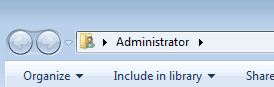
Okay as you can see in the links I was on the admin account created and I changed them however they reverted after I restarted and tried logging into the other account.
Attachments
admin.PNG
2.6 KB
· Views: 4
909.PNG
27.8 KB
· Views: 2
912.PNG
27.3 KB
· Views: 2
My Computer
At a glance
Windows 7 64 biti5 4760k8GB DDR3-2000MHzEVGA 760TI
Computer type
PC/Desktop
Computer Manufacturer/Model Number
Custom Build
OS
Windows 7 64 bit
CPU
i5 4760k
Motherboard
MSI Mini ITX Gaming AC
Memory
8GB DDR3-2000MHz
Graphics Card(s)
EVGA 760TI
Hard Drives
C: Transcend 256GB Internal Solid State Drive - 2.5" Form Factor, SATA3, 6Gb/s
Looks like we need to recreate your Cameron account .
If possible go to C:\Users\ in that folder rename Cameron to Cameron.old then create a new user with the name of Cameron . See if that works . If not we will need to delete the entire key under the SID folder . That's the entire -1000 key
My Computer
At a glance
Windows 7 Ultimate 32-Bit & Windows 7 Ultimat...Intel Core i7 CPU 950 @ 3.07GHzOCZ 6GB (3 x 2GB) 240-Pin DDR3 SDRAM DDR3 160...ATI Radeon HD 5700 Series
Computer Manufacturer/Model Number
Custom Built
OS
Windows 7 Ultimate 32-Bit & Windows 7 Ultimate 64-Bit
renamed the c:/users cameron to cameron.old But I couldnt create another user named cameron wouldnt let me...oh well I guess I will just copy over everything from my desktop onto my new bob account haha...anything else you can think of I should grab?
My Computer
At a glance
Windows 7 64 biti5 4760k8GB DDR3-2000MHzEVGA 760TI
Computer type
PC/Desktop
Computer Manufacturer/Model Number
Custom Build
OS
Windows 7 64 bit
CPU
i5 4760k
Motherboard
MSI Mini ITX Gaming AC
Memory
8GB DDR3-2000MHz
Graphics Card(s)
EVGA 760TI
Hard Drives
C: Transcend 256GB Internal Solid State Drive - 2.5" Form Factor, SATA3, 6Gb/s
Just your files you need like favorite , desktop, my documents , my video , my music
My Computer
At a glance
Windows 7 Ultimate 32-Bit & Windows 7 Ultimat...Intel Core i7 CPU 950 @ 3.07GHzOCZ 6GB (3 x 2GB) 240-Pin DDR3 SDRAM DDR3 160...ATI Radeon HD 5700 Series
Computer Manufacturer/Model Number
Custom Built
OS
Windows 7 Ultimate 32-Bit & Windows 7 Ultimate 64-Bit
Hmm I am thinking the reason why you couldn't create a new one is cause the registry ProfilePath still exist . You could delete that key restart the PC log in to Cameron and windows should recreate a new SID key for Cameron . Then all you have to do is copy the files over from Cameron.old to the recreated Cameron account .
Tip
Back up files first before trying the step above
My Computer
At a glance
Windows 7 Ultimate 32-Bit & Windows 7 Ultimat...Intel Core i7 CPU 950 @ 3.07GHzOCZ 6GB (3 x 2GB) 240-Pin DDR3 SDRAM DDR3 160...ATI Radeon HD 5700 Series
Computer Manufacturer/Model Number
Custom Built
OS
Windows 7 Ultimate 32-Bit & Windows 7 Ultimate 64-Bit


 rb: type CMD right click on CMD underneath Programs (1) choose Run as Administrator . Click on the Yes button inside UAC window . Inside command prompt window type in