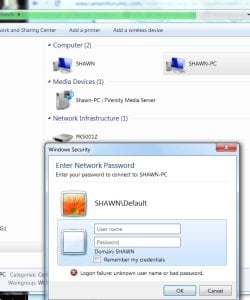
I took my old desktop which had a direct connect to a DSL modem and setup it up for as the family computer with wireless access (it has internet access just fine). I changed its computer-name from Shawn (under System, Advanced settings) to "family" so that I could use the same name (Shawn) for my new desktop (which connects via ethernet to the DSL wireless modem).
I can see the old desktop from the new desktop under network in explorer on the new desktop. So i have "Shawn" (new) and "Shawn-PC" (old) but I cannot log in via wireless to the old computer. The old has the new login name "family" but I understand the network only goes by the original computer name? But "Shawn" or "Shawn-PC" does not get me in.
I never changed the password on the old desktop but I did turn it off. But even using the old password does not work.
How can I get access to the shared files on the old (shawn-renamed-family) computer from my new desktop?
To access the machine using the user account 'Family' you would enter the following at that prompt:
SHAWN-PC\Family
Then enter the password for that account on the old machine.
Tip
It is advised to use an Administrator account when providing credentials. For example Family should be a system Administrator
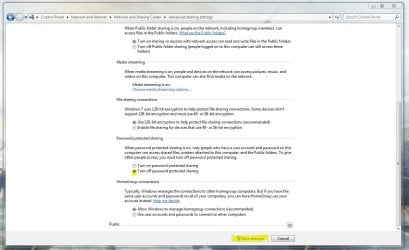
My apologies if I misinterpreted your problem. You could remove all authentication procedures by going to network and sharing centre > Change Advanced Sharing Settings and then turning off Password Protected Sharing
Hope This Helps,
Josh!
My Computer
At a glance
Windows 7 Professional x64 SP1 ; Windows Serv...Intel Core i5 2400 @ 3.10GHz8.0GB DDR3 @ 665MHz (2GBx4)AMD Radeon HD 6870
Computer type
PC/Desktop
Computer Manufacturer/Model Number
Custom Built
OS
Windows 7 Professional x64 SP1 ; Windows Server 2012 R2 Standard