Cannot RDP at all

TheUnseen

New member
I have W7 Pro 64bit installed on two laptops. I have remote access enabled on both and I have setup port forwarding on the router on the home laptop for port 3389 (rebooted router of course). RDP used to always work prior to my reload.

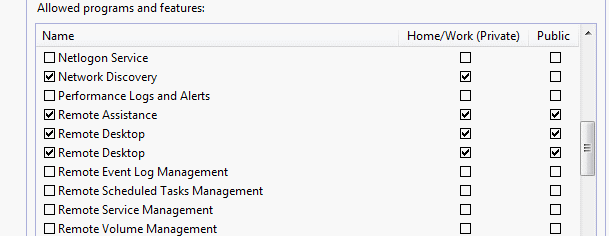
Now, I cannot connect. Both laptops are live, sleep/suspend mode is disabled and from my netbook I provide the proper static IP address for sure. I still cannot connect odd enough and I don't know why. I have RDP enabled in windows firewall on my home laptop, the one I'm trying to connect to.

Any suggestions?
 

My Computer

OS
W7
Sounds like you have already done everything in the link for the tutorial on this forum but it never hurts to double check. http://www.sevenforums.com/tutorials/3922-remote-desktop-connection-rdc-network.html?filter[2]=Networking Internet
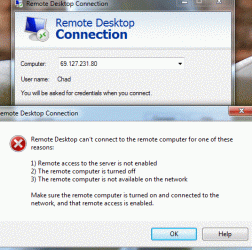
Do you get any kind of message or just the generic "Cannot Connect"
Have you tried when both machines are on the same local network, just to take the home router out of the equation. Also if I remember correctly on some routers you have to forward UDP as well as TCP
 
Last edited:

My Computer

Computer Manufacturer/Model Number
PartsIsParts
OS
Windows 7 Ultimate 64bit
CPU
Intel Pentium D 3Ghz
Motherboard
ASRock G31M-S
Memory
4 Gigs PC 6400
Graphics Card(s)
Nvidia GeForce 8500 GT
Sound Card
Realtek High Definition Audio Integrated
Monitor(s) Displays
AOC 19inch X2
Screen Resolution
1024 X 768 (I'm Old)
Hard Drives
Segate ST3160815AS Serial ATAII
Western Digital WD1600AAJA-75PSA0 Serial ATAII
PSU
500 watt..don't know mfg.
Case
Giant Black 4u rackmount I've had for years
Cooling
Stock CPU extra 120s in case
Keyboard
Generic Made in China
Mouse
Logitech USB Optical Scroll
Internet Speed
What ever comcast decides to give me usually 21Mbps up/5mbps
Its the generic connect error

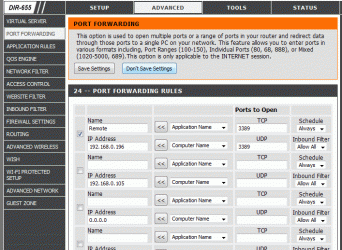
I have port 3389 forwarded for both udp and tcp

I restarted both. I tried to rdp o the same network (at home) and now, tried again from Starbucks to my home. Same problem
 

My Computer

OS
W7
you didn't perhaps change the RDP listening port on your home machine did you? Just for testing purposes try turning off the windows firewall temporarily. You are not using any third party firewall products are you?
 

My Computer

Computer Manufacturer/Model Number
PartsIsParts
OS
Windows 7 Ultimate 64bit
CPU
Intel Pentium D 3Ghz
Motherboard
ASRock G31M-S
Memory
4 Gigs PC 6400
Graphics Card(s)
Nvidia GeForce 8500 GT
Sound Card
Realtek High Definition Audio Integrated
Monitor(s) Displays
AOC 19inch X2
Screen Resolution
1024 X 768 (I'm Old)
Hard Drives
Segate ST3160815AS Serial ATAII
Western Digital WD1600AAJA-75PSA0 Serial ATAII
PSU
500 watt..don't know mfg.
Case
Giant Black 4u rackmount I've had for years
Cooling
Stock CPU extra 120s in case
Keyboard
Generic Made in China
Mouse
Logitech USB Optical Scroll
Internet Speed
What ever comcast decides to give me usually 21Mbps up/5mbps
I just reread your original post and noted at the end of the first paragraph you say something about prior to my reload, what got reloaded. When you made your attempt at home on the local network...you used the private reserved 192.168.xxx.xxx address correct. You didn't attempt to go out and back in through your router.?
 
Last edited:

My Computer

Computer Manufacturer/Model Number
PartsIsParts
OS
Windows 7 Ultimate 64bit
CPU
Intel Pentium D 3Ghz
Motherboard
ASRock G31M-S
Memory
4 Gigs PC 6400
Graphics Card(s)
Nvidia GeForce 8500 GT
Sound Card
Realtek High Definition Audio Integrated
Monitor(s) Displays
AOC 19inch X2
Screen Resolution
1024 X 768 (I'm Old)
Hard Drives
Segate ST3160815AS Serial ATAII
Western Digital WD1600AAJA-75PSA0 Serial ATAII
PSU
500 watt..don't know mfg.
Case
Giant Black 4u rackmount I've had for years
Cooling
Stock CPU extra 120s in case
Keyboard
Generic Made in China
Mouse
Logitech USB Optical Scroll
Internet Speed
What ever comcast decides to give me usually 21Mbps up/5mbps
I did not change the default at all. I reloaded the o/s

I used the private IP yes, on the router port forwarding
 

My Computer

OS
W7
are both laptops under the same workgroup?? check that and make sure that the laptop name and the name you are typing inrdp is similar!!
 

My Computer

OS
Vista/ xp/ windows server 2003/ small business server
AHH also check on control panel> Administrative tools> Computer Management
if the local and group user is well set or added!!
Cheers
 

My Computer

OS
Vista/ xp/ windows server 2003/ small business server
I did not change the default at all. I reloaded the o/s

I used the private IP yes, on the router port forwarding

I'm not sure that I'm understanding you or perhaps I wasn't clear so let's concentrate on dertermining if RDP will work when both computers are at home and plugged into the same router or switch. On your work computer click start, click run, type mstsc hit enter or click ok. Now type in the private reserved ip address of your home laptop (should be 192.168.nnn.nnn) if you still get the cannot connect message using this method and you have double checked in services.msc and all your remote desktop services are running, then I am personnally at a loss. When you say that you reloaded the operating system, does that mean you did a "Repair Install" or a clean wipe and install
 

My Computer

Computer Manufacturer/Model Number
PartsIsParts
OS
Windows 7 Ultimate 64bit
CPU
Intel Pentium D 3Ghz
Motherboard
ASRock G31M-S
Memory
4 Gigs PC 6400
Graphics Card(s)
Nvidia GeForce 8500 GT
Sound Card
Realtek High Definition Audio Integrated
Monitor(s) Displays
AOC 19inch X2
Screen Resolution
1024 X 768 (I'm Old)
Hard Drives
Segate ST3160815AS Serial ATAII
Western Digital WD1600AAJA-75PSA0 Serial ATAII
PSU
500 watt..don't know mfg.
Case
Giant Black 4u rackmount I've had for years
Cooling
Stock CPU extra 120s in case
Keyboard
Generic Made in China
Mouse
Logitech USB Optical Scroll
Internet Speed
What ever comcast decides to give me usually 21Mbps up/5mbps

My Computer

Computer Manufacturer/Model Number
PartsIsParts
OS
Windows 7 Ultimate 64bit
CPU
Intel Pentium D 3Ghz
Motherboard
ASRock G31M-S
Memory
4 Gigs PC 6400
Graphics Card(s)
Nvidia GeForce 8500 GT
Sound Card
Realtek High Definition Audio Integrated
Monitor(s) Displays
AOC 19inch X2
Screen Resolution
1024 X 768 (I'm Old)
Hard Drives
Segate ST3160815AS Serial ATAII
Western Digital WD1600AAJA-75PSA0 Serial ATAII
PSU
500 watt..don't know mfg.
Case
Giant Black 4u rackmount I've had for years
Cooling
Stock CPU extra 120s in case
Keyboard
Generic Made in China
Mouse
Logitech USB Optical Scroll
Internet Speed
What ever comcast decides to give me usually 21Mbps up/5mbps
When you say that you reloaded the operating system, does that mean you did a "Repair Install" or a clean wipe and install

Wow. You never heard of "reload o/s" before? If I repaired it, I would have said I ran the repair. Reload means reinstalled the entire o/s, not repair.
 

My Computer

OS
W7
Nope....been a Microsoft Certified Systems Engineer since the 90's....never heard of it....thanks for the explanation.
 

My Computer

Computer Manufacturer/Model Number
PartsIsParts
OS
Windows 7 Ultimate 64bit
CPU
Intel Pentium D 3Ghz
Motherboard
ASRock G31M-S
Memory
4 Gigs PC 6400
Graphics Card(s)
Nvidia GeForce 8500 GT
Sound Card
Realtek High Definition Audio Integrated
Monitor(s) Displays
AOC 19inch X2
Screen Resolution
1024 X 768 (I'm Old)
Hard Drives
Segate ST3160815AS Serial ATAII
Western Digital WD1600AAJA-75PSA0 Serial ATAII
PSU
500 watt..don't know mfg.
Case
Giant Black 4u rackmount I've had for years
Cooling
Stock CPU extra 120s in case
Keyboard
Generic Made in China
Mouse
Logitech USB Optical Scroll
Internet Speed
What ever comcast decides to give me usually 21Mbps up/5mbps
Please see attached.

I have a D-Link DIR-655 router.
 

Attachments

  • error.gif
    error.gif
    49.3 KB · Views: 2
  • pf.gif
    pf.gif
    57.5 KB · Views: 8

My Computer

OS
W7
Back
Top