
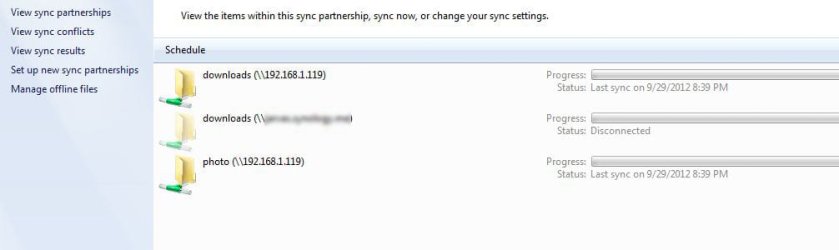
I had a drive mapped to my computer and had set up a sync partnership with it. I have since removed the mapped drive but the system still has that sync entry in Sync Center. I have tried to remove it but can't. Can't turn off "always available offline" either.
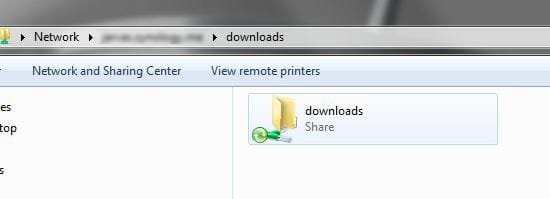
I can see the previously mapped drive in the network but it's only a ghost of the drive itself and nothing I can get rid of there either.
I also tried to delete the offline files through sync management and it goes through the motions but stays in the sync center.
Hopefully the screenshots explain this better.
I'd entertain the option of completely removing all signs that anything was ever synced and start again with a clean slate but I don't know how to go about that aside from using a restore point.
Lastly I tried toggling off and then on the whole Sync feature.
Any thoughts? Thanks.
I can see the previously mapped drive in the network but it's only a ghost of the drive itself and nothing I can get rid of there either.
I also tried to delete the offline files through sync management and it goes through the motions but stays in the sync center.
Hopefully the screenshots explain this better.
I'd entertain the option of completely removing all signs that anything was ever synced and start again with a clean slate but I don't know how to go about that aside from using a restore point.
Lastly I tried toggling off and then on the whole Sync feature.
Any thoughts? Thanks.
Attachments
My Computer
- Computer Manufacturer/Model Number
- Custom
- OS
- Windows 7
- CPU
- Intel i7-2600K
- Motherboard
- Z68XP-UD3
- Memory
- 12GB DDR3
- Graphics Card(s)
- NVidia GTX 570 x 2 SLI
- Sound Card
- Creative Labs SB0570L4
- Monitor(s) Displays
- Dell U3011 30"
- Screen Resolution
- 2560x1600
- Hard Drives
- 160GB Intel X25-M SSD
- PSU
- Topower PowerBird TOP-900W
- Case
- Cooler Master HAF 932
- Cooling
- Antec Kuhler H2O 620
- Keyboard
- Logitech G19
- Mouse
- Logitech G700
- Internet Speed
- 11Mbps
- Other Info
- Synology DS212 NAS
D-Link DIR-655 router