Solved Cannot see home wireless network but can see neighbor's

alethea11

New member
Local time
6:34 PM
Messages
7
I just moved to a new apartment and had no trouble logging into the wifi on my iPhone and Kindle, but my computer cannot even see the network. My roommates are having no trouble with the internet either. I have restarted my computer several times as well as tried to manually connect to the network, but nothing has worked. At my wits end here...
 

My Computer My Computer

At a glance

Windows 7 Home Premium 64 bit
Computer type
Laptop
Computer Manufacturer/Model Number
Hp
OS
Windows 7 Home Premium 64 bit
Antivirus
Avast
Hi there.

Just checked your system specs and saw you're using a desktop. By default, a desktop PC does not have the ability to connect to wifi connection unless you have a network card that supports it, or you have a USB wireless adapter.
 

My Computer My Computer

At a glance

Windows 10 Pro
Computer type
Laptop
Computer Manufacturer/Model Number
Lenovo E450
OS
Windows 10 Pro
Does it say I have a desktop? That is incorrect, it is a laptop.
 

My Computer My Computer

At a glance

Windows 7 Home Premium 64 bit
Computer type
Laptop
Computer Manufacturer/Model Number
Hp
OS
Windows 7 Home Premium 64 bit
Antivirus
Avast
Most laptops have a button to turn wifi ON/OFF. Have you check that ?
 

My Computer My Computer

At a glance

Win7 Enterprise, Win7 x86 (Ult 7600), Win7 x6...AMD fx8350 4ghz, AMD-32 2400mhz, AMD-64 3200m...2gb, 4gb on the Ult 7600, 4gb on Technet RTM,...Draw my own Graphics, several nVidia cards
Computer type
PC/Desktop
Computer Manufacturer/Model Number
Built them myself, Science Experiments !
OS
Win7 Enterprise, Win7 x86 (Ult 7600), Win7 x64 Ult 7600, TechNet RTM on AMD x64 (2.8Ghz)
CPU
AMD fx8350 4ghz, AMD-32 2400mhz, AMD-64 3200mhz, AMDx64 2.8G
Motherboard
SIS 755, ECS-K8M890M-M (Ult 7600), GigaByte & others
Memory
2gb, 4gb on the Ult 7600, 4gb on Technet RTM, 32gb on FX8350
Graphics Card(s)
Draw my own Graphics, several nVidia cards
Sound Card
on motherboard
Monitor(s) Displays
19" flat scr, 28" I-Inc widescr,22" Emprex Widescr, 23" Acer
Screen Resolution
1280 x 1024, 1440 x 900, 1920 x 1080
Hard Drives
6 pata Ide HD's & 2 Sata HD's
added 80gb external on Ult 7600 computer,
numerous extra 1tb, 2TB, 3Tb SATA HD's
A collection of ext HD Docks w/ HDs
PSU
430w, 550w, 600w, 700, 800, etc
Case
All Generic Full Towers
Cooling
Open Air & a few fans, some w/ colored LEDs
Keyboard
Compaq & Dell recycled from GoodWill
Mouse
Made in China Optical Wired Mouse
Internet Speed
Fast Cable InterNet
Antivirus
AVG Free on 24 different Desktops, NO Problems!
Browser
IE 8 is preferred, but use FireFox sometimes
Other Info
Linksys Routers, switches, & Hubs
Too Many USB Flash Drives to count, Biggest is 64GB !
Eight computers in my home network.
Sixteen computers at my business network.
Linked via TeamViewer !
Lots of old used spare computer parts everywhere!
Yes, I've tried turning that on/off several times.
 

My Computer My Computer

At a glance

Windows 7 Home Premium 64 bit
Computer type
Laptop
Computer Manufacturer/Model Number
Hp
OS
Windows 7 Home Premium 64 bit
Antivirus
Avast
Specifically what model HP laptop do you have? Is this a new machine, or have you had it for a while? Is it still under hardware warranty?

Have you ever previously been able to operate in wireless mode with this particular router? With a different router in some other apartment or WiFi environment? Or have you previously only operated "wired" using ethernet cable to a router?

Are there ANY wireless networks visible from your laptop? If you take it to say a Starbucks or some place where you know there absolutely is a WiFi network available, can you see THAT wireless network? Or again, nothing at all? If nothing at all even in a second test environment, and the "wireless radio" button on your laptop is set in the ON position, I'm thinking maybe a newly developed hardware problem with your laptop's wireless network adapter is responsible.

Do you have the latest Dell wireless NIC drivers and Wireless connection utilities installed? Do they have any driver/software updates available for your machine's wireless networking functionality on their support web site?

Fairly inexpensive USB wireless network adapters are available. Might be a cheap solution which would almost certainly work, if it does turn out to be a hardware problem with your laptop itself... if it's no longer under hardware warranty.
 

My Computer My Computer

At a glance

Windows 7 Pro x64 (1), Win7 Pro X64 (2)i5-3350p 3.1Ghz/6MB-cache (1); E8400 3.0Ghz/6...8GB PC3-12800 DDR3 (1); 4GB PC3-10600 DDR3 (2)ATI HD7750 (1), (see TV cards); ATI R7 250 (2)
Computer type
PC/Desktop
Computer Manufacturer/Model Number
Home-built, two systems (1) and (2)
OS
Windows 7 Pro x64 (1), Win7 Pro X64 (2)
CPU
i5-3350p 3.1Ghz/6MB-cache (1); E8400 3.0Ghz/6MB-cache (2)
Motherboard
ASUS P8Z77-V Pro (1); ASUS P5Q3 (2)
Memory
8GB PC3-12800 DDR3 (1); 4GB PC3-10600 DDR3 (2)
Graphics Card(s)
ATI HD7750 (1), (see TV cards); ATI R7 250 (2)
Sound Card
Realtek ALC892 HD Audio (1); Realtek ALC1200 HD Audio (2)
Monitor(s) Displays
Eizo HD2441W LCD, Eizo S2433W (1); Eizo 24" S2433W (2)
Screen Resolution
1920x1200, 1920x1200 (1); 1920x1200 (2)
Hard Drives
(1) 1TB SATA-II (7200RPM), 2x2TB SATA-III (7200RPM), 250GB SATA-III (10000RPM) for OS; 2x2TB external USB 3.0

(2) 320GB SATA-II (7200RPM), 750GB SATA-II (7200RPM), 150GB SATA-II (10000RPM) for OS; 2TB external USB 3.0
PSU
Nesteq ECS-6001 600W (1); Nesteq ECS-5001 500W (2)
Case
Acousti-Case 360 (1) and (2)
Cooling
Noctua NH-U12P SE2 for CPU, 2x120mm case fans (1) and (2)
Keyboard
IBM PS/2 (1) and (2)
Mouse
Logitech MX Revolution wireless (1); Microsoft wired (2)
Internet Speed
100mbps down / 10mbps up
Antivirus
Microsoft Security Essentials; Malwarebyte Anti-Malware Pro
Browser
Firefox
Other Info
Ceton InfiniTV 4-tuner cablecard-enabled TV card as well as Hauppauge HVR-2250 OTA/ATSC 2-tuner TV card in (1), running under Win7 WMC
One more thought... as I just saw your subject which said "can see neighbor's".

Typically, wireless routers have a setting that can SUPPRESS THE SSID from being broadcast. In other words, the router itself can either broadcast its SSID so that it IS visible, or NOT broadcast its SSID so that you must specifically know exactly what that SSID is and you must manually enter it along with the password in the "wireless connection" dialog in order to then manually connect to it.

Making a wireless network "invisible" in this way is a security measure that pretty much guarantees nobody outside of those truly authorized to use it will ever be able to use it, since it's "invisible" by turning off this SSID broadcast feature.

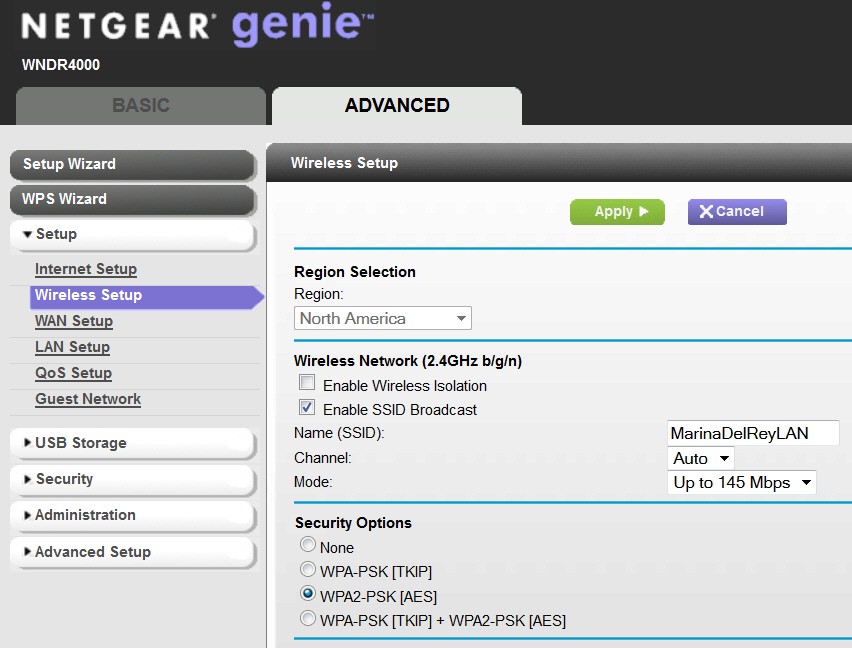
For example, with my own Netgear WNDR4000 it is the "Enable SSID broadcast" option which would be checked if you wanted the wireless network to be "visible", and un-checked if you wanted it to be "invisible".

vutWpr.jpg


Have a peek at your router's wireless setup, through a roommates computer.

Of course if the iPad and Kindle CAN currently still see the same network that your laptop can't, it's honestly unlikely that your router's SSID broadcast option is un-checked. But if their iPad/Kindle setup was done manually at some time in the past, perhaps before the router's SSID broadcast option was un-checked, then they STILL would have connectivity to the network even though it is currently "invisible" because its SSID broadcast has been disabled via setup.

Anyway, if you actually do know the SSID and password of the wireless network... even though invisible by un-check design... you can still manually enter the SSID/password and connect to it, assuming your laptop's wireless NIC is operating properly and that you don't really have a hardware problem.

 

My Computer My Computer

At a glance

Windows 7 Pro x64 (1), Win7 Pro X64 (2)i5-3350p 3.1Ghz/6MB-cache (1); E8400 3.0Ghz/6...8GB PC3-12800 DDR3 (1); 4GB PC3-10600 DDR3 (2)ATI HD7750 (1), (see TV cards); ATI R7 250 (2)
Computer type
PC/Desktop
Computer Manufacturer/Model Number
Home-built, two systems (1) and (2)
OS
Windows 7 Pro x64 (1), Win7 Pro X64 (2)
CPU
i5-3350p 3.1Ghz/6MB-cache (1); E8400 3.0Ghz/6MB-cache (2)
Motherboard
ASUS P8Z77-V Pro (1); ASUS P5Q3 (2)
Memory
8GB PC3-12800 DDR3 (1); 4GB PC3-10600 DDR3 (2)
Graphics Card(s)
ATI HD7750 (1), (see TV cards); ATI R7 250 (2)
Sound Card
Realtek ALC892 HD Audio (1); Realtek ALC1200 HD Audio (2)
Monitor(s) Displays
Eizo HD2441W LCD, Eizo S2433W (1); Eizo 24" S2433W (2)
Screen Resolution
1920x1200, 1920x1200 (1); 1920x1200 (2)
Hard Drives
(1) 1TB SATA-II (7200RPM), 2x2TB SATA-III (7200RPM), 250GB SATA-III (10000RPM) for OS; 2x2TB external USB 3.0

(2) 320GB SATA-II (7200RPM), 750GB SATA-II (7200RPM), 150GB SATA-II (10000RPM) for OS; 2TB external USB 3.0
PSU
Nesteq ECS-6001 600W (1); Nesteq ECS-5001 500W (2)
Case
Acousti-Case 360 (1) and (2)
Cooling
Noctua NH-U12P SE2 for CPU, 2x120mm case fans (1) and (2)
Keyboard
IBM PS/2 (1) and (2)
Mouse
Logitech MX Revolution wireless (1); Microsoft wired (2)
Internet Speed
100mbps down / 10mbps up
Antivirus
Microsoft Security Essentials; Malwarebyte Anti-Malware Pro
Browser
Firefox
Other Info
Ceton InfiniTV 4-tuner cablecard-enabled TV card as well as Hauppauge HVR-2250 OTA/ATSC 2-tuner TV card in (1), running under Win7 WMC
I have an hp G60-630US. It's about five years old, and therefore not under warranty anymore. I have had no previous problems connecting to any wireless networks, but I just moved and have been unable to connect on my laptop on this new network. I can see tons of other nearby networks, just not the one in my apartment. I just did a bunch of updates for my computer right before I moved, but I'm not sure what exact updates they were or if they affected my drivers. I have tried to manually create the new network, and entered the name and key of the network, but this hasn't worked either.
 

My Computer My Computer

At a glance

Windows 7 Home Premium 64 bit
Computer type
Laptop
Computer Manufacturer/Model Number
Hp
OS
Windows 7 Home Premium 64 bit
Antivirus
Avast
After completely shutting down both the router and computer again I am now able to see the network, but it says "the settings saved on this computer for the network do not match the requirements of the network" and I am not able to connect. Thoughts?


My Computer My Computer

At a glance

Windows 7 Home Premium 64 bit
Computer type
Laptop
Computer Manufacturer/Model Number
Hp
OS
Windows 7 Home Premium 64 bit
Antivirus
Avast
After taking advice from several different websites something finally worked and I was able to connect to my home network. Thanks for the advice everyone!
 

My Computer My Computer

At a glance

Windows 7 Home Premium 64 bit
Computer type
Laptop
Computer Manufacturer/Model Number
Hp
OS
Windows 7 Home Premium 64 bit
Antivirus
Avast
After taking advice from several different websites something finally worked and I was able to connect to my home network. Thanks for the advice everyone!
Do you remember what "advice from several different websites" you did which was or could have been responsible for fixing your problem? This would likely be very helpful to others in the future, even if their situation was not exactly the same as yours.

How about just listing the things you tried? Again, this would likely be helpful.

Just saying "something worked and I can now connect" is of course good news for you, but leaves the rest of us who've been following this thread a bit in the dark (for closure).
 

My Computer My Computer

At a glance

Windows 7 Pro x64 (1), Win7 Pro X64 (2)i5-3350p 3.1Ghz/6MB-cache (1); E8400 3.0Ghz/6...8GB PC3-12800 DDR3 (1); 4GB PC3-10600 DDR3 (2)ATI HD7750 (1), (see TV cards); ATI R7 250 (2)
Computer type
PC/Desktop
Computer Manufacturer/Model Number
Home-built, two systems (1) and (2)
OS
Windows 7 Pro x64 (1), Win7 Pro X64 (2)
CPU
i5-3350p 3.1Ghz/6MB-cache (1); E8400 3.0Ghz/6MB-cache (2)
Motherboard
ASUS P8Z77-V Pro (1); ASUS P5Q3 (2)
Memory
8GB PC3-12800 DDR3 (1); 4GB PC3-10600 DDR3 (2)
Graphics Card(s)
ATI HD7750 (1), (see TV cards); ATI R7 250 (2)
Sound Card
Realtek ALC892 HD Audio (1); Realtek ALC1200 HD Audio (2)
Monitor(s) Displays
Eizo HD2441W LCD, Eizo S2433W (1); Eizo 24" S2433W (2)
Screen Resolution
1920x1200, 1920x1200 (1); 1920x1200 (2)
Hard Drives
(1) 1TB SATA-II (7200RPM), 2x2TB SATA-III (7200RPM), 250GB SATA-III (10000RPM) for OS; 2x2TB external USB 3.0

(2) 320GB SATA-II (7200RPM), 750GB SATA-II (7200RPM), 150GB SATA-II (10000RPM) for OS; 2TB external USB 3.0
PSU
Nesteq ECS-6001 600W (1); Nesteq ECS-5001 500W (2)
Case
Acousti-Case 360 (1) and (2)
Cooling
Noctua NH-U12P SE2 for CPU, 2x120mm case fans (1) and (2)
Keyboard
IBM PS/2 (1) and (2)
Mouse
Logitech MX Revolution wireless (1); Microsoft wired (2)
Internet Speed
100mbps down / 10mbps up
Antivirus
Microsoft Security Essentials; Malwarebyte Anti-Malware Pro
Browser
Firefox
Other Info
Ceton InfiniTV 4-tuner cablecard-enabled TV card as well as Hauppauge HVR-2250 OTA/ATSC 2-tuner TV card in (1), running under Win7 WMC
I also posted the same question to an hp help forum, and after following this advice it worked. Hope this helps!


Start with following.

Powercycle the network:
1. Shut down your notebook.
2. Unplug the power to your router.
3. Unplug the power to your modem.
4. Wait at least 45 seconds.
5. Plug in the modem, and wait for it to come back online.
6. Plug in the router, and wait for it to come back online.
7. Turn on your notebook, and test your connection.

Reset the TCP/IP settings on your PC:
1. Go to your start screen/menu and type CMD.
2. Right click on the command prompt icon and chose Run as administrator.
3. In the window that opens type "netsh int ip reset resetlog.txt" without quotes, and press enter.
4. Restart your PC and test.

It may also help to reset the winsock catalogue:
1. Go to your start screen/menu and type CMD.
2. Right click on the command prompt icon and chose Run as administrator.
3. In the window that opens type "netsh winsock reset" without quotes, and press enter.
4. Restart your PC and test.

Reinstall the network adapter drivers:
1. Download the drivers from here but do not run them yet.
2. Go to your start screen/menu and type Device Manager.
3. Expand Network adapters.
4. Right click on the wireless adapter and choose Uninstall.
5. Run the downloaded drivers from step 1.
6. Restart your PC and test.

If those three steps do not resolve the issue, try this document published by Microsoft for networking issues: Wired and wireless network problems. You can change the operating system with the dropdown in the upper-right corner of the document.

If you have other networks available you may want to try changing the channel of your wireless router to eliminate radio frequency interference (RFI). try changing it to 1 or 11 (default is usually 6). This will take the broadcast of the wireless signal as far away as possible from most other networks. To do this you will need to contact support from your router manufacturer. Don't forget you can also reset the router completely for a fresh start, which may be a good idea.
 

My Computer My Computer

At a glance

Windows 7 Home Premium 64 bit
Computer type
Laptop
Computer Manufacturer/Model Number
Hp
OS
Windows 7 Home Premium 64 bit
Antivirus
Avast
These are all very good recipes for "cleaning things out" (e.g. undoing the things you may have unwittingly impacted negatively during your ongoing attempts to follow others' suggestions) and essentially resetting your PC's software support for networking "back to conceptual uncustomized factory settings".

And it generally can never hurt to have the most up-to-date drivers for all hardware, including network adapters. So uninstalling/reinstalling your wireless NIC's drivers falls into this category, again "resetting to factory" with the latest driver as your new starting point.

Now that you've outlined the HP forum advice you got, I'd say it was an excellent collection of general purpose remedies and recommendations. Much like very often pulling the power plug out of the wall for almost any piece of electronic equipment that is suddenly acting inexplicably crazy, waiting a minute, and then plugging it back in (therby forcing it through its "cold power-on full reset cycle") very very often is all it takes to get things all straightened out and working properly.

So when your cable system tech support CSR (or automated phone system message) tells you to do this same thing when you have odd behavior from your DVR and phone in for support, it's also not nonsense. It truly is often the easiest solution for many "should not occur" symptoms and shouldn't be discounted just because it sounds so simple.

Anyway, that's a good recipe you've recapped. It's absolutely true that in terms of the right power-on sequence when multiple networking devices are connected, the modem should always be powered on first and allowed to stabilize (meaning its lights "settle down" into their steady state pattern), then the router gets powered on next and also allowed to "settle down"), and finally you can begin powering on your network machines like desktop and laptop machines. Powering everything off and then powering them back on slowly and in this proper sequence can indeed produce seemingly miraculous results.

And of course the fact that this whole course of action appears to have gotten your problems resolves speaks to the soundness of what was suggested. The successful results speak for themselves.

Excellent.
 

My Computer My Computer

At a glance

Windows 7 Pro x64 (1), Win7 Pro X64 (2)i5-3350p 3.1Ghz/6MB-cache (1); E8400 3.0Ghz/6...8GB PC3-12800 DDR3 (1); 4GB PC3-10600 DDR3 (2)ATI HD7750 (1), (see TV cards); ATI R7 250 (2)
Computer type
PC/Desktop
Computer Manufacturer/Model Number
Home-built, two systems (1) and (2)
OS
Windows 7 Pro x64 (1), Win7 Pro X64 (2)
CPU
i5-3350p 3.1Ghz/6MB-cache (1); E8400 3.0Ghz/6MB-cache (2)
Motherboard
ASUS P8Z77-V Pro (1); ASUS P5Q3 (2)
Memory
8GB PC3-12800 DDR3 (1); 4GB PC3-10600 DDR3 (2)
Graphics Card(s)
ATI HD7750 (1), (see TV cards); ATI R7 250 (2)
Sound Card
Realtek ALC892 HD Audio (1); Realtek ALC1200 HD Audio (2)
Monitor(s) Displays
Eizo HD2441W LCD, Eizo S2433W (1); Eizo 24" S2433W (2)
Screen Resolution
1920x1200, 1920x1200 (1); 1920x1200 (2)
Hard Drives
(1) 1TB SATA-II (7200RPM), 2x2TB SATA-III (7200RPM), 250GB SATA-III (10000RPM) for OS; 2x2TB external USB 3.0

(2) 320GB SATA-II (7200RPM), 750GB SATA-II (7200RPM), 150GB SATA-II (10000RPM) for OS; 2TB external USB 3.0
PSU
Nesteq ECS-6001 600W (1); Nesteq ECS-5001 500W (2)
Case
Acousti-Case 360 (1) and (2)
Cooling
Noctua NH-U12P SE2 for CPU, 2x120mm case fans (1) and (2)
Keyboard
IBM PS/2 (1) and (2)
Mouse
Logitech MX Revolution wireless (1); Microsoft wired (2)
Internet Speed
100mbps down / 10mbps up
Antivirus
Microsoft Security Essentials; Malwarebyte Anti-Malware Pro
Browser
Firefox
Other Info
Ceton InfiniTV 4-tuner cablecard-enabled TV card as well as Hauppauge HVR-2250 OTA/ATSC 2-tuner TV card in (1), running under Win7 WMC
Back
Top