cant access root drive - lost admin rights

Ali

New member
Local time
3:59 AM
Messages
5
Hi;

I installed Windows7 recently. I was changing permissions and accidently denied authenticated users to C drive. I was logged in as admin which is the only account. Now I cant access anythig in C Drive and cant execute any thing. I tried through safe mode as well but of no use. How can I regain access or reset permissions.

Any help would be appreciated!

cheers
 

My Computer My Computer

OS
windows 7
Can you open the properties of your c:\ drive????
 

My Computer My Computer

Computer Manufacturer/Model Number
Custom made
OS
Window 7 build 7600, Xp pro(VM)
CPU
Amd Athlon 2000 xp+
Motherboard
Asus x series
Memory
kingstone(1gb+256MB)
Graphics Card(s)
Nvdia 6200(256 mb+255mb(shared))
Sound Card
soundmax
Monitor(s) Displays
Lg Flatron w1943
Screen Resolution
1360x768
Hard Drives
segate 80GB
Case
i-ball
Keyboard
i-ball
Mouse
i-ball
Internet Speed
256kbps up and 256 kbps down
Yes I can but cant do anything under the security tab which requires admin rights.
I even managed to activate hidden admin account through safe mode but cant do any admin stuff using that account too.
 

My Computer My Computer

OS
windows 7
You denied authenticated users access and you change it to what??
 

My Computer My Computer

Computer Manufacturer/Model Number
Custom made
OS
Window 7 build 7600, Xp pro(VM)
CPU
Amd Athlon 2000 xp+
Motherboard
Asus x series
Memory
kingstone(1gb+256MB)
Graphics Card(s)
Nvdia 6200(256 mb+255mb(shared))
Sound Card
soundmax
Monitor(s) Displays
Lg Flatron w1943
Screen Resolution
1360x768
Hard Drives
segate 80GB
Case
i-ball
Keyboard
i-ball
Mouse
i-ball
Internet Speed
256kbps up and 256 kbps down
authenticated users= no access. that might be a slight problem If the hidden super admin cant change it I hope you have a backup to restore, or you could try a repair install

Ken
 

My Computer My Computer

Computer Manufacturer/Model Number
HP Pavillion dv-7 1005 Tx
OS
Win 8 Release candidate 8400
CPU
[email protected]
Memory
4 gigs
Graphics Card(s)
Nvidia 9600M
Sound Card
HD built-in
Monitor(s) Displays
17" Wxga
Screen Resolution
1440x900
Cooling
none
Internet Speed
45Mb down 5Mb up
actually i was trying sumthing to get rid of that pop up asking to allow an exe to run thousand times a day:( and mistakenly denied to all.
Now I cant even retore as it doesnt open the restore window due to access problem. Looks like I am gonna give up and try ro repair/reinstall:((

cheers
 

My Computer My Computer

OS
windows 7
actually i was trying sumthing to get rid of that pop up asking to allow an exe to run thousand times a day:( and mistakenly denied to all.
Now I cant even retore as it doesnt open the restore window due to access problem. Looks like I am gonna give up and try ro repair/reinstall:((

cheers

Ali

Its actually your best idea. btw that annoying pop-up is called UAC and you can turn it off.

Ken
 

My Computer My Computer

Computer Manufacturer/Model Number
HP Pavillion dv-7 1005 Tx
OS
Win 8 Release candidate 8400
CPU
[email protected]
Memory
4 gigs
Graphics Card(s)
Nvidia 9600M
Sound Card
HD built-in
Monitor(s) Displays
17" Wxga
Screen Resolution
1440x900
Cooling
none
Internet Speed
45Mb down 5Mb up
You could give this a try first:

1 Go into Safe mode with cmd prompt

2. Open cmd prompt and type:

NET USER ADMINISTRATOR /active:yes {enter}

3. Type NET STOP ProfSvc {enter} to get to login screen.

3. Ctrl +Alt+ Del > start Task Manager> New Task>Explorer.

4.EITHER :

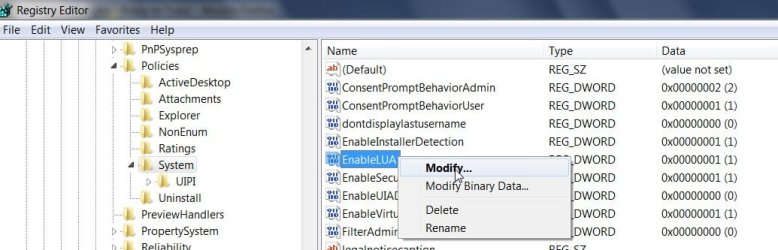
a) Open Regedit and go to

HKEY_LOCAL_MACHINE\Software\Microsoft\Windows\CurrentVersion\Policies\System.

In the right pane , rt click and Modify EnableUA and change the value to 0.

   Warning
Use this only in Windows 7. Disabling UAC like this in Windows 8 will break Store apps, and cause you to no longer be able to open and run them.


rgedit-1-2009-08-18_175442.jpg

OR

b) Go to Msconfig>Tools Tab>Disable UAC.

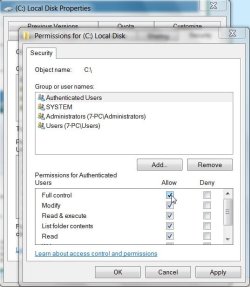
5. Then rt click C drive Properties >Security>Highlight Authenticated Users>Edit >Tick Full Control>Apply>OK. and see if you can get control of it.

AUTHENTICATED USERS -2009-08-18_180305.jpg
 
Last edited by a moderator:

My Computers My Computers

System One System Two

  • Computer type
    PC/Desktop
    OS
    7 X64
    CPU
    i5 8400
    Motherboard
    gigabyte b365m ds3h
    Memory
    2x8gb 3200mhz
    Hard Drives
    various
    PSU
    pure power 11 400w cm
    Case
    Coolermaster
    Cooling
    cryorig m9i
  • Computer type
    PC/Desktop
    OS
    7x64
    CPU
    g5400
    Motherboard
    ga b365m ds3h
    Memory
    8gb ddr4 2400
    PSU
    xfx pro 450w
Ali, based on the evidence presented, I cannot be alone in providing a singular bit of advice - you may be well served to leave UAC enabled, at least at a minimal level.

After the successful repair or re-install is accomplished.
 
Thanx SIW2... I disabled UAC and now I get the following message when I click security tab of the drive : "You dont hav permisssions to view or edit this object's permission settings".

I think, the only thing that could help is by changing the permissions from registry but dont know how to do that:)
 

My Computer My Computer

OS
windows 7
You could try this (assuming it is C drive) from an elevated cmd prompt:

icacls "C:\" /grant Administrator:F /T

As the only alternative is a reinstall, you might also give this a go - I haven't tried it on 7 , but it seems to me it may well work:

restore security settings to the default :

http://support.microsoft.com/kb/313222
 
Last edited:

My Computers My Computers

System One System Two

  • Computer type
    PC/Desktop
    OS
    7 X64
    CPU
    i5 8400
    Motherboard
    gigabyte b365m ds3h
    Memory
    2x8gb 3200mhz
    Hard Drives
    various
    PSU
    pure power 11 400w cm
    Case
    Coolermaster
    Cooling
    cryorig m9i
  • Computer type
    PC/Desktop
    OS
    7x64
    CPU
    g5400
    Motherboard
    ga b365m ds3h
    Memory
    8gb ddr4 2400
    PSU
    xfx pro 450w
This didnt work as well. Seems like I did something really stupid to it:)
Finally, reinstalled windows and all back to normal other than the time wasted.

Thaks everyone for your kind suggestions!
 

My Computer My Computer

OS
windows 7
Back
Top