

Similar Issue at PC pitstop Forum
4:15pm Mon May 11 2009
To give you the run down, I have a Dell XPS 435 that has a sata motherboard and a sata hard drive. I want to use my old slave drive (Western Digital WD1600 (250gb) as a slave drive so I bought the sata motherboard to IDE data connector and the power connector. I thought I read somewhere that the IDE drive should be placed as a master too. I turned on my computer and it would not boot, a message came up and said no boot disk found. Unplugged the power to the IDE drive and my computer booted up just fine. Turned my computer off again, plugged in the IDE hard drive and got the same error message. I tried putting the pin connector on the back as the hdd acting as the master with a slave, as a slave, and at the connector CS (whatever that means) and it still gave me an error. I just unplugged it and it worked fine again. Does anyone has any idea what I am doing wrong!!! I am pulling my hair out because this is frustrating.
Thanks to the Pit
mouse
5:47pm Mon May 11 2009
Since your using an IDE to Sata connecter remove the jumper on the IDE drive. Sata drives aren't jumpered and your system is treating the IDE as Sata.
8210GUY
5:52pm Mon May 11 2009
Never used such an adaptor so can't comment about the jumper, but as your adding a hard drive have you checked in the bios that the boot order and more importantly disk priority hasn't changed ?
I suspect the boot drive may no longer be the primary drive or something similar, so check that as well.
xyphr3
9:36pm Mon May 11 2009
I have tried everything and still nothing. I am going to try to contact Dell when I get a chance but anyone else have an idea? I tried turning on RAID but that did not do anything for me.
TomGL2
12:49am Tue May 12 2009
I suspect that adding the new drive caused a change in the boot sequence. Jumper the drive as a master (for a WDC drive, remove all jumpers), and connect the power and SATA cable. Power up, enter BIOS, and find the boot sequence settings. Make the SATA drive the first boot device, then save the settings and restart.
8210GUY
4:00am Tue May 12 2009
As I said above (although not in as much depth).
Another thought after seeing your raid comment, you do NOT use the raid setting unless you have raid, but your saying it reminded me about 1 other possible option, in the same bit as you saw raid, what are your other options ?
When using Sata and ide without raid make sure you have got Advanced or Both selected, the wording may vary, but you may need to tell the system that you are using both Sata and ide, see if that helps.
xyphr3
6:37am Tue May 12 2009
Thanks for the replies. I only see Raid or SATA option. When my SATA drive is the only one running, I can see it in the BIOS but when I plug in this IDE drive, no hard drives are shown but when I try to start windows, it shows that there are 3 drives availibe (2HDD and a DVD drive). Last night I just transferred everything off the hard drive by an external and I am going to format the drive and see if that does anything. I wonder if XP did something that Vista is not liking.
Joe C
6:44am Tue May 12 2009
check the sata ports on the motherboard, the sata drive should be the first port (sata 0 or sata 1depending on the system board)
8210GUY
6:57am Tue May 12 2009
Just tried finding a manual to see what bios options you have, but there are a couple of variations of your model so I couldn't pin it down, but the closest I got was saying you can choose raid or AHCI, so you want to set it to AHCI as your not using raid.
badbinary
6:57am Tue May 12 2009
have you tried booting with ONLY the ide drive plugged in?
got the flavor
7:12am Tue May 12 2009
Ive found on most dell machines a lot of bios settings cant be changed, In some cases once you select sata mode in the bios some more options will appear varing from standard enhanced and ide mode if you can access these settings select ide mode.
xyphr3
8:52pm Tue May 12 2009
Thanks again for all of the replies. I can't try to ide drive by itself because it was used as a slave, so it has nothing to boot. Another thing, the motherboard has a the 4 SATA connections and the main HDD has the first one, then the cd player, then the slave, would that matter at all? I don't think it would. I am going to e-mail Dell at this point and see what info they can give me because in BIOS, it only gives me the choices of SATA or RAID. Thanks everyone for your help.
8210GUY
5:26am Wed May 13 2009
When it comes to Sata ports it makes no difference which you connect to, they don't have master\slave issues like ide ones, BUT, I have never used a Sata converter to ide so have no idea about how that may change things, I take it the board has no ide port on it ?
But that aside my best guess is you will still need to follow the ide master\slave layout for the ide drive, eg master on the end plug etc.
Joe C
5:46am Wed May 13 2009
An IDE drive by itself would not need to be master, but set as a single drive on the jumpers
4:15pm Mon May 11 2009
To give you the run down, I have a Dell XPS 435 that has a sata motherboard and a sata hard drive. I want to use my old slave drive (Western Digital WD1600 (250gb) as a slave drive so I bought the sata motherboard to IDE data connector and the power connector. I thought I read somewhere that the IDE drive should be placed as a master too. I turned on my computer and it would not boot, a message came up and said no boot disk found. Unplugged the power to the IDE drive and my computer booted up just fine. Turned my computer off again, plugged in the IDE hard drive and got the same error message. I tried putting the pin connector on the back as the hdd acting as the master with a slave, as a slave, and at the connector CS (whatever that means) and it still gave me an error. I just unplugged it and it worked fine again. Does anyone has any idea what I am doing wrong!!! I am pulling my hair out because this is frustrating.
Thanks to the Pit
mouse
5:47pm Mon May 11 2009
Since your using an IDE to Sata connecter remove the jumper on the IDE drive. Sata drives aren't jumpered and your system is treating the IDE as Sata.
8210GUY
5:52pm Mon May 11 2009
Never used such an adaptor so can't comment about the jumper, but as your adding a hard drive have you checked in the bios that the boot order and more importantly disk priority hasn't changed ?
I suspect the boot drive may no longer be the primary drive or something similar, so check that as well.
xyphr3
9:36pm Mon May 11 2009
I have tried everything and still nothing. I am going to try to contact Dell when I get a chance but anyone else have an idea? I tried turning on RAID but that did not do anything for me.
TomGL2
12:49am Tue May 12 2009
I suspect that adding the new drive caused a change in the boot sequence. Jumper the drive as a master (for a WDC drive, remove all jumpers), and connect the power and SATA cable. Power up, enter BIOS, and find the boot sequence settings. Make the SATA drive the first boot device, then save the settings and restart.
8210GUY
4:00am Tue May 12 2009
As I said above (although not in as much depth).
Another thought after seeing your raid comment, you do NOT use the raid setting unless you have raid, but your saying it reminded me about 1 other possible option, in the same bit as you saw raid, what are your other options ?
When using Sata and ide without raid make sure you have got Advanced or Both selected, the wording may vary, but you may need to tell the system that you are using both Sata and ide, see if that helps.
xyphr3
6:37am Tue May 12 2009
Thanks for the replies. I only see Raid or SATA option. When my SATA drive is the only one running, I can see it in the BIOS but when I plug in this IDE drive, no hard drives are shown but when I try to start windows, it shows that there are 3 drives availibe (2HDD and a DVD drive). Last night I just transferred everything off the hard drive by an external and I am going to format the drive and see if that does anything. I wonder if XP did something that Vista is not liking.
Joe C
6:44am Tue May 12 2009
check the sata ports on the motherboard, the sata drive should be the first port (sata 0 or sata 1depending on the system board)
8210GUY
6:57am Tue May 12 2009
Just tried finding a manual to see what bios options you have, but there are a couple of variations of your model so I couldn't pin it down, but the closest I got was saying you can choose raid or AHCI, so you want to set it to AHCI as your not using raid.
badbinary
6:57am Tue May 12 2009
have you tried booting with ONLY the ide drive plugged in?
got the flavor
7:12am Tue May 12 2009
Ive found on most dell machines a lot of bios settings cant be changed, In some cases once you select sata mode in the bios some more options will appear varing from standard enhanced and ide mode if you can access these settings select ide mode.
xyphr3
8:52pm Tue May 12 2009
Thanks again for all of the replies. I can't try to ide drive by itself because it was used as a slave, so it has nothing to boot. Another thing, the motherboard has a the 4 SATA connections and the main HDD has the first one, then the cd player, then the slave, would that matter at all? I don't think it would. I am going to e-mail Dell at this point and see what info they can give me because in BIOS, it only gives me the choices of SATA or RAID. Thanks everyone for your help.
8210GUY
5:26am Wed May 13 2009
When it comes to Sata ports it makes no difference which you connect to, they don't have master\slave issues like ide ones, BUT, I have never used a Sata converter to ide so have no idea about how that may change things, I take it the board has no ide port on it ?
But that aside my best guess is you will still need to follow the ide master\slave layout for the ide drive, eg master on the end plug etc.
Joe C
5:46am Wed May 13 2009
An IDE drive by itself would not need to be master, but set as a single drive on the jumpers
My Computer
At a glance
Windows 7 7600 1 X64AMD PHENOM II X 550 PROCESSOR 3.1 ghzCorsair 4 gig ddr 3ati radeon 3300
- Computer Manufacturer/Model Number
- Custom Build
- OS
- Windows 7 7600 1 X64
- CPU
- AMD PHENOM II X 550 PROCESSOR 3.1 ghz
- Motherboard
- ASUS M4A78-TE
- Memory
- Corsair 4 gig ddr 3
- Graphics Card(s)
- ati radeon 3300
- Sound Card
- ati hd
- Monitor(s) Displays
- syncmaster 2033sw
- Screen Resolution
- 1600X900 60 hz refresh
- Hard Drives
- twin_seagates SATA's 1 TB & 500 Gig, hitachi_slimline 160 gig
- PSU
- antec_550 watt
- Case
- cooler master GLite
- Cooling
- stock_heat sink
- Internet Speed
- 20mbs up/ 1.5mbs down
- Other Info
- favorite child "stewie"
favorite dog "brian"


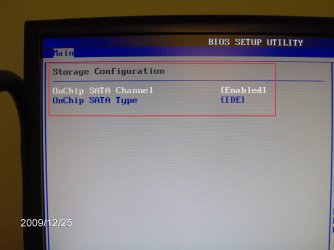


 I never even thought about that since the drive had been recognized in BIOS. I have started and restarted the system numerous times without a hitch. I went into Disk Management and the drive is recognized as healthy and online. The full drive is ready to be used. I had a feeling it was something small that I was forgetting. I appreciate all your help with this!! I will now move on to my other problem. Problems with transfer speed on my network. I will start a new thread. Thanks again, you guys are great.

