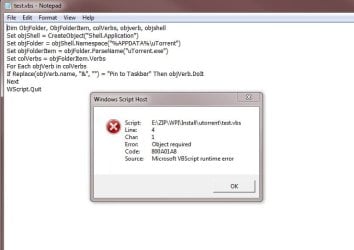
Can't get VBS script working with win7 enviromental variable

illusions

New member
Local time
5:48 AM
Messages
21
Hi

I keep getting error msg when I substitute the path with environmental variable. :confused:
Please advice, Thank you.


such as
Set objFolder = objShell.Namespace("C:\Users\Z z z\AppData\Roaming\uTorrent")
Set objFolder = objShell.Namespace("%APPDATA%\Roaming\uTorrent")


Set objFolder = objShell.Namespace("C:\Program Files (x86)\uTorrent")
Set objFolder = objShell.Namespace("%PROGRAMFILES(X86)%\uTorrent")


=====================

whole script pin to taskbar


Dim ObjFolder, ObjFolderItem, colVerbs, objverb, objshell
Set objShell = CreateObject("Shell.Application")
Set objFolder = objShell.Namespace("%PROGRAMFILES(X86)%\uTorrent")
Set objFolderItem = objFolder.ParseName("uTorrent.exe")
Set colVerbs = objFolderItem.Verbs
For Each objVerb in colVerbs
If Replace(objVerb.name, "&", "") = "Pin to Taskbar" Then objVerb.DoIt
Next
WScript.Quit
 

My Computer My Computer

OS
Windows 7 Ultimate x64
The %APPDATA% variable includes the folder named Roaming.


Maybe...

Set objFolder = objShell.Namespace("%APPDATA%\Roaming\uTorrent")

...should be:

Set objFolder = objShell.Namespace("%APPDATA%\uTorrent")
 

My Computer My Computer

Computer type
Laptop
Computer Manufacturer/Model Number
Employer provided Dell Latitude
OS
W7 Pro SP1 64bit
CPU
i7
Memory
8GB
Graphics Card(s)
Intel HD Graphics
Hard Drives
crappy SSD
Antivirus
Employer mandated Symantec Endpoint Protection
Browser
Pale Moon 64bit, IE11 64bit & Chrome 64bit
I tried the variable but unfortunately I still get an error message.

But using the following exact path it work.

Set objFolder = objShell.Namespace("C:\Users\Z z z\AppData\Roaming\uTorrent")
 

Attachments

  • Untitled.jpg
    Untitled.jpg
    32.5 KB · Views: 3

My Computer My Computer

OS
Windows 7 Ultimate x64
Try using %%APPDATA%%. It's one % at the command line but %% in a script.
 

My Computer My Computer

Computer type
PC/Desktop
Computer Manufacturer/Model Number
Home Built desktop, Dell G15 5511 Gaming laptop,MS Surface Pro 7 tablet
OS
W10 Pro desktop, W11 laptop, W11 Pro tablet (all 64-bit)
CPU
3.7Ghz 8700K i7, i7-11800H, i7-1065G7
Motherboard
ASUS TUF Z370-Pro Gaming in desktop
Memory
16G desktop, 16G laptop, 4G tablet
Graphics Card(s)
AMD Radeon RX580, RTX 3060, Intel Iris Plus
Sound Card
High Definition Audio (Built-in to mobo)
Monitor(s) Displays
Samsung U32J59 32" (2x), 15.6", 12"
Screen Resolution
3840x2160, 3840x2160, 1920x1080, 2160x1440
Hard Drives
500G SSD for OS; 2T, 10T & 15T HDDs for Data on Desktop, 1TB SSD laptop, 128G SSD tablet.
PSU
Corsair CX 750M
Case
Antec 100
Cooling
CM 212+
Keyboard
IBM Model M - used continuously since 1986
Mouse
Microsoft Pro IntelliMouse
Internet Speed
400M down 8M up
Antivirus
Windows Defender
Browser
FireFox
Other Info
Built my first computer (8Mhz 8088cpu, 640K RAM, 20MB HDD, 2 360K floppy drives) in 1985 and have been building them for myself, relatives and friends ever since.
I tried

Set objFolder = objShell.Namespace("%%APPDATA%%\uTorrent")


still the same error msg :(
 

My Computer My Computer

OS
Windows 7 Ultimate x64
I don't know much about VBS, but %appdata% expands correctly in the code below:

Code:
Option Explicit
Dim objWShell
Set objWShell = WScript.CreateObject("WScript.Shell")
Dim appData
appData = objWShell.expandEnvironmentStrings("%APPDATA%")
msgbox appdata ,0, "expanded"

The source for most of that code can be found here:
vbscript - How to Create Folders and Subfolders in %AppData% - Stack Overflow
 

My Computer My Computer

Computer type
Laptop
Computer Manufacturer/Model Number
Employer provided Dell Latitude
OS
W7 Pro SP1 64bit
CPU
i7
Memory
8GB
Graphics Card(s)
Intel HD Graphics
Hard Drives
crappy SSD
Antivirus
Employer mandated Symantec Endpoint Protection
Browser
Pale Moon 64bit, IE11 64bit & Chrome 64bit
Back
Top