Can't install drivers for nVidia GeForce 8500 GT

fragment137

New member
First, I apologize for the double-post. There is a duplicate thread in the "Graphics Cards" forum..

I have Windows 7 32bit installed on an ASUS P5RD1-VM mobo with an nVidia Geforce 8500 GT graphics card.

I have tried numerous times to install the Windows 7 (32bit) Driver from manufacture site, but when it tries to install the drivers, I get an error message saying "No drivers were found that work with your device. Setup will now close."

I don't get this! I'm on that graphics card right now, in Windows 7, and typing this thread...

Also, in Device Manager, there is no "Display Adapter" listed.... I can't seem to find any evidence of a generic display driver either....

I've already solved the problem of my sound not working (SoundMAX Integrated Digital HD Audio) and this is the last thing I need to get Windows 7 working for a REAL test run!

How can I get these drivers installed?!

Any help is appreciated
 

My Computer

OS
Windows 7 Pro 64bit
CPU
Intel Core i5
Motherboard
Intel DP55KG
Memory
4GB 3200
Graphics Card(s)
BFG nVidia GTX 260 O/C
Sound Card
Realtek HD Audio (Integrated)
Monitor(s) Displays
Samsung 32" HDTV
Screen Resolution
1360 x 768
Hard Drives
1.5TB Western Digital Cavier Green
1TB Western Digital Caviar Black
PSU
750W Corsair
Case
Antec 900
Keyboard
Logitech MX5500 Revolution Bluetooth desktop
Mouse
Logitech MX5500 Revolution
First, I apologize for the double-post. There is a duplicate thread in the "Graphics Cards" forum..

I have Windows 7 32bit installed on an ASUS P5RD1-VM mobo with an nVidia Geforce 8500 GT graphics card.

I have tried numerous times to install the Windows 7 (32bit) Driver from manufacture site, but when it tries to install the drivers, I get an error message saying "No drivers were found that work with your device. Setup will now close."

I don't get this! I'm on that graphics card right now, in Windows 7, and typing this thread...

Also, in Device Manager, there is no "Display Adapter" listed.... I can't seem to find any evidence of a generic display driver either....

I've already solved the problem of my sound not working (SoundMAX Integrated Digital HD Audio) and this is the last thing I need to get Windows 7 working for a REAL test run!

How can I get these drivers installed?!


Any help is appreciated


Hi fragment and welcome

thanks for letting us know about the dup post.

Sometimes a win 7 driver isnt 100% and using a vista driver installed in compatibility mode works. to install in compatibilty mode right click the installer and go to properties>compatibility>check vista


Hope it helps

Kenn J+
 

My Computer

Computer Manufacturer/Model Number
HP Pavillion dv-7 1005 Tx
OS
Win 8 Release candidate 8400
CPU
[email protected]
Memory
4 gigs
Graphics Card(s)
Nvidia 9600M
Sound Card
HD built-in
Monitor(s) Displays
17" Wxga
Screen Resolution
1440x900
Cooling
none
Internet Speed
45Mb down 5Mb up
I have same card.. 8500 GT that works on 512 ... I downloaded from Nvidia site and it works great... but are u shore u downloaded good drivers? for ur series and all that?
 

My Computer

Computer Manufacturer/Model Number
Hewlett-Packcard
OS
Windows 7 32 bit (x86)
CPU
1.60 GHz x2
Memory
2,00 GB
Graphics Card(s)
nVidia 8500 GT 512 Mb
Sound Card
Realtek
Yes they are the correct drivers, for geforce 8 series on windows 7 32 bit.

I'll have to try vista compatibility mode, I'm not sure if I have yet.

It's just weird because the card is obviously working if my monitor is plugged into it and windows is running! When I try to install the driver, nvidia is under the impression that it doesn't have the proper driver for my device... So weird!

Thanks for the tip Kenn, I'll give that a shot!
 

My Computer

OS
Windows 7 Pro 64bit
CPU
Intel Core i5
Motherboard
Intel DP55KG
Memory
4GB 3200
Graphics Card(s)
BFG nVidia GTX 260 O/C
Sound Card
Realtek HD Audio (Integrated)
Monitor(s) Displays
Samsung 32" HDTV
Screen Resolution
1360 x 768
Hard Drives
1.5TB Western Digital Cavier Green
1TB Western Digital Caviar Black
PSU
750W Corsair
Case
Antec 900
Keyboard
Logitech MX5500 Revolution Bluetooth desktop
Mouse
Logitech MX5500 Revolution
I have tried running the drivers in Vista compatibility mode to no avail... the drivers still won't install...

My BIOS is updated to the last possible update (Which unfortunately was 2006), and though I've gotten my sound working, the PCI-E slot does not seem to be functioning correctly. My monitor IS plugged into the GeForce and does work, but with the most basic display adapter driver running on Windows 7... According to Windows i HAVE no display adapter, thus I can't install nVidia drivers.

I'm so confused!!
 

My Computer

OS
Windows 7 Pro 64bit
CPU
Intel Core i5
Motherboard
Intel DP55KG
Memory
4GB 3200
Graphics Card(s)
BFG nVidia GTX 260 O/C
Sound Card
Realtek HD Audio (Integrated)
Monitor(s) Displays
Samsung 32" HDTV
Screen Resolution
1360 x 768
Hard Drives
1.5TB Western Digital Cavier Green
1TB Western Digital Caviar Black
PSU
750W Corsair
Case
Antec 900
Keyboard
Logitech MX5500 Revolution Bluetooth desktop
Mouse
Logitech MX5500 Revolution
bump :huh:
 

My Computer

OS
Windows 7 Pro 64bit
CPU
Intel Core i5
Motherboard
Intel DP55KG
Memory
4GB 3200
Graphics Card(s)
BFG nVidia GTX 260 O/C
Sound Card
Realtek HD Audio (Integrated)
Monitor(s) Displays
Samsung 32" HDTV
Screen Resolution
1360 x 768
Hard Drives
1.5TB Western Digital Cavier Green
1TB Western Digital Caviar Black
PSU
750W Corsair
Case
Antec 900
Keyboard
Logitech MX5500 Revolution Bluetooth desktop
Mouse
Logitech MX5500 Revolution
First uninstall the drivers from Programs and Features,.

Now download this tool:
Guru3D - Driver Sweeper

Noe run the install again.
make sue you have the downloaded file from Nvidia
 

My Computer

Computer Manufacturer/Model Number
Cheap $399.00 E-Machine
OS
Windows 7 Pro & Vista Home Premium
CPU
Athlon 64 3800+ (Orleans) 2.40GHz
Motherboard
Winfast
Memory
2GB DDR2 RAM DIMM
Graphics Card(s)
NVIDIA GeForce 8500 GT 512 MB memory HDMI out
Sound Card
creative X-Fi Exteme 7..1 channel
Monitor(s) Displays
Acer V223W 22" widescreen DVI
Screen Resolution
1680x1050
Hard Drives
WDC WD5 500GB
WDC WD25 250GB
PSU
OCZ 550 watt
Case
Gateway
Cooling
2 fans
Keyboard
Dell
Mouse
Sony Vaio
Internet Speed
18MB/s down - .72MB /s up
That didn't work. I still can't install the drivers, and there was nothing for me to remove before this process.

There's something in my registry that's odd. One of the PCI Drivers says there aren't enough resources for it to be active. I tried disabling a bunch of devices but it still won't work. Considering my vid card is in a PCI-e slot, I'd imagine this may be contributing to my problem. I lowered as many resources as I could and nothing worked.

I'm quite frustrated, but i'm still determined to see this problem fixed. The help is still appreciated.
 

My Computer

OS
Windows 7 Pro 64bit
CPU
Intel Core i5
Motherboard
Intel DP55KG
Memory
4GB 3200
Graphics Card(s)
BFG nVidia GTX 260 O/C
Sound Card
Realtek HD Audio (Integrated)
Monitor(s) Displays
Samsung 32" HDTV
Screen Resolution
1360 x 768
Hard Drives
1.5TB Western Digital Cavier Green
1TB Western Digital Caviar Black
PSU
750W Corsair
Case
Antec 900
Keyboard
Logitech MX5500 Revolution Bluetooth desktop
Mouse
Logitech MX5500 Revolution
One of the PCI Drivers says there aren't enough resources for it to be active. I tried disabling a bunch of devices but it still won't work


Could you explain that a little better.

If you get an error message what is the exact wording?
 

My Computer

Computer Manufacturer/Model Number
Cheap $399.00 E-Machine
OS
Windows 7 Pro & Vista Home Premium
CPU
Athlon 64 3800+ (Orleans) 2.40GHz
Motherboard
Winfast
Memory
2GB DDR2 RAM DIMM
Graphics Card(s)
NVIDIA GeForce 8500 GT 512 MB memory HDMI out
Sound Card
creative X-Fi Exteme 7..1 channel
Monitor(s) Displays
Acer V223W 22" widescreen DVI
Screen Resolution
1680x1050
Hard Drives
WDC WD5 500GB
WDC WD25 250GB
PSU
OCZ 550 watt
Case
Gateway
Cooling
2 fans
Keyboard
Dell
Mouse
Sony Vaio
Internet Speed
18MB/s down - .72MB /s up
Hey fragment137, have you tried installing the drivers in Safemode?
This is how I install my drivers to keep Windows 7 from automatically installing the older drivers I don't want during bootup.
Give it a shot & see what happens. ;)
Make sure you are installing the latest drivers v195.62
NVIDIA DRIVERS 195.62 WHQL
 

My Computer

Computer Manufacturer/Model Number
ABS Tech Ultimate X9
OS
Windows® 7 Ultimate x64 SP1
CPU
Intel Core 2 Duo E8400 (E0) @ 4.0GHz
Motherboard
ASUS P5Q Pro Turbo / 1780 FSB
Memory
G.SKILL-F2-8500CL5D-4GBPK (2x2Gbs) (5-5-5-15) @ 1067Mhz
Graphics Card(s)
EVGA GTX 470 SC (845/1690/2000) 160Gbs
Sound Card
VIA HD Audio / Boston Acoustics
Monitor(s) Displays
Acer X222W HD 22" LCD 2500:1 / 5ms
Screen Resolution
1680x1050
Hard Drives
Seagate Barracuda SATAII 2 x 320GB
Seagate Barracuda SATAII 1Tb
Intel® Rapid Storage Technology v10.1.0.1008
AHCI-NCQ Enabled
PSU
Silent Pro GOLD 80 PLUS 800w /95% efficiency / SLI-Crossfire
Case
ABS Stealth Black-Custom
Cooling
CoolerMaster V6GT 6 Heatpipe 200w CPU Cooler
Keyboard
Logitech G15 Gaming Keyboard (Old Style Blue!)
Mouse
Logitech MX518 Gaming Mouse
Internet Speed
1Mbs-up/ 6Mbs-down
Installing in safe mode does not work..

These are the two errors that I'm getting, as well as the fact that I don't have any Display Adapter in my device manager...

nVidia Error

Device Manager
 

My Computer

OS
Windows 7 Pro 64bit
CPU
Intel Core i5
Motherboard
Intel DP55KG
Memory
4GB 3200
Graphics Card(s)
BFG nVidia GTX 260 O/C
Sound Card
Realtek HD Audio (Integrated)
Monitor(s) Displays
Samsung 32" HDTV
Screen Resolution
1360 x 768
Hard Drives
1.5TB Western Digital Cavier Green
1TB Western Digital Caviar Black
PSU
750W Corsair
Case
Antec 900
Keyboard
Logitech MX5500 Revolution Bluetooth desktop
Mouse
Logitech MX5500 Revolution
Installing in safe mode does not work..

These are the two errors that I'm getting, as well as the fact that I don't have any Display Adapter in my device manager...

nVidia Error

Device Manager

1.
OK, I read back through the first posts & you didn't try what one person suggested which was this...

Download a Vista 32bit driver for your card & run it in Vista compatibility mode.

From what I understand from the previous posts is that you tried to install the W7 driver in Vista compatibility mode, not the Vista Driver which was what he was saying to do!
So try that...
I've used Vista drivers for the W7 OS successfully before (during the beta & RC builds) with no problems at all before there were W7 drivers...

2.
The other idea that hit me is the reason your vidcard isn't showing up in the device manager is because you don't have the chipset drivers for your mobo installed.
I have no idea where to look for the newest ATI Radeon Express 200 chipset drivers for your mobo so that's up to you.
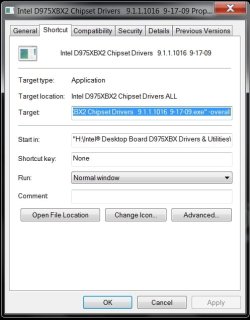
DON'T install the drivers the normal way as this doesn't work!
Use the -overall command line to do this...this is how.

1. Create a shortcut to the chipset driver package.
2. Rightclick the shortcut & click properties.
3. At the end of the target line add -overall with a space in between that & the end of the target location & click apply.
It will look something like this: "H:\Intel D975XBX2 Chipset Drivers 9.1.1.1016 9-17-09.exe" -overall (screenshot below)

4. Launch the chipset driver installation from the shortcut.

As these drivers are installed the screen will flash off & on & stuff like that but this is normal. After it's done you will have to reboot the computer. Now if all is right your device manager should now show the display adapter with any luck!
 

Attachments

  • -overall command at end of target  location.jpg
    -overall command at end of target location.jpg
    145.7 KB · Views: 134
Last edited:

My Computer

Computer Manufacturer/Model Number
ABS Tech Ultimate X9
OS
Windows® 7 Ultimate x64 SP1
CPU
Intel Core 2 Duo E8400 (E0) @ 4.0GHz
Motherboard
ASUS P5Q Pro Turbo / 1780 FSB
Memory
G.SKILL-F2-8500CL5D-4GBPK (2x2Gbs) (5-5-5-15) @ 1067Mhz
Graphics Card(s)
EVGA GTX 470 SC (845/1690/2000) 160Gbs
Sound Card
VIA HD Audio / Boston Acoustics
Monitor(s) Displays
Acer X222W HD 22" LCD 2500:1 / 5ms
Screen Resolution
1680x1050
Hard Drives
Seagate Barracuda SATAII 2 x 320GB
Seagate Barracuda SATAII 1Tb
Intel® Rapid Storage Technology v10.1.0.1008
AHCI-NCQ Enabled
PSU
Silent Pro GOLD 80 PLUS 800w /95% efficiency / SLI-Crossfire
Case
ABS Stealth Black-Custom
Cooling
CoolerMaster V6GT 6 Heatpipe 200w CPU Cooler
Keyboard
Logitech G15 Gaming Keyboard (Old Style Blue!)
Mouse
Logitech MX518 Gaming Mouse
Internet Speed
1Mbs-up/ 6Mbs-down
That's the problem, the driver file from nVidia is the same for windows 7 as it is for windows vista, I checked that before downloading it twice...

I'm currently trying your second idea now though, I will post after I've tried it and let you know.
 

My Computer

OS
Windows 7 Pro 64bit
CPU
Intel Core i5
Motherboard
Intel DP55KG
Memory
4GB 3200
Graphics Card(s)
BFG nVidia GTX 260 O/C
Sound Card
Realtek HD Audio (Integrated)
Monitor(s) Displays
Samsung 32" HDTV
Screen Resolution
1360 x 768
Hard Drives
1.5TB Western Digital Cavier Green
1TB Western Digital Caviar Black
PSU
750W Corsair
Case
Antec 900
Keyboard
Logitech MX5500 Revolution Bluetooth desktop
Mouse
Logitech MX5500 Revolution
fragment137,.

That';s what I thought too.

I meant to due an MD5 checksum,. but forgot.
 

My Computer

Computer Manufacturer/Model Number
Cheap $399.00 E-Machine
OS
Windows 7 Pro & Vista Home Premium
CPU
Athlon 64 3800+ (Orleans) 2.40GHz
Motherboard
Winfast
Memory
2GB DDR2 RAM DIMM
Graphics Card(s)
NVIDIA GeForce 8500 GT 512 MB memory HDMI out
Sound Card
creative X-Fi Exteme 7..1 channel
Monitor(s) Displays
Acer V223W 22" widescreen DVI
Screen Resolution
1680x1050
Hard Drives
WDC WD5 500GB
WDC WD25 250GB
PSU
OCZ 550 watt
Case
Gateway
Cooling
2 fans
Keyboard
Dell
Mouse
Sony Vaio
Internet Speed
18MB/s down - .72MB /s up
I'm not sure what you mean by MD5 checksum...

I can't say that I entirely remember those, but from what I do remember, I don't see how it could help :/
 

My Computer

OS
Windows 7 Pro 64bit
CPU
Intel Core i5
Motherboard
Intel DP55KG
Memory
4GB 3200
Graphics Card(s)
BFG nVidia GTX 260 O/C
Sound Card
Realtek HD Audio (Integrated)
Monitor(s) Displays
Samsung 32" HDTV
Screen Resolution
1360 x 768
Hard Drives
1.5TB Western Digital Cavier Green
1TB Western Digital Caviar Black
PSU
750W Corsair
Case
Antec 900
Keyboard
Logitech MX5500 Revolution Bluetooth desktop
Mouse
Logitech MX5500 Revolution
It check to see if they are a perfect identical match.
 

My Computer

Computer Manufacturer/Model Number
Cheap $399.00 E-Machine
OS
Windows 7 Pro & Vista Home Premium
CPU
Athlon 64 3800+ (Orleans) 2.40GHz
Motherboard
Winfast
Memory
2GB DDR2 RAM DIMM
Graphics Card(s)
NVIDIA GeForce 8500 GT 512 MB memory HDMI out
Sound Card
creative X-Fi Exteme 7..1 channel
Monitor(s) Displays
Acer V223W 22" widescreen DVI
Screen Resolution
1680x1050
Hard Drives
WDC WD5 500GB
WDC WD25 250GB
PSU
OCZ 550 watt
Case
Gateway
Cooling
2 fans
Keyboard
Dell
Mouse
Sony Vaio
Internet Speed
18MB/s down - .72MB /s up
I see.... I'm certain that the vista driver is the same as the win7 driver on nVidia's site... The filename is:

195.62_desktop_win7_winvista_32bit_english_whql.exe
 

My Computer

OS
Windows 7 Pro 64bit
CPU
Intel Core i5
Motherboard
Intel DP55KG
Memory
4GB 3200
Graphics Card(s)
BFG nVidia GTX 260 O/C
Sound Card
Realtek HD Audio (Integrated)
Monitor(s) Displays
Samsung 32" HDTV
Screen Resolution
1360 x 768
Hard Drives
1.5TB Western Digital Cavier Green
1TB Western Digital Caviar Black
PSU
750W Corsair
Case
Antec 900
Keyboard
Logitech MX5500 Revolution Bluetooth desktop
Mouse
Logitech MX5500 Revolution
Yea,. I noticed that also..
 

My Computer

Computer Manufacturer/Model Number
Cheap $399.00 E-Machine
OS
Windows 7 Pro & Vista Home Premium
CPU
Athlon 64 3800+ (Orleans) 2.40GHz
Motherboard
Winfast
Memory
2GB DDR2 RAM DIMM
Graphics Card(s)
NVIDIA GeForce 8500 GT 512 MB memory HDMI out
Sound Card
creative X-Fi Exteme 7..1 channel
Monitor(s) Displays
Acer V223W 22" widescreen DVI
Screen Resolution
1680x1050
Hard Drives
WDC WD5 500GB
WDC WD25 250GB
PSU
OCZ 550 watt
Case
Gateway
Cooling
2 fans
Keyboard
Dell
Mouse
Sony Vaio
Internet Speed
18MB/s down - .72MB /s up
As soon as I installed Win7 and my virus software, I was able to download these drivers and install no problem. Then, when I ran Windows Update, it found an "update" for my driver that was the Sept 30 release I believe. I, of course, ignored it. So I'm not sure why yours wouldn't be working, but have you tried running/installing the updates? It might help you, not sure though.
 

My Computer

OS
Win7
That's the problem, the driver file from nVidia is the same for windows 7 as it is for windows vista, I checked that before downloading it twice...

I'm currently trying your second idea now though, I will post after I've tried it and let you know.

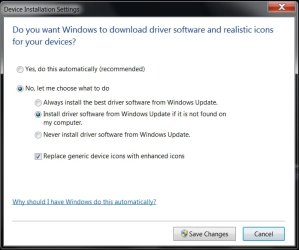
OK, I got one more idea that was triggered by the last post of amysharren, but more detailed info on how to do this.

Click Control Panel, then click view Devices & Printers.
Now Rightclick your computer Icon (Should be the name of your computer) & click Device installation settings.
Check the box (dot) that says No let me choose what to do
& then check Install driver software from Windows Update if it is not found on my computer.
Then see if it doesn't see the graphics card & drivers that need to be installed. (Click all programs then Windows Update-Check for Updates.
If it does, then half your battle is over & you can then install the updated Nvidia drivers...worth a shot! ;)

If that doesn't work then try the other one which is
Always install the best driver software from Windows Update.

After this I'm truly out of ideas to try, for now anyways...
 

Attachments

  • Image 0.jpg
    Image 0.jpg
    153.6 KB · Views: 120
Last edited:

My Computer

Computer Manufacturer/Model Number
ABS Tech Ultimate X9
OS
Windows® 7 Ultimate x64 SP1
CPU
Intel Core 2 Duo E8400 (E0) @ 4.0GHz
Motherboard
ASUS P5Q Pro Turbo / 1780 FSB
Memory
G.SKILL-F2-8500CL5D-4GBPK (2x2Gbs) (5-5-5-15) @ 1067Mhz
Graphics Card(s)
EVGA GTX 470 SC (845/1690/2000) 160Gbs
Sound Card
VIA HD Audio / Boston Acoustics
Monitor(s) Displays
Acer X222W HD 22" LCD 2500:1 / 5ms
Screen Resolution
1680x1050
Hard Drives
Seagate Barracuda SATAII 2 x 320GB
Seagate Barracuda SATAII 1Tb
Intel® Rapid Storage Technology v10.1.0.1008
AHCI-NCQ Enabled
PSU
Silent Pro GOLD 80 PLUS 800w /95% efficiency / SLI-Crossfire
Case
ABS Stealth Black-Custom
Cooling
CoolerMaster V6GT 6 Heatpipe 200w CPU Cooler
Keyboard
Logitech G15 Gaming Keyboard (Old Style Blue!)
Mouse
Logitech MX518 Gaming Mouse
Internet Speed
1Mbs-up/ 6Mbs-down
Back
Top