Cant install win7 64bit in Vitual Box

Shubhashis

New member
Local time
10:41 PM
Messages
2
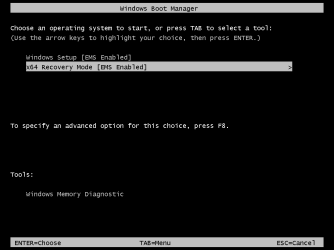
1.png

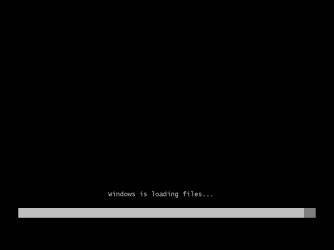
2.png

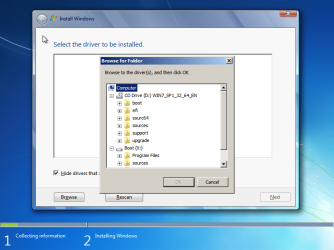
4.png

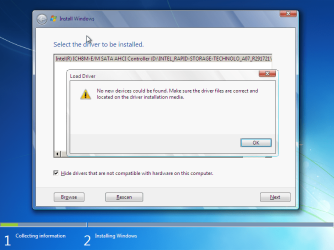
5.png

6.png
cant access my local drives to load pre os drivers which I downloaded from dell official website.so, I saved pre-os driver folder in win7 iso to access to the drivers to load.but failed.now what to do??

cant able to have the full screen shots with Virtual Box.Hope you consider
 

My Computer

Computer type
Laptop
Computer Manufacturer/Model Number
Dell Inc.
OS
Windows 7(32bit and 64bit) and Windows 8.1(32but Update 1)
CPU
Intel(R) Core(TM) i3-2330M CPU @ 2.20GHz
Memory
2GB
Graphics Card(s)
Intel(R) HD Graphics 3000
Hard Drives
TOSHIBA MQ01ACF032
Antivirus
Windows Defender
Browser
IE11
New Picture.gif

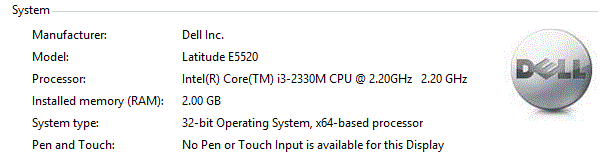
this is my system details.
 

My Computer

Computer type
Laptop
Computer Manufacturer/Model Number
Dell Inc.
OS
Windows 7(32bit and 64bit) and Windows 8.1(32but Update 1)
CPU
Intel(R) Core(TM) i3-2330M CPU @ 2.20GHz
Memory
2GB
Graphics Card(s)
Intel(R) HD Graphics 3000
Hard Drives
TOSHIBA MQ01ACF032
Antivirus
Windows Defender
Browser
IE11
I mount the installation ISO to a virtual DVD drive and Virtualbox picks it up and don't experience driver issues.
 

My Computer

Computer type
PC/Desktop
Computer Manufacturer/Model Number
Custom Build
OS
Windows 7 Ultimate x64 SP1
CPU
AMD Phenom 2 1090T
Motherboard
Gigabyte GA-890FXA-UD5
Memory
2x8GB Kingston HyperX Fury Black 1600Mhz Unganged
Graphics Card(s)
MSI GTX 970 Gaming 4G
Sound Card
Realtek On-Board HD 7.1 Audio / Logitech G35
Monitor(s) Displays
3xAcer GD245HQ
Screen Resolution
1920x1080
Hard Drives
Samsung 850 Pro 512GB SSD - OS /
WD Caviar Black SATA 3 - 1 TBx2 - Dynamic RAID 0 /
WD Caviar Green SATA 2 - 640GBx2 - Dynamic RAID 0 /
WD Caviar Green SATA 2 - 640GB - Internal Backup /
Seagate Barracude SATA 3 - 3TB - External Backup/ Sync
PSU
HighPower 1000W
Case
Cooler Master HAF 932
Cooling
Noctua NH-D14
Keyboard
Logitech G19
Mouse
Logitech G500
Internet Speed
100/4 Mbit Cable (100GB quota)
Antivirus
ZoneAlarm Extreme Security / MBAM Pro / MBAE Free / SAS Free
Browser
IE 11 - Firefox - Chrome
Other Info
Logitech F710/ G27/ G940/ Z5500 // TrackIR 5 // Nvidia 3D Surround Vision
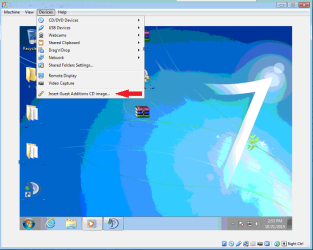
While the VM not technicly using the physical hardware. When the VM runs, it uses Virtual devices. In Virtual Box, you have an option while running a VM to insert guest additions. This should contain the drivers for virtual box systems.

If you're still having an issue, you may be missing key drivers with VB itself. I would recommend a repair install to patch anything that may be having issues.
 

Attachments

  • Capture7Forum.PNG
    Capture7Forum.PNG
    184.2 KB · Views: 13

My Computer

Computer type
Laptop
Computer Manufacturer/Model Number
Asus ROG
OS
Windows 8 x64
CPU
Intel i7 4500U
Motherboard
-
Memory
32 GB
Graphics Card(s)
NVIDIA GeForce GT 745M
Hard Drives
1 TB Western Digital
Antivirus
Avast
Browser
Google Chrome
Back
Top