Can't Install Windows Updates

raw157

New member
Hey folks,
Let me give a quick over view of what has been happening to me the past few days.
Seemingly out of the blue my computer kept blue screening. I ran memtest for a while and got no errors. I pulled out my MoBo, reseated my GPU, CPU and RAM sticks. I got it all back up and running and would randomly get blue screens.

For a while my HDD had been making some odd noises on start up, so I decided to replace my HDD. This seems to have fixed the BSoD problem. However, I new problem has started up.

I went to do a fresh install on my new drive (WD 1 TB Green), installed Win7x64 without any problems. Now, when ever I go to do windows updates, it stats to install them but will get to any random number and stop. The download line still has its animation and the window itself isn't frozen.

I have did some Google searches and cam across Microsoft Fix It. I ran that, but it has not seemed to fix anything.

I'm at the end of my rope here, :banghead:so I come to you for help.

Thanks in advance for any responses.
-Raw
 

My Computer

Computer Manufacturer/Model Number
Me, Myself and I
OS
Windows 7 Ultimate x64
Memory
Coarsair 8 GB DDR3
Graphics Card(s)
2 NVIDIA GeForce 560 SC

My Computer

Computer type
PC/Desktop
Computer Manufacturer/Model Number
Custom Asus Build
OS
Microsoft Windows 8.1 Pro 64-bit
CPU
Intel(R) Core(TM) i3-4130 CPU @ 3.40GHz
Motherboard
B85M-E
Memory
8.00 GB
Graphics Card(s)
None
Sound Card
Realtek High Definition Audio
Monitor(s) Displays
Asus 23.6" Monitor
Screen Resolution
1920 x 1080 x 32 bits (4294967296 colors) @ 60 Hz
Hard Drives
INTEL SSDSC2BW180A4
Samsung SSD 840 PRO Series
PSU
Seasonic S12II-380Bronze
Case
Lian Li
Cooling
Fan, Passive
Keyboard
Logitech K120
Mouse
Microsoft Touch Mouse
Internet Speed
4ms Ping, 19.0 Mbps Download, 19.0 Mbps Upload
Antivirus
Eset Endpoint
Browser
Internet Explorer, Chrome

My Computer

Computer type
PC/Desktop
Computer Manufacturer/Model Number
Self assembled
OS
Windows 10 Home 64Bit
CPU
Intel Core i5 10400 @ 2.90GHz
Motherboard
Intel Corporation DG41WV (PROCESSOR)
Memory
8.00GB Single-Channel Unknown @ 1329MHz (16-20-20-38)
Sound Card
Realtek High Definition Audio
Monitor(s) Displays
DELL E170S
Screen Resolution
1280x1024 pixels
Hard Drives
931GB TOSHIBA DT01ACA100 (SATA)
238GB TEAM TM8PS7256G (SATA SSD)
Case
Nothing Fancy
Cooling
Fans
Keyboard
A4 Tech Co LTD
Mouse
A4 Tech Co Ltd/Logitech
Internet Speed
25 Mbps
Downloading the readiness tool now. I ran the bat file as well. Figured might as well get both things done just to be on the safe side.
Thanks for the quick replies and I'll post back here when I get an update.
 

My Computer

Computer Manufacturer/Model Number
Me, Myself and I
OS
Windows 7 Ultimate x64
Memory
Coarsair 8 GB DDR3
Graphics Card(s)
2 NVIDIA GeForce 560 SC
Await the result.

In case I'm not around, I hope my friend Dusty will back me up ;) :)
 

My Computer

Computer type
PC/Desktop
Computer Manufacturer/Model Number
Self assembled
OS
Windows 10 Home 64Bit
CPU
Intel Core i5 10400 @ 2.90GHz
Motherboard
Intel Corporation DG41WV (PROCESSOR)
Memory
8.00GB Single-Channel Unknown @ 1329MHz (16-20-20-38)
Sound Card
Realtek High Definition Audio
Monitor(s) Displays
DELL E170S
Screen Resolution
1280x1024 pixels
Hard Drives
931GB TOSHIBA DT01ACA100 (SATA)
238GB TEAM TM8PS7256G (SATA SSD)
Case
Nothing Fancy
Cooling
Fans
Keyboard
A4 Tech Co LTD
Mouse
A4 Tech Co Ltd/Logitech
Internet Speed
25 Mbps
Await the result.

In case I'm not around, I hope my friend Dusty will back me up ;) :)
Of course. For you, anything.

I notice your link to system update readiness tool is to the Indian site? It is the exact same thing, but the headings at the top are in English - What is the System Update Readiness Tool?

Only difference is instead of windows.microsoft.com/is-IS/, it is windows.microsoft.com/en-US/.

But they both do the same thing so it wouldn't matter which you use. Every country will have a different location webpage based on where you are: Worldwide sites - Microsoft Windows

That is an excellent tool, you're spot-on, Yussi. Hopefully it helps with the problem, because it should apply to the exact issues he is having.
 

My Computer

Computer type
PC/Desktop
Computer Manufacturer/Model Number
Custom Asus Build
OS
Microsoft Windows 8.1 Pro 64-bit
CPU
Intel(R) Core(TM) i3-4130 CPU @ 3.40GHz
Motherboard
B85M-E
Memory
8.00 GB
Graphics Card(s)
None
Sound Card
Realtek High Definition Audio
Monitor(s) Displays
Asus 23.6" Monitor
Screen Resolution
1920 x 1080 x 32 bits (4294967296 colors) @ 60 Hz
Hard Drives
INTEL SSDSC2BW180A4
Samsung SSD 840 PRO Series
PSU
Seasonic S12II-380Bronze
Case
Lian Li
Cooling
Fan, Passive
Keyboard
Logitech K120
Mouse
Microsoft Touch Mouse
Internet Speed
4ms Ping, 19.0 Mbps Download, 19.0 Mbps Upload
Antivirus
Eset Endpoint
Browser
Internet Explorer, Chrome
Alright,
I went back to do windows updates. They all downloaded fine, but when it went to install, I got "Windows installer has stopped working."
Files that help describe the problem:
C:\ProgramData\Microsoft\Windows\WER\ReportQueue\AppCrash_MsiExec.exe_d0c9dee84e43720d1fd12168d8eb1cf2e57f34_cab_1103a6d9\WERA62E.tmp.appcompat.txt
C:\ProgramData\Microsoft\Windows\WER\ReportQueue\AppCrash_MsiExec.exe_d0c9dee84e43720d1fd12168d8eb1cf2e57f34_cab_1103a6d9\WERA62F.tmp.WERInternalMetadata.xml
C:\ProgramData\Microsoft\Windows\WER\ReportQueue\AppCrash_MsiExec.exe_d0c9dee84e43720d1fd12168d8eb1cf2e57f34_cab_1103a6d9\WERA6CD.tmp.mdmp

Read our privacy statement online:
Windows 7 Privacy Statement - Microsoft Windows

If the online privacy statement is not available, please read our privacy statement offline:
C:\Windows\system32\en-US\erofflps.txt
 

My Computer

Computer Manufacturer/Model Number
Me, Myself and I
OS
Windows 7 Ultimate x64
Memory
Coarsair 8 GB DDR3
Graphics Card(s)
2 NVIDIA GeForce 560 SC
Reboot, try installing few at a time. Like 3 or 4 updates together.
 

My Computer

Computer type
PC/Desktop
Computer Manufacturer/Model Number
Self assembled
OS
Windows 10 Home 64Bit
CPU
Intel Core i5 10400 @ 2.90GHz
Motherboard
Intel Corporation DG41WV (PROCESSOR)
Memory
8.00GB Single-Channel Unknown @ 1329MHz (16-20-20-38)
Sound Card
Realtek High Definition Audio
Monitor(s) Displays
DELL E170S
Screen Resolution
1280x1024 pixels
Hard Drives
931GB TOSHIBA DT01ACA100 (SATA)
238GB TEAM TM8PS7256G (SATA SSD)
Case
Nothing Fancy
Cooling
Fans
Keyboard
A4 Tech Co LTD
Mouse
A4 Tech Co Ltd/Logitech
Internet Speed
25 Mbps
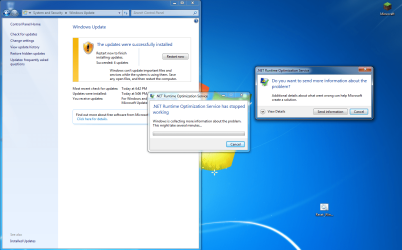
I got a different error this time attempting to download them.
However, the windows update screen says they were successfully installed....
 

Attachments

  • Capture.PNG
    Capture.PNG
    750.1 KB · Views: 45

My Computer

Computer Manufacturer/Model Number
Me, Myself and I
OS
Windows 7 Ultimate x64
Memory
Coarsair 8 GB DDR3
Graphics Card(s)
2 NVIDIA GeForce 560 SC
Alright,
I went back to do windows updates. They all downloaded fine, but when it went to install, I got "Windows installer has stopped working."
Files that help describe the problem:
C:\ProgramData\Microsoft\Windows\WER\ReportQueue\AppCrash_MsiExec.exe_d0c9dee84e43720d1fd12168d8eb1cf2e57f34_cab_1103a6d9\WERA62E.tmp.appcompat.txt
C:\ProgramData\Microsoft\Windows\WER\ReportQueue\AppCrash_MsiExec.exe_d0c9dee84e43720d1fd12168d8eb1cf2e57f34_cab_1103a6d9\WERA62F.tmp.WERInternalMetadata.xml
C:\ProgramData\Microsoft\Windows\WER\ReportQueue\AppCrash_MsiExec.exe_d0c9dee84e43720d1fd12168d8eb1cf2e57f34_cab_1103a6d9\WERA6CD.tmp.mdmp
did it give you an error code? did the files that descibe the problem link to the files, so that you can read more about it?
 

My Computer

Computer type
PC/Desktop
Computer Manufacturer/Model Number
Custom Asus Build
OS
Microsoft Windows 8.1 Pro 64-bit
CPU
Intel(R) Core(TM) i3-4130 CPU @ 3.40GHz
Motherboard
B85M-E
Memory
8.00 GB
Graphics Card(s)
None
Sound Card
Realtek High Definition Audio
Monitor(s) Displays
Asus 23.6" Monitor
Screen Resolution
1920 x 1080 x 32 bits (4294967296 colors) @ 60 Hz
Hard Drives
INTEL SSDSC2BW180A4
Samsung SSD 840 PRO Series
PSU
Seasonic S12II-380Bronze
Case
Lian Li
Cooling
Fan, Passive
Keyboard
Logitech K120
Mouse
Microsoft Touch Mouse
Internet Speed
4ms Ping, 19.0 Mbps Download, 19.0 Mbps Upload
Antivirus
Eset Endpoint
Browser
Internet Explorer, Chrome

My Computer

Computer type
PC/Desktop
Computer Manufacturer/Model Number
Custom Asus Build
OS
Microsoft Windows 8.1 Pro 64-bit
CPU
Intel(R) Core(TM) i3-4130 CPU @ 3.40GHz
Motherboard
B85M-E
Memory
8.00 GB
Graphics Card(s)
None
Sound Card
Realtek High Definition Audio
Monitor(s) Displays
Asus 23.6" Monitor
Screen Resolution
1920 x 1080 x 32 bits (4294967296 colors) @ 60 Hz
Hard Drives
INTEL SSDSC2BW180A4
Samsung SSD 840 PRO Series
PSU
Seasonic S12II-380Bronze
Case
Lian Li
Cooling
Fan, Passive
Keyboard
Logitech K120
Mouse
Microsoft Touch Mouse
Internet Speed
4ms Ping, 19.0 Mbps Download, 19.0 Mbps Upload
Antivirus
Eset Endpoint
Browser
Internet Explorer, Chrome
Alright,
I went back to do windows updates. They all downloaded fine, but when it went to install, I got "Windows installer has stopped working."
Files that help describe the problem:
C:\ProgramData\Microsoft\Windows\WER\ReportQueue\AppCrash_MsiExec.exe_d0c9dee84e43720d1fd12168d8eb1cf2e57f34_cab_1103a6d9\WERA62E.tmp.appcompat.txt
C:\ProgramData\Microsoft\Windows\WER\ReportQueue\AppCrash_MsiExec.exe_d0c9dee84e43720d1fd12168d8eb1cf2e57f34_cab_1103a6d9\WERA62F.tmp.WERInternalMetadata.xml
C:\ProgramData\Microsoft\Windows\WER\ReportQueue\AppCrash_MsiExec.exe_d0c9dee84e43720d1fd12168d8eb1cf2e57f34_cab_1103a6d9\WERA6CD.tmp.mdmp
did it give you an error code? did the files that descibe the problem link to the files, so that you can read more about it?

They did not directly link to them, but I could go in and see if there is anything in them of use. And no, no error code.
 

My Computer

Computer Manufacturer/Model Number
Me, Myself and I
OS
Windows 7 Ultimate x64
Memory
Coarsair 8 GB DDR3
Graphics Card(s)
2 NVIDIA GeForce 560 SC
^ for the failed, you would just be attempting to get help, as here. I was meaning the successful part, because it seemed like it had succeeded in the end (but is still having trouble)

The reason I recommended a repair install or clean install is because it sounds like you have some kind of file corruption.

You could also try a sfc scan, but other than that, it is probably going to have to be a start from scratch situation
http://www.sevenforums.com/tutorials/1538-sfc-scannow-command-system-file-checker.html
 

My Computer

Computer type
PC/Desktop
Computer Manufacturer/Model Number
Custom Asus Build
OS
Microsoft Windows 8.1 Pro 64-bit
CPU
Intel(R) Core(TM) i3-4130 CPU @ 3.40GHz
Motherboard
B85M-E
Memory
8.00 GB
Graphics Card(s)
None
Sound Card
Realtek High Definition Audio
Monitor(s) Displays
Asus 23.6" Monitor
Screen Resolution
1920 x 1080 x 32 bits (4294967296 colors) @ 60 Hz
Hard Drives
INTEL SSDSC2BW180A4
Samsung SSD 840 PRO Series
PSU
Seasonic S12II-380Bronze
Case
Lian Li
Cooling
Fan, Passive
Keyboard
Logitech K120
Mouse
Microsoft Touch Mouse
Internet Speed
4ms Ping, 19.0 Mbps Download, 19.0 Mbps Upload
Antivirus
Eset Endpoint
Browser
Internet Explorer, Chrome
Just a though: 3rd party firewall or anti virus might cause this problem. Also check and see how much hard drive space you have left to use.
 

My Computer

Computer type
PC/Desktop
Computer Manufacturer/Model Number
Home made Desktop
OS
Windows 10 Pro. 64/ version 1709 Windows 7 Pro/64
CPU
Intel i7-6800K @ 4.3
Motherboard
ASUS X-99 Deluxe II
Memory
Corsair Platinum 16 gig @2400
Graphics Card(s)
EVGA GTX 1070 OC
Monitor(s) Displays
Asus 27" LED LCD/VE278Q
Screen Resolution
1920-1080 or 1280-720 HDMI
Hard Drives
INTEL SSD 730-240 Gb Sata 3.0/
PSU
EVGA Platium 1200W
Case
Phanteks Luxe Tempered Glass 8 fans/ one radiator
Cooling
XSPC/ Water Cooled CPU
Keyboard
Das 4 Professional
Mouse
Logitech M705/MX Anywhere 2-S
Internet Speed
100 mbits
Antivirus
Microsoft Security Essentials/ Malwarebytes Premium 3.0/ SAS
Browser
I.E. 11 default/Firefox/ ISP Time Warner Cable/Spectrum
Other Info
LG BluRay Burner/
Sound system-KLipsch-THX/
Icy Dock ssd Hot Swap bays.
^ yes, what antivirus do you have raw? And if you have a 3rd party firewall, what?
 

My Computer

Computer type
PC/Desktop
Computer Manufacturer/Model Number
Custom Asus Build
OS
Microsoft Windows 8.1 Pro 64-bit
CPU
Intel(R) Core(TM) i3-4130 CPU @ 3.40GHz
Motherboard
B85M-E
Memory
8.00 GB
Graphics Card(s)
None
Sound Card
Realtek High Definition Audio
Monitor(s) Displays
Asus 23.6" Monitor
Screen Resolution
1920 x 1080 x 32 bits (4294967296 colors) @ 60 Hz
Hard Drives
INTEL SSDSC2BW180A4
Samsung SSD 840 PRO Series
PSU
Seasonic S12II-380Bronze
Case
Lian Li
Cooling
Fan, Passive
Keyboard
Logitech K120
Mouse
Microsoft Touch Mouse
Internet Speed
4ms Ping, 19.0 Mbps Download, 19.0 Mbps Upload
Antivirus
Eset Endpoint
Browser
Internet Explorer, Chrome
Currently just MS Security and Windows Firewall.
I have over 800 GB free on my C drive.
 

My Computer

Computer Manufacturer/Model Number
Me, Myself and I
OS
Windows 7 Ultimate x64
Memory
Coarsair 8 GB DDR3
Graphics Card(s)
2 NVIDIA GeForce 560 SC
Then it is looking like a repair install or clean install. did you do the sfc scan? You might consider waiting for someone else with more intimate knowledge on specific errors, but it is honestly looking like a simple bad installation
 

My Computer

Computer type
PC/Desktop
Computer Manufacturer/Model Number
Custom Asus Build
OS
Microsoft Windows 8.1 Pro 64-bit
CPU
Intel(R) Core(TM) i3-4130 CPU @ 3.40GHz
Motherboard
B85M-E
Memory
8.00 GB
Graphics Card(s)
None
Sound Card
Realtek High Definition Audio
Monitor(s) Displays
Asus 23.6" Monitor
Screen Resolution
1920 x 1080 x 32 bits (4294967296 colors) @ 60 Hz
Hard Drives
INTEL SSDSC2BW180A4
Samsung SSD 840 PRO Series
PSU
Seasonic S12II-380Bronze
Case
Lian Li
Cooling
Fan, Passive
Keyboard
Logitech K120
Mouse
Microsoft Touch Mouse
Internet Speed
4ms Ping, 19.0 Mbps Download, 19.0 Mbps Upload
Antivirus
Eset Endpoint
Browser
Internet Explorer, Chrome
I will be running the scan here shortly.
If I leave my computer and return, will the scan give me any issues when I return? I have to go to work in about an hour and won't be back till tomorrow.

Edit:
Started the scan, and got to 41% before "Windows Reosurce Protection could not perform the requested operation."
 

My Computer

Computer Manufacturer/Model Number
Me, Myself and I
OS
Windows 7 Ultimate x64
Memory
Coarsair 8 GB DDR3
Graphics Card(s)
2 NVIDIA GeForce 560 SC
No, if you are confident in the cooling capability (or sleep mode) of your computer
 

My Computer

Computer type
PC/Desktop
Computer Manufacturer/Model Number
Custom Asus Build
OS
Microsoft Windows 8.1 Pro 64-bit
CPU
Intel(R) Core(TM) i3-4130 CPU @ 3.40GHz
Motherboard
B85M-E
Memory
8.00 GB
Graphics Card(s)
None
Sound Card
Realtek High Definition Audio
Monitor(s) Displays
Asus 23.6" Monitor
Screen Resolution
1920 x 1080 x 32 bits (4294967296 colors) @ 60 Hz
Hard Drives
INTEL SSDSC2BW180A4
Samsung SSD 840 PRO Series
PSU
Seasonic S12II-380Bronze
Case
Lian Li
Cooling
Fan, Passive
Keyboard
Logitech K120
Mouse
Microsoft Touch Mouse
Internet Speed
4ms Ping, 19.0 Mbps Download, 19.0 Mbps Upload
Antivirus
Eset Endpoint
Browser
Internet Explorer, Chrome
Back
Top