can't make a clean win 7 install on my new sata drive :(

LilWeasel

New member
Local time
5:05 PM
Messages
12
Ok, after having given up on my old disk I'm getting pretty sick of not getting my new computer up and running, so I've just decided to install my OS on my new drive that I initially planned to use just for storage, but, that's how it goes. But do you guys think it let me do that? Of course not, it starts to mouth off as well, giving me stupid errors that I can't install Win 7 for some bull$hit reason. This is the message it's giving me during the Win 7 install:

“Windows cannot be installed to this disk. This computer’s hardware may not support booting to this disk.

Ensure that the disk’s controller is enabled in the computer’s BIOS menu.”


The only garbage in BIOS that I can find about "enabling the disk's controller" is e-sata or whatever, and I have enabled that junk, and that did nothing. I can't find any other option, maybe it's there somewhere if you know where to look for all this tripe.


The drive in question is a WD Intern Red 3TB SATA III (IntelliPower / 64MB Cache / WD30EFRX)


Thank you to any kind soul who can save me from this computer-nightmare BS.


My Computer My Computer

At a glance

Win 7 Ultimate x64
Computer type
PC/Desktop
Computer Manufacturer/Model Number
custom
OS
Win 7 Ultimate x64
That`s because you are trying to install Windows 7 on a hard drive in UEFI using a non uefi setup disc.

Go into the bios and set the boot option to Legacy mode or Legacy & UEFI mode if it has that option.

Also, disable secure boot in the bios if it`s enabled.

And a new hard drive today always asks you how do you want to initialise it, initialise it as a MBR drive for windows 7.

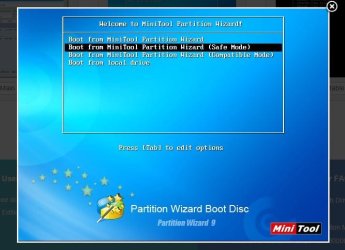
I always use my Partition Wizard Boot CD to setup a new drive for windows.

Bootable Partition Manger | MiniTool Partition Wizard Bootable Edition

With a 3 TB drive I would create a Primary Partition to install windows on, say 250 to 500 GB, mark it active and format it, that way you end up with 1 single partition for Windows, you can then use the rest of the drive for storage.

Once you get through this simple hurdle, you will never have an issue with that drive again.

Also, you should have bought a solid state drive to install windows on and not a mechanical drive (just my 2cents) :)
 

My Computer My Computer

At a glance

Windows 10 Pro x64Intel Core i7 6700KGSkill TridentZ RGB 16GB 3600 16-16-16-36EVGA GTX 980 Ti SC x2
Computer type
PC/Desktop
Computer Manufacturer/Model Number
Skylake Special #666
OS
Windows 10 Pro x64
CPU
Intel Core i7 6700K
Motherboard
Asus Sabertooth Z170 Mark 1
Memory
GSkill TridentZ RGB 16GB 3600 16-16-16-36
Graphics Card(s)
EVGA GTX 980 Ti SC x2
Sound Card
Realtek High Definition
Monitor(s) Displays
AOC G2460PG
Screen Resolution
1920 x 1080 144Hz
Hard Drives
Samsung 860 Pro 256GB, Seagate Barracuda 4TB x2
PSU
EVGA 1000 P2, EVGA White Custom Braided Cables
Case
Corsair Vengeance C70 Gunmetal Black
Cooling
Corsair H100i v2, Corsair ML120 x2, Thermal Grizzly Kryonaut
Keyboard
Logitech G910 Orion Spectrum
Mouse
Logitech G700s
Internet Speed
Verizon Fios Quantum Gateway 75/75
Antivirus
Windows Defender, Malwarebytes Free 3.8.3
Browser
Chrome
Other Info
Corsair SP120 x4, LG Blu-ray Drive, Durabrand HT-395 100 Watt Dolby Digital Amp, Corsair H2100 Wireless 7.1 Headset
Thank you very much for this detailed reply, I will try my best to follow these instructions and update you how things goes later! =)
 

My Computer My Computer

At a glance

Win 7 Ultimate x64
Computer type
PC/Desktop
Computer Manufacturer/Model Number
custom
OS
Win 7 Ultimate x64
If you already had Windows 7 on this computer, then it could be just the fact that the new hard drive is setup up as GPT, you just have to convert it to MBR.

You can have fun googling and reading up all about that :)

But that`s also a simple process of using your install disc and diskpart to convert the drive to MBR.

http://www.sevenforums.com/tutorials/119713-diskpart-pc-startup.html


http://www.sevenforums.com/tutorials/26203-convert-gpt-disk-mbr-disk.html

Option 2

http://www.sevenforums.com/tutorials/2674-partition-volume-create-new.html

Option 2
 

My Computer My Computer

At a glance

Windows 10 Pro x64Intel Core i7 6700KGSkill TridentZ RGB 16GB 3600 16-16-16-36EVGA GTX 980 Ti SC x2
Computer type
PC/Desktop
Computer Manufacturer/Model Number
Skylake Special #666
OS
Windows 10 Pro x64
CPU
Intel Core i7 6700K
Motherboard
Asus Sabertooth Z170 Mark 1
Memory
GSkill TridentZ RGB 16GB 3600 16-16-16-36
Graphics Card(s)
EVGA GTX 980 Ti SC x2
Sound Card
Realtek High Definition
Monitor(s) Displays
AOC G2460PG
Screen Resolution
1920 x 1080 144Hz
Hard Drives
Samsung 860 Pro 256GB, Seagate Barracuda 4TB x2
PSU
EVGA 1000 P2, EVGA White Custom Braided Cables
Case
Corsair Vengeance C70 Gunmetal Black
Cooling
Corsair H100i v2, Corsair ML120 x2, Thermal Grizzly Kryonaut
Keyboard
Logitech G910 Orion Spectrum
Mouse
Logitech G700s
Internet Speed
Verizon Fios Quantum Gateway 75/75
Antivirus
Windows Defender, Malwarebytes Free 3.8.3
Browser
Chrome
Other Info
Corsair SP120 x4, LG Blu-ray Drive, Durabrand HT-395 100 Watt Dolby Digital Amp, Corsair H2100 Wireless 7.1 Headset
Not sure what I'm doing wrong now... =(

I burnt a disc of that partition program you recommended, put it in, and it looks nothing like on the screenshots on the webpage, the only thing that comes up for me is like a dos command prompt thing, there's only one option available, I press enter, the screen goes black, and that's that. Thought I downloaded and burnt the wrong version at first or something, but I doublechecked it. =(

Also, when I tried to format this sata drive normally with the win 7 install disc, it wouldn't let me even do that, I clicked on format, and nothing happened. I don't know, just all these new file format stuff is confusing enough for me, I had only ever heard of FAT and NSTF stuff before I got this HDD.. =(

It also didn't let me choose the sizes of the partition, it split up like randomly one 2TB and the other 700gb something unallocated, and I coudln't event do anything with that part...and yeah, at the end it just gave me that error message I quoted.....

I did check out those BIOS settings you spoke of, and they kinda looked okay, except that one of them was like greyed out, so I couldn't touch that one. It was the start in secure boot thing...

This is really driving me mad.... I'm no computer expert by any means (obviously), but I've built three computers in the past for myself and never had so much trouble as with this one, there's just been one thing after another, and now, when everything (almost) seemed to be solved... the HDD starts giving me these troubles as well... ugh... =(

EDIT: Maybe I should mention my other components in this system if that can be of any help.

ASUS STRIX Radeon R7 370 4GB DirectCU II OC (STRIX-R7370-DC2OC-4GD5-GAMING)

Corsair Vengeance Pro DDR3 2400MHz 16GB 2x8GB CL11 (CMY16GX3M2A2400C11R)

ASUS CROSSBLADE RANGER - ATX / A88X

AMD A10-7870K Black Edition FM2+
 

My Computer My Computer

At a glance

Win 7 Ultimate x64
Computer type
PC/Desktop
Computer Manufacturer/Model Number
custom
OS
Win 7 Ultimate x64
You shouldn`t have to change anything in the bios if you already had Windows 7 on this PC.

Are you booting from the PW CD ?

It should take you to a window asking you what you want to do.

You choose the top option.

But b4 that, yes it will show what looks like a dos screen, just let that run, then you will come to a screen asking you what screen resolution you want to use, I always pick 1 and hit enter.

Make sure num lock is on, it should be off by default when running PW Boot CD.
 

Attachments

  • Capture8.JPG
    Capture8.JPG
    49.6 KB · Views: 0

My Computer My Computer

At a glance

Windows 10 Pro x64Intel Core i7 6700KGSkill TridentZ RGB 16GB 3600 16-16-16-36EVGA GTX 980 Ti SC x2
Computer type
PC/Desktop
Computer Manufacturer/Model Number
Skylake Special #666
OS
Windows 10 Pro x64
CPU
Intel Core i7 6700K
Motherboard
Asus Sabertooth Z170 Mark 1
Memory
GSkill TridentZ RGB 16GB 3600 16-16-16-36
Graphics Card(s)
EVGA GTX 980 Ti SC x2
Sound Card
Realtek High Definition
Monitor(s) Displays
AOC G2460PG
Screen Resolution
1920 x 1080 144Hz
Hard Drives
Samsung 860 Pro 256GB, Seagate Barracuda 4TB x2
PSU
EVGA 1000 P2, EVGA White Custom Braided Cables
Case
Corsair Vengeance C70 Gunmetal Black
Cooling
Corsair H100i v2, Corsair ML120 x2, Thermal Grizzly Kryonaut
Keyboard
Logitech G910 Orion Spectrum
Mouse
Logitech G700s
Internet Speed
Verizon Fios Quantum Gateway 75/75
Antivirus
Windows Defender, Malwarebytes Free 3.8.3
Browser
Chrome
Other Info
Corsair SP120 x4, LG Blu-ray Drive, Durabrand HT-395 100 Watt Dolby Digital Amp, Corsair H2100 Wireless 7.1 Headset
Nope, this is a completely newly built custom PC, so it's never had a OS before.

And yeah, I did try to boot from the PW cd, but all it gave me was that one-option dos-looking command prompt thing (that I'm totally inept in navigating), I just pressed on the single option that was available and the screen went black, and nothing more happens. =(

EDIT: Oh, I don't get that nice-looking user interface at all :(
 

My Computer My Computer

At a glance

Win 7 Ultimate x64
Computer type
PC/Desktop
Computer Manufacturer/Model Number
custom
OS
Win 7 Ultimate x64
That should be the 1st screen you see, I just booted from my disc.

Then you will see what looks like the dos screen, it should then run, show a bunch of dots loading. It runs then shows the cursor at the bottom, sits idle for a few seconds, then asks you what sccreen res to choose.

Are you using the boot menu key, then choosing your DVD drive to boot from ?

I don`t know then, the program always works great for me.
 

My Computer My Computer

At a glance

Windows 10 Pro x64Intel Core i7 6700KGSkill TridentZ RGB 16GB 3600 16-16-16-36EVGA GTX 980 Ti SC x2
Computer type
PC/Desktop
Computer Manufacturer/Model Number
Skylake Special #666
OS
Windows 10 Pro x64
CPU
Intel Core i7 6700K
Motherboard
Asus Sabertooth Z170 Mark 1
Memory
GSkill TridentZ RGB 16GB 3600 16-16-16-36
Graphics Card(s)
EVGA GTX 980 Ti SC x2
Sound Card
Realtek High Definition
Monitor(s) Displays
AOC G2460PG
Screen Resolution
1920 x 1080 144Hz
Hard Drives
Samsung 860 Pro 256GB, Seagate Barracuda 4TB x2
PSU
EVGA 1000 P2, EVGA White Custom Braided Cables
Case
Corsair Vengeance C70 Gunmetal Black
Cooling
Corsair H100i v2, Corsair ML120 x2, Thermal Grizzly Kryonaut
Keyboard
Logitech G910 Orion Spectrum
Mouse
Logitech G700s
Internet Speed
Verizon Fios Quantum Gateway 75/75
Antivirus
Windows Defender, Malwarebytes Free 3.8.3
Browser
Chrome
Other Info
Corsair SP120 x4, LG Blu-ray Drive, Durabrand HT-395 100 Watt Dolby Digital Amp, Corsair H2100 Wireless 7.1 Headset
I tried again just now, the cd boots fine, but whether I press anything when it starts up, or let the timer run down, nothing more comes up after the initial dos-looking screen, it doesn't let me choose screen size resolution or anything... =( And at first it seems like it's loading something from the cd (btw I burnt another Cd just in case it was something wrong with the disc, but that made no difference either..) but I've left it on for like 10 minutes and the screen just stays black...
 

My Computer My Computer

At a glance

Win 7 Ultimate x64
Computer type
PC/Desktop
Computer Manufacturer/Model Number
custom
OS
Win 7 Ultimate x64
OK, it`s a brand new motherboard, make sure you are using Legacy mode in the bios, and go back to using Diskpart and keep trying.

You can`t catch a break :cry::banghead::doh:

What motherboard are we using ?

Link please :)
 

My Computer My Computer

At a glance

Windows 10 Pro x64Intel Core i7 6700KGSkill TridentZ RGB 16GB 3600 16-16-16-36EVGA GTX 980 Ti SC x2
Computer type
PC/Desktop
Computer Manufacturer/Model Number
Skylake Special #666
OS
Windows 10 Pro x64
CPU
Intel Core i7 6700K
Motherboard
Asus Sabertooth Z170 Mark 1
Memory
GSkill TridentZ RGB 16GB 3600 16-16-16-36
Graphics Card(s)
EVGA GTX 980 Ti SC x2
Sound Card
Realtek High Definition
Monitor(s) Displays
AOC G2460PG
Screen Resolution
1920 x 1080 144Hz
Hard Drives
Samsung 860 Pro 256GB, Seagate Barracuda 4TB x2
PSU
EVGA 1000 P2, EVGA White Custom Braided Cables
Case
Corsair Vengeance C70 Gunmetal Black
Cooling
Corsair H100i v2, Corsair ML120 x2, Thermal Grizzly Kryonaut
Keyboard
Logitech G910 Orion Spectrum
Mouse
Logitech G700s
Internet Speed
Verizon Fios Quantum Gateway 75/75
Antivirus
Windows Defender, Malwarebytes Free 3.8.3
Browser
Chrome
Other Info
Corsair SP120 x4, LG Blu-ray Drive, Durabrand HT-395 100 Watt Dolby Digital Amp, Corsair H2100 Wireless 7.1 Headset
https://www.asus.com/Motherboards/CROSSBLADE_RANGER/

That's the mb I have.

I just tried one more time with the diskpart command prompt thing. And I can clean and turn it into a MBR drive just fine, but that's where it stops, I'm probably typing something wrong but, I can't format it, I can't assign it, and I can't activate it after that point.. it just says this: "There is no volume selected." I don't know what they mean by that. I just wrote the command select disk 0 beforehand. But maybe that's not what I'm supposed to type...
 

My Computer My Computer

At a glance

Win 7 Ultimate x64
Computer type
PC/Desktop
Computer Manufacturer/Model Number
custom
OS
Win 7 Ultimate x64
After you convert it and clean it, you should be able to install windows on it using the install disc, the drive should show up as unallocated space.

http://www.sevenforums.com/tutorials/1649-clean-install-windows-7-a.html

But the reason you can`t do anything with it, is because you did not create a partition using diskpart yet, you have to use the command "select disk 0" then follow the instructions in the link I posted above in reply #4

If you`re already in Disk 0 then just create the partition, then you can format it, set it active etc.


Read the create a partition tutorial option 2
 

My Computer My Computer

At a glance

Windows 10 Pro x64Intel Core i7 6700KGSkill TridentZ RGB 16GB 3600 16-16-16-36EVGA GTX 980 Ti SC x2
Computer type
PC/Desktop
Computer Manufacturer/Model Number
Skylake Special #666
OS
Windows 10 Pro x64
CPU
Intel Core i7 6700K
Motherboard
Asus Sabertooth Z170 Mark 1
Memory
GSkill TridentZ RGB 16GB 3600 16-16-16-36
Graphics Card(s)
EVGA GTX 980 Ti SC x2
Sound Card
Realtek High Definition
Monitor(s) Displays
AOC G2460PG
Screen Resolution
1920 x 1080 144Hz
Hard Drives
Samsung 860 Pro 256GB, Seagate Barracuda 4TB x2
PSU
EVGA 1000 P2, EVGA White Custom Braided Cables
Case
Corsair Vengeance C70 Gunmetal Black
Cooling
Corsair H100i v2, Corsair ML120 x2, Thermal Grizzly Kryonaut
Keyboard
Logitech G910 Orion Spectrum
Mouse
Logitech G700s
Internet Speed
Verizon Fios Quantum Gateway 75/75
Antivirus
Windows Defender, Malwarebytes Free 3.8.3
Browser
Chrome
Other Info
Corsair SP120 x4, LG Blu-ray Drive, Durabrand HT-395 100 Watt Dolby Digital Amp, Corsair H2100 Wireless 7.1 Headset
I have created a partition, but it doesn't matter, it just gives me the same BS, can't install windows on the drive, and in diskpart command prompt it just keeps giving me that ""There is no volume selected." garbage no matter what. I don't know what to do at this point, I feel so disheartened from this I have like zero motivation to even try anymore.

If you could perhaps write the exact commands I should type in the right order maybe I can figure out what I'm doing wrong, because obviously there's some step I'm not doing right.... =(

EDIT: At this point I'm very tempted to do one of two rather radical things.
1. Treating it with the "viking solution" by dropping my sledgehammer on this HDD.
2. Buying a small, as cheap as possible SSD drive just for installing windows on. I could perhaps get this stupid 3TB up and running later with windows installed and me able to install drivers for it.

To be honest alternative number 1 is more attractive.

Edit #2:

I kinda reined in my wrath eventually and settled for option number 2 and just placed an order of a Samsung SSD 850 Evo 250gb, hopefully I will have it by tuesday and I can finally get a closure to this hellish ordeal. One thing is for sure tho, I will never again in my life buy a product by western digital. =)

I'm sure I can get that piece of junk up and running later on tho when I already have windows installed on a disk that isn't garbage.

Thank you tho AddRam for trying so hard to get this to work for me. I will come back here and let you now how things have turned out later when I get my SSD drive. =)
 
Last edited:

My Computer My Computer

At a glance

Win 7 Ultimate x64
Computer type
PC/Desktop
Computer Manufacturer/Model Number
custom
OS
Win 7 Ultimate x64
Maybe that is the problem you need to load drivers for it before you install Windows.
 

My Computer My Computer

At a glance

Windows 7 x64 SP1Intel4gbNvidia
Computer type
Laptop
Computer Manufacturer/Model Number
Sony
OS
Windows 7 x64 SP1
CPU
Intel
Motherboard
Sony
Memory
4gb
Graphics Card(s)
Nvidia
Hard Drives
WD
Internet Speed
Dial up wasn't as bad as this !
Antivirus
Avast
Browser
Firefox
Ok, I get my new SSD Samsung drive today, and of course, I put it in, fire
it up, and wouldn't you know, it's giving me the same BS as the other drive.

I don't know guys, I've never been so close to doing brutal violence to a
computer as I've been today. I have tried EVERYTHING, it just seems that
this motherboard or whatever is the cause of this BS behavior just hates
windows with a deep passion and for no reason at all wants a windows OS
on it's HDD.

It keeps yapping at the installation menu that windows can't be installed
because some BS controller that isn't enabled in Bios. The only problem
with that poor excuse is that I have looked up Bios 1000 times by now, and
tried every possible setting related to boot devices, etc that there is,
and NOTHING works. It just gives me the same crap over and over....

So, any final suggestion from you guys? Or should I go for my viking solution
I first thought about?
 

My Computer My Computer

At a glance

Win 7 Ultimate x64
Computer type
PC/Desktop
Computer Manufacturer/Model Number
custom
OS
Win 7 Ultimate x64
I've been told to disable secure boot state in BIOS before, the problem with that suggestion though is that it's impossible to disable it in my BIOS because it's greyed out. Is there any workaround to disable it anyway?
 

My Computer My Computer

At a glance

Win 7 Ultimate x64
Computer type
PC/Desktop
Computer Manufacturer/Model Number
custom
OS
Win 7 Ultimate x64
If this is a new motherboard you may well want to contact Asus and ask for their help. Failing that, it could well be that the controller has failed or the Bios is corrupted. If you can try running a Linux Live CD in Demo mode to make sure that the drives can be seen.
Good luck
 

My Computer My Computer

At a glance

Windows 7 Enterprise 64bit Desktops; Windows ...AMD Athlon 2 X3; I5-6200 6th gen (Dell)8 Gig Desktop, 8Gig Laptop, 16Gig LaptopRadeon R5450 1Gig
Computer type
PC/Desktop
Computer Manufacturer/Model Number
Custom Desktop (2 alike) Dell inspiron 13" W10 Laptop Dell Inspiron 17 5759
OS
Windows 7 Enterprise 64bit Desktops; Windows 7 Professional 64Bit 17"Laptop
CPU
AMD Athlon 2 X3; I5-6200 6th gen (Dell)
Motherboard
Gigabyte GA 78LMT-USB3 (2 Desktops)
Memory
8 Gig Desktop, 8Gig Laptop, 16Gig Laptop
Graphics Card(s)
Radeon R5450 1Gig
Sound Card
Creative SB X-Fi Titanium Extreme Audio Desktop 1
Monitor(s) Displays
Dell 2419
Screen Resolution
1920x1080
Hard Drives
Crucial M500 500GB SSD Desktop 1 and Laptops
Samsung 850EVO 250GB - Desktop 2
PSU
Thermaltake 600watt
Case
Rosewill
Cooling
Scythe Typhoon 120mm
Keyboard
Kensington
Mouse
Logitech M310
Internet Speed
50/50
Antivirus
Avast
Browser
Firefox 68
Thank you for your reply Jc836.

Yep, it's a brand new board, yeah I might have to contact ASUS about this, may very well be something wrong with this MB.
 

My Computer My Computer

At a glance

Win 7 Ultimate x64
Computer type
PC/Desktop
Computer Manufacturer/Model Number
custom
OS
Win 7 Ultimate x64
Back
Top