Solved Cant put a folder within the 'videos' folder.

mysticeye

New member
Local time
11:23 AM
Messages
91
Hi
I have films in my documents>videos..
but i want them inside the 'videos' foler, in a 'film's folder, for my films, for example.
But it wont let me drag folers into , or create folders in the 'videos' folder.
It only lets me add files without a folder..(very messy if i have films with subtitles that i want to put all in a neat folder.)
very odd.
a bug i think?
thanks
 

My Computer My Computer

At a glance

windows 7 starter
OS
windows 7 starter
I would suggest that you run

sfc /scannow

as you should be able to put a new folder in the "Videos" folder.
 

My Computer My Computer

At a glance

7 Ultimate x64/7 Home Premium x64Intel i3 550 3.2 GHzCorsair 16 GB DDR3 (4 X 4GB)Intel HD Graphics
Computer Manufacturer/Model Number
Dell Inspiron 580
OS
7 Ultimate x64/7 Home Premium x64
CPU
Intel i3 550 3.2 GHz
Motherboard
Dell/Intel H57
Memory
Corsair 16 GB DDR3 (4 X 4GB)
Graphics Card(s)
Intel HD Graphics
Sound Card
Intel P55 HD Audio
Monitor(s) Displays
LG E2360 LED
Screen Resolution
1920 X 1080
Hard Drives
Seagate 1TB X 2 Internal,
Seagate 1TB eSATA (Backup)
PSU
Dell 300W
Case
Dell Inspiron
Cooling
Dell/Intel
Keyboard
Microsoft Wireless Comfort Keyboard 5000
Mouse
Microsoft Wireless Mouse 5000
Internet Speed
4,000 Mbit DSL
Other Info
Custom Installation -
OS separate on C:
Pagefile Separate on P:
Program Files Separate on U:
Users and ProgramData separate on V:
Hello Mysticeye, and welcome to Seven Forums.

Is this "videos" folder a folder that was created by a program to save it's files to by default?

Do you have a C:\Users\(user-name)\My Videos folder?

Are you able to create new folders at other locations?
 

My Computer My Computer

At a glance

64-bit Windows 11 Pro for WorkstationsIntel i7-8700K OC'd to 5 GHz64 GB (4x16GB) G.SKILL TridentZ RGB DDR4 3600...ASUS ROG-STRIX-GTX1080TI-O11G-GAMING
Computer type
PC/Desktop
Computer Manufacturer/Model Number
Self built custom
OS
64-bit Windows 11 Pro for Workstations
CPU
Intel i7-8700K OC'd to 5 GHz
Motherboard
ASUS ROG Maximus XI Formula Z390
Memory
64 GB (4x16GB) G.SKILL TridentZ RGB DDR4 3600 MHz
Graphics Card(s)
ASUS ROG-STRIX-GTX1080TI-O11G-GAMING
Sound Card
Integrated
Monitor(s) Displays
2 x Samsung Odyssey G7 27"
Screen Resolution
2560x1440
Hard Drives
1TB Samsung 990 PRO M.2,
4TB Samsung 990 PRO PRO M.2,
TerraMaster F8 SSD Plus NAS
PSU
Seasonic Prime Titanium 850W
Case
Thermaltake Core P3
Cooling
Corsair Hydro H115i
Keyboard
Logitech wireless K800
Mouse
Logitech MX Master 4
Internet Speed
2 Gb/s Download and 100 Mb/s Upload
Antivirus
Malwarebyte Anti-Malware Premium
Browser
Google Chrome
Other Info
Logitech Z625 speaker system,
Logitech BRIO 4K Pro webcam,
HP Color LaserJet Pro MFP M477fdn,
APC SMART-UPS RT 1000 XL - SURT1000XLI,
Galaxy S23 Plus phone
Hi all.
Thanks for the welcome, and the help.
Yes, its the default video folder.
I cant check for anymore info just now, as im running the scan recommended above.

Only thing i did do was follow some advice about turning off unwanted processes a while back to speed up the netbook performance.
Would this possibly have caused the folder error?
I cant remember what i did now tho.

Update:
The scan found no errors first time round.

I also tried to put a folder with one of my movies in it into my music folder, inside an album allready in a folder.
It worked no problem.

So why cant i do it in the video folder!?


Update2:


Do you have a C:\Users\(user-name)\My Videos folder?


Ah...

If i go to that address.... i CAN put folders inside folders...

But its a bit longwinded...

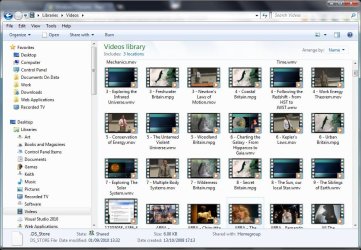
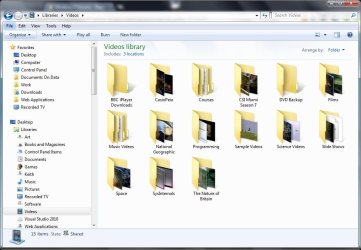
The other method.. start>documents>videos.. (videos is chosed from a list called 'libraries') is much faster to access... but it wont show folders inside the video folder..

Both ways go to the same folder,

one way allows me to drop folders inside, one way doesnt.. odd.
 
Last edited by a moderator:

My Computer My Computer

At a glance

windows 7 starter
OS
windows 7 starter
Start->Videos does indeed point to the same folder but it looks at it in a different way. It looks at it through a Video Library view depending on how you have set up your video library will define what you see If you have arrange by name you wont see any folders on the other hand if you have arrange by folder then you will.

Capture.JPG

Capture1.JPG
 

My Computer My Computer

At a glance

Microsoft Windows 7 Home Premium 64-bit Servi...Intel(R) Core(TM) i3 CPU M 330 @ 2.13GHz8 GB DDR3Intel(R) HD Graphics
Computer type
Laptop
Computer Manufacturer/Model Number
Hewlett-Packard/G62-107SA Notebook
OS
Microsoft Windows 7 Home Premium 64-bit Service Pack 1
CPU
Intel(R) Core(TM) i3 CPU M 330 @ 2.13GHz
Motherboard
Hewlett-Packard 1425
Memory
8 GB DDR3
Graphics Card(s)
Intel(R) HD Graphics
Sound Card
Realtek High Definition Audio
Monitor(s) Displays
Builtin
Screen Resolution
1366 x 768 x 32 bits (4294967296 colors) @ 60 Hz
Hard Drives
250 GB SATA Hard Disk Drive 7200 rpm
2TB Seagate GoFlex USB 2 Drive
1TB Iomega Prestige USB 2 Drive
1.5TB Iomega Prestige USB 2 Drive (Samsung)
2TB WD MyBook Live NAS.
Mouse
Logitech Anywhere MX
Internet Speed
152 Mbs download 10 Mbs upload
Antivirus
Norton 360
Browser
Chrome
well, i dont think i'll do that..
i have a netbook
and as it is i need to keep system resources as free as possible.
hence windows starter.

Well, ive 'solved' my problem.

I located my videos from the other method(C:\Users\(user-name)\My Videos ), then dragged a from it into my 'favourites' panel on th eleft.

Now I can access it just as fast as my old method, AND see all the films neatly inside thier correct files.

So thanks for that...

didnt totally 'fix' the issue maybe..
but we have lift off regardless..
ahh... even better....
i needed to select 'arange by folder'
now it works everywhere.

WOW.. did you realise that just because you choose to view files by date , etc instead of 'folder', that you cant even create a folder in that folder?!

anyways..
i guess thats the way it is..
and thanks ...
we got there.
 

My Computer My Computer

At a glance

windows 7 starter
OS
windows 7 starter
WOW.. did you realise that just because you choose to view files by date , etc instead of 'folder', that you cant even create a folder in that folder?!

The reason for that is that the library view by anything other than by folder removes the folder structure from the display so there is no way that windows can determine where you want to put the folder in the file system.
 

My Computer My Computer

At a glance

Microsoft Windows 7 Home Premium 64-bit Servi...Intel(R) Core(TM) i3 CPU M 330 @ 2.13GHz8 GB DDR3Intel(R) HD Graphics
Computer type
Laptop
Computer Manufacturer/Model Number
Hewlett-Packard/G62-107SA Notebook
OS
Microsoft Windows 7 Home Premium 64-bit Service Pack 1
CPU
Intel(R) Core(TM) i3 CPU M 330 @ 2.13GHz
Motherboard
Hewlett-Packard 1425
Memory
8 GB DDR3
Graphics Card(s)
Intel(R) HD Graphics
Sound Card
Realtek High Definition Audio
Monitor(s) Displays
Builtin
Screen Resolution
1366 x 768 x 32 bits (4294967296 colors) @ 60 Hz
Hard Drives
250 GB SATA Hard Disk Drive 7200 rpm
2TB Seagate GoFlex USB 2 Drive
1TB Iomega Prestige USB 2 Drive
1.5TB Iomega Prestige USB 2 Drive (Samsung)
2TB WD MyBook Live NAS.
Mouse
Logitech Anywhere MX
Internet Speed
152 Mbs download 10 Mbs upload
Antivirus
Norton 360
Browser
Chrome
WOW.. did you realise that just because you choose to view files by date , etc instead of 'folder', that you cant even create a folder in that folder?!

The reason for that is that the library view by anything other than by folder removes the folder structure from the display so there is no way that windows can determine where you want to put the folder in the file system.


hmm..
but windows xp doestn have this issue?

dont get me wrong tho..
i like running windows 7 starter on my netbook.

i have xp on my big pc tho.

and wouldnt touch vista if i was paid..well almost.
 

My Computer My Computer

At a glance

windows 7 starter
OS
windows 7 starter
Windows XP doesn't have libraries which are a whole lot more flexible in the way files can be grouped arranged ,sorted and collected together from all over your file system. They are worth a bit of study and experimentation if you are new to windows 7.
 

My Computer My Computer

At a glance

Microsoft Windows 7 Home Premium 64-bit Servi...Intel(R) Core(TM) i3 CPU M 330 @ 2.13GHz8 GB DDR3Intel(R) HD Graphics
Computer type
Laptop
Computer Manufacturer/Model Number
Hewlett-Packard/G62-107SA Notebook
OS
Microsoft Windows 7 Home Premium 64-bit Service Pack 1
CPU
Intel(R) Core(TM) i3 CPU M 330 @ 2.13GHz
Motherboard
Hewlett-Packard 1425
Memory
8 GB DDR3
Graphics Card(s)
Intel(R) HD Graphics
Sound Card
Realtek High Definition Audio
Monitor(s) Displays
Builtin
Screen Resolution
1366 x 768 x 32 bits (4294967296 colors) @ 60 Hz
Hard Drives
250 GB SATA Hard Disk Drive 7200 rpm
2TB Seagate GoFlex USB 2 Drive
1TB Iomega Prestige USB 2 Drive
1.5TB Iomega Prestige USB 2 Drive (Samsung)
2TB WD MyBook Live NAS.
Mouse
Logitech Anywhere MX
Internet Speed
152 Mbs download 10 Mbs upload
Antivirus
Norton 360
Browser
Chrome
Mysticeye,

I'm happy to hear that you got it sorted. :)
 

My Computer My Computer

At a glance

64-bit Windows 11 Pro for WorkstationsIntel i7-8700K OC'd to 5 GHz64 GB (4x16GB) G.SKILL TridentZ RGB DDR4 3600...ASUS ROG-STRIX-GTX1080TI-O11G-GAMING
Computer type
PC/Desktop
Computer Manufacturer/Model Number
Self built custom
OS
64-bit Windows 11 Pro for Workstations
CPU
Intel i7-8700K OC'd to 5 GHz
Motherboard
ASUS ROG Maximus XI Formula Z390
Memory
64 GB (4x16GB) G.SKILL TridentZ RGB DDR4 3600 MHz
Graphics Card(s)
ASUS ROG-STRIX-GTX1080TI-O11G-GAMING
Sound Card
Integrated
Monitor(s) Displays
2 x Samsung Odyssey G7 27"
Screen Resolution
2560x1440
Hard Drives
1TB Samsung 990 PRO M.2,
4TB Samsung 990 PRO PRO M.2,
TerraMaster F8 SSD Plus NAS
PSU
Seasonic Prime Titanium 850W
Case
Thermaltake Core P3
Cooling
Corsair Hydro H115i
Keyboard
Logitech wireless K800
Mouse
Logitech MX Master 4
Internet Speed
2 Gb/s Download and 100 Mb/s Upload
Antivirus
Malwarebyte Anti-Malware Premium
Browser
Google Chrome
Other Info
Logitech Z625 speaker system,
Logitech BRIO 4K Pro webcam,
HP Color LaserJet Pro MFP M477fdn,
APC SMART-UPS RT 1000 XL - SURT1000XLI,
Galaxy S23 Plus phone
thanks Brink :)

me too..
Now i can browse my films in comfort :)

And thanks for the heads up KADO

Im in Beds by the way, quite near you.
 

My Computer My Computer

At a glance

windows 7 starter
OS
windows 7 starter
And thanks for the heads up KADO

Im in Beds by the way, quite near you.

You are welcome mysticeye. Before I retired I drove through Beds every day on my way to work in Northampton on the dreadful M1.
 

My Computer My Computer

At a glance

Microsoft Windows 7 Home Premium 64-bit Servi...Intel(R) Core(TM) i3 CPU M 330 @ 2.13GHz8 GB DDR3Intel(R) HD Graphics
Computer type
Laptop
Computer Manufacturer/Model Number
Hewlett-Packard/G62-107SA Notebook
OS
Microsoft Windows 7 Home Premium 64-bit Service Pack 1
CPU
Intel(R) Core(TM) i3 CPU M 330 @ 2.13GHz
Motherboard
Hewlett-Packard 1425
Memory
8 GB DDR3
Graphics Card(s)
Intel(R) HD Graphics
Sound Card
Realtek High Definition Audio
Monitor(s) Displays
Builtin
Screen Resolution
1366 x 768 x 32 bits (4294967296 colors) @ 60 Hz
Hard Drives
250 GB SATA Hard Disk Drive 7200 rpm
2TB Seagate GoFlex USB 2 Drive
1TB Iomega Prestige USB 2 Drive
1.5TB Iomega Prestige USB 2 Drive (Samsung)
2TB WD MyBook Live NAS.
Mouse
Logitech Anywhere MX
Internet Speed
152 Mbs download 10 Mbs upload
Antivirus
Norton 360
Browser
Chrome
Back
Top