Can't run Flash Player

ellenc

New member
Member
VIP
Local time
8:38 AM
Messages
147
For some reason, I lost Flash Player and have been trying to download and install it. It is installed but doesn’t run; it’s just dead. I can’t pay bills online, or view countless sites, as you all know. I didn’t realize how critical Flash is to computing life until I lost it. I have Windows 7, 64 bit.
I’ve installed from Adobe and have searched for alternative programs that perform the same function, no luck. (see attached)

Don’t know if a clean install would resolve this. As always, I ask to pick your brilliant brains for ideas. ellen


For tyranny to prevail requires simply that enough good men do nothing—Edmund Burke
[FONT=&quot][/FONT]
 

Attachments

My Computer

Computer Manufacturer/Model Number
Dell Inspiron 546
OS
Windows 7 Professional
CPU
2.70gigahertz AMD Athlon 7750 Dual-Core
Motherboard
Dell, Inc. 0F896N A02
Memory
3328 Megabytes Usable Installed Memory
Graphics Card(s)
ATI Radcon HD 3200 Graphics
Monitor(s) Displays
Dell E1709W 17,2" monitor
Hard Drives
309.54G usable hard drive capacity
161.25G hard drive free space
Seagate FreeAgent Go 500G external drive
Seagate FreeAgent Go 160G external drive
Maxtor One Touch 250G external drive
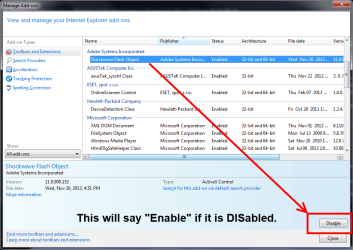
In IE menu click Tools, then Manage Add-ons and check that Shockwave Flash object is indeed there and enabled as shown below.

flashplayer.png
 

My Computer

Computer type
PC/Desktop
Computer Manufacturer/Model Number
Home Built Desktop By DataTech
OS
Windows 7 Ultimate X64 SP1
CPU
Intel i5-2550K, Differing ~4.4-4.8GHz No built in GPU
Motherboard
ASUS P8Z68-V PRO/GEN3
Memory
16GB G.Skill Sniper 1866MHz @ 2133MHz 2x8GB
Graphics Card(s)
ASUS GTX650TIB-DC2OC-2GD5, (650TI Boost)
Sound Card
Onboard Realtek 5-1
Monitor(s) Displays
Samsung P2570HD
Screen Resolution
1920x1080
Hard Drives
Samsung 840 Pro 256GB SSD for OS, 500GB Seagate Constellation (Enterprise drive) for Data
PSU
Corsair HX650W
Case
Inwin Dragon Rider
Cooling
Hyper 212 EVO w/two Noctua fans, push-pull, @1300 RPM
Keyboard
E-Z Eyes, bright yellow keys with large characters
Mouse
steelseries SENSEI Laser Pro Gaming
Internet Speed
48-51Mbs Mbs down, 11 Mbs up Xfinity Cable
Antivirus
Norton Internet Security 2013
Browser
IE 10, Opera, Pale Moon if needed
Other Info
4 case fans, LG BluRay-RE, ASUS DVD-RW, Mr. Fusion power supply, 1.21 gigawatts.
If you're talking about Adobe Flash Player instead of Adobe Shockwave Flash, try running the official Adobe Flash Uninstaller. You may have some old bits and pieces of Flash remaining on your computer that are preventing a clean install of a new/fresh copy. Important to follow all steps exactly as presented, especially Step 3, Item 3.

Uninstall Flash Player | Windows
 

My Computer

Computer type
Laptop
Computer Manufacturer/Model Number
Sony Vaio VPCEB47GM Laptop
OS
Win 7 Pro 64-bit
CPU
Intel i5 2.4 Ghz
Memory
8GB DDR3
Graphics Card(s)
Intel HD 3000
Sound Card
IDT High Definition
Monitor(s) Displays
15.6 WGXA Anti-Glare LED
Screen Resolution
1280x800
Hard Drives
640Gb 7200rpm
Antivirus
MSE
Browser
Opera (primary) with IE9 backup
Can't run Flash Player,continued

Appreciate all replies. I'm going to do the uninstall as suggested. Meanwhile, as for working in Internet Explorer, I never use IE: 1)Firefox 2) chrome, 3) Opera. I have NoScript in FF and Script Safe in Chrome, but neither comes up on some sites.
If I am able to install/run Flash in IE, will it run in the other browsers or just IE which I'm reluctant to use?
It's strange: I see Flash 12 in Contorl Panel, Programs but it's not in C: Program Files.
Thanks again.
 

My Computer

Computer Manufacturer/Model Number
Dell Inspiron 546
OS
Windows 7 Professional
CPU
2.70gigahertz AMD Athlon 7750 Dual-Core
Motherboard
Dell, Inc. 0F896N A02
Memory
3328 Megabytes Usable Installed Memory
Graphics Card(s)
ATI Radcon HD 3200 Graphics
Monitor(s) Displays
Dell E1709W 17,2" monitor
Hard Drives
309.54G usable hard drive capacity
161.25G hard drive free space
Seagate FreeAgent Go 500G external drive
Seagate FreeAgent Go 160G external drive
Maxtor One Touch 250G external drive
Appreciate all replies. I'm going to do the uninstall as suggested. Meanwhile, as for working in Internet Explorer, I never use IE: 1)Firefox 2) chrome, 3) Opera. I have NoScript in FF and Script Safe in Chrome, but neither comes up on some sites.
If I am able to install/run Flash in IE, will it run in the other browsers or just IE which I'm reluctant to use?
It's strange: I see Flash 12 in Contorl Panel, Programs but it's not in C: Program Files.
Thanks again.

There are basically two versions of Adobe Flash. One for IE and one for all other browsers (Firefox, Chrome, etc.) If you're using IE and visit the official Adobe Player Download Center it will automatically recognize which browser you're using and provide the appropriate Player version. (Don't forget to uncheck any optional offered add-ons in the center column if you don't want them.) If you're using one of the other browsers, same thing. Automatic recognition of the browser.

Seeing Flash in control panel > programs but not in C: could be a result of those left behind bits and pieces.
 

My Computer

Computer type
Laptop
Computer Manufacturer/Model Number
Sony Vaio VPCEB47GM Laptop
OS
Win 7 Pro 64-bit
CPU
Intel i5 2.4 Ghz
Memory
8GB DDR3
Graphics Card(s)
Intel HD 3000
Sound Card
IDT High Definition
Monitor(s) Displays
15.6 WGXA Anti-Glare LED
Screen Resolution
1280x800
Hard Drives
640Gb 7200rpm
Antivirus
MSE
Browser
Opera (primary) with IE9 backup
Hello ellenc,

It's strange: I see Flash 12 in Contorl Panel, Programs but it's not in C: Program Files.

I don't understand your attachment in post #1 and what it means...
I'm not sure what you see in Control Panel showing version 12, but,
Flash version 12 is BETA right now (Dec-04-2013)
Flash version 11.9.... is the "Current Official" release
This thread has the latest version info:
http://www.sevenforums.com/browsers-mail/311-latest-version-adobe-flash-player.html

Maybe you somehow installed a BETA version that is not working...???

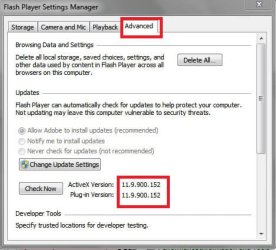
This is what I see when I open Flash Player from Control Panel:

P01.jpg


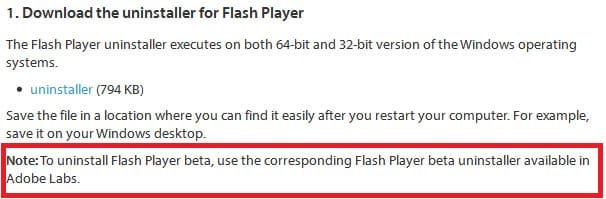
I've never used a Flash BETA version, but it looks like there is a different uninstall utility for that version...
This is from the uninstall link marsmimar gave you in post #3:
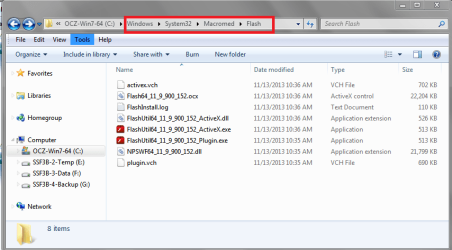
In W7-64 I see Flash installed in these two folders:
C:\Windows\System32\Macromed\Flash
C:\Windows\SysWOW64\Macromed\Flash

I don't see anything in "C:\Program Files" or "C:\Program Files (x86)" for flash.

Here is what I see in C:\Windows\System32\Macromed\Flash
FPESP01.PNG


This page lists the current Flash (non-BETA) versions:
https://www.adobe.com/software/flash/about/

Note: Chrome uses a different (built in) version of Flash than IE or Firefox...
I don't have Chrome installed now, so I can't help more with that...
 

My Computer

Computer type
PC/Desktop
Computer Manufacturer/Model Number
home built
OS
Multi-Boot W7_Pro_x64 W8.1_Pro_x64 W10_Pro_x64 +Linux_VMs +Chromium_VM
CPU
AMD Athlon II x4 620
Motherboard
Gigabyte GA-MA785G-UD3H
Memory
6GB GSkill DDR2 800
Graphics Card(s)
AMD 4670 GPU + AMD 4200 IGP
Sound Card
on board Realtek ALC889A
Monitor(s) Displays
RCA 40" LCD TV, Insignia 32" LCD TV, HP 15" LCD monitor
Screen Resolution
1680 x 1050
Hard Drives
OCZ Vertex 3 120GB,
Samsung F3 1TB (3),
Several others - WD, Seagate, Hitachi, ...
PSU
Corsair 500 W
Case
Rosewill mid tower
Cooling
CM 90mm rifle
Keyboard
Gyration wireless, Logitech wireless, Dell USB wired
Mouse
Gyration wireless, Logitech wireless, V7 USB wired
Internet Speed
Spectrum - 100Mbps D / 10Mbps U
Antivirus
Avast, MBAM3, EMET, WinPatrol
Browser
Pale Moon, Firefox, IE
Other Info
2 multi-boot PC's
Mainly HTPC/Office/Gen purpose (no gaming).
Trendnet USB KVM.
LG DVD burner/Blue Ray Player.
Tray system for removable SATA backup drives.

Not currently OCd, under-volted.
I use Hybrid sleep, rarely re-boot or shutdown.

Hauppauge HD-PVR, Avermedia PCIe TV Tuner, Hauppauge PCI TV Tuner.
Back
Top