Can't Stay Signed in to any Google Accounts with IE 11

jeremynpross

New member
Local time
8:02 PM
Messages
7
Used to work fine, but now I can't stay signed in to any Google Accounts with IE 11 on just one of several Windows PCs:

Here's how I normally use my Google account. I set all my browsers to open tabs for Google, Gmail, Google Maps and Google Calendar at startup. I use Chrome, Firefox, Edge and IE 11. All latest versions. I set them all to remember login credentials so they login automatically and open the desired pages. All browsers on all devices work fine except on one device where only Google auto logins have stopped working correctly.
Starting in May 2016, on my primary Windows 7 desktop, every time I open a browser it opens the correct Google bookmarks but none are signed in. I have to enter my email and password each time by typing.. I stay signed in for the session but have to re-enter credentials if I close and open the browser.

ATTEMPTED RESOLUTIONS:
I have reset all browsers to factory stock and have painstakingly rebuild my saved credentials. I have used CCleaner aggressively to clear caches and other files.

What fixed my issue ONLY with Chrome was to turn off "automatically log in" and "ask to remember passwords," then clear cache & cookies, restart and re-enable those two settings. This made Chrome automatically log in to Google and Gmail, etc.

I changed Firefox settings so it automatically logs in to a family member's Google accounts and that works. But not with my Google account.

With IE I followed Microsoft instructions to reset and even to edit the registry to make the browser ask to save passwords again, which worked perfectly except with Google accounts. I often see the tab open on browser launch and briefly display the logged-in Google Calendar page, then flash to a default login screen. It's as if it instantly logged me out.

I am an advanced user and can’t find a fix despite searching the Web for weeks. . I don't want to have to make a new user account on Windows 7 or reinstall Windows to resolve this. Can anyone help?
 

My Computer My Computer

At a glance

Windows 7 Ultimate x64
Computer type
PC/Desktop
OS
Windows 7 Ultimate x64
My advice would be - forget allowing browsers to save login details and get LastPass browser extension for each browser instead, See if that works.

https://lastpass.com/misc_download2.php

You'd need to download the extension for each browser.
 

My Computer My Computer

At a glance

Microsoft Windows 7 Home Premium 64-bit 7601 ...AMD C-60 APU with Radeon(tm) HD Graphics4.00 GBAMD Radeon HD 6290 Graphics
Computer type
Laptop
Computer Manufacturer/Model Number
ASUS
OS
Microsoft Windows 7 Home Premium 64-bit 7601 Multiprocessor Free Service Pack 1
CPU
AMD C-60 APU with Radeon(tm) HD Graphics
Motherboard
ASUSTeK COMPUTER INC. X501U
Memory
4.00 GB
Graphics Card(s)
AMD Radeon HD 6290 Graphics
Sound Card
(1) AMD High Definition Audio Device (2) Realtek High Defi
Screen Resolution
1366 x 768 x 32 bits (4294967296 colors) @ 60 Hz
Hard Drives
Hitachi HTS545050A7E380 SATA Disk Device
Antivirus
Comodo CIS & FW, SecureAplus App Whitelisting, Threatfire
Browser
Cyberfox 64bit, Opera 64bit, Airfox
Other Info
Spy-The-Spy, HitmanPro.Alert, Norton Connect Safe, MJRegWatcher, BitDefender TrafficLight, Voodoo Shield, Zemana AntiMalware
I have a password manager but don't care to use it as it requires a login each session. My browsers all meet my needs in terms of remembering passwords and form data, EXCEPT IE 11 on this one PC where it has stopped working correctly. Any hints on fixing my issue?
 

My Computer My Computer

At a glance

Windows 7 Ultimate x64
Computer type
PC/Desktop
OS
Windows 7 Ultimate x64
Any hints on fixing my issue?

From what you say it's a Google specific issue rather than an IE remember passwords and login details issue.

Anyway check your Google account settings:

https://support.google.com/accounts/answer/39273?hl=en

If you run Ccleaner to delete cookies it might revert the "Stay signed in" option back to unchecked. (I'm guessing) so on that basis you'd need to clear cookies then reapply the setting and then scan for cookies using Ccleaner and identify the google login cookie to keep.

Also check IE AutoComplete settings.

https://support.google.com/mail/answer/63599?hl=en
 

My Computer My Computer

At a glance

Microsoft Windows 7 Home Premium 64-bit 7601 ...AMD C-60 APU with Radeon(tm) HD Graphics4.00 GBAMD Radeon HD 6290 Graphics
Computer type
Laptop
Computer Manufacturer/Model Number
ASUS
OS
Microsoft Windows 7 Home Premium 64-bit 7601 Multiprocessor Free Service Pack 1
CPU
AMD C-60 APU with Radeon(tm) HD Graphics
Motherboard
ASUSTeK COMPUTER INC. X501U
Memory
4.00 GB
Graphics Card(s)
AMD Radeon HD 6290 Graphics
Sound Card
(1) AMD High Definition Audio Device (2) Realtek High Defi
Screen Resolution
1366 x 768 x 32 bits (4294967296 colors) @ 60 Hz
Hard Drives
Hitachi HTS545050A7E380 SATA Disk Device
Antivirus
Comodo CIS & FW, SecureAplus App Whitelisting, Threatfire
Browser
Cyberfox 64bit, Opera 64bit, Airfox
Other Info
Spy-The-Spy, HitmanPro.Alert, Norton Connect Safe, MJRegWatcher, BitDefender TrafficLight, Voodoo Shield, Zemana AntiMalware
Thanks, but I have checked and rechecked my Google account settings and IE Autocomplete settings. Everything is turned on, and autologon works fine on all my other computers with identical browser settings.
 

My Computer My Computer

At a glance

Windows 7 Ultimate x64
Computer type
PC/Desktop
OS
Windows 7 Ultimate x64
Would it be worth resetting IE to default settings?

Reset IEjpg.jpg
See if it works after a reboot.

Control Panel> Internet Options> Advanced.

Try the first (top highlighted) option in the screenshot. Reboot.

If still not working try the complete reset (bottom highlighted) option in screenshot.

If you use the second option IE should (after a reboot) launch with default settings and all addons disabled.

Try using IE to see if logins work before actually re-enabling add ons that you still need (Tools> Manage Addons)
 

My Computer My Computer

At a glance

Microsoft Windows 7 Home Premium 64-bit 7601 ...AMD C-60 APU with Radeon(tm) HD Graphics4.00 GBAMD Radeon HD 6290 Graphics
Computer type
Laptop
Computer Manufacturer/Model Number
ASUS
OS
Microsoft Windows 7 Home Premium 64-bit 7601 Multiprocessor Free Service Pack 1
CPU
AMD C-60 APU with Radeon(tm) HD Graphics
Motherboard
ASUSTeK COMPUTER INC. X501U
Memory
4.00 GB
Graphics Card(s)
AMD Radeon HD 6290 Graphics
Sound Card
(1) AMD High Definition Audio Device (2) Realtek High Defi
Screen Resolution
1366 x 768 x 32 bits (4294967296 colors) @ 60 Hz
Hard Drives
Hitachi HTS545050A7E380 SATA Disk Device
Antivirus
Comodo CIS & FW, SecureAplus App Whitelisting, Threatfire
Browser
Cyberfox 64bit, Opera 64bit, Airfox
Other Info
Spy-The-Spy, HitmanPro.Alert, Norton Connect Safe, MJRegWatcher, BitDefender TrafficLight, Voodoo Shield, Zemana AntiMalware
Hi, thanks for the reply but in my initial post, I wrote that I have already tried resetting and even reinstalling IE. Here's the quote:

"ATTEMPTED RESOLUTIONS:
I have reset all browsers to factory stock and have painstakingly rebuild my saved credentials. I have used CCleaner aggressively to clear caches and other files."

Any other ideas would be appreciated!
 

My Computer My Computer

At a glance

Windows 7 Ultimate x64
Computer type
PC/Desktop
OS
Windows 7 Ultimate x64
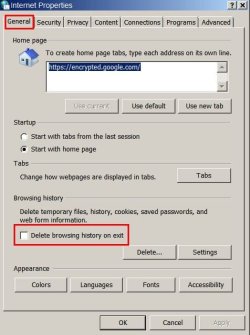
Check settings here:


Internet Properties.jpg


My Computer My Computer

At a glance

Microsoft Windows 7 Home Premium 64-bit 7601 ...AMD C-60 APU with Radeon(tm) HD Graphics4.00 GBAMD Radeon HD 6290 Graphics
Computer type
Laptop
Computer Manufacturer/Model Number
ASUS
OS
Microsoft Windows 7 Home Premium 64-bit 7601 Multiprocessor Free Service Pack 1
CPU
AMD C-60 APU with Radeon(tm) HD Graphics
Motherboard
ASUSTeK COMPUTER INC. X501U
Memory
4.00 GB
Graphics Card(s)
AMD Radeon HD 6290 Graphics
Sound Card
(1) AMD High Definition Audio Device (2) Realtek High Defi
Screen Resolution
1366 x 768 x 32 bits (4294967296 colors) @ 60 Hz
Hard Drives
Hitachi HTS545050A7E380 SATA Disk Device
Antivirus
Comodo CIS & FW, SecureAplus App Whitelisting, Threatfire
Browser
Cyberfox 64bit, Opera 64bit, Airfox
Other Info
Spy-The-Spy, HitmanPro.Alert, Norton Connect Safe, MJRegWatcher, BitDefender TrafficLight, Voodoo Shield, Zemana AntiMalware
Trust me, I have no settings issue. All the settings on all my Windows PCs are the same for IE 11 and all save Google logon credentials and autologon except on one Win 7 x64 machine, like I said.

I never check "Delete Browsing History on Exit" so it is always unchecked and I always have all Autocomplete settings checked except for Feeds.

This is an unusual problem and I have tried every standard settings and reset suggestion 10 times. Any ideas?
 

My Computer My Computer

At a glance

Windows 7 Ultimate x64
Computer type
PC/Desktop
OS
Windows 7 Ultimate x64
I do have other ideas but don't know if they will solve the issue. You could consider rolling back to IE10 and then test to see if the problem remains. You'd need to temporarily disable Windows Updates in order to avoid IE11 being downloaded and installed again after removal. Or you can just let the IE11 upgrade/ reinstall go ahead to see if it fixes the issue.


[How to Uninstall IE11 in Windows 7 to Restore Previous Version of Internet Explorer]​
 

My Computer My Computer

At a glance

Microsoft Windows 7 Home Premium 64-bit 7601 ...AMD C-60 APU with Radeon(tm) HD Graphics4.00 GBAMD Radeon HD 6290 Graphics
Computer type
Laptop
Computer Manufacturer/Model Number
ASUS
OS
Microsoft Windows 7 Home Premium 64-bit 7601 Multiprocessor Free Service Pack 1
CPU
AMD C-60 APU with Radeon(tm) HD Graphics
Motherboard
ASUSTeK COMPUTER INC. X501U
Memory
4.00 GB
Graphics Card(s)
AMD Radeon HD 6290 Graphics
Sound Card
(1) AMD High Definition Audio Device (2) Realtek High Defi
Screen Resolution
1366 x 768 x 32 bits (4294967296 colors) @ 60 Hz
Hard Drives
Hitachi HTS545050A7E380 SATA Disk Device
Antivirus
Comodo CIS & FW, SecureAplus App Whitelisting, Threatfire
Browser
Cyberfox 64bit, Opera 64bit, Airfox
Other Info
Spy-The-Spy, HitmanPro.Alert, Norton Connect Safe, MJRegWatcher, BitDefender TrafficLight, Voodoo Shield, Zemana AntiMalware
...I don't want to have to make a new user account on Windows 7...
You should make a temporary user account just for troubleshooting this issue, you can delete the account and profile folders once you know how IE11 and Google interact.

Make that temp account an admin. We might need it to delete some stuff from your normal Windows user account profile folder.
 

My Computer My Computer

At a glance

W7 Pro SP1 64biti78GBIntel HD Graphics
Computer type
Laptop
Computer Manufacturer/Model Number
Employer provided Dell Latitude
OS
W7 Pro SP1 64bit
CPU
i7
Memory
8GB
Graphics Card(s)
Intel HD Graphics
Hard Drives
crappy SSD
Antivirus
Employer mandated Symantec Endpoint Protection
Browser
Pale Moon 64bit, IE11 64bit & Chrome 64bit
Solved in an unusual way

Callendar, I followed your advice and uninstalled IE 11, rolling back to IE 10. That seemed to work although the system hung at "Configuring Windows Updates" and I had to hard reboot in safe mode to complete. IE 10 then remembered my Google passwords. I tried indtalling IE 11 x64 with the correct installer and with Windows Updates but the update failed repeatedly with the error mentioned here:

WindowsUpdate_00009C59" "WindowsUpdate_dt000" - Windows 7 - Microsoft Community

I ran the Windows Update Troubleshooter and retried a few times, then I then did a system restore back to just before uninstalling IE 11 and everything was back to normal in my system including having a functioning IE 11 install. And the best part is, now IE 11 remembers my google login credentials opens my Google Calendar page signed in to my Google account.

This is voodoo but I'm happy to report the issue appears to be fixed. Will update if the fix holds or not.
 

My Computer My Computer

At a glance

Windows 7 Ultimate x64
Computer type
PC/Desktop
OS
Windows 7 Ultimate x64
When system hangs at "configuring updates" it's always best to see if it will complete - even if it takes a few hours. Anyway the uninstall if IE11 probably fixed something (possibly in registry). I agree that if it's now working then leave it as it is.
 

My Computer My Computer

At a glance

Microsoft Windows 7 Home Premium 64-bit 7601 ...AMD C-60 APU with Radeon(tm) HD Graphics4.00 GBAMD Radeon HD 6290 Graphics
Computer type
Laptop
Computer Manufacturer/Model Number
ASUS
OS
Microsoft Windows 7 Home Premium 64-bit 7601 Multiprocessor Free Service Pack 1
CPU
AMD C-60 APU with Radeon(tm) HD Graphics
Motherboard
ASUSTeK COMPUTER INC. X501U
Memory
4.00 GB
Graphics Card(s)
AMD Radeon HD 6290 Graphics
Sound Card
(1) AMD High Definition Audio Device (2) Realtek High Defi
Screen Resolution
1366 x 768 x 32 bits (4294967296 colors) @ 60 Hz
Hard Drives
Hitachi HTS545050A7E380 SATA Disk Device
Antivirus
Comodo CIS & FW, SecureAplus App Whitelisting, Threatfire
Browser
Cyberfox 64bit, Opera 64bit, Airfox
Other Info
Spy-The-Spy, HitmanPro.Alert, Norton Connect Safe, MJRegWatcher, BitDefender TrafficLight, Voodoo Shield, Zemana AntiMalware
Back
Top