Caps lock, num lock, scroll lock screen messages

tomaskucinskas

New member
Hi,

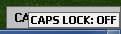
how to disable Caps lock, num lock, scroll lock screen messages?

clip.jpg

I have desktop pc with two keyboards usb and bluetooth. Also TOSHIBA Bluetooth Stack software, but in device manager: keyboard > hid keyboard device both using microsoft drivers. And I dont have any software installed for keyboards. Also bluetooth has separate system tray indications (it is also disabled) so its not that. I made some googling and found other fix it with Hkey_Local_Machine\Software\Widcomm\BTConfig\General KeyIndication set to 0, but I dont have it in registry. Acualy I dont have anywhere in registry KeyIndication. So any ideas how to disable it? Thanks
 

My Computer

OS
Windows 7 Ultimate x64
Hi,

You'll find that the messages are controlled by a piece of software that came pre-installed on your machine when you bought it. Try looking for a Hotkey managing app to see if the notifications can be disabled.


OS
 

My Computer

Computer Manufacturer/Model Number
Compaq Desktop
OS
Windows 7 Ultimate x64
CPU
AMD Sempron Dual Core
Memory
3GB
Graphics Card(s)
NVIDIA GeForce 6150SE nForce 430
Screen Resolution
1024x768
Hard Drives
150GB Sata
Where is no any software! I made clean install of windows 7 and didnt install any drivers. All came automatically. This is few years pc and original windows was xp. Now I am using win 7. So "came pre-installed" is not in this case ;)
 

My Computer

OS
Windows 7 Ultimate x64
For dell bluetooth mouse and keyboard usually goes SetPoint software. So I downloaded and installed it. Now I have double notification :)

clip2.jpg

Big one from dell and small one from microsoft. Big one I can control, but how to control small one from microsoft?
 

My Computer

OS
Windows 7 Ultimate x64
Windows has no such feature built in. Look at the software you have installed.
 

My Computer

Computer type
PC/Desktop
Computer Manufacturer/Model Number
Alienware Aurora ALX R4
OS
Windows 10 Pro (x64)
CPU
Intel Core i7-3930K (3.2GHz - 4.5GHz)
Motherboard
Alienware Aurora-R4 x79
Memory
4x Samsung 4GB PC3-12800 DDR3 (16GB 1600MHz)
Graphics Card(s)
Nvidia Geforce GTX 690
Sound Card
SteelSeries Siberia Elite
Monitor(s) Displays
Dell UltraSharp U3011
Screen Resolution
2560x1600
Hard Drives
Samsung 850 Pro 256 GB, Seagate 1TB Desktop Hybrid HDD, 2x Western Digital 4TB Green HDD
PSU
875W Some Dell PSU <.<
Case
Alienware Aurora ALX
Cooling
Custom Liquid Cooling (EK CPU & GPU blocks) dual EK 480RAD
Keyboard
Logitech G710+ Mechanical
Mouse
Logitech G700s
Internet Speed
Verizon Fios (50 mbps average)
Other Info
Server: Intel NUC D54250WYK: i5-4250U, 16GB, 256 GB mSATA, Windows Server 2012 R2
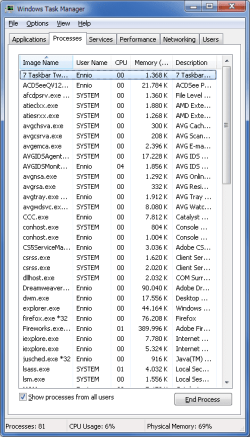
Do you have something called "quickset.exe" running in your task manager by chance?
 

My Computer

Computer Manufacturer/Model Number
Toshiba Satellite L455D
OS
Windows 7 Home Premium
CPU
Amd Semperon 2.10GHz
Memory
2 Gig
Graphics Card(s)
ATI Radeon 3100
Sound Card
Realtek
Monitor(s) Displays
15.6 inch
Screen Resolution
1366x768
Hard Drives
250gig
Mouse
Logitech Wireless
Internet Speed
16/2 cable
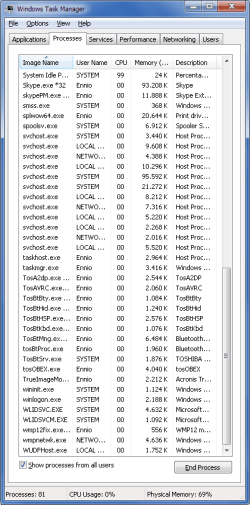
Would you be able to scroll down and show the other half of the task manager.....it may give an idea of something that may be running in the background that could be causing this.
 

My Computer

Computer Manufacturer/Model Number
Toshiba Satellite L455D
OS
Windows 7 Home Premium
CPU
Amd Semperon 2.10GHz
Memory
2 Gig
Graphics Card(s)
ATI Radeon 3100
Sound Card
Realtek
Monitor(s) Displays
15.6 inch
Screen Resolution
1366x768
Hard Drives
250gig
Mouse
Logitech Wireless
Internet Speed
16/2 cable
Hmmm....other than the bt software, I don't see anything that would give a clue about what is controlling the display of the message. I'm sure someone will have more ideas....I was just trying to look at the simple things first.

 

My Computer

Computer Manufacturer/Model Number
Toshiba Satellite L455D
OS
Windows 7 Home Premium
CPU
Amd Semperon 2.10GHz
Memory
2 Gig
Graphics Card(s)
ATI Radeon 3100
Sound Card
Realtek
Monitor(s) Displays
15.6 inch
Screen Resolution
1366x768
Hard Drives
250gig
Mouse
Logitech Wireless
Internet Speed
16/2 cable
Back
Top