Case Overheating

Sparatan117

New member
Member
VIP
Local time
5:13 PM
Messages
139
I have a few issues with my case over heating. I have an NZXT Hush with one fan on the front and one on the back. both probablly around 180mm
Theres also the V1 AX cooling the CPU and the 4870 has its own fan which pulls air in and blows it out the PCI slot..

but yet i still manage to over heat. Is there any ideas that someone has? The only way to run it is to keep the side open.
 

My Computer

Computer Manufacturer/Model Number
Custom
OS
Windows 7 x64 build
CPU
Core i7 920 @2.67GHz OC'd to 3.8GHz
Motherboard
ASUS P6T Delux
Memory
4GB 1066MHz
Graphics Card(s)
ATI Radeon 4850
Monitor(s) Displays
Acer 24"
Screen Resolution
1920x1200
Hard Drives
Hitachi 500GB 16MB Cache 7200 RPM
PSU
Rosewill 600W
Cooling
Thermaltake V1 AX
Keyboard
Logitech G15
Mouse
Logitech mx1000
Internet Speed
8Mb down
I have a few issues with my case over heating. I have an NZXT Hush with one fan on the front and one on the back. both probablly around 180mm
Theres also the V1 AX cooling the CPU and the 4870 has its own fan which pulls air in and blows it out the PCI slot..

but yet i still manage to over heat. Is there any ideas that someone has? The only way to run it is to keep the side open.

I'm not really a hardware/software expert. Looking at your post just reminded me of a similar situation on my friend's PC. After so much futile efforts, in desperation he modded his case. He cut a hole at the TOP of the case and put a fan to exhaust air through it. Guess what? It solved his problem. After that I put it at the back of my mind that if my unit will overheat I'll do the same. But of course do it at your own risk, especially if you have the Core i7 which for me is a very different, unexplored territory in terms of features.
 
Last edited:

My Computer

OS
Windows 2000
If this is the case:
NZXT Hush Silent Computer Chassis (no PSU)
Then they are 2 120mm fans. Are the thigh temps at load or idle?

Short of upgrading to more powerful fans (more CFM, more noise ) and cutting more holes in it, as Pogi mentioned, you may be somewhat limited with options. You could try cutting a hole in the bottom for exhausting to maintain aesthetics, but an exhaust hole in the top would work better.

You could always get loud/powerful fans and put them on a fan controller.

That case looks nice, but it also traps heat as you've discovered.
 

My Computer

Computer type
PC/Desktop
Computer Manufacturer/Model Number
Systems by SmartEyeball
OS
8 Pro x64
CPU
i7 3770K 4.6GHz
Motherboard
ASUS P8Z77 WS
Memory
16GB G.Skill Trident X 2666mhz
Graphics Card(s)
x2 EVGA 780 Ti Superclocked SLI
Sound Card
SB X-FI Surround 5.1 PRO USB / ATH-AD900 Headphones
Monitor(s) Displays
x3 Dell U2410 / 58" Samsung
Screen Resolution
5760*1200/ 1920*1200
Hard Drives
2x Intel 520 240GB (RAID 0) * 2x WD Caviar Blacks 2TB (RAID 0) * 2TB WD Caviar Black * Sony Optirac DVD
PSU
Silverstone Strider Evolution 1200W
Case
Thermaltake Level 10 GT Snow Edition
Cooling
Noctua NH-D14
Keyboard
Topre Realforce // Ducky Shine MX Black // Filco Ninja TKL
Mouse
Thermaltake Theron (Highly Recommended) + Razer Imperator
Antivirus
MSE
Browser
IE, FF, WaterFox
Other Info
GT Extreme V2 Sim Racing Cockpit + 40" LCD and K/B Mouse stand ▼
Fanatec CSR Elite Wheel + Clubsport V1 Pedals + CSR shifter/7G-H ▼Saitek X52 Pro ▼ TrackIR 5 Pro
Buttkicker v2 Seat Rumbler with Dedicated 5.1 and Sub Woofer attached to frame ▼
=
Bloody Big Grin
This may sound obvious but have you thoroughly cleaned all the dust from your components.
 

My Computer

OS
Windows Seven 7068 x64
CPU
Core Duo e6300 @ 2.8ghz
Motherboard
Gigabyte GA-P965-DS3
Memory
3gb DDR2 800
Graphics Card(s)
9600GT
Sound Card
XFi extrememusic
Monitor(s) Displays
22" LCD WIDE
Screen Resolution
1680x1050
Hard Drives
2 Diamondmax 80 GB
PSU
400W PSU
Case
Coolermaster Mystique
Cooling
Stock cooling
Keyboard
Logitech Illuminated
Mouse
Logitech MX Revolution
Internet Speed
2Mb
You could try putting ice cubes on your highly overclocked processor. ;)
 

My Computer

Computer Manufacturer/Model Number
Home made.
OS
7068 64 bit + XP Pro
CPU
[email protected]
Motherboard
Gigabyte GA-P35-DS3L
Memory
4x1Gb Geil Ultra 800Mhz
Graphics Card(s)
Gigabyte 9600GT
Sound Card
Onboard
Monitor(s) Displays
ViewSonic 22" 5000:1 2ms
Screen Resolution
1680x1050
Hard Drives
Samsung Sata 300, 320Gb,
Western Digital 200Gb IDE
PSU
Cheapo 430w Thermaltake
Case
Antec Performance2
Cooling
Standard Intel for CPU, various others for case+ Hardcano.
Keyboard
Microsoft , wired
Mouse
Microsoft, wired Optimouse
What cpu cool do you have? The reason why its hot is because you've done this: 2.67GHz OC'd to 3.8GHz. Try at normal speeds for a few days to see if that makes a difference.

You could also look at replacing the Thermaltake V1 AX as maybe its not so effective. I can recommend the Tuniq Tower 120.
 

My Computer

Computer Manufacturer/Model Number
self built
OS
Windows 7 Professional 64-bit
CPU
Intel E8400 3GHz
Motherboard
Intel DX48BT2
Memory
Kingston PC3-10700H 4Gb
Graphics Card(s)
XFX Radeon HD 5850 BlackEd.
Sound Card
Asus Xonar DG
Monitor(s) Displays
2x Samsung SM-T220HD 22"
Screen Resolution
1680x1050 on two monitors
Hard Drives
OCZ Vertex 2 120gb 3.5" (OS)
Seagate Momentus XT 500gb
Samsung F3 1Tb (games)
2x Samsung F1 1Tb
PSU
Thermaltake ToughPower 850w
Case
Thermaltake Armor
Cooling
Scythe Mugen II
Keyboard
Microsoft Comfort Curve USB
Mouse
Razer Diamondback 3G
Internet Speed
8128/443
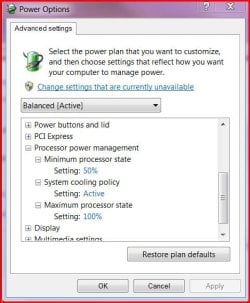
If your rig supports it, setting minimum and maximum processor states in Advanced Power Options may give you some relief.

There's probably no reason to run that processor at full OC'd speed ALL the time.
 

Attachments

  • Advanced Power Settings.JPG
    Advanced Power Settings.JPG
    46.8 KB · Views: 50

My Computer

Computer Manufacturer/Model Number
Self built
OS
Windows 7 Ultimate 32 & 64 -(Boot Camped Snow Leopard on a Mac Mini)
CPU
AMD Athlon A64 X2 6000+ 3.1GHz
Motherboard
DFI LanParty Jr 790GX M2RS
Memory
4GB Corsair XMS RAM
Graphics Card(s)
Gigabyte ATI Radeon HD4550/512MB/DDR3 passive cooled
Sound Card
latest RealTek HD/HDMI drivers
Monitor(s) Displays
Samsung LN40A550 (primary); Zalman 7" LCD (secondary)
Screen Resolution
1920x1080 ; 800x600
Hard Drives
WD Raptor for OS
Seagate 7211 640GB
Two Samsung EcoGreens for TV in RAID 0 = 3TB
Two WD MyBook 1TB externals for B/U and Movies
Optical Drive:
LG GGC-H20L Super Multi Blue BluRay/HD-DVD internal
PSU
Corsair HX520W
Case
Zalman HD160XT
Cooling
Zalman CNPS9500Cu on processor - Four Nexus case fans
Keyboard
Gyration wireless Media Center Keyboard
Mouse
Gyration Cordless Optical Air Mouse
Internet Speed
6344 kbps Down/1043 kbps Up (Comcast cable)
Other Info
HDMI audio/video out to Yamaha RX-V1065 receiver.
All controlled by a Harmony One universal remote.

Four other home built computers plus a Mac Mini, but this is my main Win7 testbed.
I was going to ask why such a big OC
 

My Computer

OS
Xp/Homeserver/Win7
CPU
Core 2 quad Q6600 @ 2.66 ghz
Motherboard
xfx
Memory
4 gb ddr2 Corsair
Graphics Card(s)
nvida 9600 gso
Sound Card
onboard?
Monitor(s) Displays
2 dell 1909w's
Screen Resolution
1440x900
Hard Drives
WD Caviar 500 gb
Velicoraptor 120 gb
PSU
antec 550w
Case
ultra
Cooling
artic cooling
Keyboard
logitech
Mouse
ms
Internet Speed
100 mbps
Other Info
Mostly gaming rig with XP installed.
WHS is an old gateway box with 1.5tb of storage running utorrent as a service with a gui.
Win7 on my acer aspire one netbook.
Well the i7 usually goes up to 4.0 GHz so I left it at a step down so that I wouldn't be constantly maxing it out. But i gotta say being able to unwrap a 1.8 GB Zip in 30 seconds is pretty nice.

The graphics card is the cuprit, accoring to speedfans but I havent even thought of overclocking that beast. Should i just make Riva tuner run the graphics card at a constatly higher speed?
and btw I saw that post on putting one on the top. Thats a great idea which I cant say i would have ever thought of. Now the only interesting question is how do you cut a hole in the top without making it trashy haha

This may sound obvious but have you thoroughly cleaned all the dust from your components.
yes, but its brand new shouldn't be that dusty

You could try putting ice cubes on your highly overclocked processor.
hahahahah That was great it def made me laugh

I was going to ask why such a big OC
my friends dad is a programmer so hes always bragging about how his computer can out do mine and all this other crap. so i finally built a computer to shut him up..... It did...

You could also look at replacing the Thermaltake V1 AX as maybe its not so effective. I can recommend the Tuniq Tower 120.

My cpu has never gotten above 45 C with the V1 AX its the best cooler I think I've ever had.
 

My Computer

Computer Manufacturer/Model Number
Custom
OS
Windows 7 x64 build
CPU
Core i7 920 @2.67GHz OC'd to 3.8GHz
Motherboard
ASUS P6T Delux
Memory
4GB 1066MHz
Graphics Card(s)
ATI Radeon 4850
Monitor(s) Displays
Acer 24"
Screen Resolution
1920x1200
Hard Drives
Hitachi 500GB 16MB Cache 7200 RPM
PSU
Rosewill 600W
Cooling
Thermaltake V1 AX
Keyboard
Logitech G15
Mouse
Logitech mx1000
Internet Speed
8Mb down
Hey Sparatan117,
Here is my experience with heat issues, I was running two 8800 GTS G92 512mb in SLI in my last system and had heat issues which did not make seem right cause I had plenty of fans for the case, top included. It was not too bad so I did not think much of it (temps where high but not critical).

Then as I was upgrading (seems I never stop..:sarc:) I noticed a nice drop in temps after putting in a stonger power supply. I looked at some general specs for you video card and found that it recommends a 500 watt min, your current power supply should be more than enough but again just my experience as my old system "should have been more than enough" also.

Once I had the new power supply my temps on video dropped around 10C! Could just be that I went to a better quality, or maybe that my new PS has a single 12v rail, or who knows. Also through the trickle down my dads PC got my old PS, better than he had, and I saw CPU and video temps drop.

Don't know if you are wanting to go out and replace your power supply but hope the info can give you another option.

Cheers.
 

My Computer

Computer Manufacturer/Model Number
Ground Up
OS
Windows 7 x64 build 7068
CPU
AMD Phenom II X3 720 @ 3.6 GHz
Motherboard
Gigabyte MA790XT-UD4P AM3
Memory
2x 2GB G.Skill DDR 3 1333
Graphics Card(s)
EVGA GTX 285 @ 702 core 1609 shader 2648 memory
Sound Card
Onboard Realtek ALC889A
Monitor(s) Displays
ViewSonic VX2640w
Screen Resolution
1900 1200
Hard Drives
SAMSUNG 7200 320GB (Boot)
Seagate 500GB (Games, Music, Files, Work)
WD 1TB X 2 (DVD's and Blu Rays)
PSU
Corsair TX850w (12v 70Amps), Backup: CyberPower 810watt UPS
Case
Antec 3000
Cooling
ZEROtherm 120mm Copper CPU, 4 X 120mm Case & 1 140mm Case
Keyboard
Microsoft Natual 4000
Mouse
Logitech G5
Internet Speed
Cable
Other Info
Work System: Win7 x64 7068, Phenom II X4 940 @ 3.6, ASRock K10N780SLI mb, EVGA GTS 250 512mb video, Corsair TX650 power, 2x 2GB G.Skill DDR2 6400, Seagate 250GB, and a lil 17" old LCD.
Thats an interesting idea. I'll have to look into it.
 

My Computer

Computer Manufacturer/Model Number
Custom
OS
Windows 7 x64 build
CPU
Core i7 920 @2.67GHz OC'd to 3.8GHz
Motherboard
ASUS P6T Delux
Memory
4GB 1066MHz
Graphics Card(s)
ATI Radeon 4850
Monitor(s) Displays
Acer 24"
Screen Resolution
1920x1200
Hard Drives
Hitachi 500GB 16MB Cache 7200 RPM
PSU
Rosewill 600W
Cooling
Thermaltake V1 AX
Keyboard
Logitech G15
Mouse
Logitech mx1000
Internet Speed
8Mb down
Looking at the picture of the case, it looks like there is sound insulating material on the side panel, if that is the case then it would also be acting as a heat insulator and if temps are a problem then I would consider removing that before anything, another solution is to use Water cooling or you could try running it in a small bar fridge LOL, JK.
 

My Computer

Computer Manufacturer/Model Number
Home Brew
OS
Windows 7 Ultimate Vista Ultimate x64
CPU
Core 2 Duo E8500 3.16Ghz @ 3.8Ghz
Motherboard
eVGA 750i FTW
Memory
2x2Gigs Patriot PC2-6400 LL
Graphics Card(s)
Inno3D GeForce GTX260 216 SP
Monitor(s) Displays
ASUS VW222U 22" 2ms Response time
Screen Resolution
1680x1050
Hard Drives
SATA 150GB
SATA II 250GB
USB IDE 750GB Ext.
PSU
HYTEC 600W & Thermaltake 650W Toughpower Power Exp
Case
Thermaltake Armor LCS (Liquid Cooling System)
Cooling
Liquid Cooling System
Keyboard
Logitech G15 Gaming Keyboard
Mouse
Logitech G9 Gaming Mouse
Looking at the picture of the case, it looks like there is sound insulating material on the side panel, if that is the case then it would also be acting as a heat insulator and if temps are a problem then I would consider removing that before anything, another solution is to use Water cooling or you could try running it in a small bar fridge LOL, JK.

lol What I'm thinkin is that what I might do is talk to my Uncle who has a metal Lathing shop, see if i can cut a hole in the side of it that looks decent and then put like a black wire meshing over top of the hole to keep certin objects from getting inside but that way the case has no problem with breating.

What do you guyst think?

btw that foam padding inside the case...makes it VERY quiet. But I dont think they had super gaming machine in mind when they designed it though ;)
 

My Computer

Computer Manufacturer/Model Number
Custom
OS
Windows 7 x64 build
CPU
Core i7 920 @2.67GHz OC'd to 3.8GHz
Motherboard
ASUS P6T Delux
Memory
4GB 1066MHz
Graphics Card(s)
ATI Radeon 4850
Monitor(s) Displays
Acer 24"
Screen Resolution
1920x1200
Hard Drives
Hitachi 500GB 16MB Cache 7200 RPM
PSU
Rosewill 600W
Cooling
Thermaltake V1 AX
Keyboard
Logitech G15
Mouse
Logitech mx1000
Internet Speed
8Mb down
I think that may work for you or maybe you could just drill enough vent holes to attach a fan to the side panel if you have room inside to do so, one of my cases has a large fan on the side (about 25cm) and I did the same thing with the mesh and it makes a lot of difference. Just remember to vacuum the vent every couple of weeks to keep the air flowing, but that's allot easier than cleaning out the inside. One other thing you may want to find out from your supplier is, can you get a replacement side cover with air vents or a fan as that will save you some time and I know that some cases do have optional side panels.
 

My Computer

Computer Manufacturer/Model Number
Home Brew
OS
Windows 7 Ultimate Vista Ultimate x64
CPU
Core 2 Duo E8500 3.16Ghz @ 3.8Ghz
Motherboard
eVGA 750i FTW
Memory
2x2Gigs Patriot PC2-6400 LL
Graphics Card(s)
Inno3D GeForce GTX260 216 SP
Monitor(s) Displays
ASUS VW222U 22" 2ms Response time
Screen Resolution
1680x1050
Hard Drives
SATA 150GB
SATA II 250GB
USB IDE 750GB Ext.
PSU
HYTEC 600W & Thermaltake 650W Toughpower Power Exp
Case
Thermaltake Armor LCS (Liquid Cooling System)
Cooling
Liquid Cooling System
Keyboard
Logitech G15 Gaming Keyboard
Mouse
Logitech G9 Gaming Mouse
I know some people with the same processor as you, with similar coolers, who would like to be able to do the same overclock as you,and never exceed 45C .

What is your secret? if you don't mind.
 

My Computer

Computer Manufacturer/Model Number
Home made.
OS
7068 64 bit + XP Pro
CPU
[email protected]
Motherboard
Gigabyte GA-P35-DS3L
Memory
4x1Gb Geil Ultra 800Mhz
Graphics Card(s)
Gigabyte 9600GT
Sound Card
Onboard
Monitor(s) Displays
ViewSonic 22" 5000:1 2ms
Screen Resolution
1680x1050
Hard Drives
Samsung Sata 300, 320Gb,
Western Digital 200Gb IDE
PSU
Cheapo 430w Thermaltake
Case
Antec Performance2
Cooling
Standard Intel for CPU, various others for case+ Hardcano.
Keyboard
Microsoft , wired
Mouse
Microsoft, wired Optimouse
try placing another coolant in it if that'll help
 

My Computer

Computer Manufacturer/Model Number
Intel
OS
Windows7
CPU
2.66Ghz
Motherboard
Intel PentiumD
Memory
512MB
Graphics Card(s)
ATI RaedonXpress2000
Sound Card
RealtekAudio Driver
Monitor(s) Displays
SyncMaster40N
Screen Resolution
1024x768
Hard Drives
SAMSUNG SP0842N ATA Device
Keyboard
A4Tech Keyboard
Mouse
Genius Mouse
Internet Speed
100mbps
I know some people with the same processor as you, with similar coolers, who would like to be able to do the same overclock as you,and never exceed 45C .

What is your secret? if you don't mind.

I guess its my case combined with that V1AX. The Thermaltake cooler has 4 heat sink pipes and a suck and blow kinda thing and a controlable fan from the actual heatsink its self. I played crysis, and touched the heatpipe with no problem. It was pretty amazing. The same cant be said for my 4870 but i guess thats a given.
 

My Computer

Computer Manufacturer/Model Number
Custom
OS
Windows 7 x64 build
CPU
Core i7 920 @2.67GHz OC'd to 3.8GHz
Motherboard
ASUS P6T Delux
Memory
4GB 1066MHz
Graphics Card(s)
ATI Radeon 4850
Monitor(s) Displays
Acer 24"
Screen Resolution
1920x1200
Hard Drives
Hitachi 500GB 16MB Cache 7200 RPM
PSU
Rosewill 600W
Cooling
Thermaltake V1 AX
Keyboard
Logitech G15
Mouse
Logitech mx1000
Internet Speed
8Mb down
I think that may work for you or maybe you could just drill enough vent holes to attach a fan to the side panel if you have room inside to do so, one of my cases has a large fan on the side (about 25cm) and I did the same thing with the mesh and it makes a lot of difference. Just remember to vacuum the vent every couple of weeks to keep the air flowing, but that's allot easier than cleaning out the inside. One other thing you may want to find out from your supplier is, can you get a replacement side cover with air vents or a fan as that will save you some time and I know that some cases do have optional side panels.


I love that idea i think I'm gonna go send them and E-mail right now
 

My Computer

Computer Manufacturer/Model Number
Custom
OS
Windows 7 x64 build
CPU
Core i7 920 @2.67GHz OC'd to 3.8GHz
Motherboard
ASUS P6T Delux
Memory
4GB 1066MHz
Graphics Card(s)
ATI Radeon 4850
Monitor(s) Displays
Acer 24"
Screen Resolution
1920x1200
Hard Drives
Hitachi 500GB 16MB Cache 7200 RPM
PSU
Rosewill 600W
Cooling
Thermaltake V1 AX
Keyboard
Logitech G15
Mouse
Logitech mx1000
Internet Speed
8Mb down
Back
Top