Catalyst 12.4 drivers not painting python

Thornton

New member
Power User
Local time
7:48 AM
Messages
597
Location
Orlando Florida
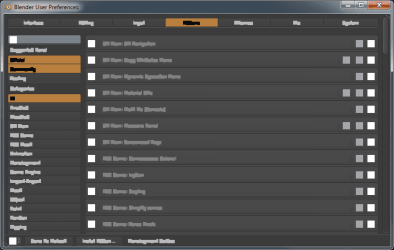
one of the many 3d programs i use is Blener 3d. it is one of the programs i first learned with, and still one of my favorites, along with outodesk inventor, and maya. recently i upgraded to catalyst 12.4 when i reset my OS and partitions... what i found is that, when i run blender, i get these boxes, that are the size of the letters, and the collors of the letters, like my drivers are becoming incompatable with opengl and python, atleast togeather. if i roll back to 12.1 it will work, but imm getting better resaults elseware with 12.4 thusfar.

if anyone knows of catalyst 12.4 drivers, and i know this happened when i tried 12.2 and 12.3 drivers also, being incompatable with python, or a mixture of python and open cl/gl... and how i might fix this problem, idd appreciate it, if you think this is a problem with blender itself, and you know how to look for the problems in the python, i can post my build later on if it proves needed. thank you for the help as usual... i have tried blender forums, but nothin, figured id try the help for drivers
 

My Computer My Computer

Computer type
PC/Desktop
Computer Manufacturer/Model Number
Custom Build
OS
windows 7 Professional
CPU
Intel I7 4790k
Motherboard
ASUS Hero VII
Memory
16gb DDR3 1600mhz
Graphics Card(s)
Dual GTX 780 ASUS
Monitor(s) Displays
2x HP 2331
Screen Resolution
1080p
Hard Drives
750gb Hitachi 7200rpm
500gb Crucial SSD
PSU
Corsair 800g
Case
NZXT Phantom
Cooling
fan
Keyboard
Razer Deathstalker
Mouse
Razer Ouroboros
Internet Speed
70mbps
Antivirus
MSE + M-Bam
Browser
Chrome
BlenderBroken.png

there is a pic... i have found out that blender works just fine if you have only one window open, it is when you have two open that problems start occurring
 

My Computer My Computer

Computer type
PC/Desktop
Computer Manufacturer/Model Number
Custom Build
OS
windows 7 Professional
CPU
Intel I7 4790k
Motherboard
ASUS Hero VII
Memory
16gb DDR3 1600mhz
Graphics Card(s)
Dual GTX 780 ASUS
Monitor(s) Displays
2x HP 2331
Screen Resolution
1080p
Hard Drives
750gb Hitachi 7200rpm
500gb Crucial SSD
PSU
Corsair 800g
Case
NZXT Phantom
Cooling
fan
Keyboard
Razer Deathstalker
Mouse
Razer Ouroboros
Internet Speed
70mbps
Antivirus
MSE + M-Bam
Browser
Chrome

My Computer My Computer

Computer type
PC/Desktop
Computer Manufacturer/Model Number
Me
OS
Win 7 Ultimate x64
CPU
FX-8350 @ 4.6 GHz so far
Motherboard
Asus M5A97 EVO
Memory
ADATA XPG V1 Series Black 8GB DDR3 1600
Graphics Card(s)
Sapphire R9 270x Dual-X
Sound Card
Xonar DGX w/ Corsair Vengence 1300
Monitor(s) Displays
Acer S232HL Abid
Screen Resolution
1920x1080
Hard Drives
120 GB OCZ Vertex 3
500 GB Seagate 7200.12
PSU
Antec Earthwatts 650W Green
Case
Antec Three Hundred
Cooling
Cooler Master 212 EVO
Keyboard
Logitech G510
Mouse
Logitech G500s
Internet Speed
35000/3000
I just installed the latest Blender and not seeing what you are. It could be that I am using the last leaked beta,

AMD Catalyst 12.x (8.97 April 18) Unofficial BETA - Guru3D.com Forums

and not the official 12.4. If that does fix it maybe go here,

http://www.amdsurveys.com/se.ashx?s=5A1E27D27E29B0E3

and fill out a bug report with as much info as you can.
i may do that, i will add, i rolled back my drivers... try somthing for me if you will... inside of blender, inside the viewport (in case you are unfamiliar, it is where the camera, lamp and 3d cube are) in the upper right hand side, there is a little triangle made of lines, like you would see on a mack to resize a window... hold shift, and drag that out, this will create a second view port window. see if the text on the buttons are there, or if the buttons are even working.

i have luxrender installed, that may be part of the problem, but thats here to stay... that is my primary renderer, its free, and its one of the best in the market competing with mentalray and indigo and octane. the build i use has lux already installed, but even when i install it myself i get these same results.

if you would like to try with lux, go to graphicall.org and click the blender logo, then press your operating system, look for one in the list that says contrib. trunk and patch- yafray and luxrender... it may not say that word for word

i will fill out a report shortly, thank you for the hlp, i have been looking for a fix for a long time, and have been sticking with 12.1 drivers just so it would work, but its time to upgrade and i need things to continue working in blender and lux... etc
 

My Computer My Computer

Computer type
PC/Desktop
Computer Manufacturer/Model Number
Custom Build
OS
windows 7 Professional
CPU
Intel I7 4790k
Motherboard
ASUS Hero VII
Memory
16gb DDR3 1600mhz
Graphics Card(s)
Dual GTX 780 ASUS
Monitor(s) Displays
2x HP 2331
Screen Resolution
1080p
Hard Drives
750gb Hitachi 7200rpm
500gb Crucial SSD
PSU
Corsair 800g
Case
NZXT Phantom
Cooling
fan
Keyboard
Razer Deathstalker
Mouse
Razer Ouroboros
Internet Speed
70mbps
Antivirus
MSE + M-Bam
Browser
Chrome
Catalyst 12.4 is buggy, nothing major but lots of annoyance, particulary that HDMI audio bug.

I suggest reverting to 12.3 to avoid further nuisance. The catalyst 12.5 beta has been leaked not far after ther 12.4 was released. (google it) On others forums people have tried it and it do fix things.

I'm waiting for the WHQL 12.5 thought.
 

My Computer My Computer

Computer type
PC/Desktop
OS
Windows 7 x64
CPU
Intel 4770k
Motherboard
ASUS MAXIMUS VI FORMULA LGA 1150 Intel Z87 HDMI
Memory
G.SKILL Ripjaws Series 8GB (2 x 4GB) 240-Pin DDR3 SDRAM DDR3
Graphics Card(s)
XFX R9 390 OC
Sound Card
Mobo integrated
Monitor(s) Displays
Samsung 226BW 22'' Panel A
Screen Resolution
1650x1080
Hard Drives
1 x SAMSUNG 840 EVO 2.5" 500GB SATA III TLC Internal Solid State Drive (SSD) MZ-7TE500BW
PSU
1 x CORSAIR HX Series HX750 750W ATX12V 2.3 / EPS12V 2.91 SL
Case
Corsair Carbide Series 500R Arctic White Steel / Plastic ATX
Internet Speed
Videotron Fiber 60mb/s cable.
Catalyst 12.4 is buggy, nothing major but lots of annoyance, particulary that HDMI audio bug.

I suggest reverting to 12.3 to avoid further nuisance. The catalyst 12.5 beta has been leaked not far after ther 12.4 was released. (google it) On others forums people have tried it and it do fix things.

I'm waiting for the WHQL 12.5 thought.
12.2 and 12.3 had the same issue acctually. i do believe this is a bug in the drivers, the question is when will they be fixed?

i forget who it is, maybe you know who they are and can give me some information on them and if this is worth perseuing. i heard of a group of modders/overclockers who built a better version of the released ati drivers. i do not know if they are any good, but it sounds like they have a name for them selves atleast.
 

My Computer My Computer

Computer type
PC/Desktop
Computer Manufacturer/Model Number
Custom Build
OS
windows 7 Professional
CPU
Intel I7 4790k
Motherboard
ASUS Hero VII
Memory
16gb DDR3 1600mhz
Graphics Card(s)
Dual GTX 780 ASUS
Monitor(s) Displays
2x HP 2331
Screen Resolution
1080p
Hard Drives
750gb Hitachi 7200rpm
500gb Crucial SSD
PSU
Corsair 800g
Case
NZXT Phantom
Cooling
fan
Keyboard
Razer Deathstalker
Mouse
Razer Ouroboros
Internet Speed
70mbps
Antivirus
MSE + M-Bam
Browser
Chrome
Catalyst 12.4 is buggy, nothing major but lots of annoyance, particulary that HDMI audio bug.

I suggest reverting to 12.3 to avoid further nuisance. The catalyst 12.5 beta has been leaked not far after ther 12.4 was released. (google it) On others forums people have tried it and it do fix things.

I'm waiting for the WHQL 12.5 thought.
12.2 and 12.3 had the same issue acctually. i do believe this is a bug in the drivers, the question is when will they be fixed?

i forget who it is, maybe you know who they are and can give me some information on them and if this is worth perseuing. i heard of a group of modders/overclockers who built a better version of the released ati drivers. i do not know if they are any good, but it sounds like they have a name for them selves atleast.


I did not had that issue with previous Catalysts, however 12.4 fixes some drivers-reset problem I had with previous.

Hopefully 12.5 will be good.
 

My Computer My Computer

Computer type
PC/Desktop
OS
Windows 7 x64
CPU
Intel 4770k
Motherboard
ASUS MAXIMUS VI FORMULA LGA 1150 Intel Z87 HDMI
Memory
G.SKILL Ripjaws Series 8GB (2 x 4GB) 240-Pin DDR3 SDRAM DDR3
Graphics Card(s)
XFX R9 390 OC
Sound Card
Mobo integrated
Monitor(s) Displays
Samsung 226BW 22'' Panel A
Screen Resolution
1650x1080
Hard Drives
1 x SAMSUNG 840 EVO 2.5" 500GB SATA III TLC Internal Solid State Drive (SSD) MZ-7TE500BW
PSU
1 x CORSAIR HX Series HX750 750W ATX12V 2.3 / EPS12V 2.91 SL
Case
Corsair Carbide Series 500R Arctic White Steel / Plastic ATX
Internet Speed
Videotron Fiber 60mb/s cable.
Back
Top