Catalyst control center error message and monitor resolution low.

Tekken179

New member
Member
Local time
1:27 AM
Messages
83
Location
Northern Ireland
My story:

Computer: Advent D1411 (Refurbished)
Graphics Card: Asus AMD Radeon HD 6670 (Brand new)
Monitor: Samsung 21.5" LED Monitor
OS: Windows 7 64x

Accidently damaged and broke my graphics card Asus AMD Radeon HD 6670, bought a replacement (the exact same card).

Plugged it in expecting everything to pretty much pick up where the old one left off only to find CCC won't start, the resolution is stuck on 1600x1200 when my monitors resolution is 1920x1080 and in general text doesn't look the sharpest.

All games and video seem to work flawlessly but this is seriously winding me up and I feel like smashing the entire computer :cry:

I've tried uninstalling all the drivers incase they somehow got damaged and reinstalling them through AMDs latest download and that just didn't work flat out, wouldn't install graphics driver.

Tried using AMD Cleaning utility and that seemed to clean it out and I reinstalled, back to my first problem, resolution capping at 1600x1200 and CCC won't work (See attached picture).

It's annoying me a lot more than it probably should and my frustration is getting the better of me.

Additional notes:

When I had the AMD driver utility finished the resolution could be changed upto crazy what I think is 4:3 resolutions (1944x1480 or something) but no 1920x1080 resolution.
Before I broke the old graphics card everything was working flawlessly, no software changes made between getting the new one until I was trying to fix my problems.
 

My Computer My Computer

At a glance

Windows 7 Premium (64 Bit)Intel Core i5-2320 3.0 Ghz8 GBAMD Radeon HD 6670
Computer type
PC/Desktop
Computer Manufacturer/Model Number
ADVENT DT1411
OS
Windows 7 Premium (64 Bit)
CPU
Intel Core i5-2320 3.0 Ghz
Motherboard
N Foxconn
Memory
8 GB
Graphics Card(s)
AMD Radeon HD 6670
Sound Card
Built in
Monitor(s) Displays
21.5" Samsung LED HD
Screen Resolution
1920x1080
Hard Drives
1x 1.5TB
1x 1TB
PSU
405v
Case
Advent standard
Keyboard
Acer
Mouse
Trust GTX
Internet Speed
Sky Broadband 20Mgbs
Antivirus
E-Trust
Browser
Firefox
Error message
 

Attachments

  • Untitled.png
    Untitled.png
    11.2 KB · Views: 22

My Computer My Computer

At a glance

Windows 7 Premium (64 Bit)Intel Core i5-2320 3.0 Ghz8 GBAMD Radeon HD 6670
Computer type
PC/Desktop
Computer Manufacturer/Model Number
ADVENT DT1411
OS
Windows 7 Premium (64 Bit)
CPU
Intel Core i5-2320 3.0 Ghz
Motherboard
N Foxconn
Memory
8 GB
Graphics Card(s)
AMD Radeon HD 6670
Sound Card
Built in
Monitor(s) Displays
21.5" Samsung LED HD
Screen Resolution
1920x1080
Hard Drives
1x 1.5TB
1x 1TB
PSU
405v
Case
Advent standard
Keyboard
Acer
Mouse
Trust GTX
Internet Speed
Sky Broadband 20Mgbs
Antivirus
E-Trust
Browser
Firefox
More information.

I just connected monitor and desktop via HDMI, my monitor lost it's settings to scale the picture size and the window was smaller than the monitor (inch of black each side).

Connected the ps3 to monitor everything was flawless.

Just realised all my available resolutions are 4:3 and no 16:9 (my monitor was scaling the 4:3 ratio to WIDE).

Just tried my monitor and vga cable in another PC and it worked clear with 16:9 resolutions
 

My Computer My Computer

At a glance

Windows 7 Premium (64 Bit)Intel Core i5-2320 3.0 Ghz8 GBAMD Radeon HD 6670
Computer type
PC/Desktop
Computer Manufacturer/Model Number
ADVENT DT1411
OS
Windows 7 Premium (64 Bit)
CPU
Intel Core i5-2320 3.0 Ghz
Motherboard
N Foxconn
Memory
8 GB
Graphics Card(s)
AMD Radeon HD 6670
Sound Card
Built in
Monitor(s) Displays
21.5" Samsung LED HD
Screen Resolution
1920x1080
Hard Drives
1x 1.5TB
1x 1TB
PSU
405v
Case
Advent standard
Keyboard
Acer
Mouse
Trust GTX
Internet Speed
Sky Broadband 20Mgbs
Antivirus
E-Trust
Browser
Firefox
Just ran the Installer again and it's telling me the Display driver isn't installed, guess the hardware working is a good start. It's now hanging a long while on installing display driver.

Edit: After the install finished it gave a FAIL on installing display driver, tried to update automatically in device manager told me it was up to date, trying to manual install now.

Edit2: Manual install timed out. Didn't work.
 
Last edited:

My Computer My Computer

At a glance

Windows 7 Premium (64 Bit)Intel Core i5-2320 3.0 Ghz8 GBAMD Radeon HD 6670
Computer type
PC/Desktop
Computer Manufacturer/Model Number
ADVENT DT1411
OS
Windows 7 Premium (64 Bit)
CPU
Intel Core i5-2320 3.0 Ghz
Motherboard
N Foxconn
Memory
8 GB
Graphics Card(s)
AMD Radeon HD 6670
Sound Card
Built in
Monitor(s) Displays
21.5" Samsung LED HD
Screen Resolution
1920x1080
Hard Drives
1x 1.5TB
1x 1TB
PSU
405v
Case
Advent standard
Keyboard
Acer
Mouse
Trust GTX
Internet Speed
Sky Broadband 20Mgbs
Antivirus
E-Trust
Browser
Firefox
Bumping up, still an unresolved issue :(
 

My Computer My Computer

At a glance

Windows 7 Premium (64 Bit)Intel Core i5-2320 3.0 Ghz8 GBAMD Radeon HD 6670
Computer type
PC/Desktop
Computer Manufacturer/Model Number
ADVENT DT1411
OS
Windows 7 Premium (64 Bit)
CPU
Intel Core i5-2320 3.0 Ghz
Motherboard
N Foxconn
Memory
8 GB
Graphics Card(s)
AMD Radeon HD 6670
Sound Card
Built in
Monitor(s) Displays
21.5" Samsung LED HD
Screen Resolution
1920x1080
Hard Drives
1x 1.5TB
1x 1TB
PSU
405v
Case
Advent standard
Keyboard
Acer
Mouse
Trust GTX
Internet Speed
Sky Broadband 20Mgbs
Antivirus
E-Trust
Browser
Firefox
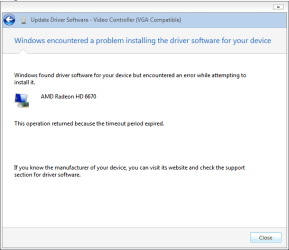
This is what comes up when attempting an update through Driver Manager, else wise, AMD Catalyst installer constantly fails on Display Driver.
 

Attachments

  • Fail 2.png
    Fail 2.png
    8.9 KB · Views: 16

My Computer My Computer

At a glance

Windows 7 Premium (64 Bit)Intel Core i5-2320 3.0 Ghz8 GBAMD Radeon HD 6670
Computer type
PC/Desktop
Computer Manufacturer/Model Number
ADVENT DT1411
OS
Windows 7 Premium (64 Bit)
CPU
Intel Core i5-2320 3.0 Ghz
Motherboard
N Foxconn
Memory
8 GB
Graphics Card(s)
AMD Radeon HD 6670
Sound Card
Built in
Monitor(s) Displays
21.5" Samsung LED HD
Screen Resolution
1920x1080
Hard Drives
1x 1.5TB
1x 1TB
PSU
405v
Case
Advent standard
Keyboard
Acer
Mouse
Trust GTX
Internet Speed
Sky Broadband 20Mgbs
Antivirus
E-Trust
Browser
Firefox
Thread is kind of confusing so let’s get some clarity….

Since you say you have a 21.5 inch Samsung monitor, I’m fairly certain the native resolution is 1920 x 1080, 60 hertz. It would/should also have an aspect ratio of 16:9, NOT 4:3, those are for the old square CRT monitors.

Secondly, (not that it really matters), but do you have the monitor’s drivers installed? And the reason I say “not really matter” is because Windows will install basic drivers for the monitor anyway which will set to the correct resolution. Nonetheless, it’salways good to use the manufacturer’s driver whenever possible.

Also, which drivers are you using – 32 or 64-bit? Based on the info presented, you should be using the 64 bit drivers found here: Desktop (AMD Downloads).

Which cable are you using to connect the monitor to thePC/Video card? I’d suggest using either HDMI, or DVI cable and NOT the VGAcable.

Please post a screen shot of your Device Manager. Also,please link to, or tell use the exact model number of your monitor.

Let’s get these questions answered, and the monitor issue sorted first, and go from there.

Thanks.
 

My Computer My Computer

At a glance

Windows 10 ProIntel Core i7-4770K (3.5Ghz)32 gig Corsair Dominator Platinum (4x8Gig)Sapphire Tri-X R9 Fury
Computer type
PC/Desktop
Computer Manufacturer/Model Number
Custom built by me.
OS
Windows 10 Pro
CPU
Intel Core i7-4770K (3.5Ghz)
Motherboard
Gigabyte G1 Sniper 5 (F10 Bios)
Memory
32 gig Corsair Dominator Platinum (4x8Gig)
Graphics Card(s)
Sapphire Tri-X R9 Fury
Sound Card
Soundblaster ZXR
Monitor(s) Displays
NEC PA242W 24" LCD Monitor
Screen Resolution
1920 x 1200
Hard Drives
Primary - Samsung 850 Pro (512gig), Samsung 840 Pro (256gig), 2TB WD Caviar Black.
PSU
EVGA Supernova 1000 G2
Case
Cooler Master HAF X
Cooling
Corsair H100i with Corsair Air Series SP120 Quiet Fans
Keyboard
Logitech Wireless Wave
Mouse
Logitech Performance MX
Internet Speed
High Speed Cable
Antivirus
Norton Security
Browser
IE11
Other Info
Memory Timings - 1866MHz @ 9-9-9-27-1T @ 1.5 volts
Seems it was something to do with a bad windows/corrupt windows install, I inserted my Windows 7 disc and repaired, everything cleaned up and reinstalled, all is great :)
 

My Computer My Computer

At a glance

Windows 7 Premium (64 Bit)Intel Core i5-2320 3.0 Ghz8 GBAMD Radeon HD 6670
Computer type
PC/Desktop
Computer Manufacturer/Model Number
ADVENT DT1411
OS
Windows 7 Premium (64 Bit)
CPU
Intel Core i5-2320 3.0 Ghz
Motherboard
N Foxconn
Memory
8 GB
Graphics Card(s)
AMD Radeon HD 6670
Sound Card
Built in
Monitor(s) Displays
21.5" Samsung LED HD
Screen Resolution
1920x1080
Hard Drives
1x 1.5TB
1x 1TB
PSU
405v
Case
Advent standard
Keyboard
Acer
Mouse
Trust GTX
Internet Speed
Sky Broadband 20Mgbs
Antivirus
E-Trust
Browser
Firefox
Happy to hear you got it fixed. Enjoy :)
 

My Computer My Computer

At a glance

Windows 10 ProIntel Core i7-4770K (3.5Ghz)32 gig Corsair Dominator Platinum (4x8Gig)Sapphire Tri-X R9 Fury
Computer type
PC/Desktop
Computer Manufacturer/Model Number
Custom built by me.
OS
Windows 10 Pro
CPU
Intel Core i7-4770K (3.5Ghz)
Motherboard
Gigabyte G1 Sniper 5 (F10 Bios)
Memory
32 gig Corsair Dominator Platinum (4x8Gig)
Graphics Card(s)
Sapphire Tri-X R9 Fury
Sound Card
Soundblaster ZXR
Monitor(s) Displays
NEC PA242W 24" LCD Monitor
Screen Resolution
1920 x 1200
Hard Drives
Primary - Samsung 850 Pro (512gig), Samsung 840 Pro (256gig), 2TB WD Caviar Black.
PSU
EVGA Supernova 1000 G2
Case
Cooler Master HAF X
Cooling
Corsair H100i with Corsair Air Series SP120 Quiet Fans
Keyboard
Logitech Wireless Wave
Mouse
Logitech Performance MX
Internet Speed
High Speed Cable
Antivirus
Norton Security
Browser
IE11
Other Info
Memory Timings - 1866MHz @ 9-9-9-27-1T @ 1.5 volts
Back
Top