
Center Titlebar Text

cclloyd9785

Master of Technology
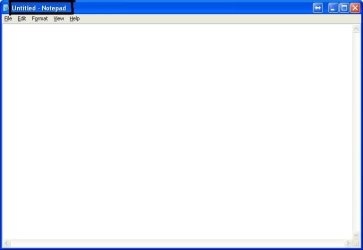
Is it possible to (without 3rd party software that runs in the background) center the title bar text in Windows 7 x64. (By that I mean the text like when you open notepad, it says "Untitled - Notepad". I want it centered.)
 

My Computer

Computer Manufacturer/Model Number
Toshiba Satellite L505D-S9565
OS
Windows 7 Home Premium x64, Mac OS X 10.6.2 x64
CPU
AMD Athlon X2 Dual-Core 2.1 GHz
Motherboard
Toshiba Built-In with Insyde H20 BIOS 1.40
Memory
4 GB DDR2 800 MHz
Graphics Card(s)
ATI Radeon HD Mobility 3100 Graphics 256MB to 1468 MB Shared
Sound Card
Realtek Mobile ALC272 HD Audio
Monitor(s) Displays
15.6" TFT LCD with TruBrite, Samsung 1080p HDTV
Screen Resolution
1366x768, 1920x1080
Hard Drives
❶:Main: Toshiba 250 GB SATA 5400 RPM
PSU
N/A
Case
N/A
Cooling
Built-in/Open window in winter :P
Keyboard
Built-in
Mouse
Build-in Symantics SmartTouch Pad
Internet Speed
55 MB/sec Down, 9 MB/sec Up
Other Info
❷:Backup: Seagate FreeAgent Desk USB 2.0 5400 RPM
❸:Media: Toshiba 640 GB USB 2.0 5400 RPM Portable Edition
I'm not really sure what you are asking but here goes.
When you are typing in note pad just hit the space bar until the cursor is where you want the title to start. Type in the title and hit enter.
 

My Computer

Computer type
PC/Desktop
Computer Manufacturer/Model Number
Home made Desktop
OS
Windows 10 Pro. 64/ version 1709 Windows 7 Pro/64
CPU
Intel i7-6800K @ 4.3
Motherboard
ASUS X-99 Deluxe II
Memory
Corsair Platinum 16 gig @2400
Graphics Card(s)
EVGA GTX 1070 OC
Monitor(s) Displays
Asus 27" LED LCD/VE278Q
Screen Resolution
1920-1080 or 1280-720 HDMI
Hard Drives
INTEL SSD 730-240 Gb Sata 3.0/
PSU
EVGA Platium 1200W
Case
Phanteks Luxe Tempered Glass 8 fans/ one radiator
Cooling
XSPC/ Water Cooled CPU
Keyboard
Das 4 Professional
Mouse
Logitech M705/MX Anywhere 2-S
Internet Speed
100 mbits
Antivirus
Microsoft Security Essentials/ Malwarebytes Premium 3.0/ SAS
Browser
I.E. 11 default/Firefox/ ISP Time Warner Cable/Spectrum
Other Info
LG BluRay Burner/
Sound system-KLipsch-THX/
Icy Dock ssd Hot Swap bays.
I'm not really sure what you are asking but here goes.
When you are typing in note pad just hit the space bar until the cursor is where you want the title to start. Type in the title and hit enter.

I guess you got it wrong, this is what he is talking about:

notepad.JPG
 

My Computer

OS
Windows 7 Ultimate
Yes that is what I'm talking about. And not just in notepad, but any program. That was just an example.
 

My Computer

Computer Manufacturer/Model Number
Toshiba Satellite L505D-S9565
OS
Windows 7 Home Premium x64, Mac OS X 10.6.2 x64
CPU
AMD Athlon X2 Dual-Core 2.1 GHz
Motherboard
Toshiba Built-In with Insyde H20 BIOS 1.40
Memory
4 GB DDR2 800 MHz
Graphics Card(s)
ATI Radeon HD Mobility 3100 Graphics 256MB to 1468 MB Shared
Sound Card
Realtek Mobile ALC272 HD Audio
Monitor(s) Displays
15.6" TFT LCD with TruBrite, Samsung 1080p HDTV
Screen Resolution
1366x768, 1920x1080
Hard Drives
❶:Main: Toshiba 250 GB SATA 5400 RPM
PSU
N/A
Case
N/A
Cooling
Built-in/Open window in winter :P
Keyboard
Built-in
Mouse
Build-in Symantics SmartTouch Pad
Internet Speed
55 MB/sec Down, 9 MB/sec Up
Other Info
❷:Backup: Seagate FreeAgent Desk USB 2.0 5400 RPM
❸:Media: Toshiba 640 GB USB 2.0 5400 RPM Portable Edition
I'm not really sure what you are asking but here goes.
When you are typing in note pad just hit the space bar until the cursor is where you want the title to start. Type in the title and hit enter.
Like I said, not sure what you are asking.
I know of no way of doing such thing but their are others here wiser than me that might help.
Maybe Niceguy could give you a hand on your request.
 

My Computer

Computer type
PC/Desktop
Computer Manufacturer/Model Number
Home made Desktop
OS
Windows 10 Pro. 64/ version 1709 Windows 7 Pro/64
CPU
Intel i7-6800K @ 4.3
Motherboard
ASUS X-99 Deluxe II
Memory
Corsair Platinum 16 gig @2400
Graphics Card(s)
EVGA GTX 1070 OC
Monitor(s) Displays
Asus 27" LED LCD/VE278Q
Screen Resolution
1920-1080 or 1280-720 HDMI
Hard Drives
INTEL SSD 730-240 Gb Sata 3.0/
PSU
EVGA Platium 1200W
Case
Phanteks Luxe Tempered Glass 8 fans/ one radiator
Cooling
XSPC/ Water Cooled CPU
Keyboard
Das 4 Professional
Mouse
Logitech M705/MX Anywhere 2-S
Internet Speed
100 mbits
Antivirus
Microsoft Security Essentials/ Malwarebytes Premium 3.0/ SAS
Browser
I.E. 11 default/Firefox/ ISP Time Warner Cable/Spectrum
Other Info
LG BluRay Burner/
Sound system-KLipsch-THX/
Icy Dock ssd Hot Swap bays.
Yea I already have that. I'm wondering in windows 7 :P
 

My Computer

Computer Manufacturer/Model Number
Toshiba Satellite L505D-S9565
OS
Windows 7 Home Premium x64, Mac OS X 10.6.2 x64
CPU
AMD Athlon X2 Dual-Core 2.1 GHz
Motherboard
Toshiba Built-In with Insyde H20 BIOS 1.40
Memory
4 GB DDR2 800 MHz
Graphics Card(s)
ATI Radeon HD Mobility 3100 Graphics 256MB to 1468 MB Shared
Sound Card
Realtek Mobile ALC272 HD Audio
Monitor(s) Displays
15.6" TFT LCD with TruBrite, Samsung 1080p HDTV
Screen Resolution
1366x768, 1920x1080
Hard Drives
❶:Main: Toshiba 250 GB SATA 5400 RPM
PSU
N/A
Case
N/A
Cooling
Built-in/Open window in winter :P
Keyboard
Built-in
Mouse
Build-in Symantics SmartTouch Pad
Internet Speed
55 MB/sec Down, 9 MB/sec Up
Other Info
❷:Backup: Seagate FreeAgent Desk USB 2.0 5400 RPM
❸:Media: Toshiba 640 GB USB 2.0 5400 RPM Portable Edition
Title bar text alignment is based on theme(visual style)s, not OSs.

You have to use a 3rd party software, but it does not run on the background, need to be run only once, and the centered-text title bar is permanant.(You can delete the program after you follow all the process)

Please note that this way does not work with aero themes.

1. download this: https://github.com/nptr/msstyleEditor/releases/download/1.4.0.2/msstyleEditorX86.zip
2. Extract and open the application
3. File => Open, select your theme's visual style(i.e. C:\Windows\Resources\Themes\Aero\Aero.msstyles)
4. Scroll down and unfold [Window] node
5. Select [caption] node
6. press [+] on the top right
7. Select Enum, CONTENTALIGNMENT
8. Press OK to add it
9. Set CONTENTALIGNMENT value to right(I don't know why, but I had to select right to center the text)
10. Select [maxcaption] node on the left, repeat step 6, 7, 8, 9 to center the text on a maximized window
11. File menu => save, save it to desktop.
12. copy the visual style file to C:\WINDOWS\resources\themes\<your theme name>
12-1. If you are modifing the default theme(aero), you have to take ownership of the original file
13. Change to a different theme and apply your theme again

Note: you have to use a theme patcher(e.g. UXTheme Patcher) to apply the modified theme
 
Last edited:

My Computer

Computer type
PC/Desktop
OS
Windows 7
Internet Speed
Korean Speed
This is the Github page hosting that download which gives some insight at its capabilities. It apparently works with Win 8 & 10 as well. GitHub - nptr/msstyleEditor: an editor for windows visual styles


12-1. If you are modifing the default theme(aero), you have to take ownership of the original file


A very easy way to take ownership of a file is by adding the Take Ownership right click menu option. So once these registry entries are added all you have to do to take ownership of a file is right click the file and select Take Ownership.

How to Add “Take Ownership” to the Right-Click Menu in Windows Explorer
 
Last edited by a moderator:

My Computer

Computer type
PC/Desktop
OS
Windows 7 Ultimate x64
Back
Top