Hi all,
i am confused which is the best fastest configuration for me :-
my wlan adapter is the Intel Centrino 1030n Single Band (2.4ghz).
the way i see it, i have 6 configs i can choose from, but i cannot tell which is the best. Perhaps you could advise me. my Router is DLINK DIR-850L and inside router setting, both 2.4ghz and 5.2 are enabled. latching on to the 5.2 is of course not available to me, a limitation of the single-band centrino 1030n.
but that doesn't matter. when it comes to 2.4ghz channel frequency, which is the best config :-
A. On Adapter>Advanced>802.11n Channel Width for Band 2.4ghz = 20mhz Only
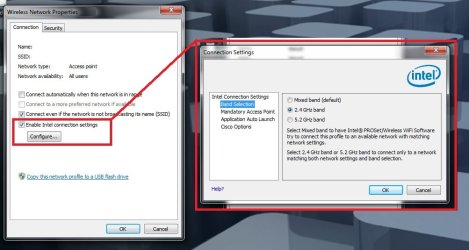
A1. (20mhz) Use Intel Connection Settings - Mixed Band.
A2. (20mhz) Use Intel Connection Settings - 2.4ghz Only.
A3. (20mhz) Don't use Intel Connection Settings at all.
B. On Adapter>Advanced>802.11n Channel Width for Band 2.4ghz = Auto (I don't get 40 or anything else, just these 2 choices 20 or auto)
B1. (Auto) Use Intel Connection Settings - Mixed Band.
B2. (Auto) Use Intel Connection Settings - 2.4ghz Only.
B3. (Auto) Don't use Intel Connection Settings at all.
So out of these 6 possible configurations (A1-3, and B1-3), which should i choose.
Any help appreciated, thanks in advance.
i am confused which is the best fastest configuration for me :-
my wlan adapter is the Intel Centrino 1030n Single Band (2.4ghz).
the way i see it, i have 6 configs i can choose from, but i cannot tell which is the best. Perhaps you could advise me. my Router is DLINK DIR-850L and inside router setting, both 2.4ghz and 5.2 are enabled. latching on to the 5.2 is of course not available to me, a limitation of the single-band centrino 1030n.
but that doesn't matter. when it comes to 2.4ghz channel frequency, which is the best config :-
A. On Adapter>Advanced>802.11n Channel Width for Band 2.4ghz = 20mhz Only
A1. (20mhz) Use Intel Connection Settings - Mixed Band.
A2. (20mhz) Use Intel Connection Settings - 2.4ghz Only.
A3. (20mhz) Don't use Intel Connection Settings at all.
B. On Adapter>Advanced>802.11n Channel Width for Band 2.4ghz = Auto (I don't get 40 or anything else, just these 2 choices 20 or auto)
B1. (Auto) Use Intel Connection Settings - Mixed Band.
B2. (Auto) Use Intel Connection Settings - 2.4ghz Only.
B3. (Auto) Don't use Intel Connection Settings at all.
So out of these 6 possible configurations (A1-3, and B1-3), which should i choose.
Any help appreciated, thanks in advance.
My Computer
At a glance
Windows 7 Ultimate x64
- Computer type
- PC/Desktop
- OS
- Windows 7 Ultimate x64