
Certain files not visible to other users

bhakeman

New member
Local time
6:28 AM
Messages
11
Location
Sioux Falls, SD
Our AutoCAD Drawings are saved in a server shared by everyone. Certain drawings that I created recently, are only visible in windows explorer on my pc (connected to the network), but they aren't visible when other users open the same folder on their computer. Is there a 'hidden to others' feature that may have been selected that I am not aware of? This is an odd one for me.

When I have the dwg file open, the .dwl file is visible to all, but not the dwg.
 

My Computer My Computer

At a glance

Windows 7 Professional 64bitIntel Core2 Quad Q94008.00gbATI FIrePro V3700 (FireGL)
Computer Manufacturer/Model Number
HP Compaq 6000 Pro Microtower
OS
Windows 7 Professional 64bit
CPU
Intel Core2 Quad Q9400
Memory
8.00gb
Graphics Card(s)
ATI FIrePro V3700 (FireGL)
Monitor(s) Displays
Samsung SyncMaster 940B (x2)
Hard Drives
500GB
Keyboard
Microsoft Natural Ergonomic 4000
Mouse
Logitech Trackman Wheel & 3D Connexion Space Navigator
Update, I copied the dwg file one level up in the directory and the file was visible to everyone. I then copied it back into the folder it needed to be in, replacing the original, and now it's visible to all.


Our AutoCAD Drawings are saved in a server shared by everyone. Certain drawings that I created recently, are only visible in windows explorer on my pc (connected to the network), but they aren't visible when other users open the same folder on their computer. Is there a 'hidden to others' feature that may have been selected that I am not aware of? This is an odd one for me.

When I have the dwg file open, the .dwl file is visible to all, but not the dwg.
 

My Computer My Computer

At a glance

Windows 7 Professional 64bitIntel Core2 Quad Q94008.00gbATI FIrePro V3700 (FireGL)
Computer Manufacturer/Model Number
HP Compaq 6000 Pro Microtower
OS
Windows 7 Professional 64bit
CPU
Intel Core2 Quad Q9400
Memory
8.00gb
Graphics Card(s)
ATI FIrePro V3700 (FireGL)
Monitor(s) Displays
Samsung SyncMaster 940B (x2)
Hard Drives
500GB
Keyboard
Microsoft Natural Ergonomic 4000
Mouse
Logitech Trackman Wheel & 3D Connexion Space Navigator
My 'fix' didn't solve the problem for all of my drawings. Just the one. It looks like the issue is with only one folder in the directory. I can copy the drawings to any folder in the server, except the one it needs to be stored in and it is visible to all.

We don't use any Data Management-type software (ie check-in/check-out) of our files.

Update, I copied the dwg file one level up in the directory and the file was visible to everyone. I then copied it back into the folder it needed to be in, replacing the original, and now it's visible to all.


Our AutoCAD Drawings are saved in a server shared by everyone. Certain drawings that I created recently, are only visible in windows explorer on my pc (connected to the network), but they aren't visible when other users open the same folder on their computer. Is there a 'hidden to others' feature that may have been selected that I am not aware of? This is an odd one for me.

When I have the dwg file open, the .dwl file is visible to all, but not the dwg.
 

My Computer My Computer

At a glance

Windows 7 Professional 64bitIntel Core2 Quad Q94008.00gbATI FIrePro V3700 (FireGL)
Computer Manufacturer/Model Number
HP Compaq 6000 Pro Microtower
OS
Windows 7 Professional 64bit
CPU
Intel Core2 Quad Q9400
Memory
8.00gb
Graphics Card(s)
ATI FIrePro V3700 (FireGL)
Monitor(s) Displays
Samsung SyncMaster 940B (x2)
Hard Drives
500GB
Keyboard
Microsoft Natural Ergonomic 4000
Mouse
Logitech Trackman Wheel & 3D Connexion Space Navigator
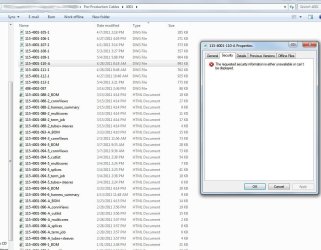
I tried looking at the Security tab under the file properties and found that I wasn't able to see who had read/write access. If I copy/pasted the file into a different folder within the server, I was able to see the security tab. I attached a screenshot of how the file information looks on my end. I am able to see all of the security information of the other files within this folder, but as soon as the files in question are moved into this folder, no one else can see them.

My 'fix' didn't solve the problem for all of my drawings. Just the one. It looks like the issue is with only one folder in the directory. I can copy the drawings to any folder in the server, except the one it needs to be stored in and it is visible to all.

We don't use any Data Management-type software (ie check-in/check-out) of our files.

Update, I copied the dwg file one level up in the directory and the file was visible to everyone. I then copied it back into the folder it needed to be in, replacing the original, and now it's visible to all.


Our AutoCAD Drawings are saved in a server shared by everyone. Certain drawings that I created recently, are only visible in windows explorer on my pc (connected to the network), but they aren't visible when other users open the same folder on their computer. Is there a 'hidden to others' feature that may have been selected that I am not aware of? This is an odd one for me.

When I have the dwg file open, the .dwl file is visible to all, but not the dwg.
 

Attachments

  • cables 2.JPG
    cables 2.JPG
    120.4 KB · Views: 59

My Computer My Computer

At a glance

Windows 7 Professional 64bitIntel Core2 Quad Q94008.00gbATI FIrePro V3700 (FireGL)
Computer Manufacturer/Model Number
HP Compaq 6000 Pro Microtower
OS
Windows 7 Professional 64bit
CPU
Intel Core2 Quad Q9400
Memory
8.00gb
Graphics Card(s)
ATI FIrePro V3700 (FireGL)
Monitor(s) Displays
Samsung SyncMaster 940B (x2)
Hard Drives
500GB
Keyboard
Microsoft Natural Ergonomic 4000
Mouse
Logitech Trackman Wheel & 3D Connexion Space Navigator
Blame it on Windows Sync... is there anyway to disable this. I clicked on "Manage Offline Files" and the button "Disable Offline Files" is greyed out. IT wants me to wait until it's done with it's sync to see if I can disable it, then.
 

My Computer My Computer

At a glance

Windows 7 Professional 64bitIntel Core2 Quad Q94008.00gbATI FIrePro V3700 (FireGL)
Computer Manufacturer/Model Number
HP Compaq 6000 Pro Microtower
OS
Windows 7 Professional 64bit
CPU
Intel Core2 Quad Q9400
Memory
8.00gb
Graphics Card(s)
ATI FIrePro V3700 (FireGL)
Monitor(s) Displays
Samsung SyncMaster 940B (x2)
Hard Drives
500GB
Keyboard
Microsoft Natural Ergonomic 4000
Mouse
Logitech Trackman Wheel & 3D Connexion Space Navigator
Back
Top