
Solved Change fontviewer text

kiwichick

New member
Member
Local time
6:00 AM
Messages
81
Hi there, Is there any way to change the Windows Font Viewer text "The Quick Brown Fox Jumps Over The Lazy Dog" to something else? Cheers.
 

My Computer

Computer Manufacturer/Model Number
Acer Aspire 5741
OS
windows 7 Home Premium
CPU
Intel Core i5 @ 2.27GHz 32nm Technology
Motherboard
Acer Aspire 5741 (CPU)
Memory
DDR3 4.0GB
Graphics Card(s)
Intel(R) Graphics Media Accelerator HD
Sound Card
Realtek High Definition Audio Intel(R) Display Audio
Monitor(s) Displays
Generic PnP Monitor on Intel Graphics Media Accelerator HD
Screen Resolution
1366x768
Hard Drives
Seagate 2.5" SATA 500GB
Keyboard
Synaptics PS/2 Port TouchPad
Mouse
Microsoft Comfort Mouse 4500 (IntelliPoint)
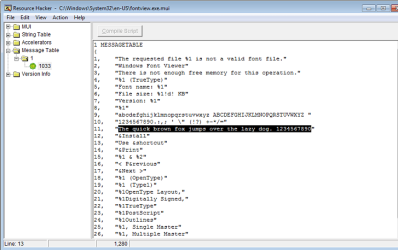
Resource Hacker
then edit file: C:\Windows\System32\en-US\fontview.exe.mui
(Instead en-US could be your system language)

Message table 1, line 11.
Do not forget to compile script button and save.

But when you save this as copy of edited file and replace original, there might be some issues with files owned by a system. Use mentioned links to solve them, if they occur.
 

Attachments

  • Quick_fox.png
    Quick_fox.png
    87.2 KB · Views: 185

My Computer

Computer type
PC/Desktop
OS
Windows 8.1 ; Windows 7 x86 (Dec2008-Jan2013)
Other Info
"The scale icon at the top right of a post or tutorial is how you can give rep to the member."
Thanks Neutron16, But when I try to open it in Resource Hacker nothing happens - the resource Hacker screen just stays blank. It opens fine in XNResourceEditor but I get an error when I try to save it.
 

My Computer

Computer Manufacturer/Model Number
Acer Aspire 5741
OS
windows 7 Home Premium
CPU
Intel Core i5 @ 2.27GHz 32nm Technology
Motherboard
Acer Aspire 5741 (CPU)
Memory
DDR3 4.0GB
Graphics Card(s)
Intel(R) Graphics Media Accelerator HD
Sound Card
Realtek High Definition Audio Intel(R) Display Audio
Monitor(s) Displays
Generic PnP Monitor on Intel Graphics Media Accelerator HD
Screen Resolution
1366x768
Hard Drives
Seagate 2.5" SATA 500GB
Keyboard
Synaptics PS/2 Port TouchPad
Mouse
Microsoft Comfort Mouse 4500 (IntelliPoint)
Thanks Neutron16, But when I try to open it in Resource Hacker nothing happens - the resource Hacker screen just stays blank. It opens fine in XNResourceEditor but I get an error when I try to save it.
Most of the time, it is not possible to open, edit and save file, which is used by system.
Try to copy file else where and open A COPY.
Save the copy and then replace original with it using a program as I mentioned in post 2.
 

My Computer

Computer type
PC/Desktop
OS
Windows 8.1 ; Windows 7 x86 (Dec2008-Jan2013)
Other Info
"The scale icon at the top right of a post or tutorial is how you can give rep to the member."
Thanks Neutron but I was using a copy.
 

My Computer

Computer Manufacturer/Model Number
Acer Aspire 5741
OS
windows 7 Home Premium
CPU
Intel Core i5 @ 2.27GHz 32nm Technology
Motherboard
Acer Aspire 5741 (CPU)
Memory
DDR3 4.0GB
Graphics Card(s)
Intel(R) Graphics Media Accelerator HD
Sound Card
Realtek High Definition Audio Intel(R) Display Audio
Monitor(s) Displays
Generic PnP Monitor on Intel Graphics Media Accelerator HD
Screen Resolution
1366x768
Hard Drives
Seagate 2.5" SATA 500GB
Keyboard
Synaptics PS/2 Port TouchPad
Mouse
Microsoft Comfort Mouse 4500 (IntelliPoint)
Thanks fimble, that's not the problem.
 

My Computer

Computer Manufacturer/Model Number
Acer Aspire 5741
OS
windows 7 Home Premium
CPU
Intel Core i5 @ 2.27GHz 32nm Technology
Motherboard
Acer Aspire 5741 (CPU)
Memory
DDR3 4.0GB
Graphics Card(s)
Intel(R) Graphics Media Accelerator HD
Sound Card
Realtek High Definition Audio Intel(R) Display Audio
Monitor(s) Displays
Generic PnP Monitor on Intel Graphics Media Accelerator HD
Screen Resolution
1366x768
Hard Drives
Seagate 2.5" SATA 500GB
Keyboard
Synaptics PS/2 Port TouchPad
Mouse
Microsoft Comfort Mouse 4500 (IntelliPoint)
Just as a sidenote, the Windows Font Viewer text "The quick brown fox jumps over the lazy dog" is used because this sentence utilizes all of the letters in the alphabet, thereby showing you what each letter would look like in any given font.
 

My Computer

Computer Manufacturer/Model Number
HP Pavillion dv5t (generation 1)
OS
Vista 64 bit and 32 bit (SP2)
CPU
Intel(R) Core(TM)2 Duo Processor T9400 (2.53 GHz
Memory
4GB DDR2 System Memory (2 Dimm)
Graphics Card(s)
512 MB NVIDIA GeForce 9600M GT
Monitor(s) Displays
15.4" diagonal WSXGA+ High-Definition HP BrightView Widescre
Screen Resolution
1680 x 1050
Hard Drives
320GB 5400RPM SATA Hard Drive with HP ProtectSmart Hard Drive Protection
Keyboard
Built-in HP
Mouse
Built in - Synaptics TouchPad V6.5 on PS/2 Port
Internet Speed
Max
Other Info
~ Intel Next-Gen Wireless-N Mini-card w/Bluetooth ~ Blu-Ray ROM DVD+/-R/RW ~ Integ. HDTV Hybrid Tuner ~ 12 Cell Battery ~ MS Office (Home Premium) 2007 ~
Just as a sidenote, the Windows Font Viewer text "The quick brown fox jumps over the lazy dog" is used because this sentence utilizes all of the letters in the alphabet, thereby showing you what each letter would look like in any given font.
Along with:

Jackdaws love my big sphinx of quartz.

Cozy lummox gives smart squid who asks for pen job.

How razorback-jumping frogs can level six piqued gymnasts!
 

My Computer

OS
windows 7 ultimate
Yeah the only problem I have with that is you really only get to see the letters in lowercase and there are no numbers. I prefer using ABCDEFGHIJKLMNOPQRSTUVWXYZabcdefghijklmnopqrstuvwxyz1234567890. So if anyone has any further suggestions...?
 

My Computer

Computer Manufacturer/Model Number
Acer Aspire 5741
OS
windows 7 Home Premium
CPU
Intel Core i5 @ 2.27GHz 32nm Technology
Motherboard
Acer Aspire 5741 (CPU)
Memory
DDR3 4.0GB
Graphics Card(s)
Intel(R) Graphics Media Accelerator HD
Sound Card
Realtek High Definition Audio Intel(R) Display Audio
Monitor(s) Displays
Generic PnP Monitor on Intel Graphics Media Accelerator HD
Screen Resolution
1366x768
Hard Drives
Seagate 2.5" SATA 500GB
Keyboard
Synaptics PS/2 Port TouchPad
Mouse
Microsoft Comfort Mouse 4500 (IntelliPoint)
OK got it sorted!! Seems I needed the beta version of resource hacker for 64-bit files. So I've changed the fontview.exe.mui file and replaced it with a straight copy and paste - no need for the file replacer. Thanks Neutron16!!
 

My Computer

Computer Manufacturer/Model Number
Acer Aspire 5741
OS
windows 7 Home Premium
CPU
Intel Core i5 @ 2.27GHz 32nm Technology
Motherboard
Acer Aspire 5741 (CPU)
Memory
DDR3 4.0GB
Graphics Card(s)
Intel(R) Graphics Media Accelerator HD
Sound Card
Realtek High Definition Audio Intel(R) Display Audio
Monitor(s) Displays
Generic PnP Monitor on Intel Graphics Media Accelerator HD
Screen Resolution
1366x768
Hard Drives
Seagate 2.5" SATA 500GB
Keyboard
Synaptics PS/2 Port TouchPad
Mouse
Microsoft Comfort Mouse 4500 (IntelliPoint)
OK got it sorted!! Seems I needed the beta version of resource hacker for 64-bit files. So I've changed the fontview.exe.mui file and replaced it with a straight copy and paste - no need for the file replacer. Thanks Neutron16!!
Good to hear!
I knew that my advice was correct for x86,but I have never tested that in x64.
 

My Computer

Computer type
PC/Desktop
OS
Windows 8.1 ; Windows 7 x86 (Dec2008-Jan2013)
Other Info
"The scale icon at the top right of a post or tutorial is how you can give rep to the member."
Resource Hacker
then edit file: C:\Windows\System32\en-US\fontview.exe.mui
(Instead en-US could be your system language)

Apparently this doesn't work in Windows 11. I edited the phrase in fontview.exe.mui, replaced the file with the edited one, restarted the computer but the Font Viewer still displays the original text. :cry:
 

My Computer

Computer type
PC/Desktop
Computer Manufacturer/Model Number
unbranded
OS
Windows 11 Pro x64
CPU
AMD Ryzen 7 5700G with Radeon Graphics
Motherboard
Asus
Memory
32 GB
Graphics Card(s)
Nvidia GeForce GTX 1660 SUPER
Browser
Firefox
Back
Top